https://github.com/rapid7/r7insight_docker
Docker logging support for InsightOps
https://github.com/rapid7/r7insight_docker
Last synced: over 1 year ago
JSON representation
Docker logging support for InsightOps
- Host: GitHub
- URL: https://github.com/rapid7/r7insight_docker
- Owner: rapid7
- License: mit
- Created: 2017-06-26T12:21:45.000Z (about 9 years ago)
- Default Branch: master
- Last Pushed: 2024-11-06T08:54:22.000Z (over 1 year ago)
- Last Synced: 2024-12-18T06:23:46.717Z (over 1 year ago)
- Language: JavaScript
- Homepage:
- Size: 516 KB
- Stars: 7
- Watchers: 44
- Forks: 7
- Open Issues: 4
-
Metadata Files:
- Readme: README.md
- Contributing: CONTRIBUTING.md
- License: LICENSE
Awesome Lists containing this project
README
# r7insight_docker
- [r7insight_docker](#r7insight_docker)
- [Arguments](#arguments)
- [Mandatory arguments](#mandatory-arguments)
- [Token](#token)
- [Region](#region)
- [Optional arguments](#optional-arguments)
- [Filtering](#filtering)
- [Notes](#notes)
- [Filters](#filters)
- [Usage as a Container](#usage-as-a-container)
- [Docker Arguments](#docker-arguments)
- [Examples](#examples)
- [Running in a restricted environment](#running-in-a-restricted-environment)
- [Usage as a CLI](#usage-as-a-cli)
- [Embedded usage](#embedded-usage)
- [Building](#building)
- [Docker](#docker)
- [Using the Docker file](#using-the-docker-file)
- [Make](#make)
- [Node](#node)
- [How it works](#how-it-works)
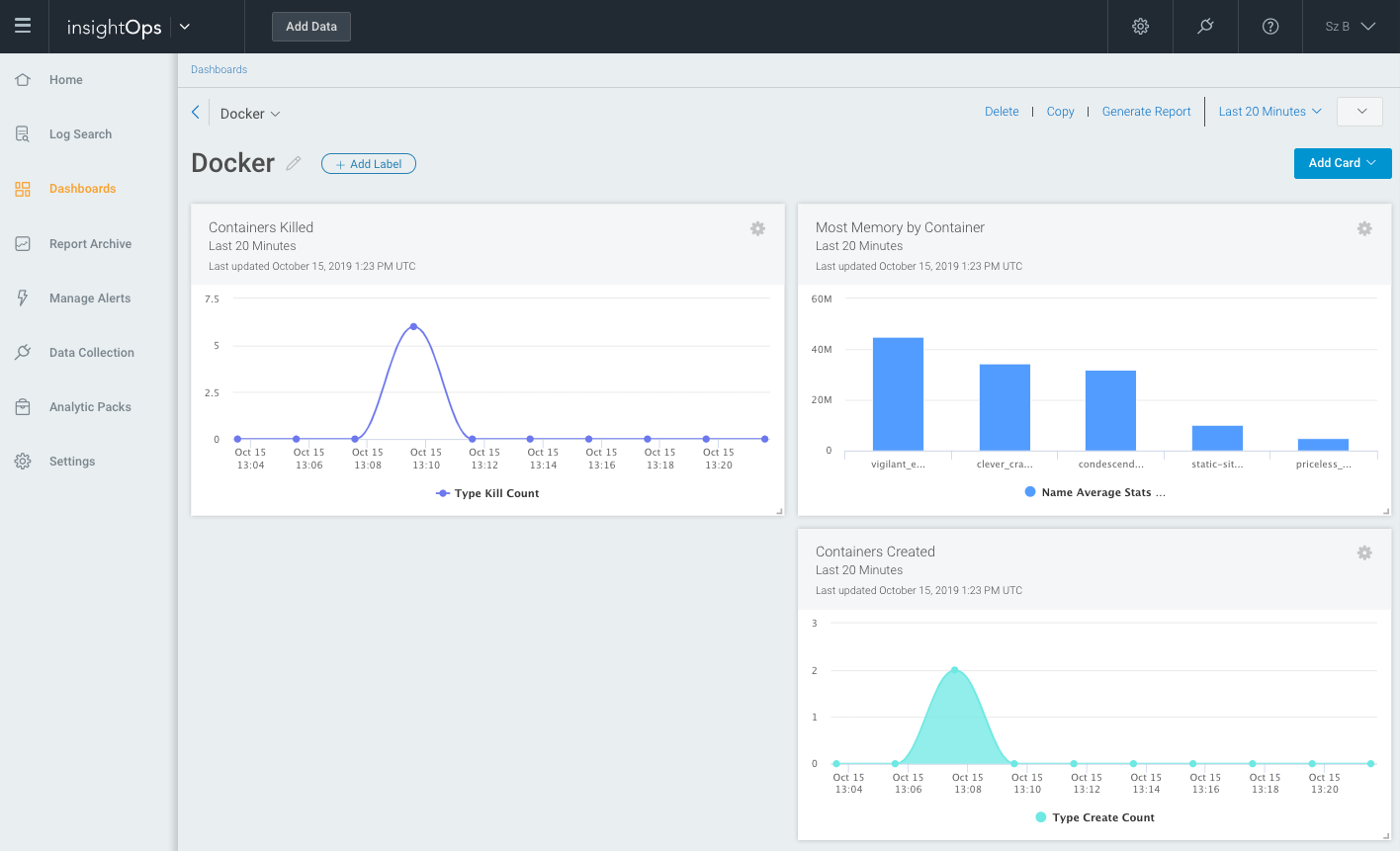
Forward all your logs to the [Rapid7 Insight Platform](https://www.rapid7.com/products/insight-platform/), like a breeze.
## Arguments
### Mandatory arguments
#### Token
You can supply the tokens using command line arguments:
- `--logstoken`: Log token for logs
- `--statstoken`: Log token for stats
- `--eventstoken`: Log token for events
- `--token`: Log token which is used for the above tokens if one is not provided.
- You can supply only this token and it'll be used for logs, stats and events.
You can also supply log, stats and event tokens using environment variables.
When both command line arguments and environment variables are supplied, the command line arguments are used.
- `INSIGHT_LOGSTOKEN`: Log token for logs
- `INSIGHT_STATSTOKEN`: Log token for stats
- `INSIGHT_EVENTSTOKEN`: Log token for events
- `INSIGHT_TOKEN`: Log token which is used for any of the above tokens if one is not provided.
- You can only supply this token and it'll be used for logs, stats and events.
#### Region
You need to supply the region to forward your logs to with either of these arguments:
- `-r `
- `--region `
E.g. `-r 'eu'`
### Optional arguments
- `--no-stats` if you do not want stats to be
published to the Rapid7 Insight Platform every second.
**You need this flag for Docker version < 1.5**
- `--no-logs` if you do not want logs to be published to the Rapid7 Insight Platform.
- `--no-docker-events` if you do not want events to be
published to the Rapid7 Insight Platform.
- `-i, --statsinterval ` downsamples the logs sent to the Rapid7 Insight Platform.
It collects samples and averages them before sending.
- `-a/--add` allows you to add a fixed value to the data being
published. This follows the format `=`.
- If you don't use the `-a` flag, a default value of `host="$(uname -n)"` will be added.
- You cannot supply multiple `-a` flags
- `--no-secure` if you want your logs to be sent to the Insight Platform un-encrypted (no TSL/SSL).
- `--log-level` to specify the logging level for the r7insight_docker container itself.
- Can also be enabled by specifying the environment variable `INSIGHT_LOG_LEVEL`
E.g. `INSIGHT_LOG_LEVEL=info`
- By default the logger is silent unless a logger level is defined
#### Filtering
You can also filter the containers for which logs/stats are forwarded.
##### Notes
- Please ensure you correctly escape the regex pattern since these can be expanded/interpreted by your shell; ideally in single-quotes.
- Use `'.*nginx.*'` rather than `.*nginx.*`
- Do not supply the REGEX pattern in a LEQL fashion as in the UI, filtering is based on normal regular expressions.
- Use `'.*nginx.*'`, not `'/.*nginx.*/'`, note the removed foreslashes.
- For each of the arguments below you can only supply at most one of each.
- Use `--skipByName '.*(nginx|haproxy).*'`
- Do not use
```bash
--skipByName '.*nginx.*' --skipByName '.*haproxy.*'
```
##### Filters
- `--matchByName ''`: forward logs/stats only for the containers whose name matches the given ``.
- `--matchByImage ''`: forward logs/stats only for the containers whose image matches the given ``.
- `--skipByName ''`: do not forward logs/stats for the containers whose name matches the given ``.
- `--skipByImage ''`: do not forward logs/stats for the containers whose image matches the given ``.
## Usage as a Container
The simplest way to forward all your container logs to the Rapid7 Insight Platform is to run this repository as a container.
- If you are using this container in production please ensure that you pin the version of the image.
- Use `rapid7/r7insight_docker:1.2.3` rather than `rapid7/r7insight_docker:latest` since `latest` might pull in breaking changes if a new version is released
- You can see the the available versions [here](https://hub.docker.com/r/rapid7/r7insight_docker/tags).
### Docker Arguments
The `--read-only` docker flag specifies that the container file system will be read-only.
This is not a requirement but since currently there's no need for writing, it makes the container more secure.
The `--security-opt=no-new-privileges` docker flag sets a kernel bit which stops the process or its children
from gaining additional privileges via setuid or sgid.
Once again not required, but increases security.
### Examples
```bash
docker run -v /var/run/docker.sock:/var/run/docker.sock \
--read-only \
--security-opt=no-new-privileges \
rapid7/r7insight_docker \
-t \
-r \
-j \
-a host="$(uname -n)"
```
You can also use different tokens for logging, stats and events:
```bash
docker run -v /var/run/docker.sock:/var/run/docker.sock \
--read-only \
--security-opt=no-new-privileges \
rapid7/r7insight_docker \
-l \
-k \
-e \
-r \
-j \
-a host="$(uname -n)"
```
### Running in a restricted environment
Some environments (such as Google Compute Engine) do not allow to access the Docker socket without special privileges.
You will get EACCES(`Error: read EACCES`) error if you try to run the container.
To run the container in such environments add `--privileged` to the `docker run` command.
Example:
```bash
docker run --privileged \
-v /var/run/docker.sock:/var/run/docker.sock \
--read-only \
--security-opt=no-new-privileges \
rapid7/r7insight_docker \
-t \
-r \
-j \
-a host="$(uname -n)"
```
## Usage as a CLI
```bash
$ npm install r7insight_docker -g
$ r7insight_docker -t "$TOKEN" -r "$REGION" -a host="$(uname -n)"
```
## Embedded usage
Install it with: `npm install r7insight_docker --save`
Then, in your JS file:
```javascript
const insight = require('r7insight_docker');
const logger = insight.utils.start({
json: false, // or true to parse lines as JSON
secure: true, // or false to connect over plain TCP
region: "eu", // specify region
token: process.env.TOKEN, // Insight Platform TOKEN
newline: true, // Split on newline delimited entries
stats: true, // disable stats if false
add: null, // an object whose properties will be added
// the following options limit the containers being matched
// so we can avoid catching logs for unwanted containers
matchByName: /hello/, // optional
matchByImage: /matteocollina/, //optional
skipByName: /.*pasteur.*/, //optional
skipByImage: /.*dockerfile.*/ //optional
});
// logger is the source stream with all the
// log lines
setTimeout(function() {
logger.destroy();
}, 5000);
```
## Building
### Docker
We currently release the container on two different bases:
- Node on Debian Bullseye
- Node on Alpine Linux
#### Using the Docker file
First clone this repository, then:
```bash
# For Debian Bullseye base:
docker build -t r7insight_docker .
# Or for Alpine Linux base:
docker build -t r7insight_docker -f alpine.Dockerfile .
```
### Make
Firstly
```bash
# For Debian Bullseye base, also the default if not specified:
export BUILD_TYPE=node-bullseye
# Or for Alpine Linux base:
export BUILD_TYPE=node-alpine
```
Then:
```bash
make build
make test
```
If you've build and tested and want to push:
```bash
# Default is "rapid7/r7insight_docker"
export DOCKER_REGISTRY_PREFIX=/
make tag
make push
```
### Node
- Update **package.json** depending on your requirements
- `make publish`
## How it works
This module wraps four [Docker
APIs](https://docs.docker.com/reference/api/docker_remote_api_v1.17/):
- `POST /containers/{id}/attach`, to fetch the logs
- `GET /containers/{id}/stats`, to fetch the stats of the container
- `GET /containers/json`, to detect the containers that are running when
this module starts
- `GET /events`, to detect new containers that will start after the
module has started
This module wraps
[docker-loghose](https://github.com/mcollina/docker-loghose) and
[docker-stats](https://github.com/pelger/docker-stats) to fetch the logs
and the stats as a never ending stream of data.
All the originating requests are wrapped in a
[never-ending-stream](https://github.com/mcollina/never-ending-stream).