https://github.com/rapidai/rapiddoc
📝 针对文档类图像做内容提取,将文档类图像一比一输出到Word或者Txt中,便于进一步使用或处理。后续计划支持输入PDF/图像,输出对应json格式、Txt格式、Word格式和Markdown格式。
https://github.com/rapidai/rapiddoc
layout-analysis layout-recover
Last synced: about 1 month ago
JSON representation
📝 针对文档类图像做内容提取,将文档类图像一比一输出到Word或者Txt中,便于进一步使用或处理。后续计划支持输入PDF/图像,输出对应json格式、Txt格式、Word格式和Markdown格式。
- Host: GitHub
- URL: https://github.com/rapidai/rapiddoc
- Owner: RapidAI
- License: apache-2.0
- Created: 2024-08-20T01:09:04.000Z (almost 2 years ago)
- Default Branch: main
- Last Pushed: 2024-11-01T00:27:45.000Z (over 1 year ago)
- Last Synced: 2025-04-05T01:04:49.966Z (about 1 year ago)
- Topics: layout-analysis, layout-recover
- Language: Python
- Homepage:
- Size: 781 KB
- Stars: 189
- Watchers: 8
- Forks: 8
- Open Issues: 3
-
Metadata Files:
- Readme: README.md
- License: LICENSE
Awesome Lists containing this project
README
# RapidDoc – 高速文档解析系统
## 😺 项目介绍
**RapidDoc 是一个轻量级、专注于文档解析的开源框架,支持 **OCR、版面分析、公式识别、表格识别和阅读顺序恢复** 等多种功能,支持将复杂 PDF 文档转换为 Markdown、JSON、WORD、HTML 格式。**
**支持docx/doc、pptx/ppt、xlsx/xls的原生解析(不使用模型)。**
**框架基于 [Mineru](https://github.com/opendatalab/MinerU) 二次开发,移除 VLM,专注于 Pipeline 产线下的高效文档解析,在 CPU 上也能保持不错的解析速度。**
**本项目所使用的默认模型主要来源于 [PaddleOCR](https://github.com/PaddlePaddle/PaddleOCR) 的 [PP-StructureV3](https://www.paddleocr.ai/main/version3.x/pipeline_usage/PP-StructureV3.html) 系列(OCR、版面分析、公式识别、阅读顺序恢复,以及部分表格识别模型),并已全部转换为 ONNX 格式,支持在 CPU/GPU 上高效推理。**
**同时支持自定义OCR、公式、表格模型,需实现 CustomBaseModel 的 batch_predict 方法,目前内置 [PaddleOCRVL](https://www.paddleocr.ai/main/version3.x/pipeline_usage/PaddleOCR-VL.html) 系列模型的集成。**
**KittyDoc 已经成为 RapidAI 开源家族成员**
---
> ✨如果该项目对您有帮助,您的star是我不断优化的动力!!!
>
> - [github点击前往](https://github.com/RapidAI/RapidDoc)
> - [gitee点击前往](https://gitee.com/hzkitty/KittyDoc)
## 👏 项目特点
- **OCR 识别**
- 使用 [RapidOCR](https://github.com/RapidAI/RapidOCR) 支持多种推理引擎
- CPU 下默认使用 OpenVINO(速度快,内存占用较高),GPU 下默认使用 torch
- **版面识别**
- 模型使用 `PP-DocLayout` 系列 ONNX 模型(v2、plus-L、L、M、S)
- **PP-DocLayoutV2**:自带阅读顺序,效果最好,默认使用
- **PP-DocLayoutV3**:自带阅读顺序,支持异形框
- **PP-DocLayout_plus-L**:效果好运行稳定
- **PP-DocLayout-L**:速度快,效果也不错
- **PP-DocLayout-S**:速度极快,存在部分漏检
- **公式识别**
- 使用 `PP-FormulaNet_plus` 系列 ONNX 模型(L、M、S)
- **PP-FormulaNet_plus-L**:速度慢,支持onnx
- **PP-FormulaNet_plus-M**:默认使用,支持onnx和torch
- **PP-FormulaNet_plus-S**:速度最快,支持onnx,复杂公式精度不够
- 支持配置只识别行间公式
- cuda环境,默认使用torch推理,公式模型onnx gpu推理会报错,暂时无人解决 [PaddleOCR/issues/15125](https://github.com/PaddlePaddle/PaddleOCR/issues/15125), [PaddleX/issues/4238](https://github.com/PaddlePaddle/PaddleX/issues/4238), [Paddle2ONNX/issues/1593](https://github.com/PaddlePaddle/Paddle2ONNX/issues/1593)
- **表格识别**
- 基于 [rapid_table_self](rapid_doc/model/table/rapid_table_self) 增强,在原有基础上增强为多模型串联方案:
- **表格分类**(区分有线/无线表格)
- **[有线表格识别UNET](https://github.com/RapidAI/TableStructureRec)** + SLANET_plus/UNITABLE(作为无线表格识别)
- **阅读顺序恢复**
- PP-DocLayoutV2和PP-DocLayoutV3使用版面模型自带的阅读顺序
- 其余版面模型,使用 PP-StructureV3 阅读顺序恢复算法,基于xycut算法和版面的结果
- **推理方式**
- 所有模型通过 ONNXRuntime 推理,OCR可配置其他推理引擎
- 除了 OCR 和 PP-DocLayout-M/S 模型,OpenVINO推理会报错,暂时难以解决。[PaddleOCR/issues/16277](https://github.com/PaddlePaddle/PaddleOCR/issues/16277)
---
## 基准测试结果
### 1. OmniDocBench
以下是RapidDoc在 OmniDocBench 上的评估结果。
Pipeline 模型使用 PP-DocLayoutV2、PP-OCRv5-mobile、PP-FormulaNet_plus-M、UNET_SLANET_PLUS。
Comprehensive evaluation of document parsing on OmniDocBench (v1.5)
Model Type
Methods
Size
Overall↑
TextEdit↓
FormulaCDM↑
TableTEDS↑
TableTEDS-S↑
Read OrderEdit↓
Specialized
VLMs
PaddleOCR-VL
0.9B
92.86
0.035
91.22
90.89
94.76
0.043
MinerU2.5
1.2B
90.67
0.047
88.46
88.22
92.38
0.044
MonkeyOCR-pro-3B
3B
88.85
0.075
87.25
86.78
90.63
0.128
OCRVerse
4B
88.56
0.058
86.91
84.55
88.45
0.071
dots.ocr
3B
88.41
0.048
83.22
86.78
90.62
0.053
MonkeyOCR-3B
3B
87.13
0.075
87.45
81.39
85.92
0.129
Deepseek-OCR
3B
87.01
0.073
83.37
84.97
88.80
0.086
MonkeyOCR-pro-1.2B
1.2B
86.96
0.084
85.02
84.24
89.02
0.130
Nanonets-OCR-s
3B
85.59
0.093
85.90
80.14
85.57
0.108
MinerU2-VLM
0.9B
85.56
0.078
80.95
83.54
87.66
0.086
olmOCR
7B
81.79
0.096
86.04
68.92
74.77
0.121
Dolphin-1.5
0.3B
83.21
0.092
80.78
78.06
84.10
0.080
POINTS-Reader
3B
80.98
0.134
79.20
77.13
81.66
0.145
Mistral OCR
-
78.83
0.164
82.84
70.03
78.04
0.144
OCRFlux
3B
74.82
0.193
68.03
75.75
80.23
0.202
Dolphin
0.3B
74.67
0.125
67.85
68.70
77.77
0.124
General
VLMs
Qwen3-VL-235B-A22B-Instruct
235B
89.15
0.069
88.14
86.21
90.55
0.068
Gemini-2.5 Pro
-
88.03
0.075
85.82
85.71
90.29
0.097
Qwen2.5-VL
72B
87.02
0.094
88.27
82.15
86.22
0.102
InternVL3.5
241B
82.67
0.142
87.23
75.00
81.28
0.125
InternVL3
78B
80.33
0.131
83.42
70.64
77.74
0.113
GPT-4o
-
75.02
0.217
79.70
67.07
76.09
0.148
Pipeline
Tools
RapidDoc
-
87.81
0.065
89.348
80.59
87.90
0.053
PP-StructureV3
-
86.73
0.073
85.79
81.68
89.48
0.073
Mineru2-pipeline
-
75.51
0.209
76.55
70.90
79.11
0.225
Marker-1.8.2
-
71.30
0.206
76.66
57.88
71.17
0.250
## 🛠️ 安装RapidDoc
#### 使用pip安装
```bash
pip install rapid-doc[cpu] -i https://mirrors.aliyun.com/pypi/simple
或
pip install rapid-doc[gpu] -i https://mirrors.aliyun.com/pypi/simple
```
#### 通过源码安装
```bash
# 克隆仓库
git clone https://github.com/RapidAI/RapidDoc.git
cd RapidDoc
# 安装依赖
pip install -e .[cpu] -i https://mirrors.aliyun.com/pypi/simple
或
pip install -e .[gpu] -i https://mirrors.aliyun.com/pypi/simple
```
#### 使用gpu推理
```python
# rapid-doc[gpu] 默认安装 onnxruntime-gpu 最新版
# 需要确定onnxruntime-gpu与GPU对应,参考 https://onnxruntime.ai/docs/execution-providers/CUDA-ExecutionProvider.html#requirements
# 在 Python 中指定 GPU(必须在导入 rapid_doc 之前设置)
import os
# 使用默认 GPU(cuda:0)
os.environ['MINERU_DEVICE_MODE'] = "cuda"
# 或指定 GPU 编号,例如使用第二块 GPU(cuda:1)
os.environ['MINERU_DEVICE_MODE'] = "cuda:1"
```
#### 使用PaddleOCRVL系列推理
vl模型的部署,参考[官方文档](https://www.paddleocr.ai/main/version3.x/pipeline_usage/PaddleOCR-VL.html#31-vlm)
```python
import os
os.environ['PADDLEOCRVL_VERSION'] = "v1.5"
os.environ['PADDLEOCRVL_VL_REC_BACKEND'] = "vllm-server"
os.environ['PADDLEOCRVL_VL_VL_REC_SERVER_URL'] = "http://localhost:8118/v1"
from rapid_doc.model.layout.rapid_layout_self import ModelType as LayoutModelType
from rapid_doc.model.custom.paddleocr_vl.paddleocr_vl import PaddleOCRVLTableModel, PaddleOCRVLOCRModel, PaddleOCRVLFormulaModel
layout_config = {
"model_type": LayoutModelType.PP_DOCLAYOUTV3,
}
ocr_config = {
"custom_model": PaddleOCRVLOCRModel()
}
formula_config = {
"custom_model": PaddleOCRVLFormulaModel()
}
table_config = {
"custom_model": PaddleOCRVLTableModel()
}
```
#### 使用docker部署RapidDoc
RapidDoc提供了便捷的docker部署方式,这有助于快速搭建环境并解决一些棘手的环境兼容问题。
您可以在文档中获取 [Docker部署说明](docker/README.md),镜像已推送至 [Docker Hub](https://hub.docker.com/r/hzkitty/rapid-doc)。
---
### 📋 使用
```python
import os
from pathlib import Path
from rapid_doc import RapidDoc
__dir__ = Path(__file__).resolve().parent.parent
output_dir = os.path.join(__dir__, "output")
doc_path_list = [
__dir__ / "demo/pdfs/示例1-论文模板.pdf",
__dir__ / "demo/docx/test.docx",
]
engine = RapidDoc()
outputs = engine(doc_path_list, output_dir=output_dir)
for output in outputs:
print(output.markdown)
```
---
## 在线体验
### 基于Gradio的在线demo
基于gradio开发的webui,界面简洁,仅包含核心解析功能,免登录
- [](https://www.modelscope.cn/studios/RapidAI/RapidDoc)
---
## 📋 使用示例
- [代码示例](./demo/demo.py)
- [参数介绍](./docs/analyze_param.md)
- [FastAPI 示例](./docker/README_API.md)
---
## 模型下载
不指定模型路径,初次运行时,会自动下载
- [RapidDoc 模型集(版面/公式/表格)](https://www.modelscope.cn/models/RapidAI/RapidDoc)
- [RapidOCR 模型](https://www.modelscope.cn/models/RapidAI/RapidOCR)
- [部分表格模型RapidTable](https://www.modelscope.cn/models/RapidAI/RapidTable)
---
## 📌 TODO
- [x] 跨页表格合并
- [x] 复选框识别,使用opencv(默认关闭、opencv识别存在误检)
- [x] 提供 fastapi,支持cpu和gpu版本的docker镜像构建
- [x] 文本型pdf,表格非OCR文本提取
- [x] 文本型pdf,使用pypdfium2提取文本框bbox
- [x] 文本型pdf,支持0/90/270度三个方向的表格解析
- [x] 文本型pdf,使用pypdfium2提取原始图片(默认截图会导致清晰度降低和图片边界可能丢失部分)
- [x] 表格内公式提取,表格内图片提取
- [x] 优化阅读顺序,支持多栏、竖排等复杂版面恢复
- [x] 公式支持torch推理,可用GPU加速
- [x] 版面、表格模型支持openvino
- [x] markdown转docx、html
- [x] 支持 PP-DocLayoutV2 版面识别+阅读顺序
- [x] OmniDocBench评测
- [x] 支持自定义的ocr、table、公式。支持PaddleOCR-VL系列
- [x] 支持docx/doc、pptx/ppt、xlsx/xls的原生解析(不使用模型)
- [x] 支持印章文本检测
- [x] 文档方向90°、270°矫正(默认关闭),表格方向90°、270°矫正(默认开启)
## 🙏 致谢
- [MinerU](https://github.com/opendatalab/MinerU)
- [PaddleOCR](https://github.com/PaddlePaddle/PaddleOCR)
- [RapidOCR](https://github.com/RapidAI/RapidOCR)
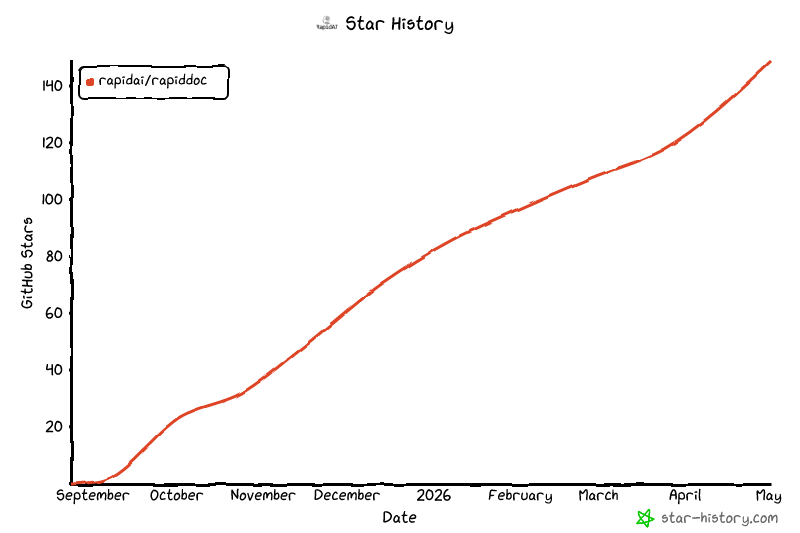
## Star History
## ⚖️ 开源许可
基于 [MinerU](https://github.com/opendatalab/MinerU) 改造而来,已**移除原项目中的 YOLO 模型**,并替换为 **PP-StructureV3 系列 ONNX 模型**。
由于已移除 AGPL 授权的 YOLO 模型部分,本项目整体不再受 AGPL 约束。
该项目采用 [Apache 2.0 license](LICENSE) 开源许可证。