https://github.com/rarimo/docs
Rarimo Developer Portal
https://github.com/rarimo/docs
developer-tools documentation guides tutorial
Last synced: over 1 year ago
JSON representation
Rarimo Developer Portal
- Host: GitHub
- URL: https://github.com/rarimo/docs
- Owner: rarimo
- License: mit
- Created: 2023-12-06T11:44:54.000Z (over 2 years ago)
- Default Branch: main
- Last Pushed: 2024-04-12T09:31:56.000Z (over 2 years ago)
- Last Synced: 2024-04-13T20:51:11.482Z (over 2 years ago)
- Topics: developer-tools, documentation, guides, tutorial
- Language: CSS
- Homepage: https://docs.rarimo.com
- Size: 59.8 MB
- Stars: 1
- Watchers: 3
- Forks: 0
- Open Issues: 2
-
Metadata Files:
- Readme: README.md
- Changelog: CHANGELOG.md
- License: LICENSE
Awesome Lists containing this project
README
# Rarimo Developer Portal
[Developer Portal](https://docs.rarimo.com/) contains technical documentation for all things Rarimo.
This website is built using [Docusaurus 2](https://docusaurus.io/), a modern static website generator
## Development
### Installation
```sh
yarn
```
### Local Development
```sh
yarn start
```
This command starts a local development server and opens up a browser window. Most changes are reflected live without having to restart the server.
### Testing
```sh
yarn typecheck
yarn lint
```
This does a quick typecheck / lint. We don't have any formal tests (yet) for this repo.
### Build
```sh
yarn build
```
This command generates static content into the `build` directory and can be served using any static contents hosting service.
## Style Guide
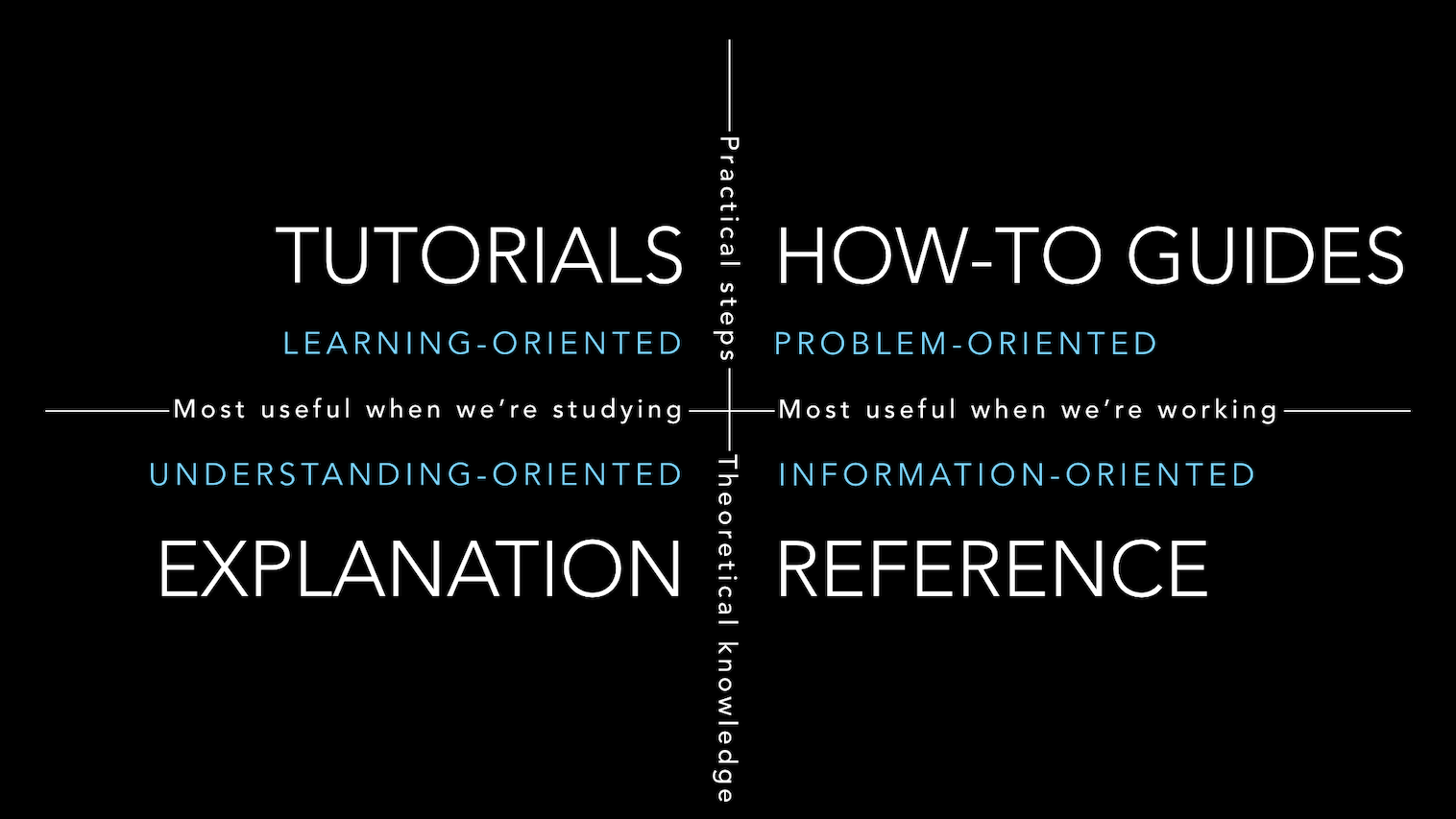
The [Divio Documentation System](https://documentation.divio.com/) principles were adopted to keep the docs comprehensive and manageable. In a nutshell, every document falls into one of the four categories:
- High-level explanation docs;
- Tutorials(learning-oriented guides);
- How-to-guides(problem-oriented guides);
- Reference;
Documents in each category have a different purpose and require a different approach to writing them.
## Contributing
We welcome contributions from the community! To contribute to this project, follow these steps:
1. Fork the repository.
1. Create a new branch with a descriptive name for your feature or bug fix.
1. Make your changes and commit them.
1. Push your changes to your branch on your GitHub fork.
1. Create a pull request from your branch to the `main` branch of this repository.
Please ensure your pull request adheres to the following guidelines:
- Add a clear pull request title;
- Add a comprehensive pull request description that includes the motivation behind the changes, steps needed to test them, etc;
- Update the CHANGELOG.md accordingly;
- Keep the codebase clean and well-documented;
- Make sure your code is properly tested;
- Reference any related issues in your pull request;
The maintainers will review your pull request and may request changes or provide feedback before merging. We appreciate your contributions!
## Changelog
For the changelog, see [CHANGELOG.md](CHANGELOG).
## License
This project is under the MIT License - see the [LICENSE](LICENSE) file for details.