https://github.com/rasbt/mini-coding-agent
Minimal and readable coding agent harness implementation in Python to explain the core components of coding agents.
https://github.com/rasbt/mini-coding-agent
Last synced: 3 months ago
JSON representation
Minimal and readable coding agent harness implementation in Python to explain the core components of coding agents.
- Host: GitHub
- URL: https://github.com/rasbt/mini-coding-agent
- Owner: rasbt
- License: apache-2.0
- Created: 2026-04-02T02:35:06.000Z (4 months ago)
- Default Branch: main
- Last Pushed: 2026-04-02T03:07:10.000Z (4 months ago)
- Last Synced: 2026-04-02T15:47:02.764Z (4 months ago)
- Language: Python
- Size: 21.5 KB
- Stars: 39
- Watchers: 0
- Forks: 5
- Open Issues: 2
-
Metadata Files:
- Readme: README.md
- License: LICENSE
Awesome Lists containing this project
- awesome-harness-engineering - rasbt/mini-coding-agent - Python coding agent harness (standard library only) that implements the six core harness components—live repo context, structured tools with permissions, context reduction, transcript resumption, and bounded subagents—in a single readable file. The clearest starting point for understanding how a coding agent loop actually works under the hood.  (Reference Implementations / Tutorials & Educational)
- awesome-ai-agents - mini-coding-agent
- awesome-agent-harness - GitHub - 939-f4b400?style=flat-square)](https://github.com/rasbt/mini-coding-agent) | coding-agent, minimal, approvals | Minimal coding agent harness illustrating approvals, memory, bounded delegation, and durable transcripts. | (Catalog / Reference Harness Implementations)
README
# Mini-Coding-Agent
This folder contains a small standalone coding agent:
- code: `mini_coding_agent.py`
- CLI: `mini-coding-agent`
It is a minimal local agent loop with:
- workspace snapshot collection
- stable prompt plus turn state
- structured tools
- approval handling for risky tools
- transcript and memory persistence
- bounded delegation
The model backend is currently based on Ollama.
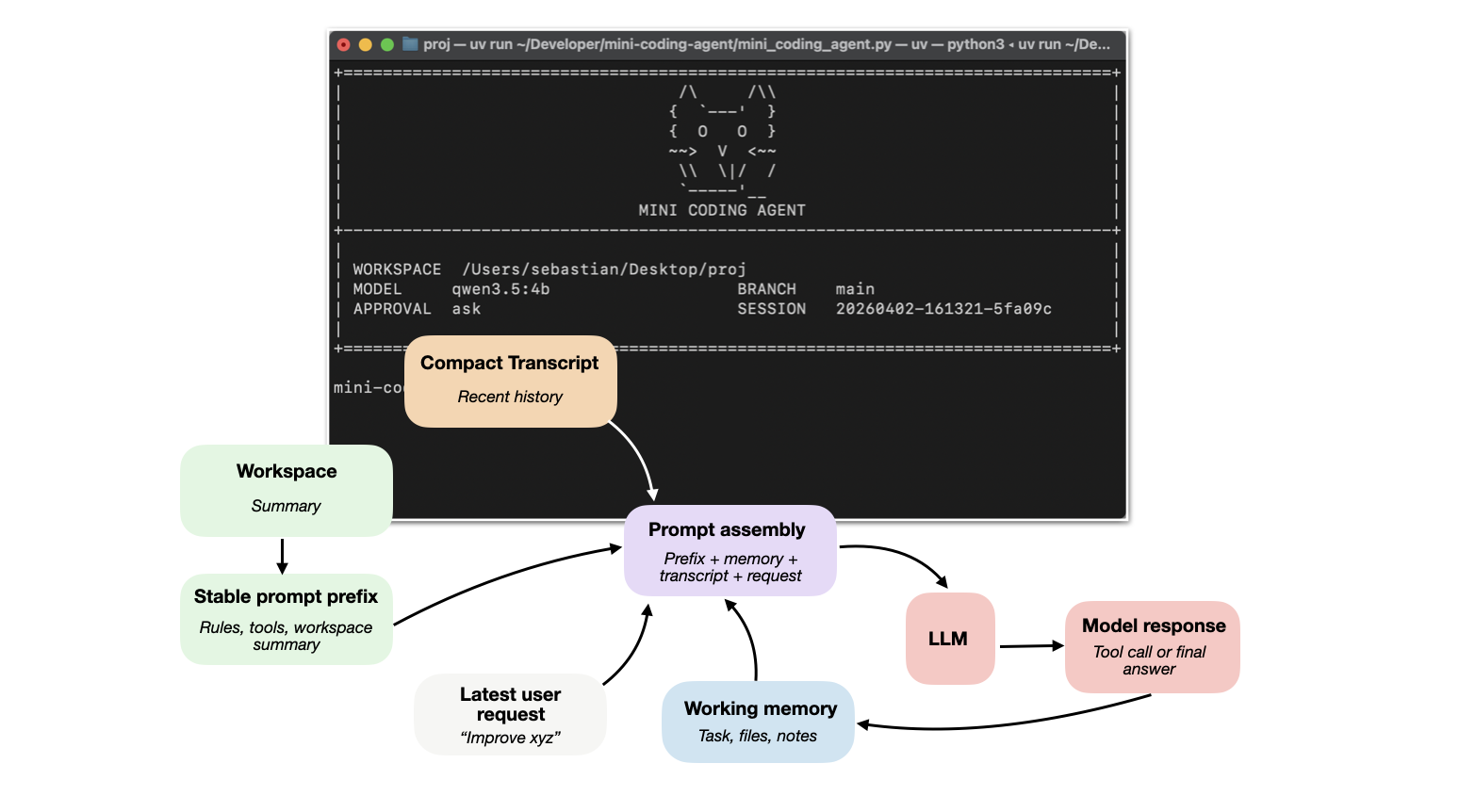
**[The detailed tutorial: Components of a Coding Agent](https://magazine.sebastianraschka.com/p/components-of-a-coding-agent)**
## Six Core Components
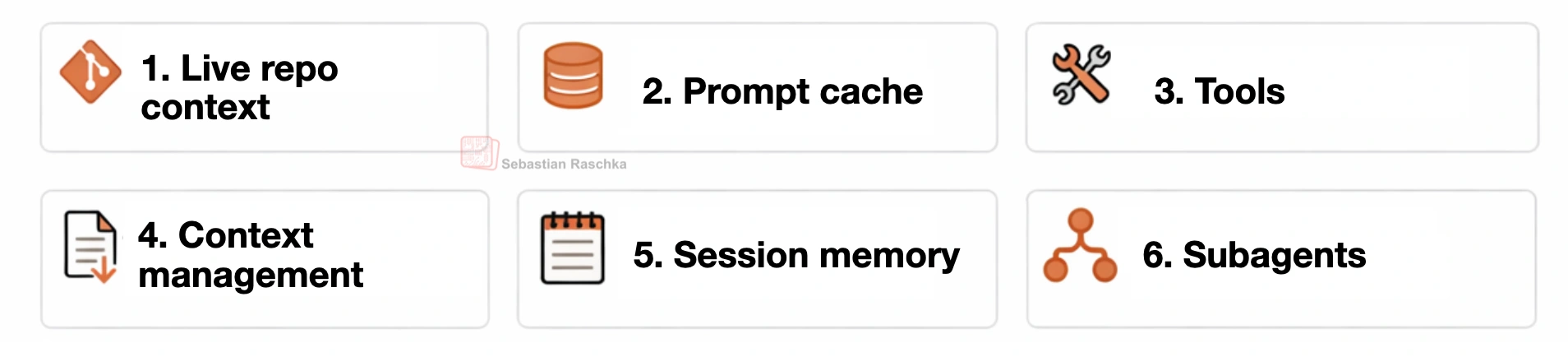
This coding harness is organized around six practical building blocks:
1. **Live repo context**
The agent collects stable workspace facts upfront, such as repo layout, instructions, and git state.
2. **Prompt shape and cache reuse**
A stable prompt prefix, which is separate from the changing request, transcript, and memory so repeated model calls can reuse the static parts efficiently.
3. **Structured tools, validation, and permissions**
The model works through named tools with checked inputs, workspace path validation, and approval gates instead of free-form arbitrary actions.
4. **Context reduction and output management**
Long outputs are clipped, repeated reads are deduplicated, and older transcript entries are compressed to keep prompt size under control.
5. **Transcripts, memory, and resumption**
The runtime keeps both a full durable transcript and a smaller working memory so sessions can be resumed while preserving important state via working memory.
6. **Delegation and bounded subagents**
Scoped subtasks can be delegated to helper agents that inherit enough context to help (but operate within limits).
## Requirements
You need:
- Python 3.10+
- Ollama installed
- an Ollama model pulled locally
Optional:
- `uv` for environment management and the `mini-coding-agent` CLI entry point
This project has no Python runtime dependency beyond the standard library, so you can run it directly with `python mini_coding_agent.py` if you do not want to use `uv`.
## Install Ollama
Install Ollama on your machine so the `ollama` command is available in your shell.
Official installation link: [ollama.com/download](https://ollama.com/download)
Then verify:
```bash
ollama --help
```
Start the server:
```bash
ollama serve
```
In another terminal, pull a model. Example:
```bash
ollama pull qwen3.5:4b
```
Qwen 3.5 model library:
- [ollama.com/library/qwen3.5](https://ollama.com/library/qwen3.5)
The default in this project is `qwen3.5:4b`. If you have sufficient memory, it is worth trying a larger model such as `qwen3.5:9b` or another larger Qwen 3.5 variant. The agent just sends prompts to Ollama's `/api/generate` endpoint.
## Project Setup
Clone the repo or your fork and change into it:
```bash
git clone https://github.com/rasbt/mini-coding-agent.git
cd mini-coding-agent
```
If you forked it first, use your fork URL instead:
```bash
git clone https://github.com//mini-coding-agent.git
cd mini-coding-agent
```
## Basic Usage
Start the agent:
```bash
cd mini-coding-agent
uv run mini-coding-agent
```
Without `uv`, run the script directly:
```bash
cd mini-coding-agent
python mini_coding_agent.py
```
By default it uses:
- model: `qwen3.5:4b`
- approval: `ask`
For a concrete usage example, see [EXAMPLE.md](EXAMPLE.md).
## Approval Modes
Risky tools such as shell commands and file writes are gated by approval.
- `--approval ask`
prompts before risky actions (default and recommended)
- `--approval auto`
allows risky actions automatically, including arbitrary command execution and file writes by the model; use only with trusted prompts and trusted repositories
- `--approval never`
denies risky actions
Example:
```bash
uv run mini-coding-agent --approval auto
```
## Resume Sessions
The agent saves sessions under the target workspace root in:
```text
.mini-coding-agent/sessions/
```
Resume the latest session:
```bash
uv run mini-coding-agent --resume latest
```
Resume a specific session:
```bash
uv run mini-coding-agent --resume 20260401-144025-2dd0aa
```
## Interactive Commands
Inside the REPL, slash commands are handled directly by the agent instead of
being sent to the model as a normal task.
- `/help`
shows the list of available interactive commands
- `/memory`
prints the distilled session memory, including the current task, tracked files, and notes
- `/session`
prints the path to the current saved session JSON file
- `/reset`
clears the current session history and distilled memory but keeps you in the REPL
- `/exit`
exits the interactive session
- `/quit`
exits the interactive session; alias for `/exit`
## Main CLI Flags
```bash
uv run mini-coding-agent --help
```
Without `uv`:
```bash
python mini_coding_agent.py --help
```
CLI flags are passed before the agent starts. Use them to choose the workspace,
model connection, resume behavior, approval mode, and generation limits.
Important flags:
- `--cwd`
sets the workspace directory the agent should inspect and modify; default: `.`
- `--model`
selects the Ollama model name, such as `qwen3.5:4b`; default: `qwen3.5:4b`
- `--host`
points the agent at the Ollama server URL (usually not needed); default: `http://127.0.0.1:11434`
- `--ollama-timeout`
controls how long the client waits for an Ollama response (usually not needed); default: `300` seconds
- `--resume`
resumes a saved session by id or uses `latest`; default: start a new session
- `--approval`
controls how risky tools are handled: `ask`, `auto`, or `never`; default: `ask`
- `--max-steps`
limits how many model and tool turns are allowed for one user request; default: `6`
- `--max-new-tokens`
caps the model output length for each step; default: `512`
- `--temperature`
controls sampling randomness; default: `0.2`
- `--top-p`
controls nucleus sampling for generation; default: `0.9`
## Example
See [EXAMPLE.md](EXAMPLE.md)
## Notes & Tips
- The agent expects the model to emit either `...` or `...`.
- Different Ollama models will follow those instructions with different reliability.
- If the model does not follow the format well, use a stronger instruction-following model.
- The agent is intentionally small and optimized for readability, not robustness.