https://github.com/raspiduino/pythoncircularprogressbar
Tkinter circular progressbar for Python 2&3
https://github.com/raspiduino/pythoncircularprogressbar
circular-progress-bar python tkinter
Last synced: about 1 year ago
JSON representation
Tkinter circular progressbar for Python 2&3
- Host: GitHub
- URL: https://github.com/raspiduino/pythoncircularprogressbar
- Owner: raspiduino
- License: lgpl-2.1
- Created: 2020-11-02T14:48:28.000Z (over 5 years ago)
- Default Branch: main
- Last Pushed: 2020-11-04T14:55:21.000Z (over 5 years ago)
- Last Synced: 2025-02-02T16:42:17.337Z (over 1 year ago)
- Topics: circular-progress-bar, python, tkinter
- Language: Python
- Homepage:
- Size: 44.9 KB
- Stars: 4
- Watchers: 2
- Forks: 0
- Open Issues: 0
-
Metadata Files:
- Readme: README.md
- License: LICENSE
Awesome Lists containing this project
README
# Python circular progressbar
Tkinter circular progressbar for Python 2 & 3
## Usage
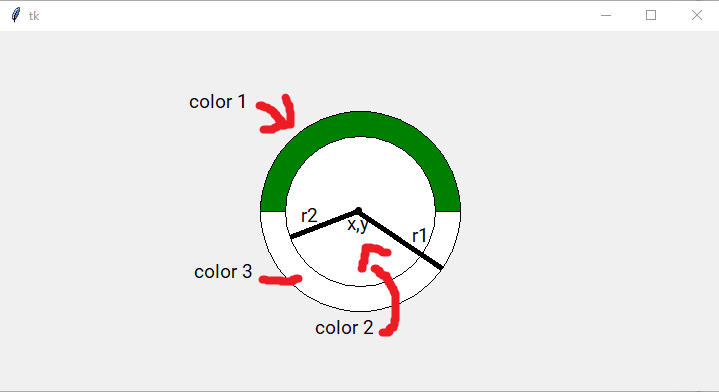
```python
myloadbar = CircularLoadBar(root, x, y, r1, r2, percent=0, color1=green, color2=white, color3=white
```
|Argument|Info|
|--------|----|
|root|The root windows id (you have created using root = tkinter.Tk())|
|x|The x location of the progressbar's center|
|y|The y location of the progressbar's center|
|r1|Described in the picture (radius of the first circle)|
|r2|Described in the picture (radius of the second circle)|
|percent|The startup percent (default is 0%)|
|color1|Color of the first circle (default is green)|
|color2|Color of the second circle (default is white)|
|color3|Color of the third circle (default is white)|
Example: (example.py)
```python
import circularloadbar
import tkinter as tk
root = tk.Tk()
root.geometry('720x360')
myload = circularloadbar.CircularLoadBar(root, 360, 180, 200, 150)
i = 0
def edit_p1():
global i
i += 1
myload.change(i)
root.after(10, edit_p1)
root.after(1000, edit_p1)
root.mainloop()
```
## Why made this?
For a simple reason: There is no 'default' circular progress bar in Python Tkinter, so I wanted to make this.
## License
Under GNU LGPL-v2.1