https://github.com/ratulsharker/rscustomtabbarcontroller
This is super flexible Custom tab bar controller implementation. You have the complete opportunity to customise according to your necessity ( ## Also support swift ## )
https://github.com/ratulsharker/rscustomtabbarcontroller
custom-tabbar-controller framework objective-c storyboard swift tabbarcontroller
Last synced: 9 months ago
JSON representation
This is super flexible Custom tab bar controller implementation. You have the complete opportunity to customise according to your necessity ( ## Also support swift ## )
- Host: GitHub
- URL: https://github.com/ratulsharker/rscustomtabbarcontroller
- Owner: ratulSharker
- License: mit
- Created: 2016-09-02T13:32:45.000Z (almost 10 years ago)
- Default Branch: master
- Last Pushed: 2017-02-28T17:10:34.000Z (over 9 years ago)
- Last Synced: 2025-04-14T09:58:05.973Z (over 1 year ago)
- Topics: custom-tabbar-controller, framework, objective-c, storyboard, swift, tabbarcontroller
- Language: Objective-C
- Homepage:
- Size: 20.5 MB
- Stars: 38
- Watchers: 6
- Forks: 6
- Open Issues: 0
-
Metadata Files:
- Readme: README.md
- License: LICENSE
Awesome Lists containing this project
README
# RSCustomTabbarController
This is super flexible Custom tab bar controller implementation. You have the complete opportunity to customise according to your necessity.
## Want to check on your own ?
Experience a **[live demonstration](https://appetize.io/app/nqd9py0znzmgar66cxtfw7vxzc?device=iphone5s&scale=75&orientation=portrait&osVersion=9.3)**
## Simple Demonstration
You can design whatever tabbar controller comes in your mind. Following is some simple demonstration. Many more are yet to come. If you have any unique idea, you would like to implement it for you feel free to contact Sharker.ratul.08@gmail.com

## Simple tutorial
###Step1:
Copy the [RSCustomTabbarController](https://github.com/ratulSharker/RSCustomTabbarController/tree/master/RSCustomTabbarController/CustomTabbarConroller) in your project.
###Step2:
Create a new class extending from the base class `RSCustomTabbarController`. Let the new class name is `Demo1TabbarController`.
`Demo1TabbarController.h` looks like following.
```obj-c
#import
#import "RSCustomTabbarController.h"
@interface Demo1TabbarController : RSCustomTabbarController
@end
```
Now implement the `RSCustomTabbarImplementationDelegate` by adding following properties & methods in `Demo1TabbarController`
```obj-c
@property UIView *viewControllerContainer;
@property NSArray *tabbarContainerHeight;
@property NSArray *tabbarWidgetHolderTop;
-(CGFloat)heightForTabbarController:(RSCustomTabbarController*)tabbarController;
-(void)newSelectedTabbarIndex:(NSUInteger)newSelectedIndex whereOldIndexWas:(NSUInteger)oldSelectedIndex;
```
Before getting into nitty gitty details, first grab some key concept about this protocol. This `RSCustomTabbarImplentationDelegate` will
ask for these 3 properties & 2 method. You are about to apply your own graphical design, but how should `RSCustomTabbarController` would
know about which is your view controller container and what will act as an tabbar container. Thats why this protocol is designed to communicate between your provided presentation and internal tabbar like maintanance.
now the `Demo1TabbarController.h` is looks like
```obj-c
#import
#import "RSCustomTabbarController.h"
@interface Demo1TabbarController : RSCustomTabbarController
#pragma mark implementation properties
@property IBOutlet UIView *viewControllerContainer;
@property IBOutletCollection (NSLayoutConstraint) NSArray *tabbarContainerHeight;
@property IBOutletCollection (NSLayoutConstraint) NSArray *tabbarWidgetHolderTop;
@end
```
and the `Demo1TabbarController.m` will look like
```obj-c
#import "Demo1TabbarController.h"
@interface Demo1TabbarController ()
@end
@implementation Demo1TabbarController
#pragma mark life cycle
-(void)viewDidLoad
{
[super viewDidLoad];
}
#pragma mark CustomTabbarImplementationDelegate
-(CGFloat)heightForTabbarController:(RSCustomTabbarController*)tabbarController
{
//todo -- implementation
}
-(void)newSelectedTabbarIndex:(NSUInteger)newSelectedIndex whereOldIndexWas:(NSUInteger)oldSelectedIndex
{
//todo -- implementation
}
@end
```
For now we are done with class. Now we need to add a inteface builder file (storyboard/nib) file for designing the tabbar controller.
Following is the hierarchy we will be following to create the `Demo1TabbarContorller`
```
UIVIewController
|
|--> self.view
|
|--> viewController container
|--> tabbar container
|
|--> bar button container
|
|--> buttons
```
Storyboard designing can be done as followos
[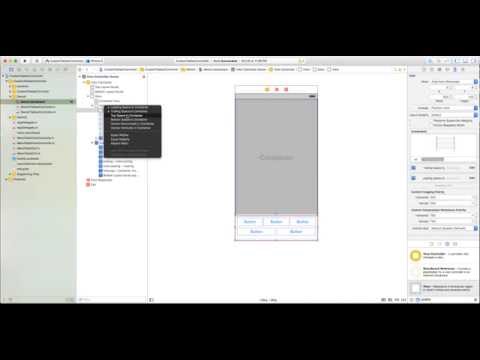](https://www.youtube.com/watch?v=8Yq26NWsHVo)
After done with your designing, now add some `IBOutlets`, `IBactions` and variables in the `Demo1TabbarController.m`. It should look like following
```obj-c
#import "Demo1TabbarController.h"
@interface Demo1TabbarController ()
{
NSArray *buttonArr;
}
@property (strong, nonatomic) IBOutlet UIButton *mViewBtn0;
@property (strong, nonatomic) IBOutlet UIButton *mViewBtn1;
@property (strong, nonatomic) IBOutlet UIButton *mViewBtn2;
@property (strong, nonatomic) IBOutlet UIButton *mViewBtn3;
@property (strong, nonatomic) IBOutlet UIButton *mViewBtn4;
@end
@implementation Demo1TabbarController
#pragma mark life cycle
-(void)viewDidLoad
{
_mViewBtn0.tag = 0;
_mViewBtn1.tag = 1;
_mViewBtn2.tag = 2;
_mViewBtn3.tag = 3;
_mViewBtn4.tag = 4;
buttonArr = @[_mViewBtn0, _mViewBtn1, _mViewBtn2, _mViewBtn3, _mViewBtn4];
[super viewDidLoad];
}
#pragma mark CustomTabbarImplementationDelegate
-(CGFloat)heightForTabbarController:(RSCustomTabbarController*)tabbarController
{
return 95;
}
-(void)newSelectedTabbarIndex:(NSUInteger)newSelectedIndex whereOldIndexWas:(NSUInteger)oldSelectedIndex
{
buttonArr[oldSelectedIndex].selected = NO;
buttonArr[newSelectedIndex].selected = YES;
}
#pragma mark IBActions
-(IBAction)tabbarButtonPressed:(UIButton*)sender
{
NSLog(@"tabbar button pressed");
[super setSelectedViewCotnrollerAtIndex:sender.tag];
}
@end
```
Now time to connect the IBAction and IBOutlet of the implementation so that the storyboard widgets can map into it. These are shown in the next video.
[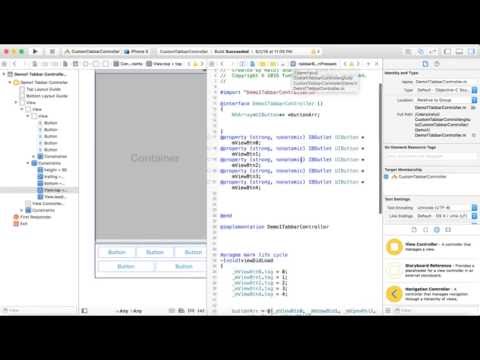](https://www.youtube.com/watch?v=kigm5uvIEuo)
Our custom tabbar is ready to rock and roll. Instantiate it from Storyboard and use it just like regular [UITabbarController](https://developer.apple.com/library/ios/documentation/UIKit/Reference/UITabBarController_Class/).