https://github.com/ravendevteam/poly
A terminal multiplexer with tabs, autocomplete, and more.
https://github.com/ravendevteam/poly
python shell terminal-multiplexer
Last synced: 6 months ago
JSON representation
A terminal multiplexer with tabs, autocomplete, and more.
- Host: GitHub
- URL: https://github.com/ravendevteam/poly
- Owner: ravendevteam
- License: bsd-3-clause
- Created: 2025-06-29T01:15:10.000Z (about 1 year ago)
- Default Branch: main
- Last Pushed: 2025-11-23T06:23:51.000Z (8 months ago)
- Last Synced: 2025-11-23T07:15:49.660Z (8 months ago)
- Topics: python, shell, terminal-multiplexer
- Language: Python
- Homepage:
- Size: 309 KB
- Stars: 7
- Watchers: 0
- Forks: 6
- Open Issues: 0
-
Metadata Files:
- Readme: README.md
- License: LICENSE
Awesome Lists containing this project
README

> [!NOTE]
> All of our free software is designed to respect your privacy, while being as simple to use as possible. Our free software is licensed under the [BSD-3-Clause license](https://ravendevteam.org/files/BSD-3-Clause.txt). By using our software, you acknowledge and agree to the terms of the license.
A terminal multiplexer with tabs, autocomplete, and more.
Made for Windows 11 and Linux.
## Installation
You can download Poly [here](https://ravendevteam.org/software/poly).
To compile from source, make sure you have Python 3.12.4 and Nuitka. Install the necessary dependencies from `requirements.txt`, then run the `build.bat` or `build.sh` script based on your platform.
## Features & Usage
- **.polyrc:** Create a .polyrc file in your home directory to define initial commands to execute.
- **Poly shell:** Poly has its own command set and autocomplete. You can set variables using `variable `, and utilize them by enclosing in curly brackets, like `{name}`. There are preset variables as well, like `{username}`, `{computer}`, and `{cwd}`. You can write custom scripts with the `.poly` file extension and execute them with Poly. You can chain multiple commands by adding a `&&`, like doing `echo Hello, && echo World!`.
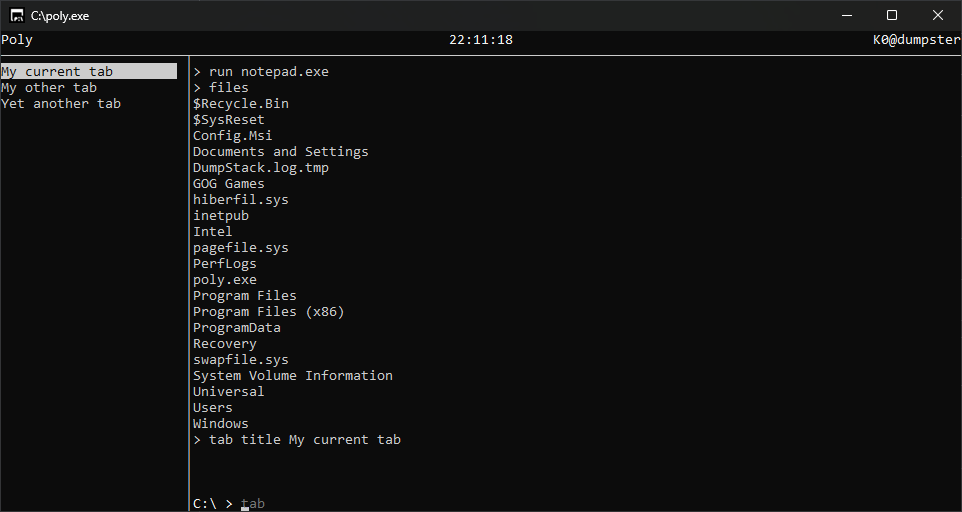
- **Tabs:** Poly has tabs for running multiple shell sessions at once.
- **Tab modes:** You can set the mode of your current tab to switch from the Poly shell to Command Prompt, Powershell, or your preferred Linux shell, using `tab mode `.
- **Creating a new tab:** CTRL + T
- **Closing current tab:** CTRL + W
- **Switching to next tab:** Tab
- **Switching to previous tab:** Shift + Tab
## Screenshots
## Authors & Contributors
- [Raven Development Team](https://ravendevteam.org/)
- [Icons by Icons8](https://icons8.com/)
- [lilafian](https://github.com/lilafian)
- [swordmasterliam](https://github.com/swordmasterliam)
- [rhhen122](https://github.com/rhhen122)
- [mre31](https://github.com/mre31)