https://github.com/raydac/jute
Small maven plugin allows to execute JUnit tests as separated external processes.
https://github.com/raydac/jute
java maven-plugin test-driven-development testing
Last synced: 4 months ago
JSON representation
Small maven plugin allows to execute JUnit tests as separated external processes.
- Host: GitHub
- URL: https://github.com/raydac/jute
- Owner: raydac
- License: apache-2.0
- Created: 2015-05-16T11:18:35.000Z (about 11 years ago)
- Default Branch: master
- Last Pushed: 2016-04-23T07:53:27.000Z (about 10 years ago)
- Last Synced: 2025-03-27T12:46:29.742Z (over 1 year ago)
- Topics: java, maven-plugin, test-driven-development, testing
- Language: Java
- Size: 231 KB
- Stars: 16
- Watchers: 2
- Forks: 1
- Open Issues: 0
-
Metadata Files:
- Readme: README.md
- Changelog: changelog.txt
- License: LICENSE
Awesome Lists containing this project
README
[](http://www.apache.org/licenses/LICENSE-2.0)
[](http://search.maven.org/#artifactdetails|com.igormaznitsa|jute|1.1.1|jar)
[](http://www.oracle.com/technetwork/java/javase/downloads/index.html)
[](https://www.paypal.com/cgi-bin/webscr?cmd=_s-xclick&hosted_button_id=AHWJHJFBAWGL2)
[](https://money.yandex.ru/embed/small.xml?account=41001158080699&quickpay=small&yamoney-payment-type=on&button-text=01&button-size=l&button-color=orange&targets=%D0%9F%D0%BE%D0%B6%D0%B5%D1%80%D1%82%D0%B2%D0%BE%D0%B2%D0%B0%D0%BD%D0%B8%D0%B5+%D0%BD%D0%B0+%D0%BF%D1%80%D0%BE%D0%B5%D0%BA%D1%82%D1%8B+%D1%81+%D0%BE%D1%82%D0%BA%D1%80%D1%8B%D1%82%D1%8B%D0%BC+%D0%B8%D1%81%D1%85%D0%BE%D0%B4%D0%BD%D1%8B%D0%BC+%D0%BA%D0%BE%D0%B4%D0%BE%D0%BC&default-sum=100&successURL=)
# What is it?
It is a small specific Maven plugin (of course it is relative small one because it of course will download and save on your machine a half-of-internet as dependencies) for specific testing tasks. Since 1.1.0 it allows annotations to mark tests, for annotations use __jute-annotations__ artifact.
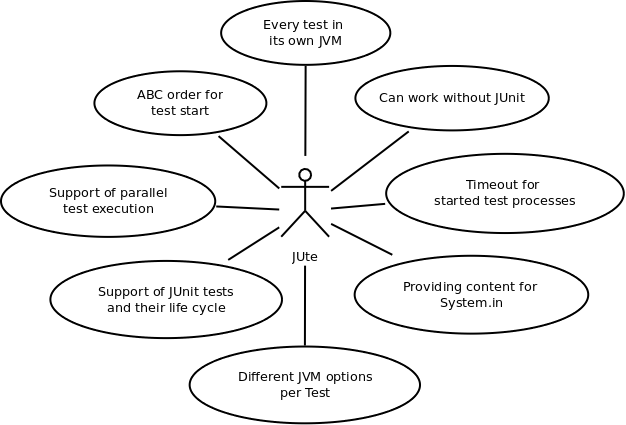
# Changelog
1.1.1
- reworked test class path generating mechanism, removed usage of jcabi-aether because sometime it throws NPE with complex settings.xml
1.1.0
- reworked project structure
- added @JUteTest annotation to mark tests to be started with JUte (provided by the jute-annotations artefact)
- improvements in test result logging
- all tests every time alphabetically sorted in bounds of their order
- added support of parallel execution for tests with the same order value
- tests marked by @JUteTest support JUnit test life cycle - @BeforeClass @Before @After @AfterClass
- added support of 'skipTests' and 'maven.test.skip' properties, like in maven-surefire
- added support of 'jute.test' property to be used from command line, like 'test' in maven-surefire
- removed hard dependency to JUnit, now JUte can process tests and without JUnit as dependency
- added configuration parameter 'onlyAnnotated' to work only with JUte annotated test methods and classes
1.0.0
- initial version
# What is the specific tasks?
Let's imagine that we want to write JUnit tests for some code which has so bizzare structure and architecture that it is very expensive to dig it and avoid influence of one test to another, may be it is a legacy code or just a system with very very complex behaviour. All your tests work separately but they are red in bunch execution.
In such situation you can use Jute. the Plugin works during test phase and executes all methods of JUnit tests as external separated processes. It finds all test methods marked as @Test and ignores all test methods marked by @Ignore. You can also exclude (or include) from its processing whole test classes or methods. Also it provides possibility to set different JRE for external processes start. Please remember that it works only with JUnit annotations.
# How to bring Jute in my project?
It is very easy, the plugin has been published in the Maven Central and you can just add its reference in pom.xml
```
...
com.igormaznitsa
jute
1.1.1
jute
...
```
after that JUte will be executing every test phase of your project during __test__ phase.
# How to use JUte annotations?
JUte annotations provided by __jute-annotations__ artifact and you can just add it as dependency
```
com.igormaznitsa
jute-annotations
1.1.1
test
```
Tests to be processed by JUte should be marked by `@com.igormaznitsa.jute.annotations.JUteTest` but keep in memory that by default JUte processes and JUnit tests so if you want work only with @JUteTest marked tests then add `true` into JUte plugin configuration. If you have similar parameters in jute plugin configuration, then they will be overrided by parameters defined in the annotation.
```java
@JUteTest(order=12,jvm="java",jvmOpts={"-Xss=10m","-Xmx256m"},timeout=3000,printConsole=true)
public void testSome() throws Exception {
...
}
```
#Test order
Since 1.1.0 version, all test methods are sorted in ABC (case-sensetive) order, if you provide __order__ parameter of annotation then tests with the same order value will be started in parallel.
```java
@JUteTest
public void testA() throws Exception {
...
}
@JUteTest(order=2)
public void testB() throws Exception {
...
}
@JUteTest(order=2)
public void testC() throws Exception {
...
}
```
In the example tests B and C will be started in parallel and process will be continued only when both tests are completed and order of the testA is -1 by default and it will be executed as the first one.
# Hey! I want to use it only for several classes!
No problems, just define name of your class in __includes__ section of the plugin configuration
```
...
com.igormaznitsa
jute
1.1.1
jute
/**/MyTestWhichShouldBeStartedInExternalProcess.java
...
```
In the case onle test methods defined in file named MyTestWhichShouldBeStartedInExternalProcess will be processed by Jute.
# I don't want execute all tests, only a pair!
Ok! In the case you just should define names or a mask for your test method names.
```
...
com.igormaznitsa
jute
1.1.1
jute
/**/MyTestWhichShouldBeStartedInExternalProcess.java
*JuteTest
...
```
After that, only test methods suffixed by JuteTest will be executed by Jute.
# It doesn't process my methods and I have not idea why!
In the case start your maven process with -X (it will turn on debug logging) and add ```true``` into Jute configuration
# It prints console output only if there is an error! and I want see test output everytime!
No problems! Just add flag to enforce pring console output of external processes into maven log ```true``` and you will see external process console output every time.
# I want to start only jute goal! How to do that?!
Just execute ```mvn test:jute``` and only jute goal will be executeed by maven for your project.