https://github.com/razbuild/raztint
Lightweight cross-platform terminal colors and icons for Python CLIs.
https://github.com/razbuild/raztint
ansi cli color color-detection cross-platform fallback icons library lightweight nerd-fonts python-library terminal terminal-colors text-coloring tty unicode utilities zero-dependency
Last synced: 6 months ago
JSON representation
Lightweight cross-platform terminal colors and icons for Python CLIs.
- Host: GitHub
- URL: https://github.com/razbuild/raztint
- Owner: razbuild
- License: mit
- Created: 2025-12-07T22:48:10.000Z (7 months ago)
- Default Branch: master
- Last Pushed: 2025-12-20T18:59:16.000Z (7 months ago)
- Last Synced: 2025-12-22T17:11:55.840Z (7 months ago)
- Topics: ansi, cli, color, color-detection, cross-platform, fallback, icons, library, lightweight, nerd-fonts, python-library, terminal, terminal-colors, text-coloring, tty, unicode, utilities, zero-dependency
- Language: Python
- Homepage:
- Size: 199 KB
- Stars: 0
- Watchers: 0
- Forks: 0
- Open Issues: 0
-
Metadata Files:
- Readme: README.md
- Changelog: CHANGELOG.md
- Contributing: CONTRIBUTING.md
- License: LICENSE
- Code of conduct: CODE_OF_CONDUCT.md
- Security: SECURITY.md
Awesome Lists containing this project
README






---
## Preview
A zero-dependency Python library for ANSI coloring and smart CLI icons with automatic environment detection.
| ASCII Icons | Nerd Font Icons | Unicode Icons |
|------------|----------------|---------------|
| 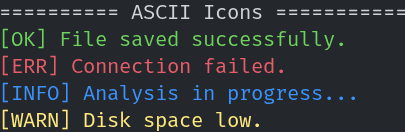 | 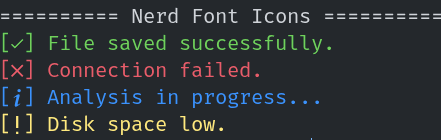 | 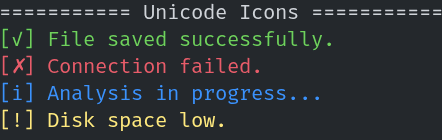 |
---
RazTint supports:
- Zero Dependencies: Built entirely with the Python standard library.
- Smart Icon Sets: Automatically degrades from **Nerd Fonts** → **Unicode** → **ASCII** based on the environment.
- Automatic Detection: Detects `NO_COLOR`, `TERM`, and `isatty` to enable/disable features appropriately.
- Windows Support: Automatically enables Virtual Terminal (VT) processing on Windows systems using `ctypes`.
- Type Hinted: Fully typed for excellent IDE support and autocompletion.
- Configurable: Granular control via Environment Variables.
This library is suitable for CLIs, logs, and tools that need portable, readable terminal output.
---
## Why RazTint?
RazTint is intentionally minimal and zero-dependency.
If you need a lightweight alternative to `colorama` or `rich` for:
- Simple CLI tools
- Scripts
- Logging utilities
- Cross-platform terminal output
RazTint gives you:
- Zero dependencies
- Automatic icon fallback (Nerd → Unicode → ASCII)
- Automatic color detection
- Configurable behaviour with environment variables
- Very small runtime overhead
---
## Features
- Zero Dependencies: Built entirely with the Python standard library.
- Smart Icon Sets: Automatically degrades from Nerd Fonts → Unicode → ASCII based on the environment.
- Automatic Detection: Detects NO_COLOR, TERM, and isatty to enable/disable features appropriately.
- Windows Support: Automatically enables Virtual Terminal (VT) processing on Windows systems using ctypes.
- Type Hinted: Fully typed for excellent IDE support and autocompletion.
- Configurable: Granular control via Environment Variables.
---
# Installation
## From PyPI
```bash
pip install raztint
```
## With pipx
```bash
pipx install raztint
```
## From source
```bash
git clone https://github.com/razbuild/raztint.git
cd raztint
pip install -e . # -e allows you to modify the source code in place
```
## How to install Nerd Font?
To install Nerd Fonts, visit the official [website](https://www.nerdfonts.com/font-downloads).
---
## Quick Start
You can import functions directly for quick usage, or instantiate the class for more control.
### Functional Usage
The easiest way to use RazTint is importing the pre-instantiated helpers:
```python
from raztint import green, red, ok, err, info, warn
# Coloring text
print(green("Success! The operation completed."))
print(red("Critical Error: Database not found."))
# Using Icons (Auto-adapts to Nerd Font/Unicode/ASCII)
print(f"{ok()} File saved successfully.")
print(f"{err()} Connection failed.")
print(f"{info()} Analysis in progress...")
print(f"{warn()} Disk space low.")
```
### Class-based Usage
Useful if you need to toggle color support dynamically within an application instance or want a scoped instance.
```python
from raztint import RazTint
tint = RazTint()
# Toggle features manually if needed
tint.set_color(False)
print(tint.blue("This will be plain text now because color is disabled."))
```
### Using the `tint` Instance
```python
from raztint import tint
print(tint.red("text"))
print(tint.ok(), "hello")
```
---
## Icons & Detection
### Icon Functions
```python
from raztint import ok, err, warn, info
print(ok(), "Operation completed")
print(err(), "An error happened")
print(warn(), "Be careful")
print(info(), "For your information")
```
### Icon Modes
RazTint attempts to make your CLI look as good as possible by detecting the font capabilities of the terminal.
| Mode | ok | err | warn | info | Condition |
|------|----|-----|------|------|-----------|
| Nerd |[] | [] | [] | [] | Detected Nerd Font via Env/Registry |
| Std | [✓] | [✗] | [!] | [i] | UTF-8 supported, no Nerd Font |
| ASCII | [OK] | [ERR] | [WARN] | [INFO] | Fallback |
> Note: Icons may not render correctly in GitHub preview depending on your browser font.
### Detection Logic
RazTint determines the best available icon and color mode using the following rules:
1. Nerd Font Mode:
- Enabled if:
- `RAZTINT_USE_NERD_ICONS` environment variable is set to `1`, `true`, `yes`, or `on`, OR
- `NERDFONTS` or `NERD_FONTS` environment variable is set, OR
- `FONT_NAME` or `TERM_FONT` environment variable contains "nerd" or "nf-", OR
- A Nerd Font is detected via system checks:
- **Linux**: Uses `fc-list` (fontconfig) to check installed fonts
- **macOS**: Checks via `system_profiler` and font directories (`~/Library/Fonts`, `/Library/Fonts`)
- **Windows**: Checks `C:\Windows\Fonts` directory via PowerShell
2. Standard Unicode Mode:
- Enabled when UTF-8 encoding is available AND
- `RAZTINT_NO_NERD_ICONS` is set (explicitly disables Nerd Fonts), OR
- Nerd Fonts are not detected and not forced via `RAZTINT_USE_NERD_ICONS`
3. ASCII Mode:
- Used when:
- Output encoding is not UTF-8 (cannot encode Nerd Font or Unicode characters), OR
- System encoding test fails for Unicode characters
---
## Configuration
You can control **RazTint** behavior using environment variables. This is useful for CI/CD pipelines or user overrides.
| Environment Variable | Value | Description |
|----------------------|-------|-------------|
| `NO_COLOR` | any | Disables all color output (standard specification). |
| `RAZTINT_NO_COLOR` | any | Specific override to disable RazTint colors. |
| `RAZTINT_FORCE_COLOR` | `1`, `true`, `yes`, `on` | Forces color output even if not a TTY. |
| `RAZTINT_USE_NERD_ICONS` | `1`, `true`, `yes`, `on` | Forces the use of Nerd Font icons. |
| `RAZTINT_NO_NERD_ICONS` | `1`, `true`, `yes`, `on` | Disables Nerd Font detection (falls back to Standard Unicode mode). |
### Programmatically:
```python
from raztint import tint
tint.set_color(False)
```
### Disable Colors
```
NO_COLOR=1
```
## Icon Behavior Configuration
### Always Use Nerd Icons
```
RAZTINT_USE_NERD_ICONS=1
```
### Force-enable Colors
```
RAZTINT_FORCE_COLOR=1
```
### Disable Nerd Icons
```
RAZTINT_NO_NERD_ICONS=1
```
---
# API Reference
## Color Functions
The following functions return strings wrapped with ANSI styling when supported:
- `black(text)`
- `red(text)`
- `green(text)`
- `yellow(text)`
- `blue(text)`
- `magenta(text)`
- `cyan(text)`
- `white(text)`
- `gray(text)`
Internally, these use `tint.color()`.
---
## Icon Functions
These return appropriate status symbols based on environment detection:
- `ok()` - Returns a success icon (green checkmark)
- `err()` - Returns an error icon (red cross)
- `warn()` - Returns a warning icon (yellow exclamation)
- `info()` - Returns an info icon (blue 'i')
RazTint selects the best available style in this order:
1. Nerd Font icons (if installed)
2. Unicode icons (if UTF-8 is supported)
3. ASCII fallback
---
## RazTint Class Methods
When using the `RazTint` class directly, you have access to additional methods:
### `color(text: str, fg_code: str) -> str`
Low-level method to apply ANSI color codes to text. Returns the text with ANSI escape sequences when color is enabled, otherwise returns plain text.
**Parameters:**
- `text`: The text to colorize
- `fg_code`: ANSI color code (e.g., "31" for red, "32" for green)
**Example:**
```python
from raztint import RazTint
tint = RazTint()
colored = tint.color("Hello", "31") # Red text
```
### `set_color(enabled: bool) -> None`
Enable or disable color output programmatically.
**Parameters:**
- `enabled`: `True` to enable colors, `False` to disable
**Example:**
```python
from raztint import RazTint
tint = RazTint()
tint.set_color(False) # Disable colors
print(tint.red("This will be plain text"))
```
## RazTint Class Attributes
### `use_color: bool`
Boolean indicating whether color output is currently enabled. This is automatically set based on environment detection but can be modified via `set_color()`.
### `icon_mode: str`
Current icon mode being used. Possible values:
- `"nerd"` - Nerd Font icons
- `"std"` - Standard Unicode icons
- `"ascii"` - ASCII fallback icons
---
# Automatic Behavior
RazTint intelligently detects and adapts to the environment:
## Color Detection
Color support is determined by checking (in order):
1. `NO_COLOR` or `RAZTINT_NO_COLOR` environment variables (disables colors)
2. `RAZTINT_FORCE_COLOR` environment variable (forces colors)
3. Whether output is connected to a TTY (`sys.stdout.isatty()`)
4. On Windows: Attempts to enable Virtual Terminal processing
5. `TERM` environment variable (must not be "dumb")
If color is not supported, all color functions return plain text.
## Icon Detection
Icon mode is determined by checking (in order):
1. Encoding capability (can the system encode Nerd Font characters?)
2. `RAZTINT_USE_NERD_ICONS` or `RAZTINT_NO_NERD_ICONS` environment variables
3. System-level Nerd Font detection (see Detection Logic section)
4. Falls back to Standard Unicode or ASCII based on encoding support
If unsupported, RazTint transparently falls back to non-colored text and simpler icons.
---
# License
MIT License