https://github.com/reacher-z/ClawBench
Open-source benchmark for browser AI agents on 153 everyday online tasks across 144 live websites. 5-layer recording + DOM-match + LLM judge. Top score 33.3%.
https://github.com/reacher-z/ClawBench
agent-evaluation agentic-ai ai-agent-benchmark ai-agents benchmark browser-agent browser-automation browser-use chrome-agent chrome-extension computer-use dataset evaluation everyday-tasks llm llm-evaluation online-tasks real-world-benchmark web-agent web-agents
Last synced: about 2 months ago
JSON representation
Open-source benchmark for browser AI agents on 153 everyday online tasks across 144 live websites. 5-layer recording + DOM-match + LLM judge. Top score 33.3%.
- Host: GitHub
- URL: https://github.com/reacher-z/ClawBench
- Owner: reacher-z
- License: apache-2.0
- Created: 2026-04-10T01:59:17.000Z (3 months ago)
- Default Branch: main
- Last Pushed: 2026-04-26T05:22:21.000Z (2 months ago)
- Last Synced: 2026-04-26T07:18:41.438Z (2 months ago)
- Topics: agent-evaluation, agentic-ai, ai-agent-benchmark, ai-agents, benchmark, browser-agent, browser-automation, browser-use, chrome-agent, chrome-extension, computer-use, dataset, evaluation, everyday-tasks, llm, llm-evaluation, online-tasks, real-world-benchmark, web-agent, web-agents
- Language: Python
- Homepage: https://claw-bench.com
- Size: 985 KB
- Stars: 96
- Watchers: 2
- Forks: 8
- Open Issues: 14
-
Metadata Files:
- Readme: README.md
- Contributing: CONTRIBUTING.md
- Funding: .github/FUNDING.yml
- License: LICENSE
- Citation: CITATION.cff
- Notice: NOTICE
- Agents: AGENTS.md
Awesome Lists containing this project
- Awesome-AI-Agents - ClawBench - Browser-agent benchmark of 153 everyday tasks on 144 live production websites across 15 categories; a submission-interception layer blocks the final write request for safe evaluation on real sites.  (Benchmark/Evaluator / Tools)
- awesome-ai-agent - ClawBench
- awesome-web-agents - ClawBench - 283 everyday tasks (V1 153 + V2 130) on 163 live production websites across 15 categories. Two-stage scoring (final HTTP-request interception + LLM judge) blocks only the write request so real sites stay clean. Public leaderboard with 5-layer execution traces (recording, action log, request log, agent messages, interception).  (Benchmarks & Research / Dev Tools)
- awesome-ai-agent-evaluation - ClawBench - website browser-agent benchmark; 283 everyday tasks (V1 153 + V2 130) across 163 platforms. Two-stage scoring: HTTP-request interception at per-task URL/method schema + LLM judge on the intercepted payload. [Paper](https://arxiv.org/abs/2604.08523) · [Live leaderboard](https://claw-bench.com) (Benchmarks)
README

[](https://github.com/reacher-z/ClawBench)
[](https://arxiv.org/abs/2604.08523)
[](https://huggingface.co/papers/2604.08523)
[](https://huggingface.co/datasets/NAIL-Group/ClawBench)
[](https://claw-bench.com)
[](https://github.com/reacher-z/ClawBench)
[](https://discord.gg/clawbench)
[](https://codespaces.new/reacher-z/ClawBench?quickstart=1)
[](https://pypi.org/project/clawbench/)
[](https://pypi.org/project/clawbench/)
[](https://github.com/reacher-z/ClawBench/commits/main)
[](https://github.com/reacher-z/ClawBench/graphs/contributors)
[](https://github.com/reacher-z/ClawBench/graphs/commit-activity)
[](https://github.com/reacher-z/ClawBench/blob/main/LICENSE)
Featured in







New: Check out our sister project HarnessBench —
fixes the base model, varies the harness. Same scoring pipeline, orthogonal axis.

```bash
git clone https://github.com/reacher-z/ClawBench.git && cd ClawBench && ./run.sh
```
Clone → configure → run. Root uv package. Docker-isolated harnesses.
### Can AI Agents Complete Everyday Online Tasks?
**ClawBench is an open-source benchmark that evaluates AI browser agents on 153 everyday online tasks — booking travel, ordering food, applying for jobs, managing email — across 144 live websites. It measures end-to-end task success with a 5-layer recording pipeline and an agentic evaluator that compares each run against human references. Top score to date: 33.3%.**
We asked frontier AI agents to do what people do every day --
order food, book travel, apply for jobs, write reviews, manage projects.
**Even the best agent only completes about 1 in 3.**
Built by ZJU-REAL · Sister project: HarnessBench · Runs on any Chrome.
---
**153** everyday tasks · **144** live websites · **15** life categories
##  News
News
- **[2026.04.25]** Added support for the **hermes** harness.
- **[2026.04.22]** Added support for the **claude-code-chrome-extension** harness — Claude Code CLI + [Claude in Chrome](https://code.claude.com/docs/en/chrome) extension.
- **[2026.04.20]** Added support for the **claw-code** harness.
- **[2026.04.18]** Added support for the **browser-use** harness.
- **[2026.04.17]** Added support for the **Codex** harness.
- **[2026.04.16]**  Added support for the **Claude Code** harness.
- **[2026.04.16]** Featured in **5 curated awesome-lists**: [awesome-harness-engineering](https://github.com/walkinglabs/awesome-harness-engineering), [Awesome-AI-Agents](https://github.com/Jenqyang/Awesome-AI-Agents), [awesome-computer-use](https://github.com/ranpox/awesome-computer-use), [Awesome-GUI-Agents](https://github.com/ZJU-REAL/Awesome-GUI-Agents), and [LLM-Agent-Benchmark-List](https://github.com/zhangxjohn/LLM-Agent-Benchmark-List).
- **[2026.04.15]** Sister project [**HarnessBench**](https://github.com/reacher-z/HarnessBench) launched — fixes the base model, varies the harness. Also on [PyPI](https://pypi.org/project/harness-bench/).
- **[2026.04.14]** Added support for the **OpenCode** harness.
- **[2026.04.14]** Project featured on [**DeepWiki**](https://deepwiki.com/reacher-z/ClawBench) — ask questions about ClawBench in natural language.
- **[2026.04.11]** Honored to be [**#3 HuggingFace Paper of the Day**](https://huggingface.co/papers/2604.08523)!
- **[2026.04.11]** Paper released on [arXiv (2604.08523)](https://arxiv.org/abs/2604.08523). Dataset published on [HuggingFace](https://huggingface.co/datasets/NAIL-Group/ClawBench).
Live Websites
 Isolated Containers
 Request Interceptor
 Five-Layer Recording
## How It Works
```
You pick a task ClawBench spins up Agent drives the Interceptor captures
from 153 real-world an isolated Docker browser: navigates, every action across
everyday scenarios container + Chromium fills forms, clicks all 5 layers of data
┌──────────────┐ ┌──────────────┐ ┌──────────────┐ ┌──────────────┐
│ "Book a pet │ ──► │ Container │ ──► │ AI Agent │ ──► │ 5 layers │
│ sitter on │ │ + Chromium │ │ browses the │ │ intercepted │
│ Rover" │ │ + Agent │ │ live site │ │ & recorded │
└──────────────┘ └──────────────┘ └──────────────┘ └──────────────┘
```
#  LLM Quick Start
Point your coding agent (Claude Code, Cursor, Copilot, etc.) at [`AGENTS.md`](AGENTS.md) and prompt away.
#  Human Quick Start
Clone the repo and run the root `uv` package entrypoint:
```bash
git clone https://github.com/reacher-z/ClawBench.git && cd ClawBench && ./run.sh
```
**Prerequisites:** [Python 3.11+](https://python.org), [uv](https://docs.astral.sh/uv/), and a container engine — [Docker](https://www.docker.com/) **or** [Podman](https://podman.io/). ClawBench auto-detects whichever is installed; force one with `export CONTAINER_ENGINE=docker` or `export CONTAINER_ENGINE=podman`.
Install Docker or Podman (macOS / Linux / Windows)
#### macOS
```bash
# Option A — Docker Desktop (easiest, includes GUI)
brew install --cask docker
open -a Docker # launch and wait for the whale icon to settle
# Option B — Podman (rootless, no daemon, CLI only)
brew install podman
podman machine init # one-time: downloads the Linux VM image
podman machine start # must be running before any podman command
```
> **macOS Podman needs a VM.** `brew install podman` alone is not enough — Podman on macOS runs containers inside a small Linux VM, so you must `podman machine init && podman machine start` once after install or `podman info` will fail with `Cannot connect to Podman`.
#### Linux (Ubuntu / Debian)
```bash
# Option A — Podman (rootless by default, recommended)
sudo apt update && sudo apt install -y podman
# Option B — Docker
sudo apt install -y docker.io
sudo usermod -aG docker $USER # log out / back in so your shell picks up the group
```
> **Rootful Docker ownership note:** with classic `sudo`-docker, files extracted from containers land owned by `root` on the host. ClawBench's driver detects this after each run and chowns `test-output/` back to your user automatically — but if you run other container tooling alongside, rootless Podman (or rootless Docker) avoids the issue entirely.
#### Windows
```powershell
# Option A — Docker Desktop (WSL2 backend)
winget install Docker.DockerDesktop
# then launch Docker Desktop from the Start menu and wait for it to be ready
# Option B — Podman
winget install RedHat.Podman
podman machine init
podman machine start
```
> Run the `uv run …` commands below from **PowerShell**, **WSL2**, or **Git Bash**. Like macOS, Windows Podman requires `podman machine init && podman machine start` before its first use.
**1. Configure models** — one-time setup:
```bash
cp models/models.example.yaml models/models.yaml
$EDITOR models/models.yaml
cp .env.example .env
$EDITOR .env
```
> [!NOTE]
> **First run builds a container image** (Chromium + ffmpeg + noVNC + the selected agent harness dependencies). You'll see a live progress spinner with the current build step. Subsequent runs reuse the cached layers and finish in seconds.
**2. Run your first task** (pick one):
> [!TIP]
> **Recommended → Interactive TUI** guided model + test case selection
> ```bash
> uv run clawbench
> ```
> Needs an interactive terminal. For pipes / CI / non-TTY, use `uv run clawbench-run` or `uv run clawbench-batch` directly.
**(b) Run one specific task against a specific model:**
```bash
uv run clawbench-run test-cases/001-daily-life-food-uber-eats claude-sonnet-4-6
```
Once the container starts, the script prints a **noVNC URL** (e.g. `http://localhost:6080/vnc.html`) — open it in your browser to watch the agent operate in real-time. If port 6080 is already in use, an alternative port is chosen automatically.
Results land in `./test-output//---/` with the full five-layer recording. The default harness is `openclaw`; pass `--harness opencode` to use [opencode](https://opencode.ai), `--harness claude-code` to use [Claude Code](https://docs.anthropic.com/en/docs/claude-code), `--harness claude-code-chrome-extension` to use Claude Code + the [Claude in Chrome](https://code.claude.com/docs/en/chrome) extension (Microsoft Edge + local bridge, bypass stack so any LiteLLM-routed provider works), `--harness codex` to use [OpenAI Codex CLI](https://github.com/openai/codex), `--harness claw-code` to use [claw-code](https://github.com/ultraworkers/claw-code), `--harness browser-use` to use [browser-use](https://github.com/browser-use/browser-use) (Python framework, routed via LiteLLM), or `--harness hermes` to use [Hermes Agent](https://github.com/NousResearch/hermes-agent) with native browser tools attached to ClawBench Chrome via CDP.
**(c) Drive the browser yourself via noVNC** — produces a human reference run:
```bash
uv run clawbench-run test-cases/001-daily-life-food-uber-eats --human
```
Open the noVNC URL the script prints, complete the task by hand, then close the tab. Port is auto-assigned if 6080 is busy.
**(d) Pair with an external browser agent** — run in Human mode, open the noVNC URL, and let an external browser agent control that browser session while ClawBench records and intercepts it.
Develop from source — clone + ``./run.sh`` for contributors
Prefer the repo checkout if you want to modify the driver, the bundled test-cases, or the container build itself.
```bash
git clone https://github.com/reacher-z/ClawBench.git && cd ClawBench
cp models/models.example.yaml models/models.yaml # edit: add your model API keys
cp .env.example .env # edit: add PurelyMail creds; optional HF_TOKEN
./run.sh # interactive TUI
uv run clawbench-run \
test-cases/001-daily-life-food-uber-eats claude-sonnet-4-6 # single run
uv run clawbench-run \
test-cases/001-daily-life-food-uber-eats --human # human mode
```
This path gives you live-reload on ``src/``, ``src/chrome-extension/``, and ``test-cases/`` — useful when iterating on the harness itself.
#  ClawBench-Lite
**New here? Run this first.** [`test-cases/lite.json`](test-cases/lite.json) is a **20-task curated subset** of the full 153, selected for household-name sites, real-world relevance, difficulty, and category diversity. It matches the 20-tasks-per-source convention of [browser-use/benchmark](https://github.com/browser-use/benchmark) and gives you a credible signal at a fraction of the full-benchmark cost.
Tier distribution: **flagship 9 / core 8 / wildcard 3** — spanning daily life (OpenTable, DoorDash, Instacart, TaskRabbit), entertainment (Eventbrite, Goodreads, Fandango), creation (Asana, Mailchimp, Squarespace), travel (Airbnb), education (LeetCode), dev-tech (GitHub), academia (Overleaf), personal management (1Password), and more. All Lite tasks are judged by [`eval/agentic_eval.md`](eval/agentic_eval.md) regardless of `url_pattern` shape.
See [`test-cases/lite.schema.json`](test-cases/lite.schema.json) for the manifest shape and the `notes` field in `lite.json` for the 4-axis selection rubric + full swap history.
#  Demos
Demos
Each ClawBench run produces a full MP4 session recording. See the [project page](https://claw-bench.com) for all 153 task recordings.
#  Example Walkthrough
Curious what one task actually looks like, start to finish? Here's task **001** end to end.
**The task** — from [`test-cases/001-daily-life-food-uber-eats/task.json`](test-cases/001-daily-life-food-uber-eats/task.json):
```json
{
"instruction": "On Uber Eats, order delivery: one Pad Thai, deliver to home address, note \"no peanuts\"",
"time_limit": 30,
"eval_schema": {
"url_pattern": "__PLACEHOLDER_WILL_NOT_MATCH__",
"method": "POST"
}
}
```
The agent gets this `instruction` verbatim, plus read-only access to `/my-info/alex_green_personal_info.json` (the dummy user's name, home address, phone, date of birth) and a disposable email account for any sign-in prompt. It has **30 minutes** to reach a `POST` request — any longer and the container is killed.
**What the agent does** (the happy path):
1. Navigates to `ubereats.com`
2. Reads the dummy user's home address from `/my-info/alex_green_personal_info.json` and enters it in the delivery-address box
3. Searches for **"Pad Thai"** in the food search
4. Picks a restaurant that has Pad Thai available for delivery to that address
5. Opens the item detail page, finds the customization or special-instructions field, enters **"no peanuts"**
6. Adds one to cart, opens the cart, and handles any sign-in prompt using the disposable email credentials
7. Reaches checkout, taps **Place Order**
**What the interceptor catches** — that final *Place Order* tap fires a `POST` request. ClawBench's request interceptor sits in front of the browser and **captures the outbound request before it reaches Uber Eats's servers**, so the dummy user is never actually charged. At the exact moment of interception, all five recording layers (MP4 video, PNG screenshots, HTTP traffic, browser actions, agent messages) are frozen into `/data/`.
**How the judge decides PASS / FAIL** — task 001's `url_pattern` is the intentional sentinel `__PLACEHOLDER_WILL_NOT_MATCH__`, which means **no request path can mechanically match**. The verdict comes from the agentic judge in [`eval/agentic_eval.md`](eval/agentic_eval.md), which replays the five-layer recording against a human reference run and checks four things:
- Did the agent actually reach the final checkout step?
- Is the cart exactly **one** Pad Thai (not two, not a combo)?
- Is the delivery address the user's home address from `alex_green_personal_info.json`?
- Does the order carry the **"no peanuts"** note in the instructions field?
All four must hold for a **PASS**. Miss any one and it's a **FAIL** with evidence from the recording pinned to the failing criterion. This per-task rubric is what makes ClawBench judge-sensitive rather than URL-regex-sensitive — see [`eval/README.md`](eval/README.md) for the full rubric format and [`eval/agentic_eval.md`](eval/agentic_eval.md) for the judge prompt.
# Results
**Success rate (%) of 6 frontier AI agents on ClawBench**
| Rank | Model | Overall | Daily | Finance | Work | Dev | Academic | Travel | Social | Pets |
| :---: | --------------------- | :------: | :------: | :------: | :------: | :------: | :------: | :------: | :------: | :------: |
| 1 | **Claude Sonnet 4.6** | **33.3** | 44.2 | **50.0** | 19.0 | 11.1 | **50.0** | 23.1 | **38.9** | **18.2** |
| 2 | GLM-5 | 24.2 | **30.8** | 16.7 | **38.1** | 16.7 | 28.6 | 0.0 | 16.7 | **18.2** |
| 3 | Gemini 3 Flash | 19.0 | 15.4 | 33.3 | 23.8 | **22.2** | 28.6 | **30.8** | 11.1 | 0.0 |
| 4 | Claude Haiku 4.5 | 18.3 | 15.4 | 22.2 | 19.0 | **27.8** | 21.4 | 7.7 | 16.7 | **18.2** |
| 5 | GPT-5.4 | 6.5 | 9.6 | 0.0 | 0.0 | 11.1 | 7.1 | 7.7 | 0.0 | 9.1 |
| 6 | Gemini 3.1 Flash Lite | 3.3 | 1.9 | 0.0 | 0.0 | 5.6 | 14.3 | 0.0 | 0.0 | 9.1 |
Task Categories (15 categories, 153 tasks)
| Category | Tasks | Example Platforms |
| ------------------------- | :---: | ------------------------------------------------------------- |
| Daily Life | 21 | Uber Eats, DoorDash, Instacart, Zillow, Craigslist |
| Entertainment & Hobbies | 15 | Ticketmaster, AMC Theatres, Topgolf, Crunchyroll |
| Creation & Initialization | 13 | Squarespace, Wix, Webflow, Ghost, Substack |
| Rating & Voting | 10 | Trustpilot, G2, Goodreads, RateMyProfessors |
| Travel | 9 | Booking.com, Expedia, Airbnb, TripAdvisor |
| Education & Learning | 9 | Coursera, Udemy, Khan Academy, Duolingo |
| Office & Secretary | 9 | Google Calendar, Slack, Notion, Trello |
| Beauty & Personal Care | 9 | Sephora, Ulta, Glossier |
| Job Search & HR | 8 | LinkedIn, Greenhouse, Lever, Workday |
| Pet & Animal Care | 8 | Chewy, Petco, Rover |
| Personal Management | 6 | Mint, YNAB, Todoist |
| Shopping & Commerce | 6 | Amazon, eBay, Etsy, Target |
| Nonprofit & Charity | 6 | GoFundMe, DonorsChoose |
| Academia & Research | 5 | Google Scholar, Semantic Scholar, OpenReview |
| Finance & Investment | 4 | Robinhood, Fidelity, Coinbase |
| Others | 15 | Automation, Dev & Tech, Government, Home Services, Automotive |
## How ClawBench compares
| Benchmark | Domain | Environment | Task count | ClawBench difference |
| ----------------------------------------------------------- | -------------------- | ------------------------ | ---------- | ----------------------------------------------------- |
| [WebArena](https://webarena.dev) | Synthetic web apps | Self-hosted replicas | 812 | Live consumer sites, not admin UIs on hosted replicas |
| [GAIA](https://huggingface.co/datasets/gaia-benchmark/GAIA) | General assistants | Closed-book text + tools | 466 | Browser-centric; end-to-end task execution |
| [SWE-bench](https://www.swebench.com) | Software engineering | GitHub repos | 2,294 | Non-code; everyday consumer workflows |
| [BrowserGym](https://github.com/ServiceNow/BrowserGym) | Web agents | Headless sandbox | — | Cloud-parity; records real user journeys |
| [Mind2Web](https://github.com/OSU-NLP-Group/Mind2Web) | Web navigation | Static traces | 2,350 | Dynamic live websites, not replayed traces |
ClawBench's niche: **live consumer websites, everyday tasks, end-to-end recording**. If you want a controlled sandbox or replayed traces, the projects above are excellent. If you want to know whether your agent can actually order food or book a flight *today*, this is the benchmark for that.
## Architecture
Container internals
```
┌─────────────────────────────────────────────────┐
│ Container (Docker / Podman) │
│ │
│ ┌───────────┐ DOM events ┌──────────────┐ │
│ │ content.js├──────────────►│ background.js│ │
│ │ (per tab) │ │ (service │ │
│ └───────────┘ │ worker) │ │
│ └──┬──────┬────┘ │
│ │ │ │
│ actions │ │ screenshots
│ │ │ │
│ ┌──────────┐ ┌──────▼──────▼────┐ │
│ │ Xvfb │◄──ffmpeg──►│ FastAPI Server │ │
│ │ :99 │ x11grab │ :7878 │ │
│ └──────────┘ └──────────────────┘ │
│ │ │
│ ┌──────────┐ ┌───────▼─────────┐ │
│ │ Chromium │ │ /data │ │
│ │ :9222 CDP│ │ actions.jsonl │ │
│ └──────────┘ │ requests.jsonl │ │
│ │ screenshots/ │ │
│ │ recording.mp4 │ │
│ └─────────────────┘ │
└─────────────────────────────────────────────────┘
```
#  CLI
CLI
```bash
# Interactive TUI (recommended):
./run.sh
# Single run:
uv run clawbench-run test-cases/001-daily-life-food-uber-eats claude-sonnet-4-6
# Human mode (you control the browser via noVNC):
uv run clawbench-run test-cases/001-daily-life-food-uber-eats --human
# Batch (all models x cases 1-50, 3 concurrent):
uv run clawbench-batch --all-models --case-range 1-50 --max-concurrent 3
```
For test case authoring details, see [CONTRIBUTING.md](CONTRIBUTING.md) and [`test-cases/task.schema.json`](test-cases/task.schema.json). For output structure and evaluation guidance, see [eval/README.md](eval/README.md).
# Evaluation
Evaluation is a **post-session** step -- first run agents to collect trajectories, then evaluate them against human reference runs.
```
1. Run agents (root uv package) 2. Evaluate (eval/)
───────────────────────── ────────────────────────────────
./run.sh / clawbench-batch ──► Claude Code subagents compare
produces test-output/ agent vs human trajectories
with 5-layer recordings under eval/agentic_eval.md rubric
```
The evaluator compares each agent trajectory against a human reference trajectory across all five recording layers (video, screenshots, HTTP traffic, browser actions, agent messages), then outputs PASS/FAIL with evidence-backed justification.
See [eval/README.md](eval/README.md) for the full evaluation guide and Claude Code prompt template.
# FAQ
What data does each run produce?
Each session records five layers of synchronized data under `/data/`:
| Layer | File | Description |
| ------------------ | ---------------------- | --------------------------------------------------------------- |
| Session replay | `recording.mp4` | Full session video (H.264, 15fps) |
| Action screenshots | `screenshots/*.png` | Timestamped PNG per browser action |
| Browser actions | `actions.jsonl` | Every DOM event (click, keydown, input, pageLoad, scroll, etc.) |
| HTTP traffic | `requests.jsonl` | Every HTTP request with headers, body, and query params |
| Agent messages | `agent-messages.jsonl` | Full agent conversation transcript (thinking, text, tool calls) |
The interceptor result is saved to `interception.json`.
How does the request interceptor work?
The interceptor blocks critical, irreversible HTTP requests (checkout, form submit, email send) to prevent real-world side effects. It connects to Chrome via CDP's `Fetch` domain and matches requests against the eval schema (`url_pattern` regex + `method` + optional `body`/`params`). When triggered, it saves the blocked request to `interception.json`, kills the agent, and stops recording.
The interceptor does **not** validate task completion -- evaluation is handled separately by evaluators post-session.
For tasks behind payment walls (agent has no valid credit card), the eval schema uses a placeholder pattern that never matches, so the session runs until timeout.
What is the synthetic user profile?
Each container gets a `/my-info/` directory with a dummy user identity (Alex Green): personal info JSON, email credentials, and a resume PDF. The email is a fresh disposable PurelyMail address generated per run. The agent reads these files when it needs to fill forms, register accounts, etc.
Source templates: `shared/alex_green_personal_info.json` (profile) and `src/clawbench/utils/resume_template.json` (resume).
Can I use Podman instead of Docker?
Yes. Set `export CONTAINER_ENGINE=podman`. The framework auto-detects whichever is available. Podman works without root privileges.
What tools can the agent use?
All supported harnesses run inside the same container recording and interception environment. CLI/MCP harnesses expose the browser tool plus a restricted set of read-only shell commands (`ls`, `cat`, `find`, `grep`, `head`, `tail`, `jq`, `wc`, etc.); commands that could bypass the browser (`curl`, `python`, `node`, `wget`) are blocked. Hermes uses native browser/file tools attached to the same ClawBench Chrome CDP endpoint. The agent instruction also explicitly requires browser-only task completion.
How do I add a new test case?
See [CONTRIBUTING.md](CONTRIBUTING.md). In short: create a directory under `test-cases/` with a `task.json` conforming to `test-cases/task.schema.json`, define the eval schema, test with human mode, and submit a PR.
## Contributing
We welcome contributions -- especially new test cases. If you've ever ordered groceries, booked an appointment, or filed a form online, you already know how to write one. Most PRs are a single JSON file and land in under a day.
**Quick wins:**
- [Add a new test case](CONTRIBUTING.md#adding-a-new-test-case) (~30 min, no container expertise needed)
- [Add a new category](CONTRIBUTING.md#what-were-looking-for) of 10+ tasks → co-author invitation on the next paper revision
- [Submit a new model](CONTRIBUTING.md#what-were-looking-for) to the public leaderboard
- Browse [good first issues](https://github.com/reacher-z/ClawBench/labels/good%20first%20issue)
See [CONTRIBUTING.md](CONTRIBUTING.md) for the full guide and contributor recognition policy.
## Community
Come hang out with researchers, builders, and contributors working on real-world browser agents.

English community
Agent builders, researchers, contributors

中文社区
研究者、开发者、贡献者交流

Async Q&A
Searchable, long-form, permanent
See [docs/community.md](docs/community.md) for channel layout, house rules, and 微信群 加入方式.
## Frequently Asked Questions
**What is ClawBench?**
ClawBench is an open-source benchmark for AI browser agents — the systems (GPT-based, Claude-based, or open) that drive a real web browser to complete a user's task. It measures whether the agent actually finishes 153 everyday online tasks across 144 live websites, not whether it produces the right-looking text.
**What kinds of tasks does ClawBench cover?**
Fifteen life categories: food delivery, travel booking, job applications, shopping, housing search, email and calendar management, academic research, software development, learning platforms, and more. Every task is something a normal person might do in a normal week, on a real website.
**How is a task judged successful?**
Each task runs in an isolated browser container with a five-layer recording: video, screenshots, network requests, browser actions, and agent messages. The evaluator compares the agent trajectory against a human reference run and assigns PASS or FAIL with evidence from the recording.
**What's the current top score?**
33.3% — roughly one task in three — from the strongest frontier model we evaluated. The majority of tasks still defeat every model we've tested; the headroom is real, and the benchmark is not saturated.
**How do I reproduce a published score?**
From a source checkout, configure `models/models.yaml` and `.env`, then run `uv run clawbench`. The TUI builds the container image and runs any subset of the 153 local `test-cases/` tasks against your model of choice.
**Is ClawBench safe to run against live websites?**
The runner uses a hardened container with a request interceptor that blocks purchases, account creation, outbound email sends, and similar irreversible actions by default. Tasks that need to *simulate* those actions (e.g., "add to cart and checkout") terminate at the last reversible step. You can relax the interceptor per-task if your research requires it.
**Can I contribute new tasks or harnesses?**
Yes. Tasks live in `test-cases/`; see `CONTRIBUTING.md` for the task schema and validation flow.
**How does ClawBench relate to HarnessBench?**
Same scoring pipeline, orthogonal axis. ClawBench fixes the harness and varies the model; HarnessBench fixes the model and varies the harness. They share the 153-task corpus, the five-layer recording, and the agentic evaluator — so numbers are directly comparable.
## Citation
If you use ClawBench in your research, please cite:
```bibtex
@misc{zhang2026clawbench,
title = {ClawBench: Can AI Agents Complete Everyday Online Tasks?},
author = {Yuxuan Zhang and Yubo Wang and Yipeng Zhu and Penghui Du and Junwen Miao and Xuan Lu and Wendong Xu and Yunzhuo Hao and Songcheng Cai and Xiaochen Wang and Huaisong Zhang and Xian Wu and Yi Lu and Minyi Lei and Kai Zou and Huifeng Yin and Ping Nie and Liang Chen and Dongfu Jiang and Wenhu Chen and Kelsey R. Allen},
year = {2026},
eprint = {2604.08523},
archivePrefix = {arXiv},
primaryClass = {cs.AI},
url = {https://arxiv.org/abs/2604.08523}
}
```
## Core Contributors
## Advisors
## Support ClawBench
If ClawBench is useful for your research or product work,
the single most helpful thing you can do is **[star the repo](https://github.com/reacher-z/ClawBench)** —
it surfaces the benchmark to other AI-agent researchers and helps us justify
continued dataset curation.

Open to contributions — new test cases, bug fixes, or evaluation submissions for a model we haven't scored yet. See [`CONTRIBUTING.md`](CONTRIBUTING.md).

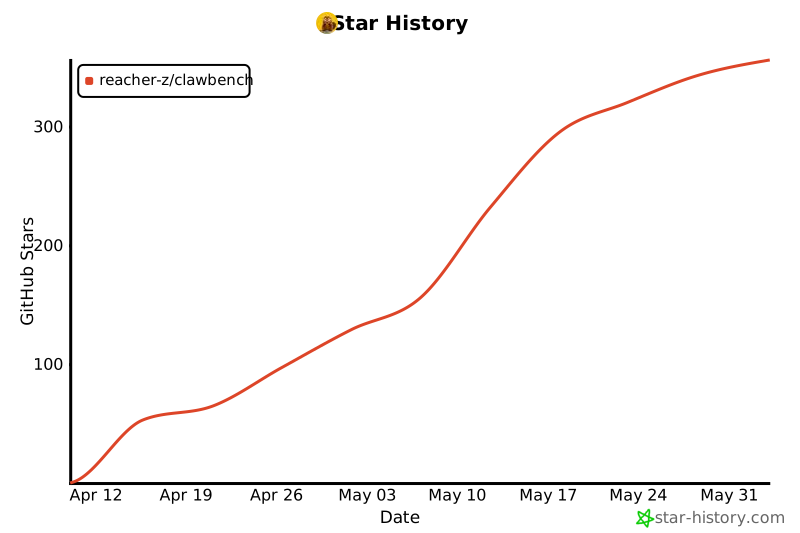
## Star History
## License & Acknowledgments
Apache 2.0 -- see [LICENSE](LICENSE).
Built with [OpenClaw](https://github.com/openclaw/openclaw), [opencode](https://opencode.ai), [Claude Code](https://docs.anthropic.com/en/docs/claude-code), the [Claude in Chrome](https://code.claude.com/docs/en/chrome) extension, [OpenAI Codex CLI](https://github.com/openai/codex), [browser-use](https://github.com/browser-use/browser-use), [claw-code](https://github.com/ultraworkers/claw-code), and [Hermes Agent](https://github.com/NousResearch/hermes-agent) (selectable harnesses), [Microsoft Playwright MCP](https://github.com/microsoft/playwright-mcp) (browser control bridge for the opencode, claude-code, codex, and claw-code harnesses), [LiteLLM](https://github.com/BerriAI/litellm) (API translation proxy for the claude-code, claude-code-chrome-extension, codex, browser-use, and claw-code harnesses), [noVNC](https://github.com/novnc/noVNC) (MPL 2.0), and [websockify](https://github.com/novnc/websockify) (LGPL 3.0).
 中文
中文