https://github.com/realm/realm-loginkit
A generic interface for logging in to Realm Mobile Platform apps
https://github.com/realm/realm-loginkit
cocoapods ios login swift uiviewcontroller
Last synced: 12 months ago
JSON representation
A generic interface for logging in to Realm Mobile Platform apps
- Host: GitHub
- URL: https://github.com/realm/realm-loginkit
- Owner: realm
- License: apache-2.0
- Archived: true
- Created: 2017-01-17T09:20:54.000Z (over 9 years ago)
- Default Branch: master
- Last Pushed: 2021-11-08T11:22:58.000Z (over 4 years ago)
- Last Synced: 2024-09-22T07:03:53.589Z (almost 2 years ago)
- Topics: cocoapods, ios, login, swift, uiviewcontroller
- Language: Swift
- Homepage:
- Size: 21.1 MB
- Stars: 74
- Watchers: 30
- Forks: 21
- Open Issues: 13
-
Metadata Files:
- Readme: README.md
- Contributing: CONTRIBUTING.md
- License: LICENSE
Awesome Lists containing this project
README
# DEPRECATED
With the introduction of [MongoDB Realm](https://www.mongodb.com/realm), this project is **deprecated**. Please use [MongoDB Realm Cloud](https://docs.mongodb.com/realm/).
-----
# Realm LoginKit
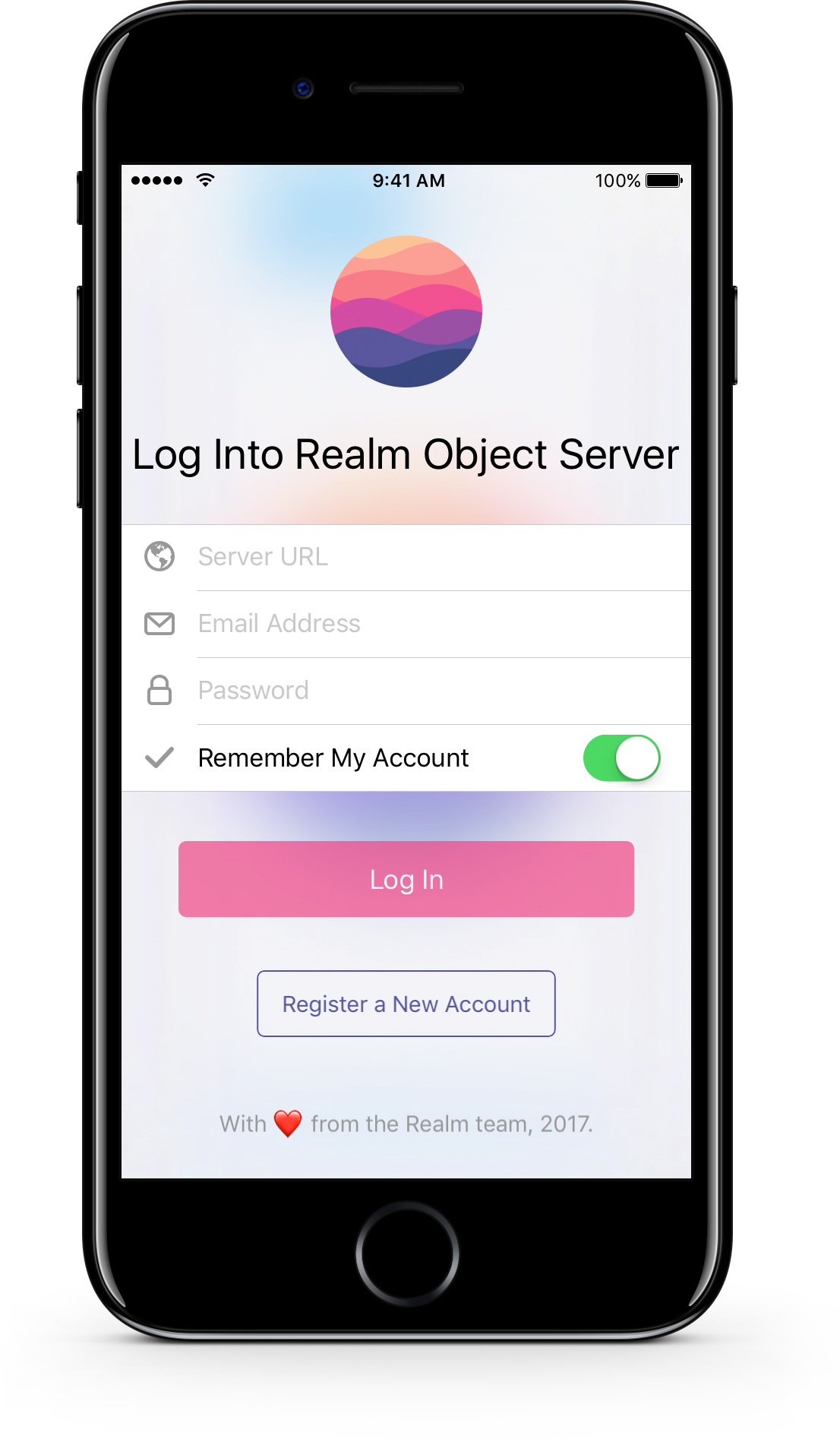
> A general purpose account login user interface for apps implementing the Realm Mobile Platform.
[](http://api.travis-ci.org/realm-demos/realm-loginkit.svg)
[](https://cocoapods.org/pods/RealmLoginKit)
[](http://cocoadocs.org/docsets/RealmLoginKit)
[](https://raw.githubusercontent.com/realm-demos/realm-loginkit/master/LICENSE)
[](http://cocoadocs.org/docsets/RealmLoginKit)
Realm LoginKit is a UI framework that provides a fully featured login screen for apps that make use of the Realm Mobile Platform.
It has been designed to be easily dropped into existing app codebases, and to provide a fully featured interface allowing users to either log in, or register new accounts in that app.
# Features
* Light & dark themes for light apps like Realm Draw, and dark apps like Realm Tasks.
* Fully adaptive to both smartphone, and tablet screen sizes.
* Easy swapping between 'log in' and 'sign up' modes.
* Optional settings to hide the server URL and 'remember me' form fields.
* The ability to remember username and passwords on subsequent app launches.
# Versions & Requirements
Realm LoginKit only supports iOS at the moment.
### [iOS](https://github.com/realm-demos/realm-loginkit/tree/master/RealmLoginKit%20Apple/)
* Xcode 8.0 and up
* iOS 9.0 and up
### Android
Currently in development, and should be finished soon.
### Xamarin
Currently on the roadmap with development starting soon.
# Third Party Dependencies
### iOS
* [Realm Objective-C](https://realm.io/docs/objc/latest/) - The Objective-C version of the Realm Mobile Database.
* [TORoundedTableView](https://github.com/TimOliver/TORoundedTableView) - A subclass of `UITableView` that creates rounded table sections when view on iPad.
# Example Code
### Swift
```swift
// Create the object
let loginController = LoginViewController(style: .lightTranslucent) // init() also defaults to lightTranslucent
// Configure any of the inputs before presenting it
loginController.serverURL = "localhost"
// Set a closure that will be called on successful login
loginController.loginSuccessfulHandler = { user in
// Provides the successfully authenticated SyncUser object
}
```
### Objective-C
```objc
// Create the object
RLMLoginViewController *loginController = [[RLMLoginViewController alloc] initWithStyle:LoginViewControllerStyleLightTranslucent];
// Configure any of the inputs before presenting it
loginController.serverURL = @"localhost";
// Set a closure that will be called on successful login
loginController.loginSuccessfulHandler = ^(RLMSyncUser *user) {
// Provides the successfully authenticated RLMSyncUser object
};
```
# Setting up the Demo App
### iOS
In order to run the Realm LoginKit demo app, it is necessary to install CocoaPods in order to integrate the third party libraries.
1. If you haven't already, [install CocoaPods](https://guides.cocoapods.org/using/getting-started.html).
2. Open Terminal, and navigate to the root Realm Puzzle directory, e.g. `cd ~/Projects/realm-loginkit`.
3. Run `pod install` to install the necessary dependencies needed by Realm LoginKit.
4. Open `RealmLoginKit.xcworkspace` instead of the `xcproject` file.
# Installation
### iOS
#### CocoaPods
CocoaPods is the recommended way to install Realm LoginKit into an app as this will automatically manage recycling Realm Objective-C as a dependency. In your `PodFile`, simply add `pod 'RealmLoginKit'`.
Realm LoginKit also provides support for third party authentication providers. However, since these providers may require additional dependencies that might otherwise be redundant, they are being isolated in separated CocoaPods subspecs:
* **Amazon Cognito** - `pod 'RealmLoginKit/AWSCognito'`
#### Manually
You can also integrate Realm LoginKit manually; simply copy the `RealmLoginKit` folder to your app, and drag it into Xcode. That being said, you will also need to install the [dependencies](#third-party-dependencies) separately as well. See their respective GitHub repositories for installation instructions.
# Contributing
See [CONTRIBUTING.md](CONTRIBUTING.md) for more details!
This project adheres to the [Contributor Covenant Code of Conduct](https://realm.io/conduct/). By participating, you are expected to uphold this code. Please report unacceptable behavior to [info@realm.io](mailto:info@realm.io).
# License
Realm LoginKit is licensed under the Apache license. See the LICENSE file for details.
