https://github.com/rebeccasc/bimtoosm
A BIM to OSM parser
https://github.com/rebeccasc/bimtoosm
3d-models bim geo ifc java josm-plugin openstreetmap osm parser
Last synced: 12 months ago
JSON representation
A BIM to OSM parser
- Host: GitHub
- URL: https://github.com/rebeccasc/bimtoosm
- Owner: rebeccasc
- License: agpl-3.0
- Created: 2021-05-02T13:29:54.000Z (about 5 years ago)
- Default Branch: master
- Last Pushed: 2024-08-18T08:57:45.000Z (almost 2 years ago)
- Last Synced: 2025-04-13T20:14:01.956Z (over 1 year ago)
- Topics: 3d-models, bim, geo, ifc, java, josm-plugin, openstreetmap, osm, parser
- Language: Kotlin
- Homepage:
- Size: 2.18 MB
- Stars: 9
- Watchers: 2
- Forks: 3
- Open Issues: 0
-
Metadata Files:
- Readme: README.md
- Contributing: CONTRIBUTING.md
- License: LICENSE
Awesome Lists containing this project
README
# BIMtoOSM
[](https://github.com/rebeccasc/BIMtoOSM/actions/workflows/gradle.yml)
[](https://github.com/rebeccasc/BIMtoOSM/blob/master/LICENSE)

A parser to transform **B**uilding **I**nformation **M**odeling ([BIM](https://en.wikipedia.org/wiki/Building_information_modeling)) to **O**pen**S**treet**M**ap ([OSM](https://www.openstreetmap.org/#map=18/50.81353/12.92928&layers=N)) data. This open source project wants to make Building Information Model data available for OpenStreetMap.
## Quick start
### Use the API
:construction: **Currently, the source code is being rebuilt from scratch and the API might change** :construction:
```kotlin
// Setup configuration (for full description see wiki -> Usage):
val defaultConfig = Configuration()
// Init parser
val parser = BIMtoOSMParser(defaultConfig)
// Parse BIM file
val osmData: OSMDataSet = parser.parse("path-to-file.ifc")
// Access the data (for full description see wiki -> Usage)
// Export OSM data
Exporter.exportOSM("bim-to-osm.osm", osmData, true)
```
### Use JOSM GUI
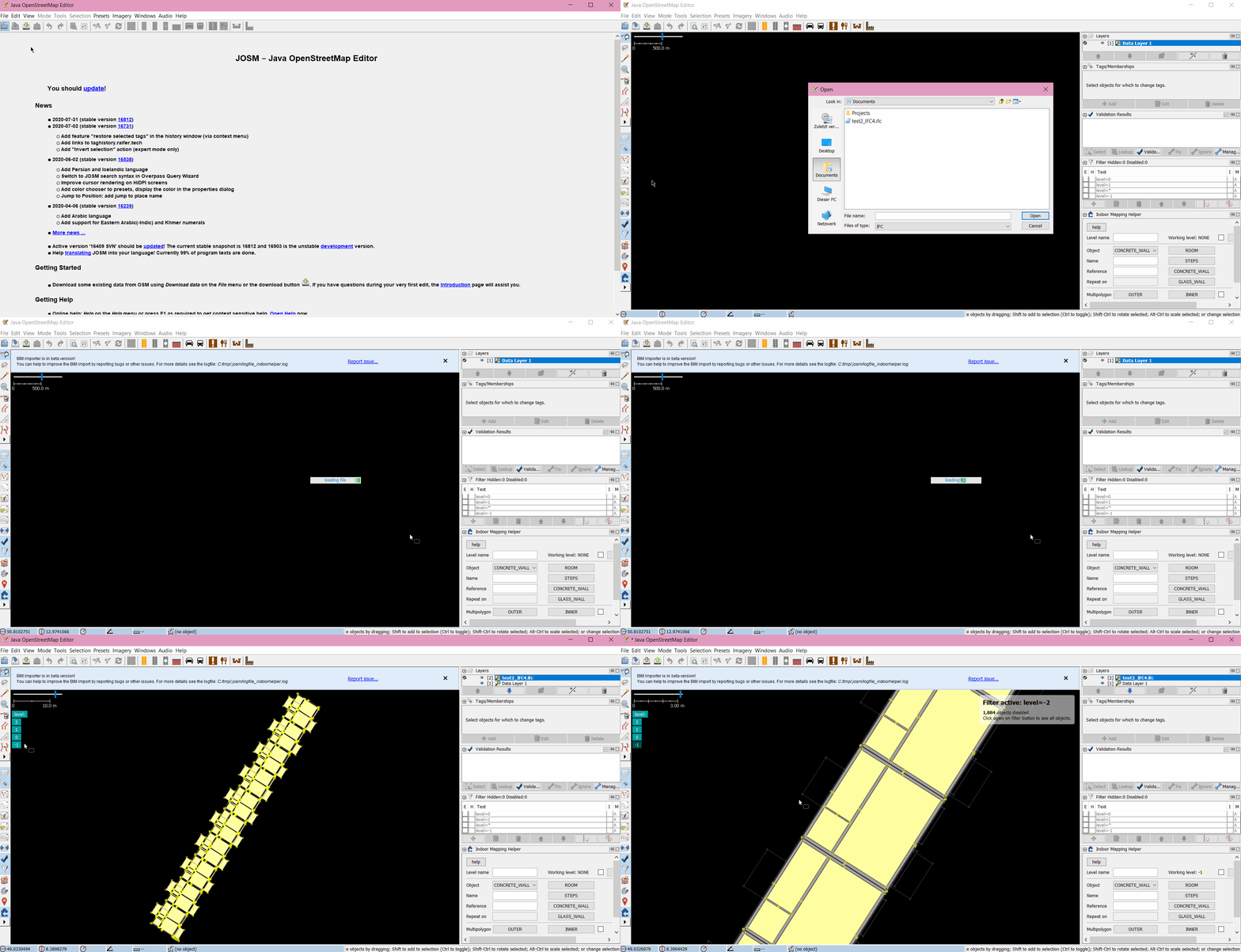
The parser is integrated into [JOSM](https://josm.openstreetmap.de/)s [IndoorHelper plugin](https://wiki.openstreetmap.org/wiki/JOSM/Plugins/indoorhelper). To use the GUI you need to install JOSM and download the IndoorHelper plugin via `Edit` → `Preferences` → `Plugins`. Import example:
## Dependencies
* [opensourceBIM/IfcPlugins](https://github.com/opensourceBIM/IfcPlugins)
* [JTS Topology Suite](https://github.com/locationtech/jts)
## Contributing
Want to contribute? Check the [contribution guidelines](https://github.com/rebeccasc/BIMtoOSM/blob/master/CONTRIBUTING.md)
## Wiki
Find a detailed user guide at https://rebeccasc.github.io/BIMtoOSM/