https://github.com/reddy-epk/fruits-counter
A react app for showing on how react-class-components-work .
https://github.com/reddy-epk/fruits-counter
front-end-web-development fruits-counter react-components reactjs
Last synced: 2 days ago
JSON representation
A react app for showing on how react-class-components-work .
- Host: GitHub
- URL: https://github.com/reddy-epk/fruits-counter
- Owner: reddy-epk
- Created: 2024-03-26T12:05:53.000Z (about 2 years ago)
- Default Branch: main
- Last Pushed: 2024-03-26T12:11:33.000Z (about 2 years ago)
- Last Synced: 2025-01-07T17:42:33.476Z (over 1 year ago)
- Topics: front-end-web-development, fruits-counter, react-components, reactjs
- Language: HTML
- Homepage: https://epkfruits.ccbp.tech/
- Size: 176 KB
- Stars: 0
- Watchers: 1
- Forks: 0
- Open Issues: 0
-
Metadata Files:
- Readme: README.md
Awesome Lists containing this project
README
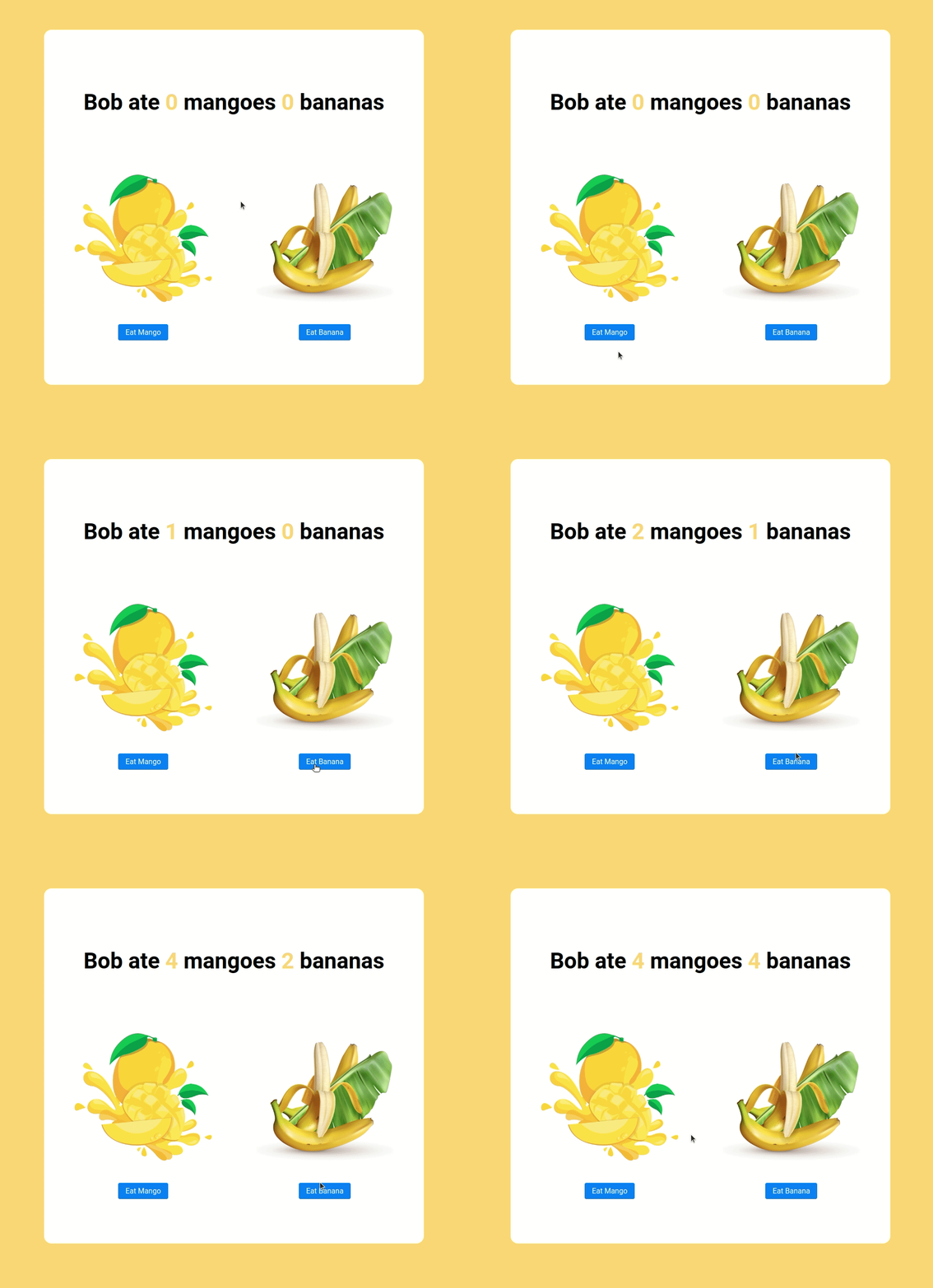
In this project, let's build a **Fruits Counter** by applying the concepts we have learned till now.
### Refer to the image below:
### Design Files
Click to view
- [Extra Small (Size < 576px) and Small (Size >= 576px)](https://assets.ccbp.in/frontend/content/react-js/fruits-counter-sm-output.png)
- [Medium (Size >= 768px), Large (Size >= 992px) and Extra Large (Size >= 1200px)](https://assets.ccbp.in/frontend/content/react-js/fruits-counter-lg-output.png)
### Set Up Instructions
Click to view
- Download dependencies by running `npm install`
- Start up the app using `npm start`
### Completion Instructions
Functionality to be added
The app must have the following functionalities
- Initially, the count of the eaten mangoes and bananas should be 0
- When **Eat Mango** is clicked the count of the mangoes eaten should be incremented by 1
- When **Eat Banana** is clicked the count of the bananas eaten should be incremented by 1
Implementation Files
Use these files to complete the implementation:
- `src/components/FruitsCounter/index.js`
- `src/components/FruitsCounter/index.css`
### Quick Tips
Click to view
- **State updates are merged**. It means that when you update only one key-value pair in the `state` object, it will not affect the other key-value pairs in the state object.
For example let's say your state is as followed:
```
state = { key1 : value1, key2 : value2 }
```
If you use this.setState such as :
```
this.setState(prevState => ({key1: prevState + valueN}))
```
Your new state will be :
```
state = { key1 : value3, key2 : value2 }
```
- You can use the below cursor CSS property for buttons to set the type of mouse cursor, to show when the mouse pointer is over an element,
```
cursor: pointer;
```
- You can use the below outline CSS property for buttons and input elements to remove the highlighting when the elements are clicked,
```
outline: none
```
### Resources
Image URLs
- [https://assets.ccbp.in/frontend/react-js/mango-img.png](https://assets.ccbp.in/frontend/react-js/mango-img.png) alt should be **mango**
- [https://assets.ccbp.in/frontend/react-js/banana-img.png](https://assets.ccbp.in/frontend/react-js/banana-img.png) alt should be **banana**
Colors
Hex: #ffd569
Hex: #ffffff
Hex: #000000
Hex: #007bff
Font-families
- Roboto
> ### _Things to Keep in Mind_
>
> - All components you implement should go in the `src/components` directory.
> - Don't change the component folder names as those are the files being imported into the tests.
> - **Do not remove the pre-filled code**
> - Want to quickly review some of the concepts you’ve been learning? Take a look at the Cheat Sheets.