https://github.com/redhat-developer/podman-desktop-redhat-pack-ext
https://github.com/redhat-developer/podman-desktop-redhat-pack-ext
Last synced: 8 months ago
JSON representation
- Host: GitHub
- URL: https://github.com/redhat-developer/podman-desktop-redhat-pack-ext
- Owner: redhat-developer
- License: apache-2.0
- Created: 2024-02-08T10:22:25.000Z (about 2 years ago)
- Default Branch: main
- Last Pushed: 2024-08-21T13:33:30.000Z (over 1 year ago)
- Last Synced: 2025-06-05T05:29:40.824Z (9 months ago)
- Language: Dockerfile
- Size: 245 KB
- Stars: 2
- Watchers: 17
- Forks: 3
- Open Issues: 3
-
Metadata Files:
- Readme: README.md
- License: LICENSE
- Codeowners: CODEOWNERS
Awesome Lists containing this project
README
# Red Hat Extension Pack for Podman Desktop
The Podman Desktop Extension Pack is a collection of extensions designed to enhance the functionality of Podman Desktop with Red Hat technologies and tools. This pack gives access to a range of features streamlining development workflow, improving productivity and brings Red Hat tools handy.
## Included Extensions
By installing the Red Hat Extension Pack for Podman Desktop, you'll get access to the following extensions:
### ✨ Podman AI Lab
[Podman AI Lab](https://github.com/containers/podman-desktop-extension-ai-lab) lets you work with LLMs locally, exploring AI fundamentals, experimenting with models and prompts, and serving models while maintaining data security and privacy.
### ✨ BootC (Bootable Container)
[BootC](https://github.com/containers/podman-desktop-extension-bootc) allows you to create bootable OS containers and generating disk images.
### ✨ Red Hat Account Extension
The [Red Hat Account Extension](https://github.com/redhat-developer/podman-desktop-redhat-account-ext) puts the Red Hat Developers Subscription and the Red Hat ecosystem at your fingertips.
### ✨ OpenShift Local
The [OpenShift Local Extension](https://github.com/crc-org/crc-extension) enables you to run a lightweight MicroShift cluster locally, allowing you to test and develop Kubernetes applications without the need for expensive infrastructure.
### ✨ Sandbox
The [OpenShift Developer Sandbox Extension] helps you learn containers, Kubernetes, and OpenShift in your browser using [Developer Sandbox](https://developers.redhat.com/developer-sandbox) for free.
### ✨ OpenShift Checker
The [OpenShift Checker](https://github.com/redhat-developer/podman-desktop-image-checker-openshift-ext) is a tool whose goal is to analyze a Containerfile and highlight the directives and commands which could cause an unexpected behavior when running on an OpenShift cluster.
## Installation
You can install the Red Hat Extension Pack directly inside of Podman Desktop. Simply click on the "Extensions" tab in the sidebar and search for "Red Hat Extension Pack".
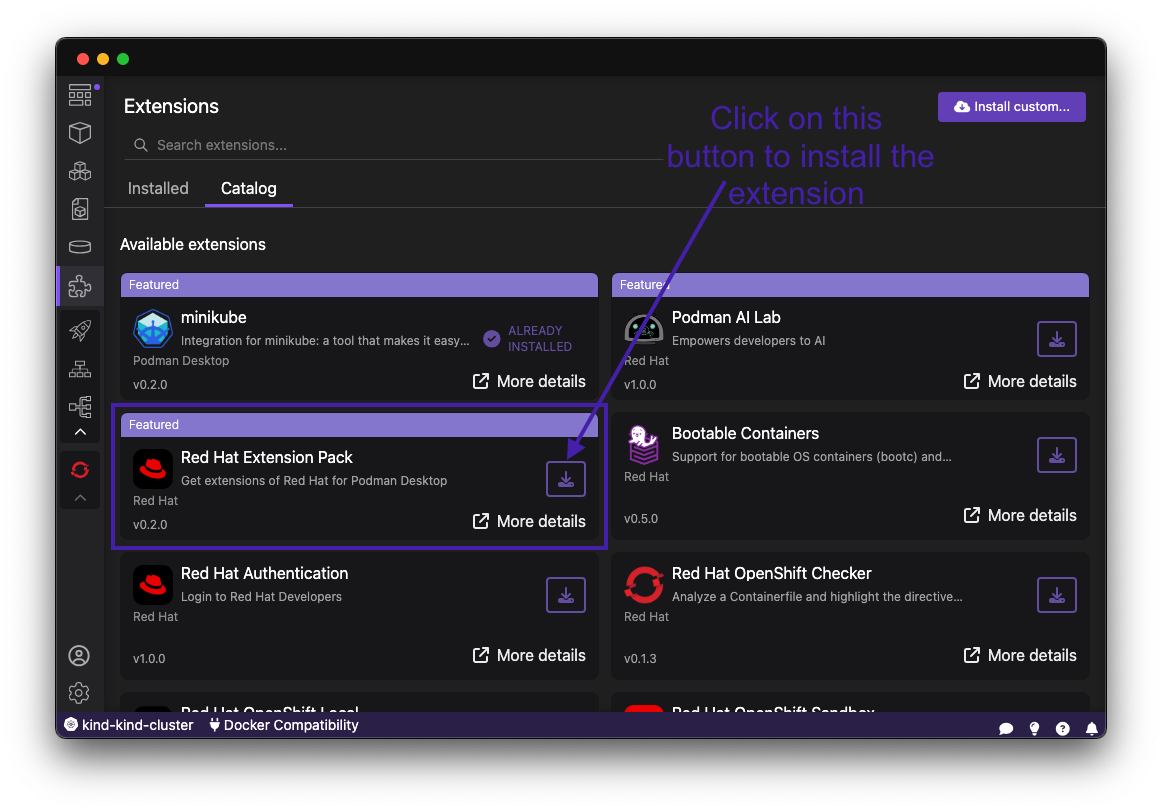
Alternatively, you can use the container image `ghcr.io/redhat-developer/podman-desktop-redhat-pack-ext:nightly` to install nightly version of the Extension pack.