https://github.com/redis-developer/basic-rate-limiting-demo-python
This repo shows a basic rate limiting demo in Python and Django
https://github.com/redis-developer/basic-rate-limiting-demo-python
Last synced: 4 months ago
JSON representation
This repo shows a basic rate limiting demo in Python and Django
- Host: GitHub
- URL: https://github.com/redis-developer/basic-rate-limiting-demo-python
- Owner: redis-developer
- License: mit
- Created: 2020-12-30T11:34:50.000Z (over 5 years ago)
- Default Branch: master
- Last Pushed: 2023-06-27T07:21:41.000Z (almost 3 years ago)
- Last Synced: 2025-04-12T03:53:19.510Z (about 1 year ago)
- Language: Python
- Size: 6.95 MB
- Stars: 10
- Watchers: 4
- Forks: 9
- Open Issues: 4
-
Metadata Files:
- Readme: README.md
- License: LICENSE
Awesome Lists containing this project
README

# Basic Redis Rate-limiting Demo Python (Django)
Show how the redis works with Python (Django).
## Try it out


## How to run on Google Cloud
### 1. Click "Run on Google Cloud"
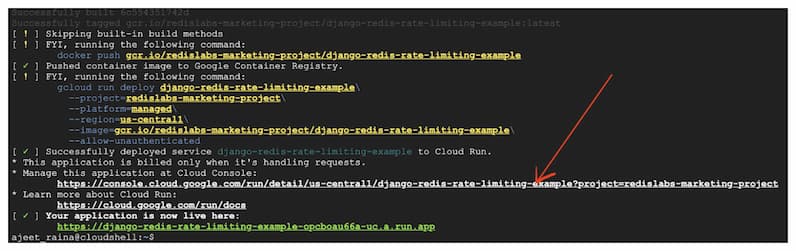
Open up the link under "Manage this application at Cloud Console"
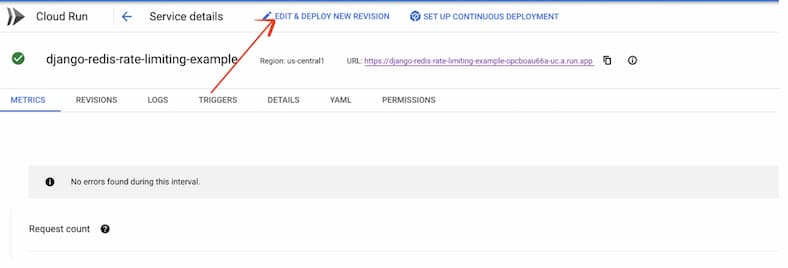
### 2. Click “Edit and Deploy New Revision”
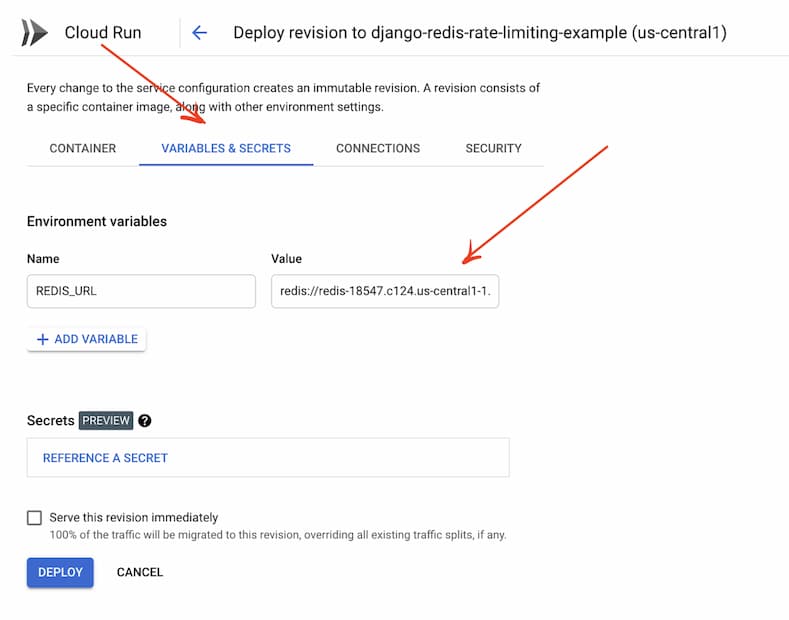
### 3. Click “Variables and Secrets”
Supply Redis Enterprise Cloud Endpoint URL
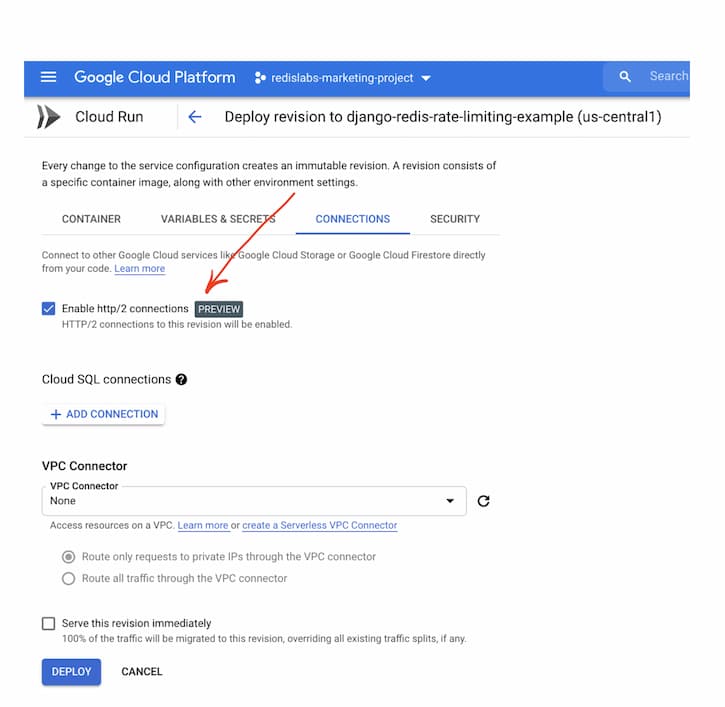
### 4. Enable HTTP/2
Ensure that you have Redis Enterprise Cloud DB created under GCP.
### 5. Allow all the traffic
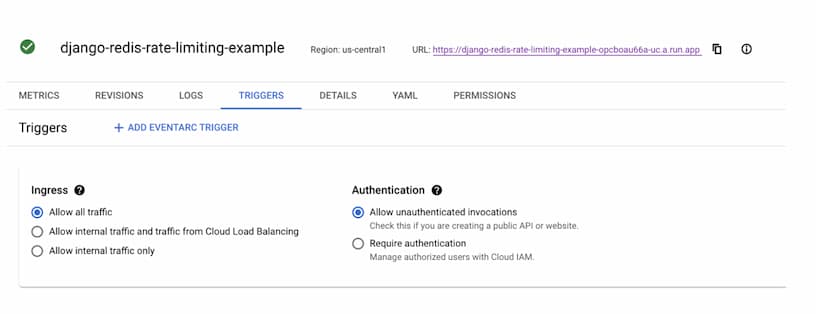
Hence, you should be able to access Rate Limiting app

---
# How it works?
## 1. How the data is stored:
- New responses are added key-ip:
SETNX your_ip:PING limit_amount
Example: SETNX 127.0.0.1:PING 10
more information
- Set a timeout on key:
EXPIRE your_ip:PING timeout
Example: EXPIRE 127.0.0.1:PING 1000
more information
## 2. How the data is accessed:
- Next responses are get bucket:
GET your_ip:PING
Example: GET 127.0.0.1:PING
more information
- Next responses are changed bucket:
DECRBY your_ip:PING amount
Example: DECRBY 127.0.0.1:PING 1
more information
---
## How to run it locally?
```
git clone https://github.com/redis-developer/basic-rate-limiting-demo-python.git
```
### Run docker compose or install redis manually
Install docker (on mac: https://docs.docker.com/docker-for-mac/install/)
```sh
docker network create global
docker-compose up -d --build
```
#### Open directory server (cd server/configuration): copy .env.example to create .env (copy .env.example .env or cp .env.example .env). And provide the values for environment variables (if needed)
- DJANGO_DEBUG: Django debug mode
- ALLOWED_HOSTS: Allowed hosts
- REDIS_URL: Redis server url
- REDIS_HOST: Redis server host
- REDIS_PORT: Redis server port
- REDIS_DB: Redis server db index
- REDIS_PASSWORD: Redis server password
#### Run backend
Install python, pip and venv (on mac: https://installpython3.com/mac/)
Use python version: 3.8
``` sh
python3 -m venv venv
source ./venv/bin/activate
pip3 install -r requirements.txt
python3 server/manage.py collectstatic
python3 server/manage.py runserver
```
#### Run frontend
Static сontent runs automatically with the backend part.
