https://github.com/redis-developer/basic-redis-leaderboard-demo-java
A basic Redis Leaderboard app written in Java
https://github.com/redis-developer/basic-redis-leaderboard-demo-java
Last synced: about 1 year ago
JSON representation
A basic Redis Leaderboard app written in Java
- Host: GitHub
- URL: https://github.com/redis-developer/basic-redis-leaderboard-demo-java
- Owner: redis-developer
- Created: 2021-02-11T13:54:26.000Z (about 5 years ago)
- Default Branch: master
- Last Pushed: 2023-06-27T07:38:39.000Z (almost 3 years ago)
- Last Synced: 2025-01-25T09:27:38.994Z (over 1 year ago)
- Language: Vue
- Size: 5.54 MB
- Stars: 2
- Watchers: 6
- Forks: 7
- Open Issues: 1
-
Metadata Files:
- Readme: README.md
Awesome Lists containing this project
README
# Basic Redis Leaderboard Demo Java (Spring)
A basic leaderboard application using Redis and Java/Spring. The application models public companies and their market capitalization.
## Try it out

(See notes: How to run on Google Cloud)
## How to run on Google Cloud
If you don't have redis yet, plug it in (https://spring-gcp.saturnism.me/app-dev/cloud-services/cache/memorystore-redis).
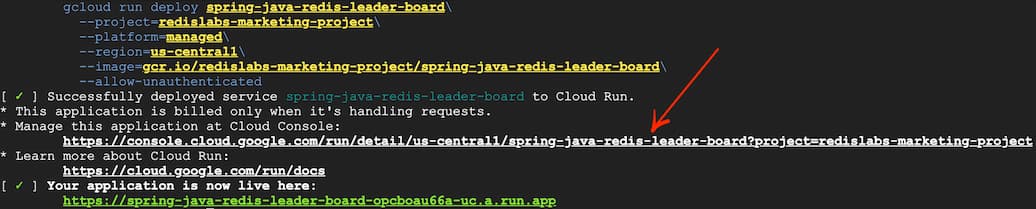
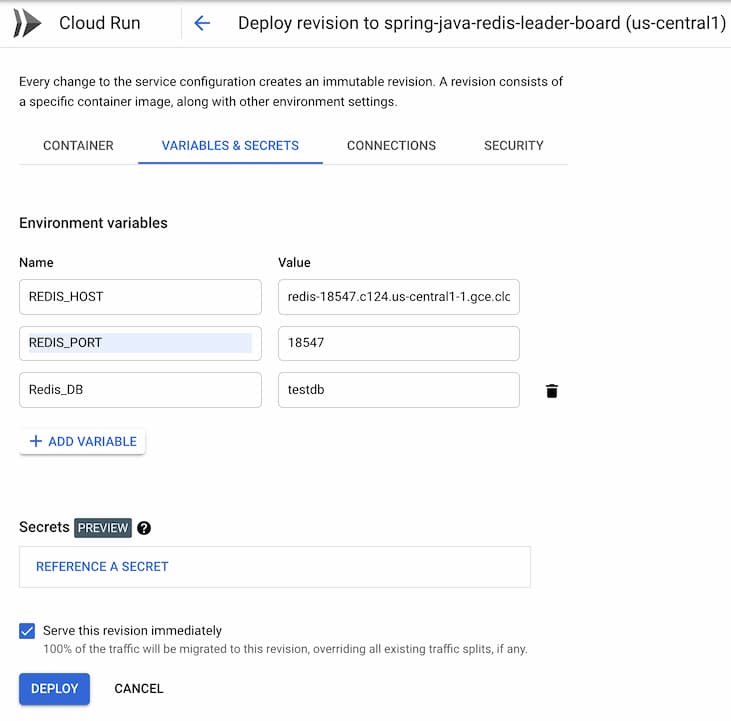
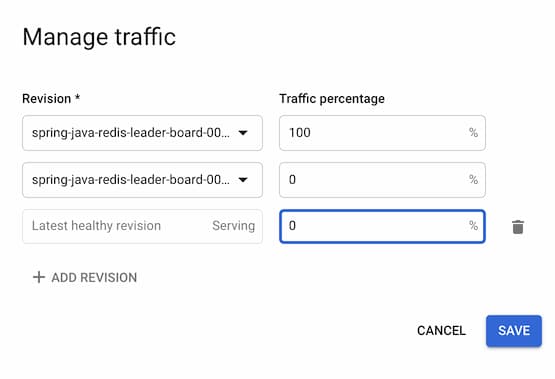
After successful deployment, you need to manually enable the vpc connector as shown in the pictures:
1. Click on "Run on Google Cloud"
2. Click "Edit and deploy new revision" button and choose "Variables and Secrets".
3. Manage the traffic
Problem with unsupported flags when deploying google cloud run button
## How it works?
## 1. How the data is stored:
#### How the data is stored:
- The AAPL's details - market cap of 2.6 triillions and USA origin - are stored in a hash like below:
```bash
HSET "company:AAPL" symbol "AAPL" market_cap "2600000000000" country USA
```
- The Ranks of AAPL of 2.6 trillions are stored in a ZSET.
```bash
ZADD companyLeaderboard 2600000000000 company:AAPL
```
#### How the data is accessed:
- Top 10 companies:
```bash
ZREVRANGE companyLeaderboard 0 9 WITHSCORES
```
- All companies:
```bash
ZREVRANGE companyLeaderboard 0 -1 WITHSCORES
```
- Bottom 10 companies:
```bash
ZRANGE companyLeaderboard 0 9 WITHSCORES
```
- Between rank 10 and 15:
```bash
ZREVRANGE companyLeaderboard 9 14 WITHSCORES
```
- Show ranks of AAPL, FB and TSLA:
```bash
ZREVRANGE companyLeaderBoard company:AAPL company:FB company:TSLA
```
- Adding 1 billion to market cap of FB company:
```bash
ZINCRBY companyLeaderBoard 1000000000 "company:FB"
```
- Reducing 1 billion of market cap of FB company:
```bash
ZINCRBY companyLeaderBoard -1000000000 "company:FB"
```
- Companies between 500 billion and 1 trillion:
```bash
ZCOUNT companyLeaderBoard 500000000000 1000000000000
```
- Companies over a Trillion:
```bash
ZCOUNT companyLeaderBoard 1000000000000 +inf
```
## How to run it locally?
#### Open the files server/.env.example to see the available environment variables. You may set these variables when you start the application.
- REDIS_URL: Redis server url
- REDIS_HOST: Redis server host
- REDIS_PORT: Redis server port
- REDIS_PASSWORD: Redis server password
#### Run backend
1. Install gradle (Use Gradle 6.3 or later) (on mac: https://gradle.org/install/)
2. Install JDK (use 8 or later version) (on mac: https://docs.oracle.com/javase/10/install/installation-jdk-and-jre-macos.htm)
3. Set any relevant environment variables (if not connecting to Redis on localhost:6379). For example:
``` sh
$ REDIS_PORT=6379
```
3. From the root directory of the project, run the following commands:
``` sh
cd server
./gradlew build
./gradlew run
```
4. Point your browser to `localhost:5000`.
