https://github.com/ree-verse/rexor
Cross-platform Rust library with CLI app implementing XOR encryption/decryption
https://github.com/ree-verse/rexor
cli decryption encryption security xor
Last synced: 3 months ago
JSON representation
Cross-platform Rust library with CLI app implementing XOR encryption/decryption
- Host: GitHub
- URL: https://github.com/ree-verse/rexor
- Owner: Ree-verse
- License: mit
- Created: 2025-10-22T09:30:23.000Z (9 months ago)
- Default Branch: main
- Last Pushed: 2026-03-10T16:46:02.000Z (4 months ago)
- Last Synced: 2026-03-13T01:15:37.037Z (4 months ago)
- Topics: cli, decryption, encryption, security, xor
- Language: Rust
- Homepage: https://crates.io/crates/ReXOR
- Size: 1.98 MB
- Stars: 3
- Watchers: 1
- Forks: 0
- Open Issues: 0
-
Metadata Files:
- Readme: README.md
- Changelog: CHANGELOG.md
- License: LICENSE
Awesome Lists containing this project
README
ReXOR - Cross-platform Rust library with CLI app, implementing XOR encryption/decryption

[](https://github.com/ree-verse/rexor/commits)
[](https://github.com/ree-verse/rexor/issues)
[](https://github.com/ree-verse/rexor/actions)
[](https://github.com/ree-verse/rexor/blob/main/LICENSE)
[](https://discord.gg/ZZfqH9Z4uQ)
[](https://github.com/ree-verse/rexor/stargazers)
[](https://crates.io/crates/rexor)
[](https://crates.io/crates/rexor)
[](https://github.com/ree-verse/rexor/releases)
### [Read the docs →](https://docs.rs/rexor)
---
## Overview
`rexor` is a **simple and cross-platform Rust library with CLI app** that provides **basic file encryption and decryption** functionality using **XOR logic**. It's designed to be **easy to use** while offering **secure file protection** with **password-based encryption**.
## Features
- 🌐 **Cross-platform compatibility** - Works on Windows and UNIX-based systems
- 🔐 Simple **file encryption/decryption** using **XOR logic** with a **provided password** - Quick and easy to use
- ⚙ **Automatic or custom output file path** - Generates `.rxor` files by default, or use a custom path
- ⚡ **Efficient processing in 8K chunks** for large files - Handles large files without using excessive memory
- 📦 **No external dependencies** - Pure Rust implementation, no third-party crates required
## Installation
Add `rexor` as a dependency in `Cargo.toml`:
```toml
[dependencies]
ReXOR = "0.1.0"
```
## Parameters
| Parameter | Type | Default | Description |
| ------------- | -------------- | ------- | --------------------------------------------------------------------------------------------------------- |
| `input_path` | `&str` | - | Path to the file to process (for `encode`, it must exist; for `decode`, it must be a valid `.rxor` file). |
| `password` | `&str` | - | The password used for XOR encryption/decryption. Must not be empty. |
| `output_path` | `Option<&str>` | `None` | Custom output file path. If `None`, `.rxor` is appended on encode, or stripped on decode. |
## Return Value
Both `encode` and `decode` return a `std::io::Result`.
- On success, the `Ok` variant contains the path to the generated file.
- On failure, an appropriate `std::io::Error` is returned, commonly due to:
- Invalid input paths or missing files
- Empty password (`std::io::ErrorKind::InvalidInput`)
- I/O issues while reading or writing files
## Usage
### Encoding a File
```rust
use rexor::encode;
fn main() -> std::io::Result<()> {
let input = "example.txt";
let password = "password123";
// Encode the file into "example.txt.rxor"
let output = encode(input, password, None)?;
println!("Encoded file saved at: {}", output);
Ok(())
}
```
### Decoding a File
```rust
use rexor::decode;
fn main() -> std::io::Result<()> {
let input = "example.txt.rxor";
let password = "password123";
// Decode the file back to its original form
let output = decode(input, password, None)?;
println!("Decoded file saved at: {}", output);
Ok(())
}
```
### Custom Output Paths
You can specify custom output paths for both encoding and decoding:
```rust
use rexor::{encode, decode};
fn main() -> std::io::Result<()> {
let input = "example.txt";
let password = "password123";
// Encode to a custom location
let encoded = encode(input, password, Some("encrypted/output.rxor"))?;
// Decode back into another file
let decoded = decode(&encoded, password, Some("decrypted/example.txt"))?;
println!("Encoded: {}", encoded);
println!("Decoded: {}", decoded);
Ok(())
}
```
## How It Works
The library uses the XOR operation to encrypt and decrypt files with the provided password. Since XOR is reversible with the same key, the same function can be used for both encryption and decryption.
---
# CLI Application
A **user-friendly command-line interface** for ReXOR is available as a separate application.
## Features
- ✨ **Interactive text-based menu interface**
- 📁 **File selection dialogs** for choosing input and output files
- 🔒 **Secure password entry** (input is hidden)
- 🎨 **Colorful terminal** output for better user experience
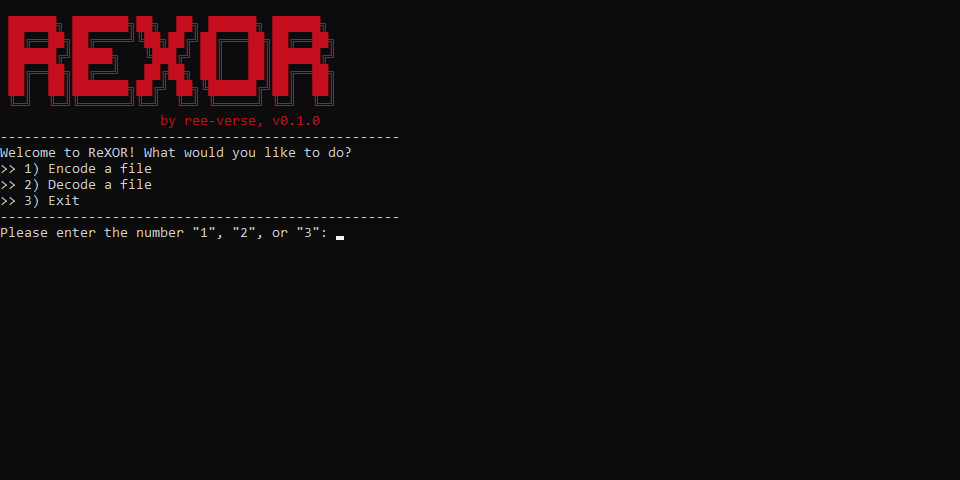
## Screenshot
## Installation
### Option 1: Via releases
You can download pre-built binaries directly from the GitHub Releases page:
> https://github.com/ree-verse/rexor/releases
### Option 2: Using Cargo
You can easily install ReXOR CLI using Cargo:
```bash
cargo install ReXOR
```
After installation, you can run the CLI from the terminal:
```bash
ReXOR
```
### Option 3: Building from source
Alternatively, you can clone the repository and install the CLI locally:
```bash
git clone https://github.com/ree-verse/ReXOR.git
cd ReXOR
cargo run --release
```
## Usage
Simply run the application to get started.
The application provides an interactive menu with the following options:
> 1) Encode a file
> 2) Decode a file
> 3) Exit
The CLI guides you through:
- Selecting the input file via a dialog
- Entering a password (which will be hidden during typing)
- Choosing where to save the output file
## Dependencies
The CLI application uses several crates to improve the user experience:
- `clearscreen`: For clearing the terminal
- `colored`: For colorful text output
- `rfd`: For file dialogs
- `rpassword`: For secure password input (hidden input)
---
## Star History
## License
Released under the [MIT License](https://github.com/ree-verse/ReXOR/blob/main/LICENSE) © 2025 [Ree-verse](https://github.com/ree-verse).