https://github.com/reelyactive/barnacles-opcua
Distribute ambient IoT sensor data from Pareto Anywhere open source middleware via an OPC-UA server. We believe in an open Internet of Things.
https://github.com/reelyactive/barnacles-opcua
iot opc-ua opc-ua-server pareto-anywhere
Last synced: 10 months ago
JSON representation
Distribute ambient IoT sensor data from Pareto Anywhere open source middleware via an OPC-UA server. We believe in an open Internet of Things.
- Host: GitHub
- URL: https://github.com/reelyactive/barnacles-opcua
- Owner: reelyactive
- License: mit
- Created: 2024-05-22T00:36:11.000Z (about 2 years ago)
- Default Branch: master
- Last Pushed: 2025-03-13T00:11:43.000Z (over 1 year ago)
- Last Synced: 2025-04-17T08:29:27.238Z (about 1 year ago)
- Topics: iot, opc-ua, opc-ua-server, pareto-anywhere
- Language: JavaScript
- Homepage: https://www.reelyactive.com/pareto/anywhere/
- Size: 146 KB
- Stars: 0
- Watchers: 2
- Forks: 0
- Open Issues: 0
-
Metadata Files:
- Readme: README.md
- Contributing: CONTRIBUTING.md
- License: LICENSE
- Code of conduct: CODE_OF_CONDUCT.md
- Security: SECURITY.md
Awesome Lists containing this project
README
barnacles-opcua
===============
__barnacles-opcua__ is an OPC UA server of IoT data from ambient wireless sensors. [reelyActive](https://www.reelyactive.com) is an [OPC UA logo member](https://opcfoundation.org/members/view/7804).
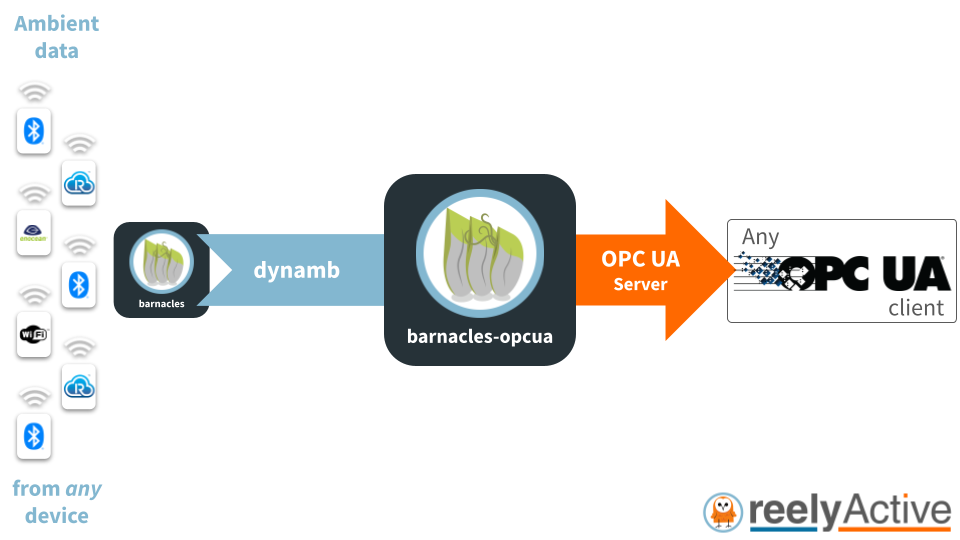
__barnacles-opcua__ ingests a real-time stream of _dynamb_ objects from [barnacles](https://github.com/reelyactive/barnacles/), converting their properties into standard OPC UA format. It couples seamlessly with reelyActive's [Pareto Anywhere](https://www.reelyactive.com/pareto/anywhere/) open source IoT middleware.
__barnacles-opcua__ is a lightweight [Node.js package](https://www.npmjs.com/package/barnacles-opcua) that can run on resource-constrained edge devices as well as on powerful cloud servers and anything in between.
Pareto Anywhere integration
---------------------------
A common application of __barnacles-opcua__ is to publish IoT data from [pareto-anywhere](https://github.com/reelyactive/pareto-anywhere) via an OPC UA server. Simply follow our [Create a Pareto Anywhere startup script](https://reelyactive.github.io/diy/pareto-anywhere-startup-script/) tutorial using the script below:
```javascript
#!/usr/bin/env node
const ParetoAnywhere = require('../lib/paretoanywhere.js');
// Edit the options to customise the server
const BARNACLES_OPCUA_OPTIONS = {};
// ----- Exit gracefully if the optional dependency is not found -----
let BarnaclesOPCUA;
try {
BarnaclesOPCUA = require('barnacles-opcua');
}
catch(err) {
console.log('This script requires barnacles-opcua. Install with:');
console.log('\r\n "npm install barnacles-opcua"\r\n');
return console.log('and then run this script again.');
}
// -------------------------------------------------------------------
let pa = new ParetoAnywhere();
pa.barnacles.addInterface(BarnaclesOPCUA, BARNACLES_OPCUA_OPTIONS);
```
Supported Properties
--------------------
__barnacles-opcua__ currently supports the following properties, in alphabetical order:
| OPC UA browseName | OPC UA dataType | dynamb property |
|:---------------------------|:----------------|:---------------------------|
| AccelerationTimeSeriesX | YArrayItem | accelerationTimeSeries |
| AccelerationTimeSeriesY | YArrayItem | accelerationTimeSeries |
| AccelerationTimeSeriesZ | YArrayItem | accelerationTimeSeries |
| CarbonDioxideConcentration | AnalogDataItem | carbonDioxideConcentration |
| Illuminance | AnalogDataItem | illuminance |
| PM1.0 | AnalogDataItem | pm1.0 |
| PM2.5 | AnalogDataItem | pm2.5 |
| PM10 | AnalogDataItem | pm10 |
| Pressure | AnalogDataItem | pressure |
| RelativeHumidity | AnalogDataItem | relativeHumidity |
| SoundPressure | AnalogDataItem | soundPressure |
| Temperature | AnalogDataItem | temperature |
| VelocityOverallX | AnalogDataItem | velocityOverall |
| VelocityOverallY | AnalogDataItem | velocityOverall |
| VelocityOverallZ | AnalogDataItem | velocityOverall |
| VolatileOrganicCompoundsConcentration | AnalogDataItem | volatileOrganicCompundsConcentration |
Additional [dynamb properties](https://reelyactive.github.io/diy/cheatsheet/#dynamb) will be added in future. Helpful [node-opcua API documentation](https://node-opcua.github.io/api_doc/) references for adding items:
- [AddAnalogDataItemOptions](https://node-opcua.github.io/api_doc/2.132.0/interfaces/node_opcua.AddAnalogDataItemOptions.html)
- [AddYArrayItemOptions](https://node-opcua.github.io/api_doc/2.132.0/interfaces/node_opcua.AddYArrayItemOptions.html)
Quick Start
-----------
Clone this repository, then from its root folder, install dependencies with `npm install`. Start the OPC-UA server with the following command:
npm start
and connect an OPC-UA client (see examples below) on port __4840__ and resource path __/UA/ParetoAnywhere__. Note that no device data will be available without a source of [dynamb](https://reelyactive.github.io/diy/cheatsheet/#dynamb) data, for example from [Pareto Anywhere](https://www.reelyactive.com/pareto/anywhere/) open source IoT middleware.
To validate _secure_ communication, simply provide a certificate and private key as [config files](#config-files).
Simulated Data
--------------
The following simulated devices/sensors are supported for interface testing.
### EnOcean EMSIB
To simulate an [EnOcean EMSIB](https://www.enocean.com/en/product/stm-550-kit/) multisensor, start __barnacles-opcua__ with the following command:
npm run enocean-emsib
Simulated sensor `browseName = "e500100e851b/3"` will expose the following variables:
| OPC UA browseName | OPC UA dataType |
|:------------------|:----------------|
| Illuminance | AnalogDataItem |
| RelativeHumidity | AnalogDataItem |
| Temperature | AnalogDataItem |
### HibouAir CO2 Noise Sensor
To simulate a [HibouAir CO2 Noise](https://hibouair.com/air-quality-monitor-co2-noise-sensor.php) air quality sensor, start __barnacles-opcua__ with the following command:
npm run hibouair-co2noise
Simulated sensor `browseName = "41b00a14c024/3"` will expose the following variables:
| OPC UA browseName | OPC UA dataType |
|:--------------------------------------|:----------------|
| CarbonDioxideConcentration | AnalogDataItem |
| Pressure | AnalogDataItem |
| RelativeHumidity | AnalogDataItem |
| SoundPressure | AnalogDataItem |
| Temperature | AnalogDataItem |
| VolatileOrganicCompoundsConcentration | AnalogDataItem |
### HibouAir PM Sensor
To simulate a [HibouAir PM](https://hibouair.com/specifications-air-quality-monitor-pm-sensor.php) air quality sensor, start __barnacles-opcua__ with the following command:
npm run hibouair-pm
Simulated sensor `browseName = "41b00a145977/3"` will expose the following variables:
| OPC UA browseName | OPC UA dataType |
|:--------------------------------------|:----------------|
| Illuminance | AnalogDataItem |
| PM1.0 | AnalogDataItem |
| PM2.5 | AnalogDataItem |
| PM10 | AnalogDataItem |
| Pressure | AnalogDataItem |
| RelativeHumidity | AnalogDataItem |
| Temperature | AnalogDataItem |
| VolatileOrganicCompoundsConcentration | AnalogDataItem |
### Sensor-Works BluVib
To simulate a [Sensor-Works BluVib](https://www.sensor-works.com/products/) industrial vibration sensor, start __barnacles-opcua__ with the following command:
npm run sensorworks-bluvib
Simulated sensor `browseName = "5e4504b1071b/3"` will expose the following variables:
| OPC UA browseName | OPC UA dataType |
|:------------------------|:----------------|
| Temperature | AnalogDataItem |
| AccelerationTimeSeriesX | YArrayItem |
| AccelerationTimeSeriesY | YArrayItem |
| AccelerationTimeSeriesZ | YArrayItem |
| VelocityOverallX | AnalogDataItem |
| VelocityOverallY | AnalogDataItem |
| VelocityOverallZ | AnalogDataItem |
Observing Data with opcua-commander
-----------------------------------
The [opcua-commander](https://github.com/node-opcua/opcua-commander) CLI, based on the same [node-opcua](https://github.com/node-opcua/node-opcua) open source package used by __barnacles-opcua__, provides a simple means of browsing and monitoring the OPC-UA data.
After installing [opcua-commander](https://github.com/node-opcua/opcua-commander), open a terminal and browse to the __barnacles-opcua__ server with the following command:
opcua-commander -e opc.tcp://localhost:4840
Use the arrow keys and the t / l / i / c / u / s / a keys to navigate through the CLI interface, and use the x key to close.
Observing Data with UaExpert
----------------------------
Unified Automation offers [UaExpert](https://www.unified-automation.com/products/development-tools/uaexpert.html), a full-featured Windows/Linux OPC UA client, for [free download](https://www.unified-automation.com/downloads/opc-ua-clients.html), with registration.
Config Files
------------
The __/config__ folder accepts the following run-time configuration files:
- __certificate.pem__ (security certificate)
- __key.pem__ (private key)
Alternatively, these can be specified in the [Options](#Options).
Security Certificate
--------------------
__barnacles-opcua__ does _not_, by default, implement a secure OPC-UA server. This facilitates testing in a local sandbox environment. In any other environment, the use of an [Application Instance Certificate](https://reference.opcfoundation.org/Core/Part6/docs/6.2.2) is essential for secure operation.
When creating the security certificate, for example using OpenSSL, ensure that the following properties are included and correctly entered for compliance with the OPC UA specification.
| Property | Example | Description |
|:---------------------|:-----------------------------|:-----------------------|
| subjectAltName | urn:machine:NodeOPCUA-Server | Application URI |
| commonName (CN) | Pareto Anywhere | Name of the product |
| organizationName (O) | Your organisation | Operator of server |
The Node-OPCUA server will output warnings when a certificate is present but not compliant, for example:
"The certificate subjectAltName uniformResourceIdentifier is missing."
"Please regenerate a specific certificate with a uniformResourceIdentifier that matches your server applicationUri"
"applicationUri = urn:machine:NodeOPCUA-Server"
It is up to the user to generate and validate compliant security certificates.
Creating a Self-Signed Certificate for OPC-UA using OpenSSL
-----------------------------------------------------------
In a development environment, it is common for __barnacles-opcua__ to run on the same local network as OPC UA client. A self-signed server certificate (for __barnacles-opcua__) and the CA certificate can be generated with OpenSSL using the following procedure:
### Create a server.cnf file
```
[req]
default_bits = 2048
distinguished_name = req_distinguished_name
req_extensions = req_ext
x509_extensions = v3_req
prompt = no
[req_distinguished_name]
countryName = CA
stateOrProvinceName = QC
localityName = Montreal
organizationName = reelyActive
commonName = Pareto Anywhere
domainComponent = machine
[req_ext]
subjectAltName = @alt_names
keyUsage = digitalSignature, nonRepudiation, keyEncipherment, dataEncipherment
extendedKeyUsage = serverAuth, clientAuth
[v3_req]
subjectAltName = @alt_names
[alt_names]
URI.1 = urn:machine:NodeOPCUA-Server
```
Update the domainComponent and URI.1 fields, replacing "machine" with the network name of the machine running __barnacles-opcua__. Optionally update the other fields of the distinguished name to reflect the organisation/software using __barnacles-opcua__.
### Create a CA.cnf file
```
[ req ]
prompt = no
distinguished_name = req_distinguished_name
[ req_distinguished_name ]
C = CA
ST = QC
L = Montreal
O = reelyActive
OU = Develop
CN = Pareto Anywhere
```
Optionally update the fields of the distinguished name to reflect the organisation/software using __barnacles-opcua__.
### Create the .pem files using OpenSSL
First, generate a CA private key & certificate:
openssl req -nodes -new -x509 -keyout CA_key.pem -out CA_certificate.pem -days 1825 -config CA.cnf
Second, generate the web server's secret key & CSR:
openssl req -sha256 -nodes -newkey rsa:2048 -keyout key.pem -out server.csr -config server.cnf
Third, create the web server's certificate, signing it with its own certificate authority:
openssl x509 -req -days 398 -in server.csr -CA CA_certificate.pem -CAkey CA_key.pem -CAcreateserial -out certificate.pem -extensions req_ext -extfile server.cnf
### Assign the certificates
Configure __barnacles-opcua__ by copying the `certificate.pem` and `key.pem` files to the /config folder, as described in the [Config Files](#standalone-secure-websockets) section above.
Options
-------
__barnacles-opcua__ supports the following options:
| Property | Default | Description |
|:----------------|:---------------------------|:------------------------------|
| port | 4840 | OPC UA Server port |
| certificateFile | config/certificate.pem | Path to optional certificate |
| privateKeyFile | config/key.pem | Path to optional key |
Acknowledgements
----------------
__barnacles-opcua__ is based on the [Node-OPCUA](https://node-opcua.github.io/) open source project, maintained by [Sterfive](https://www.sterfive.com), which we invite you to consider sponsoring at [opencollective.com/node-opcua](https://opencollective.com/node-opcua).
Contributing
------------
Discover [how to contribute](CONTRIBUTING.md) to this open source project which upholds a standard [code of conduct](CODE_OF_CONDUCT.md).
Security
--------
Consult our [security policy](SECURITY.md) for best practices using this open source software and to report vulnerabilities.
License
-------
MIT License
Copyright (c) 2024-2025 [reelyActive](https://www.reelyactive.com)
Permission is hereby granted, free of charge, to any person obtaining a copy of this software and associated documentation files (the "Software"), to deal in the Software without restriction, including without limitation the rights to use, copy, modify, merge, publish, distribute, sublicense, and/or sell copies of the Software, and to permit persons to whom the Software is furnished to do so, subject to the following conditions:
The above copyright notice and this permission notice shall be included in all copies or substantial portions of the Software.
THE SOFTWARE IS PROVIDED "AS IS", WITHOUT WARRANTY OF ANY KIND, EXPRESS OR
IMPLIED, INCLUDING BUT NOT LIMITED TO THE WARRANTIES OF MERCHANTABILITY,
FITNESS FOR A PARTICULAR PURPOSE AND NONINFRINGEMENT. IN NO EVENT SHALL THE
AUTHORS OR COPYRIGHT HOLDERS BE LIABLE FOR ANY CLAIM, DAMAGES OR OTHER
LIABILITY, WHETHER IN AN ACTION OF CONTRACT, TORT OR OTHERWISE, ARISING FROM,
OUT OF OR IN CONNECTION WITH THE SOFTWARE OR THE USE OR OTHER DEALINGS IN
THE SOFTWARE.