https://github.com/renatocassino/googleanalyticsab
Js lib to create A/B tests using events in Google Analytics
https://github.com/renatocassino/googleanalyticsab
ab analytics ga google test
Last synced: 3 months ago
JSON representation
Js lib to create A/B tests using events in Google Analytics
- Host: GitHub
- URL: https://github.com/renatocassino/googleanalyticsab
- Owner: renatocassino
- Created: 2018-01-04T17:14:03.000Z (over 8 years ago)
- Default Branch: master
- Last Pushed: 2018-04-06T18:15:03.000Z (about 8 years ago)
- Last Synced: 2025-08-08T23:25:43.208Z (11 months ago)
- Topics: ab, analytics, ga, google, test
- Language: JavaScript
- Homepage:
- Size: 209 KB
- Stars: 2
- Watchers: 2
- Forks: 0
- Open Issues: 0
-
Metadata Files:
- Readme: README.md
- Changelog: CHANGELOG.md
Awesome Lists containing this project
README
# Google Analytics AB
[](https://www.npmjs.org/package/google-analytics-ab) [](https://travis-ci.org/tacnoman/googleAnalyticsAB) [](https://codecov.io/gh/tacnoman/googleAnalyticsAB) [](https://codeclimate.com/github/tacnoman/googleAnalyticsAB) [](http://hits.dwyl.io/tacnoman/googleAnalyticsAB)
Lib tool in javascript to create A/B tests using Google Analytics events in easy way. With a simple configuration you can edit your page and get metrics.
## Getting started
### NPM
To install using npm you must run.
```bash
$ npm i --save google-analytics-ab
```
And use require to get the lib.
```js
var googleAnalyticsAB = require('googleAnalyticsAB');
// Or with ecma6
import googleAnalyticsAB from 'googleAnalyticsAB'
```
### Bower
To install using Bower you must run.
```bash
$ bower install google-analytics-ab
```
You can get in folder dist the compressed file (`/dist/google-analytics-ab.min.js`).
## Dependencies
- Google Analytics script (obvious?)
## Create your own first test
You must have GA script in your page.
To make a simple test, you can call:
```html
.....
.....
```
```js
// Example of AB change button color. Green or Red.
googleAnalyticsAB.create({
name: 'MY_TEST', // Name of your first test
percentage: 80, // Percentage of users to run in this test (Default is 80)
// Alternatives
options: [
{
name: 'green-button', // Name of your alternative
weight: 1, // weight of your alternative (optional, default is 1)
},
{
name: 'red-button',
weight: 1,
}
],
// Method called when AB is sorted
run: function(option) { // Current option
var myButton = document.getElementById('myButton'); // Getting some button
myButton.style.background = option.name === 'green-button' ? '#0F0' : '#F00'; // Change color using the label
// Event onClick in button tested
myButton.addEventListener('click', function(ev) {
option.convert(); // Option has a method called convert. Use to convert :D
});
}
});
```
## How to see the results
Open your Google Analytics account and go to:
`Behavior > Events > Overview`
In Event category, go to `googleAnalyticsAB`.
Click in `Event Action`.
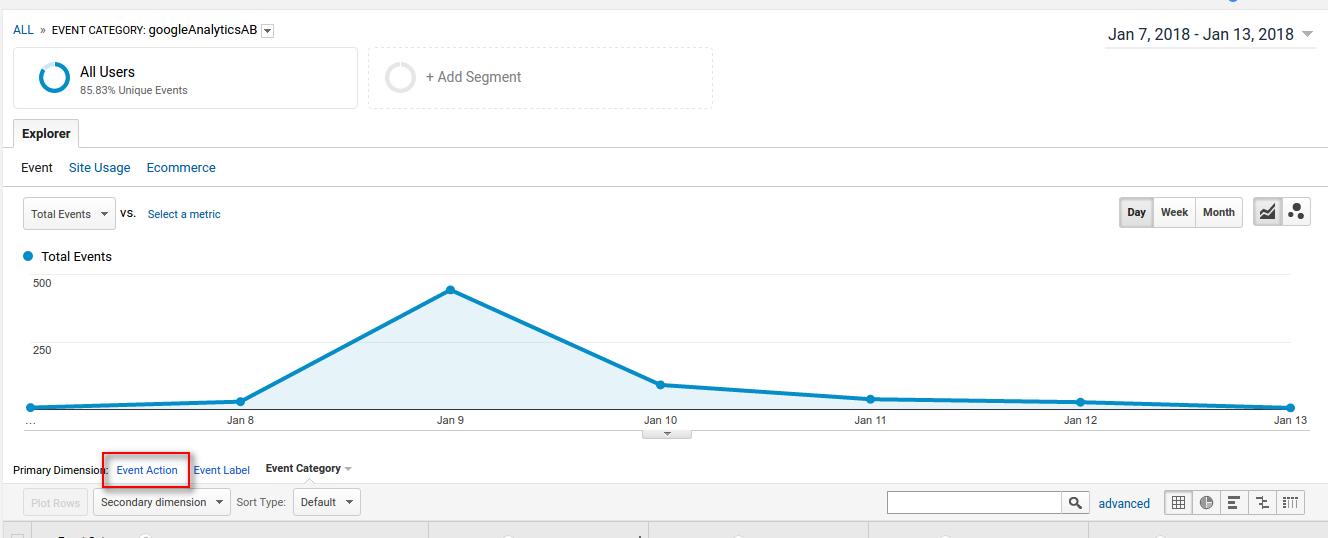
Now, you will see all A/B tests running.
Click in your current A/B test.
Now, you will see your options, check all and click in `Plot rows`.
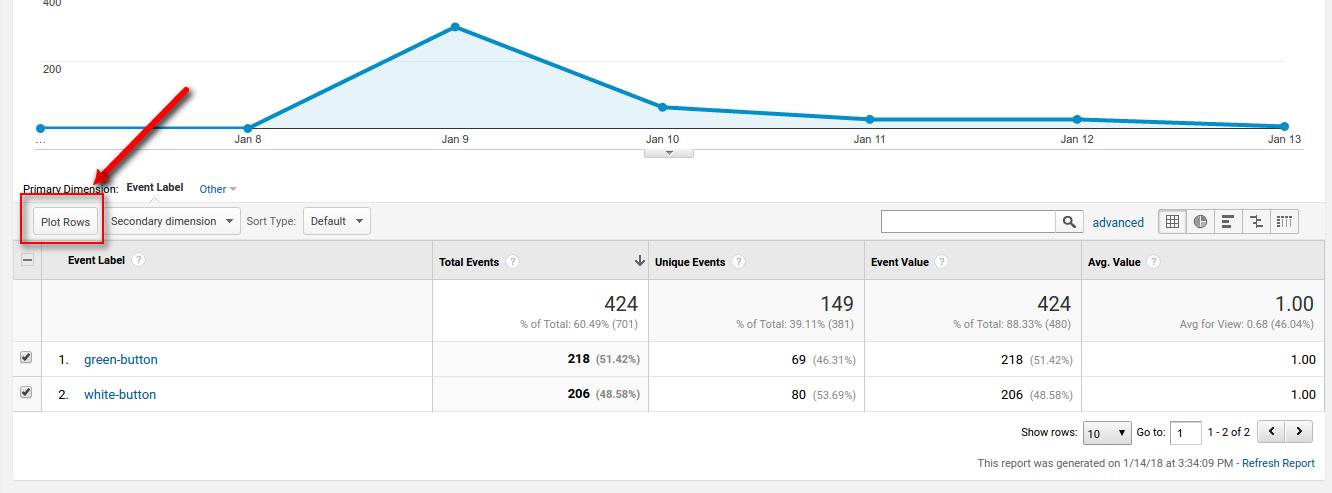
See your test result :D
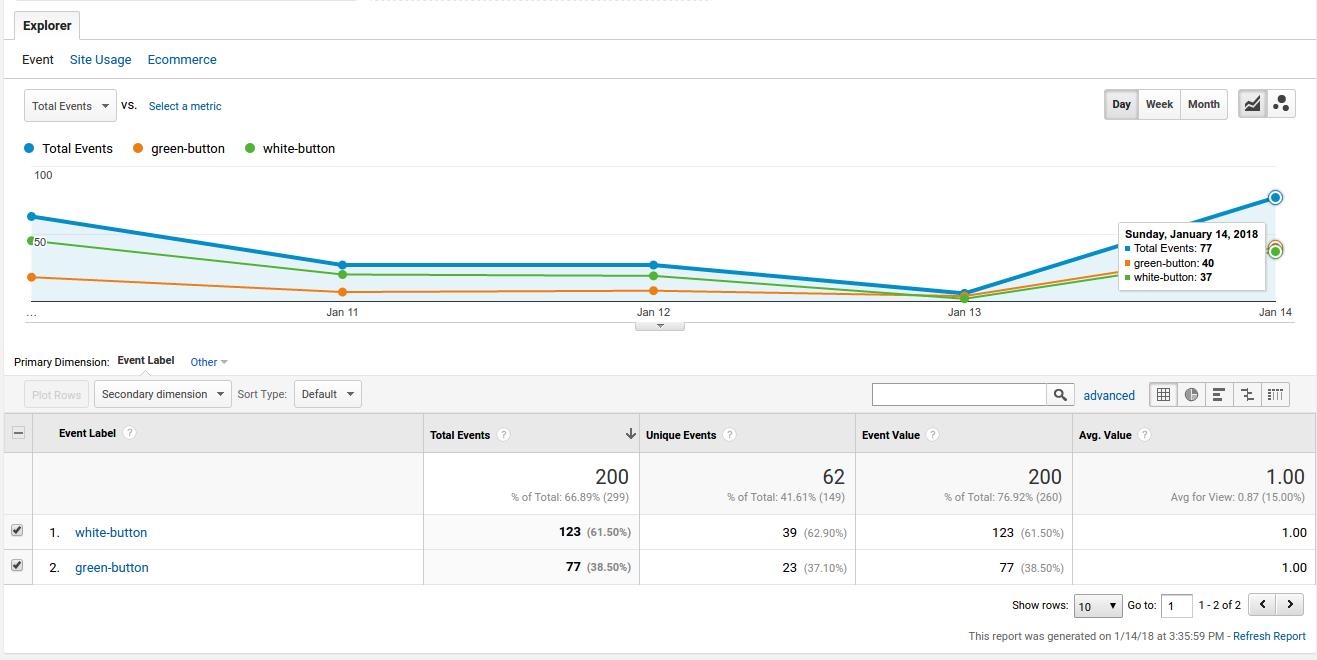
Ps: If you cannot see the events, you need change the date and add the current day.
Bugs? Tacnoman ``.