https://github.com/renderkit/openvkl
Intel(R) Open Volume Kernel Library
https://github.com/renderkit/openvkl
Last synced: about 1 year ago
JSON representation
Intel(R) Open Volume Kernel Library
- Host: GitHub
- URL: https://github.com/renderkit/openvkl
- Owner: RenderKit
- License: apache-2.0
- Created: 2019-09-27T20:17:19.000Z (almost 7 years ago)
- Default Branch: devel
- Last Pushed: 2024-11-28T15:19:18.000Z (over 1 year ago)
- Last Synced: 2024-11-28T16:24:48.673Z (over 1 year ago)
- Language: C++
- Size: 6.61 MB
- Stars: 202
- Watchers: 22
- Forks: 27
- Open Issues: 7
-
Metadata Files:
- Readme: README.md
- Changelog: CHANGELOG.md
- License: LICENSE.txt
- Security: SECURITY.md
Awesome Lists containing this project
README
# Intel® Open Volume Kernel Library
This is release v2.0.1 of Intel® Open VKL. For changes and new features
see the [changelog](CHANGELOG.md). Visit http://www.openvkl.org for more
information.
# Overview
Intel® Open Volume Kernel Library (Intel® Open VKL) is a collection of
high-performance volume computation kernels, developed at Intel. The
target users of Open VKL are graphics application engineers who want to
improve the performance of their volume rendering applications by
leveraging Open VKL’s performance-optimized kernels, which include
volume traversal and sampling functionality for a variety of volumetric
data formats. Open VKL supports x86 CPUs under Linux, macOS, and
Windows; ARM CPUs on macOS; as well as Intel® GPUs under Linux and
Windows (currently in beta).
Open VKL contains kernels optimized for the latest x86 processors with
support for SSE, AVX, AVX2, and AVX-512 instructions, and for ARM
processors with support for NEON instructions. Open VKL supports Intel
GPUs based on the Xe HPG microarchitecture (Intel® Arc™ GPU) under Linux
and Windows and Xe HPC microarchitecture (Intel® Data Center GPU Flex
Series and Intel® Data Center GPU Max Series) under Linux. Intel GPU
support leverages the [SYCL](https://www.khronos.org/sycl/) open
standard programming language; SYCL allows one to write C++ code that
can be run on various devices, such as CPUs and GPUs. Open VKL is part
of the [Intel® oneAPI Rendering
Toolkit](https://software.intel.com/en-us/rendering-framework) and is
released under the permissive [Apache 2.0
license](http://www.apache.org/licenses/LICENSE-2.0).
Open VKL provides a C-based API on CPU and GPU, and also supports
applications written with the Intel® Implicit SPMD Program Compiler
(Intel® ISPC) for CPU by also providing an ISPC interface to the core
volume algorithms. This makes it possible to write a renderer in ISPC
that automatically vectorizes and leverages SSE, AVX, AVX2, AVX-512, and
NEON instructions. ISPC also supports runtime code selection, thus ISPC
will select the best code path for your application.
In addition to the volume kernels, Open VKL provides tutorials and
example renderers to demonstrate how to best use the Open VKL API.
## Version History
### Open VKL 2.0.1
- Removed ISPC runtime dependency and level zero loader requirement
- Add DEPENDENTLOADFLAG linker parameter for Windows binaries,
restricting DLL loading behavior
- Superbuild updates to latest versions of dependencies
### Open VKL 2.0.0
- This Open VKL release adds support for Intel® Arc™ GPUs, Intel® Data
Center GPU Flex Series and Intel® Data Center GPU Max Series through
SYCL.
- The SYCL support of Open VKL is in beta phase. Current
functionality, quality, and GPU performance may not reflect that of
the final product.
- Open VKL CPU support in this release remains at Gold level,
incorporating the same quality and performance as previous releases.
- API changes:
- Handle types are now passed by pointer in the following APIs:
- `vklComputeSample*()`
- `vklComputeGradient*()`
- `vklGet*IteratorSize*()`
- `vklInit*Iterator*()`
- `vklIterate*()`
- `vklLoadModule()` has been removed; compile-time linkage to an Open
VKL device implementation (`cpu` or `gpu`) is now required
- Added `vklInit()` API, which must be called to initialize the
library
- `VKL_FILTER_[TRILINEAR,TRICUBIC]` are renamed to
`VKL_FILTER_[LINEAR,CUBIC]`
- `VKLAMRMethod` enum is now `uint32_t`
- `structuredSpherical` volumes: the `gridSpacing` default now results
in the volume occupying a full sphere
- Added new examples demonstrating GPU usage: `vklExamplesGPU` and
`vklTutorialGPU`
- Superbuild updates to latest versions of dependencies
### Open VKL 1.3.2
- Move to and require latest versions of RenderKit dependencies: Embree
v4.0.0 and rkcommon v1.11.0
- ARM support: expose ISPC neon-i32x8 target via OPENVKL_ISA_NEON2X
CMake option
- Superbuild updates to latest versions of dependencies
### Open VKL 1.3.1
- Superbuild updates to latest versions of dependencies
- Note that the update to zlib v1.2.13 remedies CVE-2022-37434
### Open VKL 1.3.0
- Added AVX512 8-wide CPU device mode, enabled via the
`OPENVKL_ISA_AVX512SKX_8_WIDE` CMake option
- VDB volumes: added support for packed / contiguous data layouts for
temporally constant volumes, which can provide improved performance
(`nodesPackedDense`, `nodesPackedTile` parameters)
- VDB utility library: added `repackNodes` flag to toggle usage of
packed data layouts
- Particle volumes: general memory efficiency and performance
improvements
- Superbuild updates to latest versions of dependencies
- Minimum ISPC version is now v1.18.0
### Open VKL 1.2.0
- Added `vklSetParam()` API function which can set parameters of any
supported type
- Structured regular volumes:
- Added support for cell-centered data via the `cellCentered`
parameter; vertex-centered remains the default
- Added support for more general transformations via the
`indexToObject` parameter
- Added `indexOrigin` parameter which applies an index-space vec3i
translation
- VDB volumes:
- Added `indexClippingBounds` parameter, which can restrict the active
voxel bounding box
- The `indexToObject` parameter can now be provided as a
`VKL_AFFINE3F`
- Corrected bounding box computations in `InnerNode` observer
- Particle volumes:
- Now ignoring particles with zero radius
- VDB utility library: added `commit` flag (default true) to volume
creation methods, allowing apps to set additional parameters before
first commit
- Examples:
- Added new set of minimal examples, which step through creation of
basic volume and isosurface renderers
- Exposing `intervalResolutionHint` parameter in `vklExamples`
application
- Superbuild updates to latest versions of dependencies
### Open VKL 1.1.0
- vklExamples improvements: asynchronous rendering, multiple viewports,
docking, and more
- Fixed bug in `openvkl_utility_vdb` which could lead to crashes when
creating VDB volumes with temporally constant tiles
- Superbuild updates to latest versions of dependencies
- Minimum rkcommon version is now 1.8.0
### Open VKL 1.0.1
- Fixed issue in `structuredRegular` and `vdb` interval iterators that
could lead to erroneous initial intervals for certain ray inputs
- Fixed handling of `intervalResolutionHint` interval iterator context
parameter for `amr`, `particle`, and `unstructured` volumes with small
numbers of cells / primitives
### Open VKL 1.0.0
- The version 1.0 release marks long term API stability (until v2.0)
- Open VKL can now be built for ARM CPUs that support Neon
- Iterator API updates:
- Introducing interval and hit iterator contexts, which hold
iterator-specific configuration (eliminates value selector objects)
- Interval and hit iteration is now supported on any volume attribute
- Interval iterators now include a `time` parameter
- Interval iterators now support the `intervalResolutionHint`
parameter, replacing `maxIteratorDepth` and
`elementaryCellIteration`
- Supporting configurable background values; default is now
`VKL_BACKGROUND_UNDEFINED` (NaN) for all volume types
- `vklGetValueRange()` now supports all volume attributes
- Added ISPC-side API bindings for `vklGetNumAttributes()` and
`vklGetValueRange()`
- Structured regular volumes:
- Added support for tricubic filtering
- More accurate gradient computations respecting filter mode
- Hit iteration robustness improvements
- VDB volumes:
- Interval and hit iteration robustness improvements
- Corrected interval iterator `nominalDeltaT` computation for
non-normalized ray directions and non-uniform object-space grid
spacings
- Fixed bug which could cause incorrect value range computations for
temporally varying volumes
- vklExamples additions demonstrating:
- Multi-attribute interval / hit iteration
- Configurable background values
- Temporally varying volumes
- Superbuild updates to latest versions of dependencies
- Now requiring minimum versions:
- Embree 3.13.1
- rkcommon 1.7.0
- ISPC 1.16.0
### Open VKL 0.13.0
- Driver (now device) API changes:
- Renamed `VKLDriver` to `VKLDevice` and updated associated device
setup APIs
- Use of multiple concurrent devices is now supported; therefore
`vklNewVolume()` and `vklNewData()` now require a device handle
- Renamed the `ispc_device` module and `ispc` device to `cpu_device`
and `cpu`, respectively
- The `OPENVKL_CPU_DEVICE_DEFAULT_WIDTH` environment variable can now
be used to change the `cpu` device’s default SIMD width at run time
- Added new `VKLTemporalFormat` enum used for temporally varying volume
parameterization
- VDB volumes:
- Support for temporally structured and temporally unstructured (TUV)
attribute data, which can be used for motion blurred rendering
- Supporting tricubic filtering via `VKL_FILTER_TRICUBIC` filter type
- Added support for half precision float-point (FP16) attribute data
via `VKL_HALF` data type
- Added a new `InnerNode` observer and associated utility functions
which allows applications to introspect inner nodes of the internal
tree structure, including bounding boxes and value ranges
- Renamed `VKL_FORMAT_CONSTANT_ZYX` to `VKL_FORMAT_DENSE_ZYX`
- Structured regular and spherical volumes:
- Added support for half precision float-point (FP16) attribute data
via `VKL_HALF` data type
- Unstructured volumes:
- Added support for elementary cell iteration via the
`elementaryCellIteration` parameter
- Robustness improvements for hit iteration
- AMR volumes:
- Improved interval iterator implementation, resolving issues with
returned interval `nominalDeltaT` values
- Interval iterators now support `maxIteratorDepth` parameter
- Interval and hit iteration performance improvements when multiple
values ranges / values are selected
- Added new temporal compression utilities which applications can use
for processing temporally unstructured attribute data
- vklExamples additions demonstrating:
- Motion blurred rendering on temporally structured and temporally
unstructured `vdb` volumes
- Tricubic filtering on `vdb` volumes
- Half-precision floating-point (FP16) support for
`structuredRegular`, `structuredSpherical`, and `vdb` volumes
- Elementary cell interval iteration on `unstructured` volumes
- Use of the `InnerNode` observer on `vdb` volumes
- Superbuild updates to:
- Embree 3.13.0
- rkcommon 1.6.1
- Minimum rkcommon version is now 1.6.1
### Open VKL 0.12.1
- Fixed bug in VDB volume interval iterator implementation which could
lead to missed intervals or incorrect value ranges in returned
intervals
### Open VKL 0.12.0
- Added support for temporally varying volumes with associated API
changes for sampling, gradients, and hit iteration. This feature can
be used to enable motion blurred rendering
- Structured regular volumes:
- Support for temporally structured and temporally unstructured (TUV)
input data
- Improved `nominalDeltaT` for interval iteration
- Interval iterator robustness improvements for axis-aligned rays
- Sampling performance improvements
- VDB volumes:
- Multi-attribute support (including three-component float grids)
- Interval iterator robustness improvements for axis-aligned rays
- Performance improvements for scalar sampling
- Now restricting volumes to exactly four levels
- Allowing leaf nodes on the lowest level only
- Unstructured volumes:
- Improved `nominalDeltaT` for interval iteration
- `vdb_util` updates:
- Support for loading multi-attribute .vdb files (`float` and `Vec3s`
grids)
- Fix order of rotation matrix coefficients loaded from .vdb files
- vklExamples additions demonstrating:
- Motion blurred rendering on temporally structured and temporally
unstructured volumes (`structuredRegular` only)
- Support for `vdb` multi-attribute volumes
- Hit iterator time support
- Superbuild updates to:
- Embree 3.12.2
- rkcommon 1.6.0
- ISPC 1.15.0
- OpenVDB 8.0.0
- Minimum rkcommon version is now 1.6.0
### Open VKL 0.11.0
- Introduced API support for multi-attribute volumes, including APIs for
sampling multiple attributes simultaneously
- Initially only `structuredRegular` and `structuredSpherical` volume
types support multi-attribute data
- Iterator APIs now work on sampler objects rather than volumes,
supporting finer-grained configurability
- Observers can now be created for both volume and sampler objects
- `LeafNodeAccess` observers must now be created on sampler objects
- Log and error callbacks now support a user pointer
- `vdb` volume interval iterators:
- Added support for elementary cell iteration when `maxIteratorDepth`
is set to `VKL_VDB_NUM_LEVELS`-1
- Up to 2x faster iteration
- `unstructured` and `particle` volume interval iterators:
- Improved interior empty space skipping behavior
- Added support for configurable iterator depth via the
`maxIteratorDepth` parameter
- Added support for filter modes in `structuredRegular` and
`structuredSpherical` volumes
- `amr` volumes now support `method` parameter on sampler objects
- Added new `interval_iterator_debug` renderer in `vklExamples` to
visualize interval iteration behavior
- Hit iterator accuracy improvements for `unstructured` volumes
- Fixed bugs in `amr` and `vdb` volume bounding box computations
- Fixed bug in `unstructured` volume gradient computations near empty
regions
- Minimum ISPC version is now v1.14.1
### Open VKL 0.10.0 (alpha)
- Added new `particle` volume type supporting Gaussian radial basis
functions
- Introduced `VKLSampler` objects allowing configuration of sampling and
gradient behavior
- Added stream-wide sampling and gradient APIs
- Introduced a new way to allocate iterators, giving the user more
freedom in choosing allocation schemes and reducing iterator size
- Added support for strided data arrays
- Added gradient implementations for `amr` and `vdb` volumes
- Hit iterator accuracy improvements for `amr`, `structuredSpherical`,
`unstructured`, and `vdb` volumes
- Up to 4x performance improvement for `structuredRegular` and
`structuredSpherical` sampling for volumes in the 1-2GB range
- Up to 2x performance improvement for `structuredRegular` interval
iteration
- Improved commit speed for `unstructured` volumes
- Improved value range computation in `vdb` volumes
- Improved isosurface shading in `vklExamples`
- Improved parameter validation across all volume types
- Aligned `VKLHit[4,8,16]` and `VKLInterval[4,8,16]` structs
- Added hit epsilon to `VKLHit[4,8,16]`
- Updated parameter names for `vdb` volumes
- Renamed `VKLVdbLeafFormat` to `VKLFormat`
- Fixed incorrect use of system-installed CMake in superbuild while
building dependencies
- Fixed various memory leaks
- Fixed crashes which could occur in `VdbVolume::cleanup()` and
`vklShutdown()`
- Moved from ospcommon to rkcommon v1.4.1
### Open VKL 0.9.0 (alpha)
- Added support for VDB sparse structured volumes (`"vdb"` volume type)
- Added `vdb_util` library to simplify instantiation of VDB volumes, and
support loading of .vdb files using OpenVDB
- Added `VKLObserver` and associated APIs, which may used by volume
types to pass information back to the application
- A `LeafNodeAccess` observer is provided for VDB volumes to support
on-demand loading of leaf nodes
- Structured regular volumes:
- Up to 6x performance improvement for scalar iterator initialization
- Up to 2x performance improvement for scalar iterator iteration
- General improvements to the CMake Superbuild for building Open VKL and
all associated dependencies
- Allowing instantiation of ISPC driver for any supported SIMD width (in
addition to the default automatically selected width)
- Volume type names are now camelCase (legacy snake_case type names are
deprecated), impacting `structuredRegular` and `structuredSpherical`
volumes
- Enabling `flushDenormals` driver mode by default
- Aligning public `vkl_vvec3f[4,8,16]` and `vkl_vrange1f[4,8,16]` types
- Added `VKL_LOG_NONE` log level
- Fixed bug in `vklExamples` which could lead to improper rendering on
macOS Catalina
- Fixed bug in unstructured volume interval iterator which could lead to
errors with some combinations of lane masks
- Now providing binary releases for Linux, macOS, and Windows
### Open VKL 0.8.0 (alpha)
- Added support for structured volumes on spherical grids
(`"structured_spherical"` volume type)
- Structured regular volumes:
- Up to 8x performance improvement for scalar (single-wide) sampling
- Fixed hit iterator bug which could lead to isosurfacing artifacts
- Renamed `voxelData` parameter to `data`
- Unstructured volumes:
- Up to 4x performance improvement for scalar (single-wide) sampling
- Improved interval iterator implementation for more efficient space
skipping and tighter value bounds on returned intervals
- Now using Embree for BVH builds for faster build times / volume
commits
- Renamed `vertex.value` and `cell.value` parameters to `vertex.data`
and `cell.data`, respectively
- AMR volumes:
- renamed `block.cellWidth` parameter to `cellWidth`, and clarified
API documentation
- Added `vklGetValueRange()` API for querying volume value ranges
- Added new driver parameters, APIs, and environment variables allowing
user control of log levels, log / error output redirection, number of
threads, and other options
- `vklIterateHit[4,8,16]()` and `vklIterateInterval[4,8,16]()` calls now
only populate hit / interval data for active lanes
- Changed `VKLDataType` enum values for better forward compatibility
- ISPC-side hit and interval iterator objects must now be declared
`varying`
- More flexible ISA build configuration through `OPENVKL_MAX_ISA` and
`OPENVKL_ISA_*` CMake build options
- Minimum ospcommon version is now 1.1.0
### Open VKL 0.7.0 (alpha)
- Initial public alpha release, with support for structured,
unstructured, and AMR volumes.
## Support and Contact
Open VKL is under active development, and though we do our best to
guarantee stable release versions a certain number of bugs,
as-yet-missing features, inconsistencies, or any other issues are still
possible. Should you find any such issues please report them immediately
via [Open VKL’s GitHub Issue
Tracker](https://github.com/OpenVKL/openvkl/issues) (or, if you should
happen to have a fix for it, you can also send us a pull request); you
may also contact us via email at .
Join our [mailing
list](https://groups.google.com/forum/#!forum/openvkl-announce/join) to
receive release announcements and major news regarding Open VKL.
# Open VKL API
The Open VKL API is provided in two parts: a host-side API which is
responsible for object creation and configuration (e.g. instantiating
new volumes and providing data from the application), and a device-side
API which provides access to low-level kernels such as volume sampling
and iteration. The host-side API is identical for all Open VKL device
implementations, while the device-side API varies slightly between
device implementations.
To access the Open VKL host-side API you first need to include the Open
VKL header. For C99 or C++:
``` cpp
#include
```
Additionally, the device-side APIs are provided through a
device-specific header provided by the currently linked-to device:
``` cpp
#include
```
CPU applications using the Intel® Implicit SPMD Program Compiler (Intel®
ISPC) can include the host- and device-side APIs similarly via:
``` cpp
#include
#include
```
This documentation will discuss the C99/C++ API. The ISPC version has
the same functionality and flavor. Looking at the headers, the
`vklTutorialISPC` example, and this documentation should be enough to
figure it out.
## Device initialization and shutdown
To use the API, one of the implemented backends must be linked at
compile time. Currently both a CPU and GPU device are available. To link
one of these devices within CMake, use for example:
``` cpp
target_link_libraries(myApp PRIVATE openvkl::openvkl openvkl::openvkl_module_cpu_device)
```
or
``` cpp
target_link_libraries(myApp PRIVATE openvkl::openvkl openvkl::openvkl_module_gpu_device)
```
The application code must then first initialize Open VKL:
``` cpp
vklInit();
```
A device then needs to be instantiated, either via:
``` cpp
VKLDevice device = vklNewDevice("cpu");
```
or
``` cpp
VKLDevice device = vklNewDevice("gpu");
```
By default, the CPU device selects the maximum supported SIMD width (and
associated ISA) for the system. Optionally, a specific width may be
requested using the `cpu_4`, `cpu_8`, or `cpu_16` device names. Note
that the system must support the given width (SSE4.1 for 4-wide, AVX for
8-wide, and AVX512 for 16-wide).
Once a device is created, you can call
``` cpp
void vklDeviceSetInt(VKLDevice, const char *name, int val);
void vklDeviceSetString(VKLDevice, const char *name, const char *val);
```
to set parameters on the device. The following parameters are understood
by all devices:
| Type | Name | Description |
|:-------|:---------------|:------------------------------------------------------------------------------------------------------------------------------------------------------------------|
| int | logLevel | logging level; valid values are `VKL_LOG_DEBUG`, `VKL_LOG_INFO`, `VKL_LOG_WARNING`, `VKL_LOG_ERROR` and `VKL_LOG_NONE` |
| string | logOutput | convenience for setting where log messages go; valid values are `cout`, `cerr` and `none` |
| string | errorOutput | convenience for setting where error messages go; valid values are `cout`, `cerr` and `none` |
| int | numThreads | number of threads which Open VKL can use |
| int | flushDenormals | sets the `Flush to Zero` and `Denormals are Zero` mode of the MXCSR control and status register (default: 1); see Performance Recommendations section for details |
Parameters shared by all devices.
Additionally, the following parameters are understood by the `gpu`
device:
| Type | Name | Description |
|:--------|:------------|:--------------------------------------------|
| void \* | syclContext | *REQUIRED*: pointer to a valid SYCL context |
Parameters understood by the `gpu` device
Once parameters are set, the device must be committed with
``` cpp
vklCommitDevice(device);
```
The newly committed device is then ready to use. Users may change
parameters on a device after initialization. In this case the device
would need to be re-committed.
All Open VKL objects are associated with a device. A device handle must
be explicitly provided when creating volume and data objects, via
`vklNewVolume()` and `vklNewData()` respectively. Other object types are
automatically associated with a device via transitive dependency on a
volume.
On CPU, Open VKL provides vector-wide versions for several APIs. To
determine the native vector width for a given device, call:
``` cpp
int width = vklGetNativeSIMDWidth(VKLDevice device);
```
When the application is finished with an Open VKL device or shutting
down, release the device via:
``` cpp
vklReleaseDevice(VKLDevice device);
```
### Environment variables
The generic device parameters can be overridden via environment
variables for easy changes to Open VKL’s behavior without needing to
change the application (variables are prefixed by convention with
“`OPENVKL_`”):
| Variable | Description |
|:------------------------|:------------------------------------------------------------------------------------------------------------------------------------------------------------------|
| OPENVKL_LOG_LEVEL | logging level; valid values are `debug`, `info`, `warning`, `error` and `none` |
| OPENVKL_LOG_OUTPUT | convenience for setting where log messages go; valid values are `cout`, `cerr` and `none` |
| OPENVKL_ERROR_OUTPUT | convenience for setting where error messages go; valid values are `cout`, `cerr` and `none` |
| OPENVKL_THREADS | number of threads which Open VKL can use |
| OPENVKL_FLUSH_DENORMALS | sets the `Flush to Zero` and `Denormals are Zero` mode of the MXCSR control and status register (default: 1); see Performance Recommendations section for details |
Environment variables understood by all devices.
Note that these environment variables take precedence over values set
through the `vklDeviceSet*()` functions.
Additionally, the CPU device’s default SIMD width can be overriden at
run time with the `OPENVKL_CPU_DEVICE_DEFAULT_WIDTH` environment
variable. Legal values are 4, 8, or 16. This setting is only applicable
when the generic `cpu` device is instantiated; if a specific width is
requested via the `cpu_[4,8,16]` device names then the environment
variable is ignored.
### Error handling and log messages
The following errors are currently used by Open VKL:
| Name | Description |
|:----------------------|:------------------------------------------------------|
| VKL_NO_ERROR | no error occurred |
| VKL_UNKNOWN_ERROR | an unknown error occurred |
| VKL_INVALID_ARGUMENT | an invalid argument was specified |
| VKL_INVALID_OPERATION | the operation is not allowed for the specified object |
| VKL_OUT_OF_MEMORY | there is not enough memory to execute the command |
| VKL_UNSUPPORTED_CPU | the CPU is not supported (minimum ISA is SSE4.1) |
Possible error codes, i.e., valid named constants of type `VKLError`.
These error codes are either directly returned by some API functions, or
are recorded to be later queried by the application via
``` cpp
VKLError vklDeviceGetLastErrorCode(VKLDevice);
```
A more descriptive error message can be queried by calling
``` cpp
const char* vklDeviceGetLastErrorMsg(VKLDevice);
```
Alternatively, the application can also register a callback function of
type
``` cpp
typedef void (*VKLErrorCallback)(void *, VKLError, const char* message);
```
via
``` cpp
void vklDeviceSetErrorCallback(VKLDevice, VKLErrorFunc, void *);
```
to get notified when errors occur. Applications may be interested in
messages which Open VKL emits, whether for debugging or logging events.
Applications can register a callback function of type
``` cpp
typedef void (*VKLLogCallback)(void *, const char* message);
```
via
``` cpp
void vklDeviceSetLogCallback(VKLDevice, VKLLogCallback, void *);
```
which Open VKL will use to emit log messages. Applications can clear
either callback by passing `nullptr` instead of an actual function
pointer. By default, Open VKL uses `cout` and `cerr` to emit log and
error messages, respectively. The last parameter to
`vklDeviceSetErrorCallback` and `vklDeviceSetLogCallback` is a user data
pointer. Open VKL passes this pointer to the callback functions as the
first parameter. Note that in addition to setting the above callbacks,
this behavior can be changed via the device parameters and environment
variables described previously.
## Basic data types
Open VKL defines 3-component vectors of integer and float types:
``` cpp
typedef struct
{
int x, y, z;
} vkl_vec3i;
typedef struct
{
float x, y, z;
} vkl_vec3f;
```
Vector versions of these are also defined in structure-of-array format
for 4, 8, and 16 wide types.
``` cpp
typedef struct
{
float x[WIDTH];
float y[WIDTH];
float z[WIDTH];
} vkl_vvec3f##WIDTH;
typedef struct
{
float lower[WIDTH], upper[WIDTH];
} vkl_vrange1f##WIDTH;
```
1-D range and 3-D ranges are defined as ranges and boxes, with no vector
versions:
``` cpp
typedef struct
{
float lower, upper;
} vkl_range1f;
typedef struct
{
vkl_vec3f lower, upper;
} vkl_box3f;
```
## Object model
Objects in Open VKL are exposed to the APIs as handles with internal
reference counting for lifetime determination. Objects are created with
each particular type’s `vklNew...` API entry point. For example,
`vklNewData` and `vklNewVolume`.
In general, modifiable parameters to objects are modified using
`vklSet...` functions based on the type of the parameter being set. The
parameter name is passed as a string. Below are variants of `vklSet...`.
``` cpp
void vklSetBool(VKLObject object, const char *name, int b);
void vklSetFloat(VKLObject object, const char *name, float x);
void vklSetVec3f(VKLObject object, const char *name, float x, float y, float z);
void vklSetInt(VKLObject object, const char *name, int x);
void vklSetVec3i(VKLObject object, const char *name, int x, int y, int z);
void vklSetData(VKLObject object, const char *name, VKLData data);
void vklSetString(VKLObject object, const char *name, const char *s);
void vklSetVoidPtr(VKLObject object, const char *name, void *v);
```
A more generic parameter setter is also available, which allows setting
parameters beyond the explicit types above:
``` cpp
void vklSetParam(VKLObject object,
const char *name,
VKLDataType dataType,
const void *mem);
```
Note that `mem` must always be a pointer *to* the object, otherwise
accidental type casting can occur. This is especially true for pointer
types (`VKL_VOID_PTR` and `VKLObject` handles), as they will implicitly
cast to `void\ *`, but be incorrectly interpreted.
After parameters have been set, `vklCommit` must be called on the object
to make them take effect.
Open VKL uses reference counting to manage the lifetime of all objects.
Therefore one cannot explicitly “delete” any object. Instead, one can
indicate the application does not need or will not access the given
object anymore by calling
``` cpp
void vklRelease(VKLObject);
```
This decreases the object’s reference count. If the count reaches `0`
the object will automatically be deleted.
## Managed data
Large data is passed to Open VKL via a `VKLData` handle created with
`vklNewData`:
``` cpp
VKLData vklNewData(VKLDevice device,
size_t numItems,
VKLDataType dataType,
const void *source,
VKLDataCreationFlags dataCreationFlags,
size_t byteStride);
```
Data objects can be created as Open VKL owned
(`dataCreationFlags = VKL_DATA_DEFAULT`), in which the library will make
a copy of the data for its use, or shared
(`dataCreationFlags = VKL_DATA_SHARED_BUFFER`), which will try to use
the passed pointer for usage. The library is allowed to copy data when a
volume is committed. Note that for the `gpu` device, shared data buffers
only support source data from USM shared allocations.
The distance between consecutive elements in `source` is given in bytes
with `byteStride`. If the provided `byteStride` is zero, then it will be
determined automatically as `sizeof(type)`. Open VKL owned data will be
compacted into a naturally-strided array on copy, regardless of the
original `byteStride`.
As with other object types, when data objects are no longer needed they
should be released via `vklRelease`.
The enum type `VKLDataType` describes the different element types that
can be represented in Open VKL. The types accepted vary per volume; see
the volume section for specifics. Valid constants are listed in the
table below.
| Type/Name | Description |
|:-----------------------------|:---------------------------------------------------------------------------------------------|
| VKL_DEVICE | API device object reference |
| VKL_DATA | data reference |
| VKL_OBJECT | generic object reference |
| VKL_VOLUME | volume object reference |
| VKL_STRING | C-style zero-terminated character string |
| VKL_CHAR, VKL_VEC\[234\]C | 8 bit signed character scalar and \[234\]-element vector |
| VKL_UCHAR, VKL_VEC\[234\]UC | 8 bit unsigned character scalar and \[234\]-element vector |
| VKL_SHORT, VKL_VEC\[234\]S | 16 bit unsigned integer scalar and \[234\]-element vector |
| VKL_USHORT, VKL_VEC\[234\]US | 16 bit unsigned integer scalar and \[234\]-element vector |
| VKL_INT, VKL_VEC\[234\]I | 32 bit signed integer scalar and \[234\]-element vector |
| VKL_UINT, VKL_VEC\[234\]UI | 32 bit unsigned integer scalar and \[234\]-element vector |
| VKL_LONG, VKL_VEC\[234\]L | 64 bit signed integer scalar and \[234\]-element vector |
| VKL_ULONG, VKL_VEC\[234\]UL | 64 bit unsigned integer scalar and \[234\]-element vector |
| VKL_HALF, VKL_VEC\[234\]H | 16 bit half precision floating-point scalar and \[234\]-element vector (IEEE 754 `binary16`) |
| VKL_FLOAT, VKL_VEC\[234\]F | 32 bit single precision floating-point scalar and \[234\]-element vector |
| VKL_DOUBLE, VKL_VEC\[234\]D | 64 bit double precision floating-point scalar and \[234\]-element vector |
| VKL_BOX\[1234\]I | 32 bit integer box (lower + upper bounds) |
| VKL_BOX\[1234\]F | 32 bit single precision floating-point box (lower + upper bounds) |
| VKL_LINEAR\[23\]F | 32 bit single precision floating-point linear transform (\[23\] vectors) |
| VKL_AFFINE\[23\]F | 32 bit single precision floating-point affine transform (linear transform plus translation) |
| VKL_VOID_PTR | raw memory address |
Valid named constants for `VKLDataType`.
## Volume types
Open VKL currently supports structured volumes on regular and spherical
grids; unstructured volumes with tetrahedral, wedge, pyramid, and
hexahedral primitive types; adaptive mesh refinement (AMR) volumes;
sparse VDB volumes; and particle volumes. Volumes are created with
`vklNewVolume` with a device and appropriate type string:
``` cpp
VKLVolume vklNewVolume(VKLDevice device, const char *type);
```
In addition to the usual `vklSet...()` and `vklCommit()` APIs, the
volume bounding box can be queried:
``` cpp
vkl_box3f vklGetBoundingBox(VKLVolume volume);
```
The number of attributes in a volume can also be queried:
``` cpp
unsigned int vklGetNumAttributes(VKLVolume volume);
```
Finally, the value range of the volume for a given attribute can be
queried:
``` cpp
vkl_range1f vklGetValueRange(VKLVolume volume, unsigned int attributeIndex);
```
### Structured Volumes
Structured volumes only need to store the values of the samples, because
their addresses in memory can be easily computed from a 3D position.
Data can be provided either per cell or per vertex (the default),
selectable via the `cellCentered` parameter. This parameter also affects
the interpretation of the volume’s dimensions, which will be in units of
cells or vertices, respectively. A volume with $(x, y, z)$ vertices will
have $(x-1, y-1, z-1)$ cells.
#### Structured Regular Volumes
A common type of structured volumes are regular grids, which are created
by passing a type string of `"structuredRegular"` to `vklNewVolume`. The
parameters understood by structured regular volumes are summarized in
the table below.
| Type | Name | Default | Description |
|:----------------------|:---------------------------------|:-----------------------------------|:-------------------------------------------------------------------------------------------------------------------------------------------------------------------------------------------------------------------------------------------|
| vec3i | dimensions | | number of values in each dimension $(x, y, z)$ |
| VKLData VKLData\[\] | data | | VKLData object(s) of volume data, supported types are: |
| | | | `VKL_UCHAR` |
| | | | `VKL_SHORT` |
| | | | `VKL_USHORT` |
| | | | `VKL_HALF` |
| | | | `VKL_FLOAT` |
| | | | `VKL_DOUBLE` |
| | | | Multiple attributes are supported through passing an array of VKLData objects. |
| bool | cellCentered | false | indicates if data is provided per cell (true) or per vertex (false) |
| vec3f | gridOrigin | $(0, 0, 0)$ | origin of the grid in object space |
| vec3f | gridSpacing | $(1, 1, 1)$ | size of the grid cells in object space |
| affine3f | indexToObject | 1, 0, 0, 0, 1, 0, 0, 0, 1, 0, 0, 0 | Defines the transformation from index space to object space. In index space, the grid is an axis-aligned regular grid, and grid cells have size (1,1,1). This parameter takes precedence over `gridOrigin` and `gridSpacing`, if provided. |
| vec3i | indexOrigin | $(0, 0, 0)$ | Defines the index space origin of the volume. This translation is applied before any (`gridOrigin`, `gridSpacing`) or `indexToObject` transformation. |
| uint32 | temporalFormat | `VKL_TEMPORAL_FORMAT_CONSTANT` | The temporal format for this volume. Use `VKLTemporalFormat` for named constants. Structured regular volumes support `VKL_TEMPORAL_FORMAT_CONSTANT`, `VKL_TEMPORAL_FORMAT_STRUCTURED`, and `VKL_TEMPORAL_FORMAT_UNSTRUCTURED`. |
| int | temporallyStructuredNumTimesteps | | For temporally structured variation, number of timesteps per voxel. Only valid if `temporalFormat` is `VKL_TEMPORAL_FORMAT_STRUCTURED`. |
| uint32\[\] uint64\[\] | temporallyUnstructuredIndices | | For temporally unstructured variation, indices to `data` time series beginning per voxel. Only valid if `temporalFormat` is `VKL_TEMPORAL_FORMAT_UNSTRUCTURED`. |
| float\[\] | temporallyUnstructuredTimes | | For temporally unstructured variation, time values corresponding to values in `data`. Only valid if `temporalFormat` is `VKL_TEMPORAL_FORMAT_UNSTRUCTURED`. |
| float\[\] | background | `VKL_BACKGROUND_UNDEFINED` | For each attribute, the value that is returned when sampling an undefined region outside the volume domain. |
Configuration parameters for structured regular (`"structuredRegular"`)
volumes.
Structured regular volumes support temporally structured and temporally
unstructured temporal variation. See section ‘Temporal Variation’ for
more detail.
The following additional parameters can be set both on
`"structuredRegular"` volumes and their sampler objects. Sampler object
parameters default to volume parameters.
| Type | Name | Default | Description |
|:-----|:---------------|:--------------------|:----------------------------------------------------------------------------------------------------------------|
| int | filter | `VKL_FILTER_LINEAR` | The filter used for reconstructing the field. Use `VKLFilter` for named constants. |
| int | gradientFilter | `filter` | The filter used for reconstructing the field during gradient computations. Use `VKLFilter` for named constants. |
Configuration parameters for structured regular (`"structuredRegular"`)
volumes and their sampler objects.
##### Reconstruction filters
Structured regular volumes support the filter types
`VKL_FILTER_NEAREST`, `VKL_FILTER_LINEAR`, and `VKL_FILTER_CUBIC` for
both `filter` and `gradientFilter`.
Note that when `gradientFilter` is set to `VKL_FILTER_NEAREST`,
gradients are always $(0, 0, 0)$.
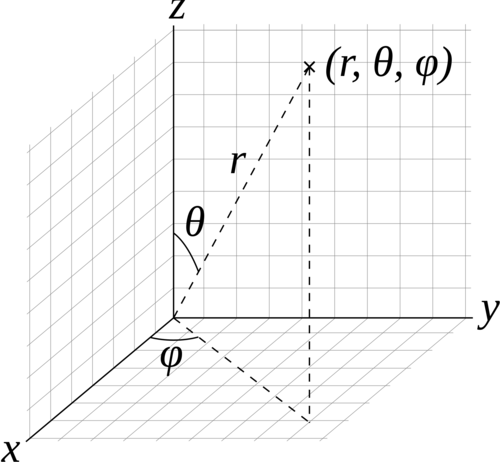
#### Structured Spherical Volumes
Structured spherical volumes are also supported, which are created by
passing a type string of `"structuredSpherical"` to `vklNewVolume`. The
grid dimensions and parameters are defined in terms of radial distance
($r$), inclination angle ($\theta$), and azimuthal angle ($\phi$),
conforming with the ISO convention for spherical coordinate systems.
Structured spherical volumes currently only support vertex-centered
data. The coordinate system and parameters understood by structured
spherical volumes are summarized below.
| Type | Name | Default | Description |
|:--------------------|:------------|:--------------------------:|:-----------------------------------------------------------------------------------------------------------------------------------------------------|
| vec3i | dimensions | | number of voxels in each dimension $(r, \theta, \phi)$ |
| VKLData VKLData\[\] | data | | VKLData object(s) of voxel data, supported types are: |
| | | | `VKL_UCHAR` |
| | | | `VKL_SHORT` |
| | | | `VKL_USHORT` |
| | | | `VKL_HALF` |
| | | | `VKL_FLOAT` |
| | | | `VKL_DOUBLE` |
| | | | Multiple attributes are supported through passing an array of VKLData objects. |
| vec3f | gridOrigin | $(0, 0, 0)$ | origin of the grid in units of $(r, \theta, \phi)$; angles in degrees |
| vec3f | gridSpacing | $(1, \theta_0, \phi_0)$ | size of the grid cells in units of $(r, \theta, \phi)$; angles in degrees. The defaults \_0 and \_0 are such that the volume occupies a full sphere. |
| float\[\] | background | `VKL_BACKGROUND_UNDEFINED` | For each attribute, the value that is returned when sampling an undefined region outside the volume domain. |
Configuration parameters for structured spherical
(`"structuredSpherical"`) volumes.
These grid parameters support flexible specification of spheres,
hemispheres, spherical shells, spherical wedges, and so forth. The grid
extents (computed as
$[gridOrigin, gridOrigin + (dimensions - 1) * gridSpacing]$) however
must be constrained such that:
- $r \geq 0$
- $0 \leq \theta \leq 180$
- $0 \leq \phi \leq 360$
The following additional parameters can be set both on
`"structuredSpherical"` volumes and their sampler objects. Sampler
object parameters default to volume parameters.
| Type | Name | Default | Description |
|:-----|:---------------|:--------------------|:----------------------------------------------------------------------------------------------------------------|
| int | filter | `VKL_FILTER_LINEAR` | The filter used for reconstructing the field. Use `VKLFilter` for named constants. |
| int | gradientFilter | `filter` | The filter used for reconstructing the field during gradient computations. Use `VKLFilter` for named constants. |
Configuration parameters for structured spherical
(`"structuredSpherical"`) volumes and their sampler objects.
### Adaptive Mesh Refinement (AMR) Volumes
Open VKL currently supports block-structured (Berger-Colella) AMR
volumes. Volumes are specified as a list of blocks, which exist at
levels of refinement in potentially overlapping regions. Blocks exist in
a tree structure, with coarser refinement level blocks containing finer
blocks. The cell width is equal for all blocks at the same refinement
level, though blocks at a coarser level have a larger cell width than
finer levels.
There can be any number of refinement levels and any number of blocks at
any level of refinement.
Blocks are defined by three parameters: their bounds, the refinement
level in which they reside, and the scalar data contained within each
block.
Note that cell widths are defined *per refinement level*, not per block.
AMR volumes are created by passing the type string `"amr"` to
`vklNewVolume`, and have the following parameters:
| Type | Name | Default | Description |
|:------------|:-------------|:---------------------------|:-------------------------------------------------------------------------------------------------------------------------------------|
| float\[\] | cellWidth | | \[data\] array of each level’s cell width |
| box3i\[\] | block.bounds | | \[data\] array of each block’s bounds (in voxels) |
| int\[\] | block.level | | \[data\] array of each block’s refinement level |
| VKLData\[\] | block.data | | \[data\] array of each block’s VKLData object containing the actual scalar voxel data. Currently only `VKL_FLOAT` data is supported. |
| vec3f | gridOrigin | $(0, 0, 0)$ | origin of the grid in object space |
| vec3f | gridSpacing | $(1, 1, 1)$ | size of the grid cells in object space |
| float | background | `VKL_BACKGROUND_UNDEFINED` | The value that is returned when sampling an undefined region outside the volume domain. |
Configuration parameters for AMR (`"amr"`) volumes.
Note that the `gridOrigin` and `gridSpacing` parameters act just like
the structured volume equivalent, but they only modify the root
(coarsest level) of refinement.
The following additional parameters can be set both on `"amr"` volumes
and their sampler objects. Sampler object parameters default to volume
parameters.
| Type | Name | Default | Description |
|:---------------|:-------|------------------:|:-------------------------------------------------------|
| `VKLAMRMethod` | method | `VKL_AMR_CURRENT` | `VKLAMRMethod` sampling method. Supported methods are: |
| | | | `VKL_AMR_CURRENT` |
| | | | `VKL_AMR_FINEST` |
| | | | `VKL_AMR_OCTANT` |
Configuration parameters for AMR (`"AMR"`) volumes and their sampler
objects.
Open VKL’s AMR implementation was designed to cover Berger-Colella \[1\]
and Chombo \[2\] AMR data. The `method` parameter above determines the
interpolation method used when sampling the volume.
- `VKL_AMR_CURRENT` finds the finest refinement level at that cell and
interpolates through this “current” level
- `VKL_AMR_FINEST` will interpolate at the closest existing cell in the
volume-wide finest refinement level regardless of the sample cell’s
level
- `VKL_AMR_OCTANT` interpolates through all available refinement levels
at that cell. This method avoids discontinuities at refinement level
boundaries at the cost of performance
Gradients are computed using finite differences, using the `method`
defined on the sampler.
Details and more information can be found in the publication for the
implementation \[3\].
1. M. J. Berger, and P. Colella. “Local adaptive mesh refinement for
shock hydrodynamics.” Journal of Computational Physics 82.1 (1989):
64-84. DOI: 10.1016/0021-9991(89)90035-1
2. M. Adams, P. Colella, D. T. Graves, J.N. Johnson, N.D. Keen, T. J.
Ligocki. D. F. Martin. P.W. McCorquodale, D. Modiano. P.O. Schwartz,
T.D. Sternberg and B. Van Straalen, Chombo Software Package for AMR
Applications - Design Document, Lawrence Berkeley National
Laboratory Technical Report LBNL-6616E.
3. I. Wald, C. Brownlee, W. Usher, and A. Knoll. CPU volume rendering
of adaptive mesh refinement data. SIGGRAPH Asia 2017 Symposium on
Visualization on - SA ’17, 18(8), 1–8. DOI: 10.1145/3139295.3139305
### Unstructured Volumes
Unstructured volumes can have their topology and geometry freely
defined. Geometry can be composed of tetrahedral, hexahedral, wedge or
pyramid cell types. The data format used is compatible with VTK and
consists of multiple arrays: vertex positions and values, vertex
indices, cell start indices, cell types, and cell values.
Sampled cell values can be specified either per-vertex (`vertex.data`)
or per-cell (`cell.data`). If both arrays are set, `cell.data` takes
precedence.
Similar to a mesh, each cell is formed by a group of indices into the
vertices. For each vertex, the corresponding (by array index) data value
will be used for sampling when rendering, if specified. The index order
for a tetrahedron is the same as `VTK_TETRA`: bottom triangle
counterclockwise, then the top vertex.
For hexahedral cells, each hexahedron is formed by a group of eight
indices into the vertices and data values. Vertex ordering is the same
as `VTK_HEXAHEDRON`: four bottom vertices counterclockwise, then top
four counterclockwise.
For wedge cells, each wedge is formed by a group of six indices into the
vertices and data values. Vertex ordering is the same as `VTK_WEDGE`:
three bottom vertices counterclockwise, then top three counterclockwise.
For pyramid cells, each cell is formed by a group of five indices into
the vertices and data values. Vertex ordering is the same as
`VTK_PYRAMID`: four bottom vertices counterclockwise, then the top
vertex.
To maintain VTK data compatibility, the `index` array may be specified
with cell sizes interleaved with vertex indices in the following format:
$n, id_1, ..., id_n, m, id_1, ..., id_m$. This alternative `index` array
layout can be enabled through the `indexPrefixed` flag (in which case,
the `cell.type` parameter should be omitted).
Gradients are computed using finite differences.
Unstructured volumes are created by passing the type string
`"unstructured"` to `vklNewVolume`, and have the following parameters:
| Type | Name | Default | Description |
|:------------------------|:-------------------|:---------------------------|:--------------------------------------------------------------------------------------------------------------------------------------------------------|
| vec3f\[\] | vertex.position | | \[data\] array of vertex positions |
| float\[\] | vertex.data | | \[data\] array of vertex data values to be sampled |
| uint32\[\] / uint64\[\] | index | | \[data\] array of indices (into the vertex array(s)) that form cells |
| bool | indexPrefixed | false | indicates that the `index` array is provided in a VTK-compatible format, where the indices of each cell are prefixed with the number of vertices |
| uint32\[\] / uint64\[\] | cell.index | | \[data\] array of locations (into the index array), specifying the first index of each cell |
| float\[\] | cell.data | | \[data\] array of cell data values to be sampled |
| uint8\[\] | cell.type | | \[data\] array of cell types (VTK compatible). Supported types are: |
| | | | `VKL_TETRAHEDRON` |
| | | | `VKL_HEXAHEDRON` |
| | | | `VKL_WEDGE` |
| | | | `VKL_PYRAMID` |
| bool | hexIterative | false | hexahedron interpolation method, defaults to fast non-iterative version which could have rendering inaccuracies may appear if hex is not parallelepiped |
| bool | precomputedNormals | false | whether to accelerate by precomputing, at a cost of 12 bytes/face |
| float | background | `VKL_BACKGROUND_UNDEFINED` | The value that is returned when sampling an undefined region outside the volume domain. |
Configuration parameters for unstructured (`"unstructured"`) volumes.
### VDB Volumes
VDB volumes implement a data structure that is very similar to the data
structure outlined in Museth \[1\].
The data structure is a hierarchical regular grid at its core: Nodes are
regular grids, and each grid cell may either store a constant value
(this is called a tile), or child pointers.
Nodes in VDB trees are wide: Nodes on the first level have a resolution
of 32^3 voxels by default, on the next level 16^3, and on the leaf level
8^3 voxels. All nodes on a given level have the same resolution. This
makes it easy to find the node containing a coordinate using shift
operations (cp. \[1\]).
VDB leaf nodes are implicit in Open VKL: they are stored as pointers to
user-provided data.

VDB volumes interpret input data as constant cells (which are then
potentially filtered). This is in contrast to `structuredRegular`
volumes, which can have either a vertex-centered or cell-centered
interpretation.
The VDB implementation in Open VKL follows the following goals:
- Efficient data structure traversal on vector architectures.
- Enable the use of industry-standard .vdb files created through the
OpenVDB library.
- Compatibility with OpenVDB on a leaf data level, so that .vdb files
may be loaded with minimal overhead.
VDB volumes are created by passing the type string `"vdb"` to
`vklNewVolume`, and have the following parameters:
| Type | Name | Default | Description |
|:-------------------|:--------------------------------------|:-----------------------------------|:--------------------------------------------------------------------------------------------------------------------------------------------------------------------------------------------------------------------------------------------------------------------------------------------------------------------------------------------------------------------------------------------------------------------------------------------------------------------------------------------------------------------------------------|
| affine3f float\[\] | indexToObject | 1, 0, 0, 0, 1, 0, 0, 0, 1, 0, 0, 0 | Defines the transformation from index space to object space. In index space, the grid is an axis-aligned regular grid, and leaf voxels have size (1,1,1). A `vkl_affine3f` can be provided; alternatively an array of 12 values of type `float` can be used, where the first 9 values are interpreted as a row-major linear transformation matrix, and the last 3 values are the translation of the grid origin. |
| uint32\[\] | node.format | | For each input node, the data format. Currently supported are `VKL_FORMAT_TILE` for tiles, and `VKL_FORMAT_DENSE_ZYX` for nodes that are dense regular grids. |
| uint32\[\] | node.level | | For each input node, the level on which this node exists. Tiles may exist on levels \[1, `VKL_VDB_NUM_LEVELS-1`\], all other nodes may only exist on level `VKL_VDB_NUM_LEVELS-1`. |
| vec3i\[\] | node.origin | | For each input node, the node origin index. |
| VKLData\[\] | node.data | | For each input node, the attribute data. Single-attribute volumes may have one array provided per node, while multi-attribute volumes require an array per attribute for each node. Nodes with format `VKL_FORMAT_TILE` are expected to have single-entry arrays per attribute. Nodes with format `VKL_FORMAT_DENSE_ZYX` are expected to have arrays with `vklVdbLevelNumVoxels(level[i])` entries per attribute. `VKL_HALF` and `VKL_FLOAT` data is currently supported; all nodes for a given attribute must be the same data type. |
| uint32\[\] | node.temporalFormat | `VKL_TEMPORAL_FORMAT_CONSTANT` | The temporal format for this volume. Use `VKLTemporalFormat` for named constants. VDB volumes support `VKL_TEMPORAL_FORMAT_CONSTANT`, `VKL_TEMPORAL_FORMAT_STRUCTURED`, and `VKL_TEMPORAL_FORMAT_UNSTRUCTURED`. |
| int\[\] | node.temporallyStructuredNumTimesteps | | For temporally structured variation, number of timesteps per voxel. Only valid if `temporalFormat` is `VKL_TEMPORAL_FORMAT_STRUCTURED`. |
| VKLData\[\] | node.temporallyUnstructuredIndices | | For temporally unstructured variation, beginning per voxel. Supported data types for each node are `VKL_UINT` and `VKL_ULONG`. Only valid if `temporalFormat` is `VKL_TEMPORAL_FORMAT_UNSTRUCTURED`. |
| VKLData\[\] | node.temporallyUnstructuredTimes | | For temporally unstructured variation, time values corresponding to values in `node.data`. For each node, the data must be of type `VKL_FLOAT`. Only valid if `temporalFormat` is `VKL_TEMPORAL_FORMAT_UNSTRUCTURED`. |
| VKLData\[\] | nodesPackedDense | | Optionally provided instead of `node.data`, for each attribute a single array of all dense node data (`VKL_FORMAT_DENSE_ZYX` only) in a contiguous layout, provided in the same order as the corresponding `node.*` parameters. This packed layout may be more performant. Supported for temporally constant data only. |
| VKLData\[\] | nodesPackedTile | | Optionally provided instead of `node.data`, for each attribute a single array of all tile node data (`VKL_FORMAT_TILE` only) in a contiguous layout, provided in the same order as the corresponding `node.*` parameters. This packed layout may be more performant. Supported for temporally constant data only. |
| float\[\] | background | `VKL_BACKGROUND_UNDEFINED` | For each attribute, the value that is returned when sampling an undefined region outside the volume domain. |
| box3i | indexClippingBounds | | Clips the volume to the specified index-space bounding box. This is useful for volumes with dimensions that are not even multiples of the leaf node dimensions, or .vdb files with restrictive active voxel bounding boxes. |
Configuration parameters for VDB (`"vdb"`) volumes.
The level, origin, format, and data parameters must have the same size,
and there must be at least one valid node or `commit()` will fail. The
`nodesPackedDense` and `nodesPackedTile` parameters may be provided
instead of `node.data`; this packed data layout may provide better
performance.
VDB volumes support temporally structured and temporally unstructured
temporal variation. See section ‘Temporal Variation’ for more detail.
The following additional parameters can be set both on `vdb` volumes and
their sampler objects (sampler object parameters default to volume
parameters).
| Type | Name | Default | Description |
|:-----|:-----------------|:-----------------------|:----------------------------------------------------------------------------------------------------------------|
| int | filter | `VKL_FILTER_LINEAR` | The filter used for reconstructing the field. Use `VKLFilter` for named constants. |
| int | gradientFilter | `filter` | The filter used for reconstructing the field during gradient computations. Use `VKLFilter` for named constants. |
| int | maxSamplingDepth | `VKL_VDB_NUM_LEVELS`-1 | Do not descend further than to this depth during sampling. |
Configuration parameters for VDB (`"vdb"`) volumes and their sampler
objects.
VDB volume objects support the following observers:
| Name | Buffer Type | Description |
|:----------|-------------|:------------------------------------------------------------------------------------------------------------------------------------------------------------------------------------------------------------------------------------------------------------------------------------------------------------------------------------------------------------------------------------------------------------------------------------------------------------------------------------------------------------------------------------------------------------------------------------------------|
| InnerNode | float\[\] | Return an array of bounding boxes, along with value ranges, of inner nodes in the data structure. The bounding box is given in object space. For a volume with M attributes, the entries in this array are (6+2\*M)-tuples `(minX, minY, minZ, maxX, maxY, maxZ, lower_0, upper_0, lower_1, upper_1, ...)`. This is in effect a low resolution representation of the volume. The InnerNode observer can be parametrized using `int maxDepth` to control the depth at which inner nodes are returned. Note that the observer will also return leaf nodes or tiles at lower levels if they exist. |
Observers supported by VDB (`"vdb"`) volumes.
VDB sampler objects support the following observers:
| Name | Buffer Type | Description |
|:---------------|:------------|:-----------------------------------------------------------------------------------------------------------------------------------------------------------------------------------------------------------------------------------------------|
| LeafNodeAccess | uint32\[\] | This observer returns an array with as many entries as input nodes were passed. If the input node i was accessed during traversal, then the ith entry in this array has a nonzero value. This can be used for on-demand loading of leaf nodes. |
Observers supported by sampler objects created on VDB (`"vdb"`) volumes.
#### Reconstruction filters
VDB volumes support the filter types `VKL_FILTER_NEAREST`,
`VKL_FILTER_LINEAR`, and `VKL_FILTER_CUBIC` for both `filter` and
`gradientFilter`.
Note that when `gradientFilter` is set to `VKL_FILTER_NEAREST`,
gradients are always $(0, 0, 0)$.
#### Major differences to OpenVDB
- Open VKL implements sampling in ISPC, and can exploit wide SIMD
architectures.
- VDB volumes in Open VKL are read-only once committed, and designed for
rendering only. Authoring or manipulating datasets is not in the scope
of this implementation.
- The only supported field types are `VKL_HALF` and `VKL_FLOAT` at this
point. Other field types may be supported in the future. Note that
multi-attribute volumes may be used to represent multi-component
(e.g. vector) fields.
- The root level in Open VKL has a single node with resolution 64^3
(cp. \[1\]. OpenVDB uses a hash map, instead).
- Open VKL supports four-level vdb volumes. The resolution of each level
can be configured at compile time using CMake variables.
- `VKL_VDB_LOG_RESOLUTION_0` sets the base 2 logarithm of the root
level resolution. This variable defaults to 6, which means that the
root level has a resolution of $(2^6)^3 = 64^3$.
- `VKL_VDB_LOG_RESOLUTION_1` and `VKL_VDB_LOG_RESOLUTION_2` default to
5 and 4, respectively. This matches the default Open VDB resolution
for inner levels.
- `VKL_VDB_LOG_RESOLUTION_3` set the base 2 logarithm of the leaf
level resolution, and defaults to 3. Therefore, leaf nodes have a
resolution of $8^3$ voxels. Again, this matches the Open VDB
default. The default settings lead to a domain resolution of
$2^18^3=262144^3$ voxels.
#### Loading OpenVDB .vdb files
Files generated with OpenVDB can be loaded easily since Open VKL `vdb`
volumes implement the same leaf data layout. This means that OpenVDB
leaf data pointers can be passed to Open VKL using shared data buffers,
avoiding copy operations.
An example of this can be found in
`utility/vdb/include/openvkl/utility/vdb/OpenVdbGrid.h`, where the class
`OpenVdbFloatGrid` encapsulates the necessary operations. This class is
also accessible through the `vklExamples` application using the `-file`
and `-field` command line arguments.
To use this example feature, compile Open VKL with `OpenVDB_ROOT`
pointing to the OpenVDB prefix.
1. Museth, K. VDB: High-Resolution Sparse Volumes with Dynamic
Topology. ACM Transactions on Graphics 32(3), 2013. DOI:
10.1145/2487228.2487235
### Particle Volumes
Particle volumes consist of a set of points in space. Each point has a
position, a radius, and a weight typically associated with an attribute.
A radial basis function defines the contribution of that particle.
Currently, we use the Gaussian radial basis function,
phi(P) = w \* exp( -0.5 \* ((P - p) / r)^2 )
where P is the particle position, p is the sample position, r is the
radius and w is the weight.
At each sample, the scalar field value is then computed as the sum of
each radial basis function phi, for each particle that overlaps it.
Gradients are similarly computed, based on the summed analytical
contributions of each contributing particle.
Particles with a radius less than or equal to zero are ignored. At least
one valid particle (radius greater than zero) must be provided.
The Open VKL implementation is similar to direct evaluation of samples
in Reda et al.\[2\]. It uses an Embree-built BVH with a custom
traversal, similar to the method in \[1\].
Particle volumes are created by passing the type string `"particle"` to
`vklNewVolume`, and have the following parameters:
| Type | Name | Default | Description |
|:----------|:------------------------|:--------|:---------------------------------------------------------------------------------------------------------------------------------------------------------------------------------------------------------------------------------------------------------------------------------------------------------------------------------------------------------------------------------------------------------------------------------------------------|
| vec3f\[\] | particle.position | | \[data\] array of particle positions |
| float\[\] | particle.radius | | \[data\] array of particle radii |
| float\[\] | particle.weight | null | \[data\] (optional) array of particle weights, specifying the height of the kernel. |
| float | radiusSupportFactor | 3.0 | The multipler of the particle radius required for support. Larger radii ensure smooth results at the cost of performance. In the Gaussian kernel, the the radius is one standard deviation (sigma), so a `radiusSupportFactor` of 3 corresponds to 3\*sigma. |
| float | clampMaxCumulativeValue | 0 | The maximum cumulative value possible, set by user. All cumulative values will be clamped to this, and further traversal (RBF summation) of particle contributions will halt when this value is reached. A value of zero or less turns this off. |
| bool | estimateValueRanges | true | Enable heuristic estimation of value ranges which are used in internal acceleration structures for interval and hit iterators, as well as for determining the volume’s overall value range. When set to `false`, the user *must* specify `clampMaxCumulativeValue`, and all value ranges will be assumed \[0, `clampMaxCumulativeValue`\]. Disabling this may improve volume commit time, but will make interval and hit iteration less efficient. |
Configuration parameters for particle (`"particle"`) volumes.
1. Knoll, A., Wald, I., Navratil, P., Bowen, A., Reda, K., Papka, M.E.
and Gaither, K. (2014), RBF Volume Ray Casting on Multicore and
Manycore CPUs. Computer Graphics Forum, 33: 71-80.
doi:10.1111/cgf.12363
2. K. Reda, A. Knoll, K. Nomura, M. E. Papka, A. E. Johnson and J.
Leigh, “Visualizing large-scale atomistic simulations in
ultra-resolution immersive environments,” 2013 IEEE Symposium on
Large-Scale Data Analysis and Visualization (LDAV), Atlanta, GA,
2013, pp. 59-65.
## Temporal Variation
Open VKL supports two types of temporal variation: temporally structured
and temporally unstructured. When one of these modes is enabled, the
volume can be sampled at different times. In both modes, time is assumed
to vary between zero and one. This can be useful for implementing
renderers with motion blur, for example.
Temporal variation is generally configured through a parameter
`temporalFormat`, which accepts constants from the `VKLTemporalFormat`
enum, though not all modes may be supported by all volumes. On volumes
that expect multiple input nodes, the parameter is an array
`node.temporalFormat`, and must provide one value per node. Multiple
attributes in a voxel share the same temporal configuration. Please
refer to the individual volume sections above to find out supported for
each volume type.
`temporalFormat` defaults to `VKL_TEMPORAL_FORMAT_CONSTANT` for all
volume types. This means that no temporal variation is present in the
data.
Temporally structured variation is configured by setting
`temporalFormat` to `VKL_TEMPORAL_FORMAT_STRUCTURED`. In this mode, the
volume expects an additional parameter
`[node.]temporallyStructuredNumTimesteps`, which specifies how many time
steps are provided for all voxels, and must be at least 2. A volume, or
node, with $N$ voxels expects $N * temporallyStructuredNumTimesteps$
values for each attribute. The values are assumed evenly spaced over
times $[0, 1]$: $\{0, 1/(N-1), ..., 1\}$
Temporally unstructured variation supports differing time step counts
and sample times per voxel. For $N$ input voxels,
`temporallyUnstructuredIndices` is an array of $N+1$ indices. Voxel $i$
has
$N_i = [temporallyUnstructuredIndices[i+1]-temporallyUnstructuredIndices[i])$
temporal samples starting at index $temporallyUnstructuredIndices[i]$.
`temporallyUnstructuredTimes` specifies the times corresponding to the
sample values; the time values for each voxel must be between zero and
one and strictly increasing: $t0 < t1 < ... < tN$. To return a value at
sample time t, $t0 <= t <= tN$, Open VKL will interpolate linearly from
the two nearest time steps. Time values outside this range are clamped
to $[t0, tN]$.
## Sampler Objects
Computing the value of a volume at an object space coordinate is done
using the sampling API, and sampler objects. Sampler objects can be
created using
``` cpp
VKLSampler vklNewSampler(VKLVolume volume);
```
Sampler objects may then be parametrized with traversal parameters.
Available parameters are defined by volumes, and are a subset of the
volume parameters. As an example, `filter` can be set on both `vdb`
volumes and their sampler objects. The volume parameter is used as the
default for sampler objects. The sampler object parameter provides an
override per ray. More detail on parameters can be found in the sections
on volumes. Use `vklCommit()` to commit parameters to the sampler
object.
## Sampling
The scalar API takes a volume and coordinate, and returns a float value.
The volume’s background value (by default `VKL_BACKGROUND_UNDEFINED`) is
returned for probe points outside the volume. The attribute index
selects the scalar attribute of interest; not all volumes support
multiple attributes. The time value, which must be between 0 and 1,
specifies the sampling time. For temporally constant volumes, this value
has no effect.
For the `cpu` device, the scalar sampling API is:
``` cpp
float vklComputeSample(const VKLSampler *sampler,
const vkl_vec3f *objectCoordinates,
unsigned int attributeIndex,
float time);
```
while on the `gpu` device, it is:
``` cpp
float vklComputeSample(const VKLSampler *sampler,
const vkl_vec3f *objectCoordinates,
unsigned int attributeIndex,
float time,
const VKLFeatureFlags featureFlags);
```
Note that the `gpu` sampling API introduces an additional `featureFlags`
argument. These provided “feature flags” allow Open VKL to prune
unnecessary code during just-in-time (JIT) compilation on GPU, providing
potentially significant performance gains. See section ‘Feature flag
usage on GPU’ for details.
### Vector-wide and Stream-wide Sampling (CPU device only)
On the `cpu` device, vector-wide and stream-wide sampling APIs are also
provided.
Vector versions allow sampling at 4, 8, or 16 positions at once.
Depending on the machine type and Open VKL device implementation, these
can give greater performance. An active lane mask `valid` is passed in
as an array of integers; set 0 for lanes to be ignored, -1 for active
lanes. An array of time values corresponding to each object coordinate
may be provided; a `NULL` value indicates all times are zero.
``` cpp
void vklComputeSample4(const int *valid,
const VKLSampler *sampler,
const vkl_vvec3f4 *objectCoordinates,
float *samples,
unsigned int attributeIndex,
const float *times);
void vklComputeSample8(const int *valid,
const VKLSampler *sampler,
const vkl_vvec3f8 *objectCoordinates,
float *samples,
unsigned int attributeIndex,
const float *times);
void vklComputeSample16(const int *valid,
const VKLSampler *sampler,
const vkl_vvec3f16 *objectCoordinates,
float *samples,
unsigned int attributeIndex,
const float *times);
```
A stream version allows sampling an arbitrary number of positions at
once. While the vector version requires coordinates to be provided in a
structure-of-arrays layout, the stream version allows coordinates to be
provided in an array-of-structures layout. Thus, the stream API can be
used to avoid reformatting of data by the application. As with the
vector versions, the stream API can give greater performance than the
scalar API.
``` cpp
void vklComputeSampleN(const VKLSampler *sampler,
unsigned int N,
const vkl_vec3f *objectCoordinates,
float *samples,
unsigned int attributeIndex,
const float *times);
```
All of the above sampling APIs can be used, regardless of the device’s
native SIMD width.
### Sampling Multiple Attributes
Open VKL provides additional APIs for sampling multiple scalar
attributes in a single call through the `vklComputeSampleM*()`
interfaces. Beyond convenience, these can give improved performance
relative to the single attribute sampling APIs. As with the single
attribute APIs, sampling time values may be specified; note that these
are provided per object coordinate only (rather than separately per
attribute).
A scalar API supports sampling `M` attributes specified by
`attributeIndices` on a single object space coordinate:
For the `cpu` device, the scalar sampling API is:
``` cpp
void vklComputeSampleM(const VKLSampler *sampler,
const vkl_vec3f *objectCoordinates,
float *samples,
unsigned int M,
const unsigned int *attributeIndices,
float time);
```
while on the `gpu` device, it is:
``` cpp
void vklComputeSampleM(const VKLSampler *sampler,
const vkl_vec3f *objectCoordinates,
float *samples,
unsigned int M,
const unsigned int *attributeIndices,
float time,
const VKLFeatureFlags featureFlags);
```
Again, see section ‘Feature flag usage on GPU’ for details on feature
flags.
#### Vector-wide and Stream-wide Multi-Attribute Sampling (CPU device only)
On the `cpu` device, vector-wide and stream-wide sampling APIs are also
provided.
Vector versions allow sampling at 4, 8, or 16 positions at once across
the `M` attributes:
``` cpp
void vklComputeSampleM4(const int *valid,
const VKLSampler *sampler,
const vkl_vvec3f4 *objectCoordinates,
float *samples,
unsigned int M,
const unsigned int *attributeIndices,
const float *times);
void vklComputeSampleM8(const int *valid,
const VKLSampler *sampler,
const vkl_vvec3f8 *objectCoordinates,
float *samples,
unsigned int M,
const unsigned int *attributeIndices,
const float *times);
void vklComputeSampleM16(const int *valid,
const VKLSampler *sampler,
const vkl_vvec3f16 *objectCoordinates,
float *samples,
unsigned int M,
const unsigned int *attributeIndices,
const float *times);
```
The `[4, 8, 16] * M` sampled values are populated in the `samples` array
in a structure-of-arrays layout, with all values for each attribute
provided in sequence. That is, sample values `s_m,n` for the `m`th
attribute and `n`th object coordinate will be populated as
``` cpp
samples = [s_0,0, s_0,1, ..., s_0,N-1,
s_1,0, s_1,1, ..., s_1,N-1,
...,
s_M-1,0, s_M-1,1, ..., s_M-1,N-1]
```
A stream version allows sampling an arbitrary number of positions at
once across the `M` attributes. As with single attribute stream
sampling, the `N` coordinates are provided in an array-of-structures
layout.
``` cpp
void vklComputeSampleMN(const VKLSampler *sampler,
unsigned int N,
const vkl_vec3f *objectCoordinates,
float *samples,
unsigned int M,
const unsigned int *attributeIndices,
const float *times);
```
The `M * N` sampled values are populated in the `samples` array in an
array-of-structures layout, with all attribute values for each
coordinate provided in sequence as
``` cpp
samples = [s_0,0, s_1,0, ..., s_M-1,0,
s_0,1, s_1,1, ..., s_M-1,1,
...,
s_0,N-1, s_1,N-1, ..., s_M-1,N-1]
```
All of the above sampling APIs can be used, regardless of the device’s
native SIMD width.
## Gradients
In a very similar API to `vklComputeSample`, `vklComputeGradient`
queries the value gradient at an object space coordinate. Again, a
scalar API, now returning a vec3f instead of a float. NaN values are
returned for points outside the volume. The time value, which must be
between 0 and 1, specifies the sampling time. For temporally constant
volumes, this value has no effect.
For the `cpu` device, the scalar sampling API is:
``` cpp
vkl_vec3f vklComputeGradient(const VKLSampler *sampler,
const vkl_vec3f *objectCoordinates,
unsigned int attributeIndex,
float time);
```
while on the `gpu` device, it is:
``` cpp
vkl_vec3f vklComputeGradient(const VKLSampler *sampler,
const vkl_vec3f *objectCoordinates,
unsigned int attributeIndex,
float time,
const VKLFeatureFlags featureFlags);
```
### Vector-wide and Stream-wide Gradients (CPU device only)
As with the sampling APIs, on the `cpu` device vector-wide and
stream-wide gradient APIs are also provided.
The vector versions are:
``` cpp
void vklComputeGradient4(const int *valid,
const VKLSampler *sampler,
const vkl_vvec3f4 *objectCoordinates,
vkl_vvec3f4 *gradients,
unsigned int attributeIndex,
const float *times);
void vklComputeGradient8(const int *valid,
const VKLSampler *sampler,
const vkl_vvec3f8 *objectCoordinates,
vkl_vvec3f8 *gradients,
unsigned int attributeIndex,
const float *times);
void vklComputeGradient16(const int *valid,
const VKLSampler *sampler,
const vkl_vvec3f16 *objectCoordinates,
vkl_vvec3f16 *gradients,
unsigned int attributeIndex,
const float *times);
```
Finally, a stream version is provided:
``` cpp
void vklComputeGradientN(const VKLSampler *sampler,
unsigned int N,
const vkl_vec3f *objectCoordinates,
vkl_vec3f *gradients,
unsigned int attributeIndex,
const float *times);
```
All of the above gradient APIs can be used, regardless of the device’s
native SIMD width.
## Iterators
Open VKL has APIs to search for particular volume values along a ray.
Queries can be for ranges of volume values (`vklIterateInterval`) or for
particular values (`vklIterateHit`).
Interval iterators require a context object to define the sampler and
parameters related to iteration behavior. An interval iterator context
is created via
``` cpp
VKLIntervalIteratorContext vklNewIntervalIteratorContext(VKLSampler sampler);
```
The parameters understood by interval iterator contexts are defined in
the table below.
| Type | Name | Default | Description |
|:----------------|:-----------------------|:--------------|:------------------------------------------------------------------------------------------------------------------------------------------------------------------------------------------------------------------------------------------------------------------------------------------|
| int | attributeIndex | 0 | Defines the volume attribute of interest.