https://github.com/renderkit/ospray
An Open, Scalable, Portable, Ray Tracing Based Rendering Engine for High-Fidelity Visualization
https://github.com/renderkit/ospray
c-plus-plus ospray path-tracer ray-tracing rendering visualization
Last synced: about 1 year ago
JSON representation
An Open, Scalable, Portable, Ray Tracing Based Rendering Engine for High-Fidelity Visualization
- Host: GitHub
- URL: https://github.com/renderkit/ospray
- Owner: RenderKit
- License: apache-2.0
- Created: 2013-06-20T19:16:51.000Z (about 13 years ago)
- Default Branch: devel
- Last Pushed: 2025-01-08T16:07:29.000Z (over 1 year ago)
- Last Synced: 2025-04-12T20:43:46.385Z (over 1 year ago)
- Topics: c-plus-plus, ospray, path-tracer, ray-tracing, rendering, visualization
- Language: C++
- Homepage: http://ospray.org
- Size: 31 MB
- Stars: 1,044
- Watchers: 67
- Forks: 188
- Open Issues: 55
-
Metadata Files:
- Readme: README.md
- Changelog: CHANGELOG.md
- License: LICENSE.txt
- Security: SECURITY.md
Awesome Lists containing this project
README
OSPRay
======
This is release v3.3.0 (devel) of Intel® OSPRay. For changes and new
features see the [changelog](CHANGELOG.md). Visit http://www.ospray.org
for more information.
OSPRay Overview
===============
Intel® OSPRay is an **o**pen source, **s**calable, and **p**ortable
**ray** tracing engine for high-performance, high-fidelity visualization
on Intel Architecture CPUs, Intel Xe GPUs, and Aarch64/ARM64 CPUs.
OSPRay is part of the [Intel Rendering Toolkit (Render
Kit)](https://software.intel.com/en-us/rendering-framework) and is
released under the permissive [Apache 2.0
license](http://www.apache.org/licenses/LICENSE-2.0).
The purpose of OSPRay is to provide an open, powerful, and easy-to-use
rendering library that allows one to easily build applications that use
ray tracing based rendering for interactive applications (including both
surface- and volume-based visualizations). OSPRay runs on anything from
laptops, to workstations, to compute nodes in HPC systems.
OSPRay internally builds on top of Intel
[Embree](https://www.embree.org/), Intel [Open
VKL](https://www.openvkl.org/), and Intel [Open Image
Denoise](https://www.openimagedenoise.org/). The CPU implementation is
based on Intel [ISPC (Implicit SPMD Program
Compiler)](https://ispc.github.io/) and fully exploits modern
instruction sets like Intel SSE4, AVX, AVX2, AVX-512 and NEON to achieve
high rendering performance. Hence, a CPU with support for at least
SSE4.1 is required to run OSPRay on x86_64 architectures, or a CPU with
support for NEON is required to run OSPRay on ARM64 architectures.
OSPRay’s GPU implementation (beta status) is based on the
[SYCL](https://www.khronos.org/sycl/) cross-platform programming
language implemented by [Intel oneAPI Data Parallel C++
(DPC++)](https://www.intel.com/content/www/us/en/developer/tools/oneapi/data-parallel-c-plus-plus.html)
and currently supports Intel Arc™ GPUs on Linux and Windows, and Intel
Data Center GPU Flex and Max Series on Linux, exploiting ray tracing
hardware support.
OSPRay Support and Contact
--------------------------
OSPRay is under active development, and though we do our best to
guarantee stable release versions a certain number of bugs,
as-yet-missing features, inconsistencies, or any other issues are still
possible. For any such requests or findings please use [OSPRay’s GitHub
Issue Tracker](https://github.com/RenderKit/OSPRay/issues) (or, if you
should happen to have a fix for it, you can also send us a pull
request).
To receive release announcements simply [“Watch” the OSPRay
repository](https://github.com/RenderKit/OSPRay) on GitHub.
Building and Finding OSPRay
===========================
The latest OSPRay sources are always available at the [OSPRay GitHub
repository](http://github.com/RenderKit/ospray). The default `master`
branch should always point to the latest bugfix release.
Prerequisites
-------------
OSPRay currently supports Linux, Mac OS X, and Windows. In addition,
before you can build OSPRay you need the following prerequisites:
- You can clone the latest OSPRay sources via:
``` sh
git clone https://github.com/RenderKit/ospray.git
```
- To build OSPRay you need [CMake](http://www.cmake.org), any form of
C++11 compiler (we recommend using GCC, but also support Clang, MSVC,
and [Intel® C++ Compiler
(icc)](https://software.intel.com/en-us/c-compilers)), and standard
Linux development tools.
- Additionally you require a copy of the [Intel® Implicit SPMD Program
Compiler (ISPC)](http://ispc.github.io), version 1.23.0 or later.
Please obtain a release of ISPC from the [ISPC downloads
page](https://ispc.github.io/downloads.html). If ISPC is not found by
CMake its location can be hinted with the variable `ISPC_EXECUTABLE`.
- OSPRay builds on top of the [Intel Rendering Toolkit (Render Kit)
common library (rkcommon)](https://www.github.com/RenderKit/rkcommon).
The library provides abstractions for tasking, aligned memory
allocation, vector math types, among others. For users who also need
to build rkcommon, we recommend the default the Intel [Threading
Building Blocks (TBB)](https://www.threadingbuildingblocks.org/) as
tasking system for performance and flexibility reasons. TBB must be
built from source when targeting ARM CPUs, or can be built from source
as part of the [superbuild](#cmake-superbuild). Alternatively you can
set CMake variable `RKCOMMON_TASKING_SYSTEM` to `OpenMP` or
`Internal`.
- OSPRay also heavily uses Intel [Embree](https://www.embree.org/),
installing version 4.3.3 or newer is required. If Embree is not found
by CMake its location can be hinted with the variable `embree_DIR`.
- OSPRay supports volume rendering (enabled by default via
`OSPRAY_ENABLE_VOLUMES`), which heavily uses Intel [Open
VKL](https://www.openvkl.org/), version 2.0.1 or newer is required. If
Open VKL is not found by CMake its location can be hinted with the
variable `openvkl_DIR`, or disable `OSPRAY_ENABLE_VOLUMES`.
- OSPRay also provides an optional module implementing the `denoiser`
image operation, which is enabled by `OSPRAY_MODULE_DENOISER`. This
module requires Intel [Open Image
Denoise](https://www.openimagedenoise.org/) in version 2.3.0 or newer.
You may need to hint the location of the library with the CMake
variable `OpenImageDenoise_DIR`.
- For the optional MPI modules (enabled by `OSPRAY_MODULE_MPI`), which
provide the `mpiOffload` and `mpiDistributed` devices, you need an MPI
library and [Google Snappy](https://github.com/google/snappy).
- The optional example application, the test suit and benchmarks need
some version of OpenGL and GLFW as well as
[GoogleTest](https://github.com/google/googletest) and [Google
Benchmark](https://github.com/google/benchmark/)
Depending on your Linux distribution you can install these dependencies
using `yum` or `apt-get`. Some of these packages might already be
installed or might have slightly different names.
Type the following to install the dependencies using `yum`:
``` sh
sudo yum install cmake.x86_64
sudo yum install tbb.x86_64 tbb-devel.x86_64
```
Type the following to install the dependencies using `apt-get`:
``` sh
sudo apt-get install cmake-curses-gui
sudo apt-get install libtbb-dev
```
Under Mac OS X these dependencies can be installed using
[MacPorts](http://www.macports.org/):
``` sh
sudo port install cmake tbb
```
Under Windows please directly use the appropriate installers for
[CMake](https://cmake.org/download/),
[TBB](https://github.com/oneapi-src/oneTBB/releases),
[ISPC](https://ispc.github.io/downloads.html) (for your Visual Studio
version) and [Embree](https://github.com/RenderKit/embree/releases/).
### Additional Prerequisites for GPU Build
To build OSPRay’s GPU module you need
- a SYCL compiler, either the open source [oneAPI DPC++ Compiler
2023-10-26](https://github.com/intel/llvm/releases/tag/nightly-2023-10-26)
or the latest [Intel oneAPI DPC++/C++
Compiler](https://www.intel.com/content/www/us/en/developer/articles/tool/oneapi-standalone-components.html#dpcpp-cpp)
- a recent [CMake](http://www.cmake.org), version 3.25.3 or higher
CMake Superbuild
----------------
For convenience, OSPRay provides a CMake Superbuild script which will
pull down OSPRay’s dependencies and build OSPRay itself. By default, the
result is an install directory, with each dependency in its own
directory.
Run with:
``` sh
mkdir build
cd build
cmake [/scripts/superbuild]
cmake --build .
```
On Windows make sure to select a 64 bit generator, e.g.
``` sh
cmake -G "Visual Studio 17 2022" [/scripts/superbuild]
```
The resulting `install` directory (or the one set with
`CMAKE_INSTALL_PREFIX`) will have everything in it, with one
subdirectory per dependency.
CMake options to note (all have sensible defaults):
CMAKE_INSTALL_PREFIX
will be the root directory where everything gets installed.
BUILD_JOBS
sets the number given to `make -j` for parallel builds.
INSTALL_IN_SEPARATE_DIRECTORIES
toggles installation of all libraries in separate or the same directory.
BUILD_OPENVKL
whether to enable volume rendering via Open VKL
BUILD_EMBREE_FROM_SOURCE
set to OFF will download a pre-built version of Embree.
BUILD_OIDN_FROM_SOURCE
set to OFF will download a pre-built version of Open Image Denoise.
OIDN_VERSION
determines which version of Open Image Denoise to pull down.
BUILD_OSPRAY_MODULE_MPI
set to ON to build OSPRay’s MPI module for data-replicated and
distributed parallel rendering on multiple nodes.
BUILD_GPU_SUPPORT
enables beta GPU support, fetching the SYCL variants of the dependencies
and builds `OSPRAY_MODULE_GPU`
BUILD_TBB_FROM_SOURCE
set to ON to build TBB from source (required for ARM support). The
default setting is OFF.
For the full set of options, run:
``` sh
ccmake [/scripts/superbuild]
```
or
``` sh
cmake-gui [/scripts/superbuild]
```
### Cross-Compilation with the Superbuild
The superbuild can be passed a [CMake Toolchain
file](https://cmake.org/cmake/help/latest/manual/cmake-toolchains.7.html)
to configure for cross-compilation. This is done by passing the
toolchain file when running cmake. When cross compiling it is also
likely that you’ll want to build TBB and Embree from source to ensure
they’re built for the correct target, rather than the target the Github
binaries are built for. It may also be necessary to disable specific
ISAs for the target by passing `BUILD_ISA_=OFF` as well.
``` sh
mkdir build
cd build
cmake --toolchain [toolchain_file.cmake] [path/to/this/directory]
-DBUILD_TBB_FROM_SOURCE=ON \
-DBUILD_EMBREE_FROM_SOURCE=ON \
```
While OSPRay supports ARM natively, it may be desirable to cross-compile
it for `x86_64` to run in Rosetta depending on the application
integrating OSPRay. This can be done using the toolchain file
`toolchains/macos-rosetta.cmake`, and by disabling all non-SSE ISAs when
building. This can also be done by launching an `x86_64` bash shell and
then compiling as usual in this environment, which will cause the
compilation chain to target `x86_64`. The `BUILD_ISA_=OFF`
flags should be passed to disable all ISAs besides SSE4 for Rosetta:
``` sh
arch -x86_64 bash
mkdir build
cd build
cmake [path/to/this/directory]
-DBUILD_TBB_FROM_SOURCE=ON \
-DBUILD_EMBREE_FROM_SOURCE=ON \
-DBUILD_ISA_AVX=OFF \
-DBUILD_ISA_AVX2=OFF \
-DBUILD_ISA_AVX512=OFF \
```
Standard CMake Build
--------------------
### Compiling OSPRay on Linux and Mac OS X
Assuming the above requisites are all fulfilled, building OSPRay through
CMake is easy:
- Create a build directory, and go into it
``` sh
mkdir ospray/build
cd ospray/build
```
(We do recommend having separate build directories for different
configurations such as release, debug, etc.).
- The compiler CMake will use will default to whatever the `CC` and
`CXX` environment variables point to. Should you want to specify a
different compiler, run cmake manually while specifying the desired
compiler. The default compiler on most linux machines is `gcc`, but it
can be pointed to `clang` instead by executing the following:
``` sh
cmake -DCMAKE_CXX_COMPILER=clang++ -DCMAKE_C_COMPILER=clang ..
```
CMake will now use Clang instead of GCC. If you are OK with using the
default compiler on your system, then simply skip this step. Note that
the compiler variables cannot be changed after the first `cmake` or
`ccmake` run.
- Open the CMake configuration dialog
``` sh
ccmake ..
```
- Make sure to properly set build mode and enable the components you
need, etc.; then type ’c’onfigure and ’g’enerate. When back on the
command prompt, build it using
``` sh
make
```
- You should now have `libospray.[so,dylib]` as well as a set of
[example applications](#tutorials).
### Compiling OSPRay on Windows
On Windows using the CMake GUI (`cmake-gui.exe`) is the most convenient
way to configure OSPRay and to create the Visual Studio solution files:
- Browse to the OSPRay sources and specify a build directory (if it does
not exist yet CMake will create it).
- Click “Configure” and select as generator the Visual Studio version
you have; OSPRay needs “Visual Studio 15 2017 Win64” or newer, 32
bit builds are not supported, e.g., “Visual Studio 17 2022”.
- If the configuration fails because some dependencies could not be
found then follow the instructions given in the error message, e.g.,
set the variable `embree_DIR` to the folder where Embree was installed
and `openvkl_DIR` to where Open VKL was installed.
- Optionally change the default build options, and then click “Generate”
to create the solution and project files in the build directory.
- Open the generated `OSPRay.sln` in Visual Studio, select the build
configuration and compile the project.
Alternatively, OSPRay can also be built without any GUI, entirely on the
console. In the Visual Studio command prompt type:
``` sh
cd path\to\ospray
mkdir build
cd build
cmake -G "Visual Studio 17 2022" [-D VARIABLE=value] ..
cmake --build . --config Release
```
Use `-D` to set variables for CMake, e.g., the path to Embree with
“`-D embree_DIR=\path\to\embree`”.
You can also build only some projects with the `--target` switch.
Additional parameters after “`--`” will be passed to `msbuild`. For
example, to build in parallel only the OSPRay library without the
example applications use
``` sh
cmake --build . --config Release --target ospray -- /m
```
Finding an OSPRay Install with CMake
------------------------------------
Client applications using OSPRay can find it with CMake’s
`find_package()` command. For example,
``` sh
find_package(ospray 3.0.0 REQUIRED)
```
finds OSPRay via OSPRay’s configuration file `osprayConfig.cmake`[^1].
Once found, the following is all that is required to use OSPRay:
``` sh
target_link_libraries(${client_target} ospray::ospray)
```
This will automatically propagate all required include paths, linked
libraries, and compiler definitions to the client CMake target (either
an executable or library).
Advanced users may want to link to additional targets which are exported
in OSPRay’s CMake config, which includes all installed modules. All
targets built with OSPRay are exported in the `ospray::` namespace,
therefore all targets locally used in the OSPRay source tree can be
accessed from an install. For example, `ospray_module_cpu` can be
consumed directly via the `ospray::ospray_module_cpu` target. All
targets have their libraries, includes, and definitions attached to them
for public consumption (please [report
bugs](#ospray-support-and-contact) if this is broken!).
Documentation
=============
The following [API
documentation](https://www.ospray.org/OSPRay_readme_devel.pdf "OSPRay Documentation")
of OSPRay can also be found as a [pdf
document](https://www.ospray.org/OSPRay_readme_devel.pdf "OSPRay Documentation").
For a deeper explanation of the concepts, design, features and
performance of OSPRay also have a look at the IEEE Vis 2016 paper
“[OSPRay – A CPU Ray Tracing Framework for Scientific
Visualization](https://www.ospray.org/talks/IEEEVis2016_OSPRay_paper.pdf)”
(49MB, or get the [smaller
version](https://www.ospray.org/talks/IEEEVis2016_OSPRay_paper_small.pdf)
1.8MB). The [slides of the
talk](https://www.ospray.org/talks/IEEEVis2016_OSPRay_talk.pdf) (5.2MB)
are also available.
OSPRay API
==========
To access the OSPRay API you first need to include the OSPRay header
``` cpp
#include "ospray/ospray.h"
```
where the API is compatible with C99 and C++.
Initialization and Shutdown
---------------------------
To use the API, OSPRay must be initialized with a “device”. A device is
the object which implements the API. Creating and initializing a device
can be done in either of two ways: command line arguments using
`ospInit` or manually instantiating a device and setting parameters on
it.
### Command Line Arguments
The first is to do so by giving OSPRay the command line from `main()` by
calling
``` cpp
OSPError ospInit(int *argc, const char **argv);
```
OSPRay parses (and removes) its known command line parameters from your
application’s `main` function. For an example see the
[tutorial](#osptutorial). For possible error codes see section [Error
Handling and Status Messages](#error-handling-and-status-messages). It
is important to note that the arguments passed to `ospInit` are
processed in order they are listed. The following parameters (which are
prefixed by convention with “`--osp:`”) are understood:
| Parameter | Description |
|:--------------------------------------------|:-----------------------------------------------------------------------------------------------------------------------------------------------------------------------------------------------------------------------------|
| `--osp:debug` | enables various extra checks and debug output, and disables multi-threading |
| `--osp:num-threads=` | use `n` threads instead of per default using all detected hardware threads |
| `--osp:log-level=` | set logging level; valid values (in order of severity) are `none`, `error`, `warning`, `info`, and `debug` |
| `--osp:warn-as-error` | send `warning` and `error` messages through the error callback, otherwise send `warning` messages through the message callback; must have sufficient `logLevel` to enable warnings |
| `--osp:verbose` | shortcut for `--osp:log-level=info` and enable debug output on `cout`, error output on `cerr` |
| `--osp:vv` | shortcut for `--osp:log-level=debug` and enable debug output on `cout`, error output on `cerr` |
| `--osp:load-modules=[,...]` | load one or more modules during initialization; equivalent to calling `ospLoadModule(name)` |
| `--osp:log-output=` | convenience for setting where status messages go; valid values for `dst` are `cerr` and `cout` |
| `--osp:error-output=` | convenience for setting where error messages go; valid values for `dst` are `cerr` and `cout` |
| `--osp:device=` | use `name` as the type of device for OSPRay to create; e.g., `--osp:device=cpu` gives you the default `cpu` device; Note if the device to be used is defined in a module, remember to pass `--osp:load-modules=` first |
| `--osp:set-affinity=` | if `1`, bind software threads to hardware threads; `0` disables binding; default is `0` |
| `--osp:device-params=:[,...]` | set one or more other device parameters; equivalent to calling `ospDeviceSet*(param, value)` |
Command line parameters accepted by OSPRay’s `ospInit`.
### Manual Device Instantiation
The second method of initialization is to explicitly create the device
and possibly set parameters. This method looks almost identical to how
other [objects](#objects) are created and used by OSPRay (described in
later sections). The first step is to create the device with
``` cpp
OSPDevice ospNewDevice(const char *type);
```
where the `type` string maps to a specific device implementation. OSPRay
always provides the “`cpu`” device, which maps to a fast, local CPU
implementation. Other devices can also be added through additional
modules, such as distributed MPI device implementations. See next
Chapter for details.
Once a device is created, you can call
``` cpp
void ospDeviceSetParam(OSPObject, const char *id, OSPDataType type, const void *mem);
```
to set parameters on the device. The semantics of setting parameters is
exactly the same as `ospSetParam`, which is documented below in the
[parameters](#parameters) section. The following parameters can be set
on all devices:
| Type | Name | Description |
|:-------|:------------------------|:-----------------------------------------------------------------------------------------------------------------------------------------------------------------------------------|
| int | numThreads | number of threads which OSPRay should use |
| bool | disableMipMapGeneration | disable the default generation of MIP maps for textures (e.g., to save the additional memory needed) |
| uint | logLevel | logging level; valid values (in order of severity) are `OSP_LOG_NONE`, `OSP_LOG_ERROR`, `OSP_LOG_WARNING`, `OSP_LOG_INFO`, and `OSP_LOG_DEBUG` |
| string | logOutput | convenience for setting where status messages go; valid values are `cerr` and `cout` |
| string | errorOutput | convenience for setting where error messages go; valid values are `cerr` and `cout` |
| bool | debug | set debug mode; equivalent to `logLevel=debug` and `numThreads=1` |
| bool | warnAsError | send `warning` and `error` messages through the error callback, otherwise send `warning` messages through the message callback; must have sufficient `logLevel` to enable warnings |
| bool | setAffinity | bind software threads to hardware threads if set to 1; 0 disables binding omitting the parameter will let OSPRay choose |
Parameters shared by all devices.
Once parameters are set on the created device, the device must be
committed with
``` cpp
void ospDeviceCommit(OSPDevice);
```
To use the newly committed device, you must call
``` cpp
void ospSetCurrentDevice(OSPDevice);
```
This then sets the given device as the object which will respond to all
other OSPRay API calls.
Device handle lifetimes are managed with two calls, the first which
increments the internal reference count to the given `OSPDevice`
``` cpp
void ospDeviceRetain(OSPDevice)
```
and the second which decrements the reference count
``` cpp
void ospDeviceRelease(OSPDevice)
```
Users can change parameters on the device after initialization (from
either method above), by calling
``` cpp
OSPDevice ospGetCurrentDevice();
```
This function returns the handle to the device currently used to respond
to OSPRay API calls, where users can set/change parameters and recommit
the device. If changes are made to the device that is already set as the
current device, it does not need to be set as current again. Note this
API call will increment the ref count of the returned device handle, so
applications must use `ospDeviceRelease` when finished using the handle
to avoid leaking the underlying device object. If there is no current
device set, this will return an invalid `NULL` handle.
When a device is created, its reference count is initially `1`. When a
device is set as the current device, it internally has its reference
count incremented. Note that `ospDeviceRetain` and `ospDeviceRelease`
should only be used with reference counts that the application tracks:
removing reference held by the current set device should be handled by
`ospShutdown`. Thus, `ospDeviceRelease` should only decrement the
reference counts that come from `ospNewDevice`, `ospGetCurrentDevice`,
and the number of explicit calls to `ospDeviceRetain`.
OSPRay allows applications to query runtime properties of a device in
order to do enhanced validation of what device was loaded at runtime.
The following function can be used to get these device-specific
properties (attributes about the device, not parameter values)
``` cpp
int64_t ospDeviceGetProperty(OSPDevice, OSPDeviceProperty);
```
It returns an integer value of the queried property and the following
properties can be provided as parameter:
``` cpp
OSP_DEVICE_VERSION
OSP_DEVICE_VERSION_MAJOR
OSP_DEVICE_VERSION_MINOR
OSP_DEVICE_VERSION_PATCH
OSP_DEVICE_SO_VERSION
```
### Environment Variables
OSPRay’s generic device parameters can be overridden via environment
variables for easy changes to OSPRay’s behavior without needing to
change the application (variables are prefixed by convention with
“`OSPRAY_`”):
| Variable | Description |
|:---------------------|:-----------------------------------------------------------------------------------------------------------|
| OSPRAY_NUM_THREADS | equivalent to `--osp:num-threads` |
| OSPRAY_LOG_LEVEL | equivalent to `--osp:log-level` |
| OSPRAY_LOG_OUTPUT | equivalent to `--osp:log-output` |
| OSPRAY_ERROR_OUTPUT | equivalent to `--osp:error-output` |
| OSPRAY_DEBUG | equivalent to `--osp:debug` |
| OSPRAY_WARN_AS_ERROR | equivalent to `--osp:warn-as-error` |
| OSPRAY_SET_AFFINITY | equivalent to `--osp:set-affinity` |
| OSPRAY_LOAD_MODULES | equivalent to `--osp:load-modules`, can be a comma separated list of modules which will be loaded in order |
| OSPRAY_DEVICE | equivalent to `--osp:device:` |
Environment variables interpreted by OSPRay.
Note that these environment variables take precedence over values
specified through `ospInit` or manually set device parameters.
### Error Handling and Status Messages
The following errors are currently used by OSPRay:
| Name | Description |
|:----------------------|:-----------------------------------------------------------------------------|
| OSP_NO_ERROR | no error occurred |
| OSP_UNKNOWN_ERROR | an unknown error occurred |
| OSP_INVALID_ARGUMENT | an invalid argument was specified |
| OSP_INVALID_OPERATION | the operation is not allowed for the specified object |
| OSP_OUT_OF_MEMORY | there is not enough memory to execute the command |
| OSP_UNSUPPORTED_CPU | the CPU is not supported (minimum ISA is SSE4.1 on x86_64 and NEON on ARM64) |
| OSP_VERSION_MISMATCH | a module could not be loaded due to mismatching version |
Possible error codes, i.e., valid named constants of type `OSPError`.
These error codes are either directly return by some API functions, or
are recorded to be later queried by the application via
``` cpp
OSPError ospDeviceGetLastErrorCode(OSPDevice);
```
A more descriptive error message can be queried by calling
``` cpp
const char* ospDeviceGetLastErrorMsg(OSPDevice);
```
Alternatively, the application can also register a callback function of
type
``` cpp
typedef void (*OSPErrorCallback)(void *userData, OSPError, const char* errorDetails);
```
via
``` cpp
void ospDeviceSetErrorCallback(OSPDevice, OSPErrorCallback, void *userData);
```
to get notified when errors occur.
Applications may be interested in messages which OSPRay emits, whether
for debugging or logging events. Applications can call
``` cpp
void ospDeviceSetStatusCallback(OSPDevice, OSPStatusCallback, void *userData);
```
in order to register a callback function of type
``` cpp
typedef void (*OSPStatusCallback)(void *userData, const char* messageText);
```
which OSPRay will use to emit status messages. By default, OSPRay uses a
callback which does nothing, so any output desired by an application
will require that a callback is provided. Note that callbacks for C++
`std::cout` and `std::cerr` can be alternatively set through `ospInit`
or the `OSPRAY_LOG_OUTPUT` environment variable.
Applications can clear either callback by passing `NULL` instead of an
actual function pointer.
### Loading OSPRay Extensions at Runtime
OSPRay’s functionality can be extended via plugins (which we call
“modules”), which are implemented in shared libraries. To load module
`name` from `libospray_module_.so` (on Linux and Mac OS X) or
`ospray_module_.dll` (on Windows) use
``` cpp
OSPError ospLoadModule(const char *name);
```
Modules are searched in OS-dependent paths. `ospLoadModule` returns
`OSP_NO_ERROR` if the plugin could be successfully loaded.
### Shutting Down OSPRay
When the application is finished using OSPRay (typically on application
exit), the OSPRay API should be finalized with
``` cpp
void ospShutdown();
```
This API call ensures that the current device is cleaned up
appropriately. Due to static object allocation having non-deterministic
ordering, it is recommended that applications call `ospShutdown` before
the calling application process terminates.
Objects
-------
All entities of OSPRay (the [renderer](#renderers), [volumes](#volumes),
[geometries](#geometries), [lights](#lights), [cameras](#cameras), …)
are a logical specialization of `OSPObject` and share common mechanism
to deal with parameters and lifetime.
An important aspect of object parameters is that parameters do not get
passed to objects immediately. Instead, parameters are not visible at
all to objects until they get explicitly committed to a given object via
a call to
``` cpp
void ospCommit(OSPObject);
```
at which time all previously additions or changes to parameters are
visible at the same time. If a user wants to change the state of an
existing object (e.g., to change the origin of an already existing
camera) it is perfectly valid to do so, as long as the changed
parameters are recommitted.
The commit semantic allow for batching up multiple small changes, and
specifies exactly when changes to objects will occur. This can impact
performance and consistency for devices crossing a PCI bus or across a
network.
Note that OSPRay uses reference counting to manage the lifetime of all
objects, so one cannot explicitly “delete” any object. Instead, to
indicate that the application does not need and does not access the
given object anymore, call
``` cpp
void ospRelease(OSPObject);
```
This decreases its reference count and if the count reaches `0` the
object will automatically get deleted. Passing `NULL` is not an error.
Note that every handle returned via the API needs to be released when
the object is no longer needed, to avoid memory leaks.
Sometimes applications may want to have more than one reference to an
object, where it is desirable for the application to increment the
reference count of an object. This is done with
``` cpp
void ospRetain(OSPObject);
```
It is important to note that this is only necessary if the application
wants to call `ospRelease` on an object more than once: objects which
contain other objects as parameters internally increment/decrement ref
counts and should not be explicitly done by the application.
### Parameters
Parameters allow to configure the behavior of and to pass data to
objects. However, objects do *not* have an explicit interface for
reasons of high flexibility and a more stable compile-time API. Instead,
parameters are passed separately to objects in an arbitrary order, and
unknown parameters will simply be ignored (though a warning message will
be posted). The following function allows adding various types of
parameters with name `id` to a given object:
``` cpp
void ospSetParam(OSPObject, const char *id, OSPDataType type, const void *mem);
```
The valid parameter names for all `OSPObject`s and what types are valid
are discussed in future sections.
Note that `mem` must always be a pointer *to* the object, otherwise
accidental type casting can occur. This is especially true for pointer
types (`OSP_VOID_PTR` and `OSPObject` handles), as they will implicitly
cast to `void *`, but be incorrectly interpreted. To help with some of
these issues, there also exist variants of `ospSetParam` for specific
types, such as `ospSetInt` and `ospSetVec3f` in the OSPRay utility
library (found in `ospray_util.h`). Note that half precision float
parameters `OSP_HALF, OSP_VEC[234]H` are not supported.
Users can also remove parameters that have been explicitly set from
`ospSetParam`. Any parameters which have been removed will go back to
their default value during the next commit unless a new parameter was
set after the parameter was removed. To remove a parameter, use
``` cpp
void ospRemoveParam(OSPObject, const char *id);
```
### Data
OSPRay consumes data arrays from the application using a specific object
type, `OSPData`. There are several components to describing a data
array: element type, 1/2/3 dimensional striding, and whether the array
is shared with the application or copied into opaque, OSPRay-owned
memory.
Shared data arrays require that the application’s array memory outlives
the lifetime of the created `OSPData`, as OSPRay is referring to
application memory. Where this is not preferable, applications use
opaque arrays to allow the `OSPData` to own the lifetime of the array
memory. However, opaque arrays dictate the cost of copying data into it,
which should be kept in mind.
Thus, the most efficient way to specify a data array from the
application is to created a shared data array, which is done with
``` cpp
OSPData ospNewSharedData(const void *sharedData,
OSPDataType,
uint64_t numItems1,
int64_t byteStride1 = 0,
uint64_t numItems2 = 1,
int64_t byteStride2 = 0,
uint64_t numItems3 = 1,
int64_t byteStride3 = 0,
OSPDeleterCallback = NULL,
void *userData = NULL);
```
The call returns an `OSPData` handle to the created array. The calling
program guarantees that the `sharedData` pointer will remain valid for
the duration that this data array is being used. The number of elements
`numItems` must be positive (there cannot be an empty data object). The
data is arranged in three dimensions, with specializations to two or one
dimension (if some `numItems` are 1). The distance between consecutive
elements (per dimension) is given in bytes with `byteStride` and can
also be negative. If `byteStride` is zero it will be determined
automatically (e.g., as `sizeof(type)`). Strides do not need to be
ordered, i.e., `byteStride2` can be smaller than `byteStride1`, which is
equivalent to a transpose. However, if the stride should be calculated,
then an ordering in dimensions is assumed to disambiguate, i.e.,
`byteStride1 < byteStride2 < byteStride3`.
An application can pass ownership of shared data to OSPRay (for example,
when it temporarily created a modified version of its data only to make
it compatible with OSPRay) by providing a deleter function that OSPRay
will call whenever the time comes to deallocate the shared buffer. The
deleter function has the following signature:
``` cpp
typedef void (*OSPDeleterCallback)(const void *userData, const void *sharedData);
```
where `sharedData` will receive the address of the buffer and `userData`
will receive whatever additional state the function needs to perform the
deletion (both provided to `ospNewSharedData` when sharing the data with
OSPRay).
The enum type `OSPDataType` describes the different element types that
can be represented in OSPRay; valid constants are listed in the table
below.
| Type / Name | Description |
|:-----------------------------|:---------------------------------------------------------------------------------------------|
| OSP_DEVICE | API device object reference |
| OSP_DATA | data reference |
| OSP_OBJECT | generic object reference |
| OSP_CAMERA | camera object reference |
| OSP_FRAMEBUFFER | framebuffer object reference |
| OSP_FUTURE | future object reference |
| OSP_LIGHT | light object reference |
| OSP_MATERIAL | material object reference |
| OSP_TEXTURE | texture object reference |
| OSP_RENDERER | renderer object reference |
| OSP_WORLD | world object reference |
| OSP_GROUP | group object reference |
| OSP_INSTANCE | instance object reference |
| OSP_GEOMETRY | geometry object reference |
| OSP_GEOMETRIC_MODEL | geometric model object reference |
| OSP_VOLUME | volume object reference |
| OSP_VOLUMETRIC_MODEL | volumetric model object reference |
| OSP_TRANSFER_FUNCTION | transfer function object reference |
| OSP_IMAGE_OPERATION | image operation object reference |
| OSP_STRING | C-style zero-terminated character string |
| OSP_BOOL | 8 bit boolean |
| OSP_CHAR, OSP_VEC\[234\]C | 8 bit signed character scalar and \[234\]-element vector |
| OSP_UCHAR, OSP_VEC\[234\]UC | 8 bit unsigned character scalar and \[234\]-element vector |
| OSP_SHORT, OSP_VEC\[234\]S | 16 bit unsigned integer scalar and \[234\]-element vector |
| OSP_USHORT, OSP_VEC\[234\]US | 16 bit unsigned integer scalar and \[234\]-element vector |
| OSP_INT, OSP_VEC\[234\]I | 32 bit signed integer scalar and \[234\]-element vector |
| OSP_UINT, OSP_VEC\[234\]UI | 32 bit unsigned integer scalar and \[234\]-element vector |
| OSP_LONG, OSP_VEC\[234\]L | 64 bit signed integer scalar and \[234\]-element vector |
| OSP_ULONG, OSP_VEC\[234\]UL | 64 bit unsigned integer scalar and \[234\]-element vector |
| OSP_HALF, OSP_VEC\[234\]H | 16 bit half precision floating-point scalar and \[234\]-element vector (IEEE 754 `binary16`) |
| OSP_FLOAT, OSP_VEC\[234\]F | 32 bit single precision floating-point scalar and \[234\]-element vector |
| OSP_DOUBLE, OSP_VEC\[234\]D | 64 bit double precision floating-point scalar and \[234\]-element vector |
| OSP_BOX\[1234\]I | 32 bit integer box (lower + upper bounds) |
| OSP_BOX\[1234\]F | 32 bit single precision floating-point box (lower + upper bounds) |
| OSP_LINEAR\[23\]F | 32 bit single precision floating-point linear transform (\[23\] vectors) |
| OSP_AFFINE\[23\]F | 32 bit single precision floating-point affine transform (linear transform plus translation) |
| OSP_QUATF | 32 bit single precision floating-point quaternion, in $(i, j, k, w)$ layout |
| OSP_VOID_PTR | raw memory address (only found in module extensions) |
Valid named constants for `OSPDataType`.
If the elements of the array are handles to objects, then their
reference counter is incremented.
An opaque `OSPData` with memory allocated by OSPRay is created with
``` cpp
OSPData ospNewData(OSPDataType,
uint64_t numItems1,
uint64_t numItems2 = 1,
uint64_t numItems3 = 1);
```
To allow for (partial) copies or updates of data arrays use
``` cpp
void ospCopyData(const OSPData source,
OSPData destination,
uint64_t destinationIndex1 = 0,
uint64_t destinationIndex2 = 0,
uint64_t destinationIndex3 = 0);
```
which will copy the whole[^2] content of the `source` array into
`destination` at the given location `destinationIndex`. The
`OSPDataType`s of the data objects must match. The region to be copied
must be valid inside the destination, i.e., in all dimensions,
`destinationIndex + sourceSize <= destinationSize`. The affected region
`[destinationIndex, destinationIndex + sourceSize)` is marked as dirty,
which may be used by OSPRay to only process or update that sub-region
(e.g., updating an acceleration structure). If the destination array is
shared with OSPData by the application (created with
`ospNewSharedData`), then
- the source array must be shared as well (thus `ospCopyData` cannot be
used to read opaque data)
- if source and destination memory overlaps (aliasing), then behavior is
undefined
- except if source and destination regions are identical (including
matching strides), which can be used by application to mark that
region as dirty (instead of the whole `OSPData`)
To add a data array as parameter named `id` to another object call also
use
``` cpp
void ospSetObject(OSPObject, const char *id, OSPData);
```
Volumes
-------
Volumes are volumetric data sets with discretely sampled values in 3D
space, typically a 3D scalar field. To create a new volume object of
given type `type` use
``` cpp
OSPVolume ospNewVolume(const char *type);
```
Note that OSPRay’s implementation forwards `type` directly to Open VKL,
allowing new Open VKL volume types to be usable within OSPRay without
the need to change (or even recompile) OSPRay.
### Structured Regular Volume
Structured volumes only need to store the values of the samples, because
their addresses in memory can be easily computed from a 3D position. A
common type of structured volumes are regular grids.
Structured regular volumes are created by passing the type string
“`structuredRegular`” to `ospNewVolume`. Structured volumes are
represented through an `OSPData` 3D array `data` (which may or may not
be shared with the application). The voxel data must be laid out in
xyz-order[^3] and can be compact (best for performance) or can have a
stride between voxels, specified through the `byteStride1` parameter
when creating the `OSPData`. Only 1D strides are supported, additional
strides between scanlines (2D, `byteStride2`) and slices (3D,
`byteStride3`) are not.
The parameters understood by structured volumes are summarized in the
table below.
| Type | Name | Default | Description |
|:--------|:---------------|---------------------------:|:--------------------------------------------------------------------------------------------------------------------|
| vec3f | gridOrigin | $(0, 0, 0)$ | origin of the grid in object-space |
| vec3f | gridSpacing | $(1, 1, 1)$ | size of the grid cells in object-space |
| OSPData | data | | the actual voxel 3D [data](#data) |
| bool | cellCentered | false | whether the data is provided per cell (as opposed to per vertex) |
| uint | filter | `OSP_VOLUME_FILTER_LINEAR` | filter used for reconstructing the field, also allowed is `OSP_VOLUME_FILTER_NEAREST` and `OSP_VOLUME_FILTER_CUBIC` |
| uint | gradientFilter | same as `filter` | filter used during gradient computations |
| float | background | `NaN` | value that is used when sampling an undefined region outside the volume domain |
Configuration parameters for structured regular volumes.
The size of the volume is inferred from the size of the 3D array `data`,
as is the type of the voxel values (currently supported are:
`OSP_UCHAR`, `OSP_SHORT`, `OSP_USHORT`, `OSP_HALF`, `OSP_FLOAT`, and
`OSP_DOUBLE`). Data can be provided either per cell or per vertex (the
default), selectable via the `cellCentered` parameter (which will also
affect the computed bounding box).
### Structured Spherical Volume
Structured spherical volumes are also supported, which are created by
passing a type string of “`structuredSpherical`” to `ospNewVolume`. The
grid dimensions and parameters are defined in terms of radial distance
$r$, inclination angle $\theta$, and azimuthal angle $\phi$, conforming
with the ISO convention for spherical coordinate systems. The coordinate
system and parameters understood by structured spherical volumes are
summarized below.
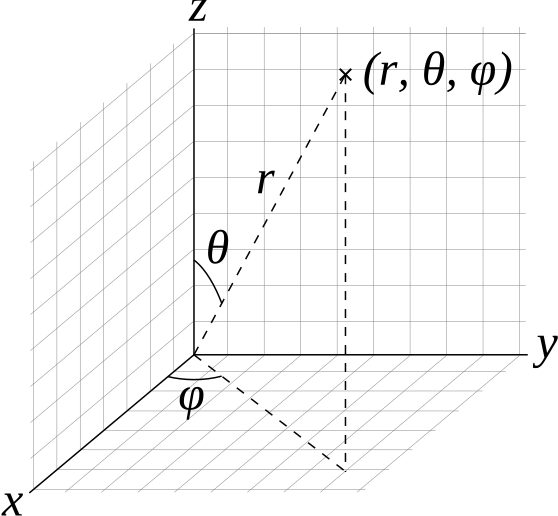
Coordinate system of structured spherical
volumes.
| Type | Name | Default | Description |
|:--------|:---------------|----------------------------:|:----------------------------------------------------------------------------------------------------------------|
| vec3f | gridOrigin | $(0, 0, 0)$ | origin of the grid in units of $(r, \theta, \phi)$; angles in degrees |
| vec3f | gridSpacing | $(1, 180/dim.y, 360/dim.z)$ | size of the grid cells in units of $(r, \theta, \phi)$, per default covering the full sphere; angles in degrees |
| OSPData | data | | the actual voxel 3D [data](#data) |
| uint | filter | `OSP_VOLUME_FILTER_LINEAR` | filter used for reconstructing the field, also allowed is `OSP_VOLUME_FILTER_NEAREST` |
| uint | gradientFilter | same as `filter` | filter used during gradient computations |
| float | background | `NaN` | value that is used when sampling an undefined region outside the volume domain |
Configuration parameters for structured spherical volumes.
The dimensions $(r, \theta, \phi)$ of the volume are inferred from the
size of the 3D array `data`, as is the type of the voxel values
(currently supported are: `OSP_UCHAR`, `OSP_SHORT`, `OSP_USHORT`,
`OSP_HALF`, `OSP_FLOAT`, and `OSP_DOUBLE`).
These grid parameters support flexible specification of spheres,
hemispheres, spherical shells, spherical wedges, and so forth. The grid
extents (computed as
`[gridOrigin, gridOrigin + (dimensions - 1) * gridSpacing]`) however
must be constrained such that:
- $r \geq 0$
- $0 \leq \theta \leq 180$
- $0 \leq \phi \leq 360$
### Adaptive Mesh Refinement (AMR) Volume
OSPRay currently supports block-structured (Berger-Colella) AMR volumes.
Volumes are specified as a list of blocks, which exist at levels of
refinement in potentially overlapping regions. Blocks exist in a tree
structure, with coarser refinement level blocks containing finer blocks.
The cell width is equal for all blocks at the same refinement level,
though blocks at a coarser level have a larger cell width than finer
levels.
There can be any number of refinement levels and any number of blocks at
any level of refinement. An AMR volume type is created by passing the
type string “`amr`” to `ospNewVolume`.
Blocks are defined by three parameters: their bounds, the refinement
level in which they reside, and the scalar data contained within each
block.
Note that cell widths are defined *per refinement level*, not per block.
| Type | Name | Default | Description |
|:------------|:-------------|------------------:|:-----------------------------------------------------------------------------------------------------------------------|
| uint | method | `OSP_AMR_CURRENT` | `OSPAMRMethod` sampling method. Supported methods are: |
| | | | `OSP_AMR_CURRENT` |
| | | | `OSP_AMR_FINEST` |
| | | | `OSP_AMR_OCTANT` |
| float\[\] | cellWidth | NULL | array of each level’s cell width |
| box3i\[\] | block.bounds | NULL | [data](#data) array of grid sizes (in voxels) for each AMR block |
| int\[\] | block.level | NULL | array of each block’s refinement level |
| OSPData\[\] | block.data | NULL | [data](#data) array of OSPData containing the actual scalar voxel data, only `OSP_FLOAT` is supported as `OSPDataType` |
| vec3f | gridOrigin | $(0, 0, 0)$ | origin of the grid |
| vec3f | gridSpacing | $(1, 1, 1)$ | size of the grid cells |
| float | background | `NaN` | value that is used when sampling an undefined region outside the volume domain |
Configuration parameters for AMR volumes.
Lastly, note that the `gridOrigin` and `gridSpacing` parameters act just
like the structured volume equivalent, but they only modify the root
(coarsest level) of refinement.
In particular, OSPRay’s / Open VKL’s AMR implementation was designed to
cover Berger-Colella \[1\] and Chombo \[2\] AMR data. The `method`
parameter above determines the interpolation method used when sampling
the volume.
OSP_AMR_CURRENT
finds the finest refinement level at that cell and interpolates through
this “current” level
OSP_AMR_FINEST
will interpolate at the closest existing cell in the volume-wide finest
refinement level regardless of the sample cell’s level
OSP_AMR_OCTANT
interpolates through all available refinement levels at that cell. This
method avoids discontinuities at refinement level boundaries at the cost
of performance
Details and more information can be found in the publication for the
implementation \[3\].
1. M.J. Berger and P. Colella, “Local adaptive mesh refinement for
shock hydrodynamics.” Journal of Computational Physics 82.1 (1989):
64-84. DOI: 10.1016/0021-9991(89)90035-1
2. M. Adams, P. Colella, D.T. Graves, J.N. Johnson, N.D. Keen, T.J.
Ligocki, D.F. Martin. P.W. McCorquodale, D. Modiano. P.O. Schwartz,
T.D. Sternberg, and B. Van Straalen, “Chombo Software Package for
AMR Applications – Design Document”, Lawrence Berkeley National
Laboratory Technical Report LBNL-6616E.
3. I. Wald, C. Brownlee, W. Usher, and A. Knoll, “CPU volume rendering
of adaptive mesh refinement data”. SIGGRAPH Asia 2017 Symposium on
Visualization – SA ’17, 18(8), 1–8. DOI: 10.1145/3139295.3139305
### Unstructured Volume
Unstructured volumes can have their topology and geometry freely
defined. Geometry can be composed of tetrahedral, hexahedral, wedge or
pyramid cell types. The data format used is compatible with VTK and
consists of multiple arrays: vertex positions and values, vertex
indices, cell start indices, cell types, and cell values. An
unstructured volume type is created by passing the type string
“`unstructured`” to `ospNewVolume`.
Sampled cell values can be specified either per-vertex (`vertex.data`)
or per-cell (`cell.data`). If both arrays are set, `cell.data` takes
precedence.
Similar to a mesh, each cell is formed by a group of indices into the
vertices. For each vertex, the corresponding (by array index) data value
will be used for sampling when rendering, if specified. The index order
for a tetrahedron is the same as `VTK_TETRA`: bottom triangle
counterclockwise, then the top vertex.
For hexahedral cells, each hexahedron is formed by a group of eight
indices into the vertices and data values. Vertex ordering is the same
as `VTK_HEXAHEDRON`: four bottom vertices counterclockwise, then top
four counterclockwise.
For wedge cells, each wedge is formed by a group of six indices into the
vertices and data values. Vertex ordering is the same as `VTK_WEDGE`:
three bottom vertices counterclockwise, then top three counterclockwise.
For pyramid cells, each cell is formed by a group of five indices into
the vertices and data values. Vertex ordering is the same as
`VTK_PYRAMID`: four bottom vertices counterclockwise, then the top
vertex.
To maintain VTK data compatibility, the `index` array may be specified
with cell sizes interleaved with vertex indices in the following format:
$n, id_1, ..., id_n, m, id_1, ..., id_m$. This alternative `index` array
layout can be enabled through the `indexPrefixed` flag (in which case,
the `cell.type` parameter must be omitted).
| Type | Name | Default | Description |
|:------------------------|:-------------------|--------:|:--------------------------------------------------------------------------------------------------------------------------------------------------------|
| vec3f\[\] | vertex.position | | [data](#data) array of vertex positions |
| float\[\] | vertex.data | | [data](#data) array of vertex data values to be sampled |
| uint32\[\] / uint64\[\] | index | | [data](#data) array of indices (into the vertex array(s)) that form cells |
| bool | indexPrefixed | false | indicates that the `index` array is compatible to VTK, where the indices of each cell are prefixed with the number of vertices |
| uint32\[\] / uint64\[\] | cell.index | | [data](#data) array of locations (into the index array), specifying the first index of each cell |
| float\[\] | cell.data | | [data](#data) array of cell data values to be sampled |
| uint8\[\] | cell.type | | [data](#data) array of cell types (VTK compatible), only set if `indexPrefixed = false`. Supported types are: |
| | | | `OSP_TETRAHEDRON` |
| | | | `OSP_HEXAHEDRON` |
| | | | `OSP_WEDGE` |
| | | | `OSP_PYRAMID` |
| bool | hexIterative | false | hexahedron interpolation method, defaults to fast non-iterative version which could have rendering inaccuracies may appear if hex is not parallelepiped |
| bool | precomputedNormals | false | whether to accelerate by precomputing, at a cost of 12 bytes/face |
| float | background | `NaN` | value that is used when sampling an undefined region outside the volume domain |
Configuration parameters for unstructured volumes.
### VDB Volume
VDB volumes implement a data structure that is very similar to the data
structure outlined in Museth \[1\], they are created by passing the type
string “`vdb`” to `ospNewVolume`.
The data structure is a hierarchical regular grid at its core: Nodes are
regular grids, and each grid cell may either store a constant value
(this is called a tile), or child pointers. Nodes in VDB trees are wide:
Nodes on the first level have a resolution of 323 voxels, on
the next level 163, and on the leaf level 83
voxels. All nodes on a given level have the same resolution. This makes
it easy to find the node containing a coordinate using shift operations
(see \[1\]). VDB leaf nodes are implicit in OSPRay / Open VKL: they are
stored as pointers to user-provided data.
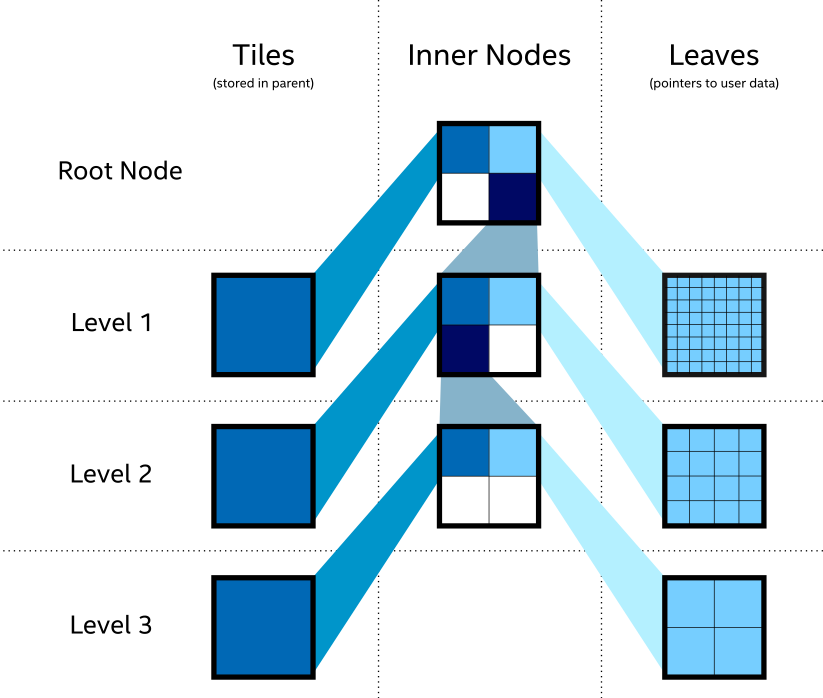
Topology of VDB volumes.
VDB volumes interpret input data as constant cells (which are then
potentially filtered). This is in contrast to `structuredRegular`
volumes, which have a vertex-centered interpretation.
The VDB implementation in OSPRay / Open VKL follows the following goals:
- Efficient data structure traversal on vector architectures.
- Enable the use of industry-standard `.vdb` files created through the
OpenVDB library.
- Compatibility with OpenVDB on a leaf data level, so that `.vdb` file
may be loaded with minimal overhead.
VDB volumes have the following parameters:
| Type | Name | Description |
|:------------|:-----------------|:-------------------------------------------------------------------------------------------------------------------------------------------------------------------------------------------------------------------------------------------------------------------------------------------------------------------------------------|
| int | maxSamplingDepth | do not descend further than to this depth during sampling, the maximum value and the default is 3 |
| uint32\[\] | node.level | level on which each input node exists, may be 1, 2 or 3 (levels are counted from the root level = 0 down) |
| vec3i\[\] | node.origin | the node origin index (per input node) |
| OSPData\[\] | node.data | [data](#data) arrays with the node data (per input node). Nodes that are tiles are expected to have single-item arrays. Leaf-nodes with grid data expected to have compact 3D arrays in zyx layout (z changes most quickly) with the correct number of voxels for the `level`. Only `OSP_FLOAT` is supported as field `OSPDataType`. |
| OSPData | nodesPackedDense | optionally provided instead of `node.data`, a single array of all dense node data in a contiguous zyx layout, provided in the same order as the corresponding `node.*` parameters |
| OSPData | nodesPackedTile | optionally provided instead of `node.data`, a single array of all tile node data in a contiguous layout, provided in the same order as the corresponding `node.*` parameters |
| uint32\[\] | node.format | for each input node, whether it is of format `OSP_VOLUME_FORMAT_DENSE_ZYX` (and thus stored in `nodesPackedDense`), or `OSP_VOLUME_FORMAT_TILE` (stored in `nodesPackedTile`) |
| uint | filter | filter used for reconstructing the field, default is `OSP_VOLUME_FILTER_LINEAR`, alternatively `OSP_VOLUME_FILTER_NEAREST`, or `OSP_VOLUME_FILTER_CUBIC`. |
| uint | gradientFilter | filter used for reconstructing the field during gradient computations, default same as `filter` |
| float | background | value that is used when sampling an undefined region outside the volume domain, default `NaN` |
Configuration parameters for VDB volumes.
The `nodesPackedDense` and `nodesPackedTile` together with `node.format`
parameters may be provided instead of `node.data`; this packed data
layout may provide better performance.
1. Museth, K. VDB: High-Resolution Sparse Volumes with Dynamic
Topology. ACM Transactions on Graphics 32(3), 2013. DOI:
10.1145/2487228.2487235
### Particle Volume
Particle volumes consist of a set of points in space. Each point has a
position, a radius, and a weight typically associated with an attribute.
Particle volumes are created by passing the type string “`particle`” to
`ospNewVolume`.
A radial basis function defines the contribution of that particle.
Currently, we use the Gaussian radial basis function
$$\phi(P) = w \exp\left(-\frac{(P - p)^2}{2 r^2}\right),$$ where $P$ is
the particle position, $p$ is the sample position, $r$ is the radius and
$w$ is the weight. At each sample, the scalar field value is then
computed as the sum of each radial basis function $\phi$, for each
particle that overlaps it.
The OSPRay / Open VKL implementation is similar to direct evaluation of
samples in Reda et al. \[2\]. It uses an Embree-built BVH with a custom
traversal, similar to the method in \[1\].
| Type | Name | Default | Description |
|:----------|:------------------------|--------:|:---------------------------------------------------------------------------------------------------------------------------------------------------------------------------------------------------------------------------------------------------------------------------------------------------------------------------------------------------------------------------------------------------------------|
| vec3f\[\] | particle.position | | [data](#data) array of particle positions |
| float\[\] | particle.radius | | [data](#data) array of particle radii |
| float\[\] | particle.weight | NULL | optional [data](#data) array of particle weights, specifying the height of the kernel. |
| float | radiusSupportFactor | 3.0 | The multiplier of the particle radius required for support. Larger radii ensure smooth results at the cost of performance. In the Gaussian kernel, the radius is one standard deviation ($\sigma$), so a value of 3 corresponds to $3 \sigma$. |
| float | clampMaxCumulativeValue | 0 | The maximum cumulative value possible, set by user. All cumulative values will be clamped to this, and further traversal (RBF summation) of particle contributions will halt when this value is reached. A value of zero or less turns this off. |
| bool | estimateValueRanges | true | Enable heuristic estimation of value ranges which are used in internal acceleration structures as well as for determining the volume’s overall value range. When set to `false`, the user *must* specify `clampMaxCumulativeValue`, and all value ranges will be assumed \[0–`clampMaxCumulativeValue`\]. Disabling this switch may improve volume commit time, but will make volume rendering less efficient. |
Configuration parameters for particle volumes.
1. A. Knoll, I. Wald, P. Navratil, A. Bowen, K. Reda, M.E., Papka,
and K. Gaither, “RBF Volume Ray Casting on Multicore and Manycore
CPUs”, 2014, Computer Graphics Forum, 33: 71–80.
doi:10.1111/cgf.12363
2. K. Reda, A. Knoll, K. Nomura, M. E. Papka, A. E. Johnson and J.
Leigh, “Visualizing large-scale atomistic simulations in
ultra-resolution immersive environments”, 2013 IEEE Symposium on
Large-Scale Data Analysis and Visualization (LDAV), Atlanta, GA,
2013, pp. 59–65.
### Transfer Function
Transfer functions map the scalar values of volumes to color and opacity
and thus they can be used to visually emphasize certain features of the
volume. To create a new transfer function of given type `type` use
``` cpp
OSPTransferFunction ospNewTransferFunction(const char *type);
```
The returned handle can be assigned to a volumetric model (described
below) as parameter “`transferFunction`” using `ospSetObject`.
One type of transfer function that is supported by OSPRay is the linear
transfer function, which interpolates between given equidistant colors
and opacities. It is create by passing the string “`piecewiseLinear`” to
`ospNewTransferFunction` and it is controlled by these parameters:
| Type | Name | Description |
|:----------|:--------|:----------------------------------------------|
| vec3f\[\] | color | [data](#data) array of colors (linear RGB) |
| float\[\] | opacity | [data](#data) array of opacities |
| box1f | value | domain (scalar range) this function maps from |
Parameters accepted by the linear transfer function.
The arrays `color` and `opacity` can be of different length.
### VolumetricModels
Volumes in OSPRay are given volume rendering appearance information
through VolumetricModels. This decouples the physical representation of
the volume (and possible acceleration structures it contains) to
rendering-specific parameters (where more than one set may exist
concurrently). To create a volume instance, call
``` cpp
OSPVolumetricModel ospNewVolumetricModel(OSPVolume);
```
The passed volume can be `NULL` as long as the volume to be used is
passed as a parameter. If both a volume is specified on object creation
and as a parameter, the parameter value is used. If the parameter value
is later removed, the volume object passed on object creation is again
used.
| Type | Name | Default | Description |
|:--------------------|:-----------------|--------:|:-------------------------------------------------------------------------------------------------------------------------------------|
| OSPVolume | volume | | optional [volume](#volumes) object this model references |
| OSPTransferFunction | transferFunction | | [transfer function](#transfer-function) to use |
| float | densityScale | 1.0 | makes volumes uniformly thinner or thicker |
| float | anisotropy | 0.0 | anisotropy of the (Henyey-Greenstein) phase function in \[-1–1\] ([path tracer](#path-tracer) only), default to isotropic scattering |
| uint32 | id | -1u | optional user ID, for [framebuffer](#framebuffer) channel `OSP_FB_ID_OBJECT` |
Parameters understood by VolumetricModel.
Geometries
----------
Geometries in OSPRay are objects that describe intersectable surfaces.
To create a new geometry object of given type `type` use
``` cpp
OSPGeometry ospNewGeometry(const char *type);
```
Note that in the current implementation geometries are limited to a
maximum of 232 primitives.
### Mesh
A mesh consisting of either triangles or quads is created by calling
`ospNewGeometry` with type string “`mesh`”. Once created, a mesh
recognizes the following parameters:
| Type | Name | Description |
|:------------------------|:-----------------------|:---------------------------------------------------------------------------------------------------------------------|
| vec3f\[\] | vertex.position | [data](#data) array of vertex positions, overridden by `motion.*` arrays |
| vec3f\[\] | normal | [data](#data) array of face-varying normals, overridden by `motion.*` arrays |
| vec3f\[\] | vertex.normal | [data](#data) array of vertex-varying normals, overridden by `motion.*` arrays |
| vec4f\[\] / vec3f\[\] | color | [data](#data) array of face-varying colors (linear RGBA/RGB) |
| vec4f\[\] / vec3f\[\] | vertex.color | [data](#data) array of vertex-varying colors (linear RGBA/RGB) |
| vec2f\[\] | texcoord | [data](#data) array of face-varying texture coordinates |
| vec2f\[\] | vertex.texcoord | [data](#data) array of vertex-varying texture coordinates |
| vec3ui\[\] / vec4ui\[\] | index | [data](#data) array of (either triangle or quad) indices (into the vertex array(s)) |
| bool | quadSoup | when no explicit `index` is given, indicates whether to assume a ‘soup’ of quads instead of triangles, default false |
| vec3f\[\]\[\] | motion.vertex.position | [data](#data) array of vertex position arrays (uniformly distributed keys for deformation motion blur) |
| vec3f\[\]\[\] | motion.normal | [data](#data) array of face-varying normal arrays (uniformly distributed keys for deformation motion blur) |
| vec3f\[\]\[\] | motion.vertex.normal | [data](#data) array of vertex-varying normal arrays (uniformly distributed keys for deformation motion blur) |
| box1f | time | time associated with first and last key in `motion.*` arrays (for deformation motion blur), default \[0, 1\] |
Parameters defining a mesh geometry.
The data type of index arrays differentiates between the underlying
geometry, triangles are used for a index with `vec3ui` type and quads
for `vec4ui` type. Quads are internally handled as a pair of two
triangles, thus mixing triangles and quads is supported by encoding some
triangle as a quad with the last two vertex indices being identical
(`w=z`).
The `vertex.position` array is mandatory to create a valid mesh.
The `index` array is optional. If none is provided, a ‘triangle soup’ is
assumed, i.e., each three consecutive vertices form one triangle; unless
the boolean `quadSoup` is set to true, then a ‘quad soup’ is assumed
i.e., each four subsequent vertices form one quad. If the size of the
`vertex.position` array is not a multiple of three for triangles or four
for quads, the remainder vertices are ignored.
Face-varying attributes (`normal`, `motion.normal`, `color`, `texcoord`)
map unique values to each vertex of a primitive/face (triangle or quad),
thus attributes can be different for the same vertex that is shared by
multiple primitives. Essentially, face-varying attributes are a
‘attribute soup’ and behave similar to the implicit index, the size of
the array must be at least three times the number of triangles or four
times the number of quads, respectively. Face-varying attributes take
precedence over the respective vertex attributes (`vertex.normal`,
`motion.vertex.normal`, `vertex.color`, `vertex.texcoord`) when both
arrays of the same attribute are present.
### Subdivision
A mesh consisting of subdivision surfaces, created by specifying a
geometry of type “`subdivision`”. Once created, a subdivision recognizes
the following parameters:
| Type | Name | Description |
|:----------|:--------------------|:----------------------------------------------------------------------------------------------------------------------|
| vec3f\[\] | vertex.position | [data](#data) array of vertex positions |
| vec4f\[\] | color | optional [data](#data) array of face-varying colors (linear RGBA) |
| vec4f\[\] | vertex.color | optional [data](#data) array of vertex-varying colors (linear RGBA) |
| vec2f\[\] | texcoord | optional [data](#data) array of vertex-varying texture coordinates |
| vec2f\[\] | vertex.texcoord | optional [data](#data) array of vertex-varying texture coordinates |
| float | level | global level of tessellation, default 5 |
| uint\[\] | index | [data](#data) array of indices (into the vertex array(s)) |
| float\[\] | index.level | optional [data](#data) array of per-edge levels of tessellation, overrides global level |
| uint\[\] | face | optional [data](#data) array holding the number of indices/edges (3 to 15) per face, defaults to 4 (a pure quad mesh) |
| vec2i\[\] | edgeCrease.index | optional [data](#data) array of edge crease indices |
| float\[\] | edgeCrease.weight | optional [data](#data) array of edge crease weights |
| uint\[\] | vertexCrease.index | optional [data](#data) array of vertex crease indices |
| float\[\] | vertexCrease.weight | optional [data](#data) array of vertex crease weights |
| uint | mode | `OSPSubdivisionMode` subdivision edge boundary mode, supported modes are: |
| | | `OSP_SUBDIVISION_NO_BOUNDARY` |
| | | `OSP_SUBDIVISION_SMOOTH_BOUNDARY` (default) |
| | | `OSP_SUBDIVISION_PIN_CORNERS` |
| | | `OSP_SUBDIVISION_PIN_BOUNDARY` |
| | | `OSP_SUBDIVISION_PIN_ALL` |
Parameters defining a Subdivision geometry.
The `vertex` and `index` arrays are mandatory to create a valid
subdivision surface. If no `face` array is present then a pure quad mesh
is assumed (the number of indices must be a multiple of 4). Optionally
supported are edge and vertex creases.
### Spheres
A geometry consisting of individual spheres, each of which can have an
own radius, is created by calling `ospNewGeometry` with type string
“`sphere`”. The spheres will not be tessellated but rendered
procedurally and are thus perfectly round. To allow a variety of sphere
representations in the application this geometry allows a flexible way
of specifying the data of center position and radius within a
[data](#data) array:
| Type | Name | Default | Description |
|:----------|:----------------|--------:|:--------------------------------------------------------------------------|
| vec3f\[\] | sphere.position | | [data](#data) array of center positions |
| float\[\] | sphere.radius | NULL | optional [data](#data) array of the per-sphere radius |
| vec3f\[\] | sphere.normal | NULL | optional [data](#data) array of normals (only for “oriented disc”) |
| vec2f\[\] | sphere.texcoord | NULL | optional [data](#data) array of texture coordinates (constant per sphere) |
| float | radius | 0.01 | default radius for all spheres (if `sphere.radius` is not set) |
| uint | type | | `OSPSphereType` for rendering the sphere. Supported types are: |
| | | | `OSP_SPHERE` (default) |
| | | | `OSP_DISC` |
| | | | `OSP_ORIENTED_DISC` |
Parameters defining a spheres geometry.
### Curves
A geometry consisting of multiple curves is created by calling
`ospNewGeometry` with type string “`curve`”. The parameters defining
this geometry are listed in the table below.
| Type | Name | Description |
|:-----------|:-----------------------|:---------------------------------------------------------------------------------|
| vec4f\[\] | vertex.position_radius | [data](#data) array of vertex position and per-vertex radius |
| vec2f\[\] | vertex.texcoord | [data](#data) array of per-vertex texture coordinates |
| vec4f\[\] | vertex.color | [data](#data) array of corresponding vertex colors (linear RGBA) |
| vec3f\[\] | vertex.normal | [data](#data) array of curve normals (only for “ribbon” curves) |
| vec4f\[\] | vertex.tangent | [data](#data) array of curve tangents (only for “hermite” curves) |
| uint32\[\] | index | [data](#data) array of indices to the first vertex or tangent of a curve segment |
| uint | type | `OSPCurveType` for rendering the curve. Supported types are: |
| | | `OSP_FLAT` |
| | | `OSP_ROUND` |
| | | `OSP_RIBBON` |
| | | `OSP_DISJOINT` |
| uint | basis | `OSPCurveBasis` for defining the curve. Supported bases are: |
| | | `OSP_LINEAR` |
| | | `OSP_BEZIER` |
| | | `OSP_BSPLINE` |
| | | `OSP_HERMITE` |
| | | `OSP_CATMULL_ROM` |
Parameters defining a curves geometry.
Positions in `vertex.position_radius` parameter supports per-vertex
varying radii with data type `vec4f[]` and instantiate Embree curves
internally for the relevant type/basis mapping.
The following section describes the properties of different curve basis’
and how they use the data provided in data buffers:
OSP_LINEAR
The indices point to the first of 2 consecutive control points in the
vertex buffer. The first control point is the start and the second
control point the end of the line segment. The curve goes through all
control points listed in the vertex buffer.
OSP_BEZIER
The indices point to the first of 4 consecutive control points in the
vertex buffer. The first control point represents the start point of the
curve, and the 4th control point the end point of the curve. The Bézier
basis is interpolating, thus the curve does go exactly through the first
and fourth control vertex.
OSP_BSPLINE
The indices point to the first of 4 consecutive control points in the
vertex buffer. This basis is not interpolating, thus the curve does in
general not go through any of the control points directly. Using this
basis, 3 control points can be shared for two continuous neighboring
curve segments, e.g., the curves $(p0, p1, p2, p3)$ and
$(p1, p2, p3, p4)$ are C1 continuous. This feature make this basis a
good choice to construct continuous multi-segment curves, as memory
consumption can be kept minimal.
OSP_HERMITE
It is necessary to have both vertex buffer and tangent buffer for using
this basis. The indices point to the first of 2 consecutive points in
the vertex buffer, and the first of 2 consecutive tangents in the
tangent buffer. This basis is interpolating, thus does exactly go
through the first and second control point, and the first order
derivative at the begin and end matches exactly the value specified in
the tangent buffer. When connecting two segments continuously, the end
point and tangent of the previous segment can be shared.
OSP_CATMULL_ROM
The indices point to the first of 4 consecutive control points in the
vertex buffer. If $(p0, p1, p2, p3)$ represent the points then this
basis goes through $p1$ and $p2$, with tangents as $(p2-p0)/2$ and
$(p3-p1)/2$.
The following section describes the properties of different curve types’
and how they define the geometry of a curve:
OSP_FLAT
This type enables faster rendering as the curve is rendered as a
connected sequence of ray facing quads.
OSP_ROUND
This type enables rendering a real geometric surface for the curve which
allows closeup views. This mode renders a sweep surface by sweeping a
varying radius circle tangential along the curve.
OSP_RIBBON
The type enables normal orientation of the curve and requires a normal
buffer be specified along with vertex buffer. The curve is rendered as a
flat band whose center approximately follows the provided vertex buffer
and whose normal orientation approximately follows the provided normal
buffer. Not supported for basis `OSP_LINEAR`.
OSP_DISJOINT
Only supported for basis `OSP_LINEAR`; the segments are open and not
connected at the joints, i.e., the curve segments are either individual
cones or cylinders.
### Boxes
OSPRay can directly render axis-aligned bounding boxes without the need
to convert them to quads or triangles. To do so create a boxes geometry
by calling `ospNewGeometry` with type string “`box`”.
| Type | Name | Description |
|:----------|:-----|:-----------------------------|
| box3f\[\] | box | [data](#data) array of boxes |
Parameters defining a boxes geometry.
### Planes
OSPRay can directly render planes defined by plane equation coefficients
in its implicit form $ax + by + cz + d = 0$. By default planes are
infinite but their extents can be limited by defining optional bounding
boxes. A planes geometry can be created by calling `ospNewGeometry` with
type string “`plane`”.
| Type | Name | Description |
|:----------|:-------------------|:---------------------------------------------------------|
| vec4f\[\] | plane.coefficients | [data](#data) array of plane coefficients $(a, b, c, d)$ |
| box3f\[\] | plane.bounds | optional [data](#data) array of bounding boxes |
Parameters defining a planes geometry.
### Isosurfaces
OSPRay can directly render multiple isosurfaces of a volume without
first tessellating them. To do so create an isosurfaces geometry by
calling `ospNewGeometry` with type string “`isosurface`”. The appearance
information of the surfaces is set through the Geometric Model.
Per-isosurface colors can be set by passing per-primitive colors to the
Geometric Model, in order of the isosurface array.
| Type | Name | Description |
|:----------|:---------|:---------------------------------------------------|
| float | isovalue | single isovalues |
| float\[\] | isovalue | [data](#data) array of isovalues |
| OSPVolume | volume | handle of the [Volume](#volumes) to be isosurfaced |
Parameters defining an isosurfaces geometry.
### GeometricModels
Geometries are matched with surface appearance information through
GeometricModels. These take a geometry, which defines the surface
representation, and applies either full-object or per-primitive color
and material information. To create a geometric model, call
``` cpp
OSPGeometricModel ospNewGeometricModel(OSPGeometry);
```
The passed geometry can be `NULL` as long as the geometry to be used is
passed as a parameter. If both a geometry is specified on object
creation and as a parameter, the parameter value is used. If the
parameter value is later removed, the geometry object passed on object
creation is again used.
Color and material are fetched with the primitive ID of the hit (clamped
to the valid range, thus a single color or material is fine), or mapped
first via the `index` array (if present). All parameters are optional,
however, some renderers (notably the [path tracer](#path-tracer))
require a material to be set. Materials are either handles of
`OSPMaterial`, or indices into the `material` array on the
[renderer](#renderers), which allows to build a [world](#world) which
can be used by different types of renderers.
An `invertNormals` flag allows to invert (shading) normal vectors of the
rendered geometry. That is particularly useful for clipping. By changing
normal vectors orientation one can control whether inside or outside of
the clipping geometry is being removed. For example, a clipping geometry
with normals oriented outside clips everything what’s inside.
| Type | Name | Description |
|:----------------------------------------------------|:--------------|:-----------------------------------------------------------------------------------------------------------------------------------------------------|
| OSPGeometry | geometry | optional [geometry](#geometries) object this model references |
| OSPMaterial / OSPMaterial\[\] / uint32 / uint32\[\] | material | optional ([data](#data) array of per-primitive) [material](#materials), may be an index into the `material` parameter on the renderer (if it exists) |
| vec4f / vec4f\[\] | color | optional ([data](#data) array of per-primitive) color assigned to the geometry (linear RGBA) |
| uint8\[\] | index | optional [data](#data) array of per-primitive indices into `color` and `material` |
| bool | invertNormals | inverts all shading normals (Ns), default false |
| uint32 | id | optional user ID, for [framebuffer](#framebuffer) channel `OSP_FB_ID_OBJECT`, default -1u |
Parameters understood by GeometricModel.
Lights
------
To create a new light source of given type `type` use
``` cpp
OSPLight ospNewLight(const char *type);
```
All light sources accept the following parameters:
| Type | Name | Default | Description |
|:------|:------------------|--------:|:----------------------------------------------------------------------------------------------------------------------------------|
| vec3f | color | white | color of the light (linear RGB) |
| float | intensity | 1 | intensity of the light (a factor) |
| uint | intensityQuantity | | `OSPIntensityQuantity` to set the radiometric quantity represented by `intensity`. The default value depends on the light source. |
| bool | visible | true | whether the light can be directly seen |
Parameters accepted by all lights.
In OSPRay the `intensity` parameter of a light source can correspond to
different types of radiometric quantities. The type of the value
represented by a light’s `intensity` parameter is set using
`intensityQuantity`, which accepts values from the enum type
`OSPIntensityQuantity`. The supported types of `OSPIntensityQuantity`
differ between the different light sources (see documentation of each
specific light source).
| Name | Description |
|:----------------------------------|:---------------------------------------------------------------------------------------------------------------------------------------|
| OSP_INTENSITY_QUANTITY_POWER | the overall amount of light energy emitted by the light source into the scene, unit is W |
| OSP_INTENSITY_QUANTITY_INTENSITY | the overall amount of light emitted by the light in a given direction, unit is W/sr |
| OSP_INTENSITY_QUANTITY_RADIANCE | the amount of light emitted by a point on the light source in a given direction, unit is W/sr/m2 |
| OSP_INTENSITY_QUANTITY_IRRADIANCE | the amount of light arriving at a surface point, assuming the light is oriented towards to the surface, unit is W/m2 |
| OSP_INTENSITY_QUANTITY_SCALE