https://github.com/repplus/rep-chrome
rep+ — Burp-style HTTP Repeater for Chrome DevTools with built‑in AI to explain requests and suggest attacks
https://github.com/repplus/rep-chrome
css html javascript markdown
Last synced: 5 months ago
JSON representation
rep+ — Burp-style HTTP Repeater for Chrome DevTools with built‑in AI to explain requests and suggest attacks
- Host: GitHub
- URL: https://github.com/repplus/rep-chrome
- Owner: repplus
- License: mit
- Created: 2025-11-20T15:45:51.000Z (8 months ago)
- Default Branch: main
- Last Pushed: 2026-01-13T12:31:32.000Z (7 months ago)
- Last Synced: 2026-01-13T15:36:43.479Z (7 months ago)
- Topics: css, html, javascript, markdown
- Language: JavaScript
- Homepage:
- Size: 1.34 MB
- Stars: 1,355
- Watchers: 15
- Forks: 166
- Open Issues: 9
-
Metadata Files:
- Readme: README.md
- Contributing: CONTRIBUTING.md
- Funding: .github/FUNDING.yml
- License: LICENSE
- Security: SECURITY.md
Awesome Lists containing this project
README





# rep+
rep+ is a lightweight Chrome DevTools extension inspired by Burp Suite's Repeater, now supercharged with AI. I often need to poke at a few requests without spinning up the full Burp stack, so I built this extension to keep my workflow fast, focused, and intelligent with integrated LLM support.

[](https://video.twimg.com/amplify_video/1992382891196571648/pl/zE5-oOXgVua1ZBQn.m3u8?tag=14)
## 🚀 Install rep+ Chrome Extension
[](https://chromewebstore.google.com/detail/rep+/dhildnnjbegaggknfkagdpnballiepfm)
## Table of Contents
- [Features](#features)
- [Quick Start](#quick-start)
- [Installation](#installation)
- [Permissions & Privacy](#permissions--privacy)
- [Limitations](#-limitations)
- [Star History](#star-history)
- [Found a Bug or Issue?](#found-a-bug-or-issue)
- [❤️ Support the Project](#️-support-the-project)
## Features
### Capture & Replay
- No proxy setup; works directly in Chrome (no CA certs needed).
- Capture every HTTP request and replay with modified method, headers, or body.
- Multi-tab capture (optional permission) with visual indicators 🌍 and deduplication.
- Clear workspace quickly; export/import requests as JSON for sharing or later reuse.
### Organization & Filtering
- Hierarchical grouping by page and domain (first-party prioritized).
- Third-party detection and collapsible groups; domain badges for quick context.
- Starring for requests, pages, and domains (auto-star for new matches).
- Timeline view (flat, chronological) to see what loaded before a request.
- Filters: method, domain, color tags, text search, regex mode.
### Views & Editing
- Pretty / Raw / Hex views; layout toggle (horizontal/vertical).
- Converters: Base64, URL encode/decode, JWT decode, Hex/UTF-8.
- History, undo/redo, and syntax highlighting for requests/responses.
- Context menu helpers on the request editor:
- Convert selected text (Base64, URL encode/decode, JWT decode).
- **Copy as** full HTTP request in multiple languages: `curl`, PowerShell (`Invoke-WebRequest`), Python (`requests`), and JavaScript `fetch`.
- Screenshot editor for request/response pairs: full-content capture, side‑by‑side or stacked layout, zoom, highlight and black-box redaction, resizable/movable annotations, keyboard delete, and undo/redo for all edits.
### Bulk & Automation
- Bulk replay with 4 attack modes: Sniper, Battering Ram, Pitchfork, Cluster Bomb.
- Mark positions with `§`, configure payloads, pause/resume long runs.
- Response diff view to spot changes between baseline and attempts.
### Extractors & Search
- Unified Extractor: secrets, endpoints, and parameters from captured JS.
- **Secret Scanner**: entropy + patterns with confidence scores; pagination and domain filter.
- Powered by [Kingfisher](https://github.com/mongodb/kingfisher) rules for comprehensive secret detection
- Supports AWS, GitHub, Google, Slack, Stripe, Twilio, Azure, and many more service providers
- Rules stored locally in `rules/` directory for offline use
- **Note**: Secret scanning only analyzes JavaScript files from the **current inspected tab**.
- **Export**: Export all secrets to CSV for analysis and reporting
- **Endpoint Extractor**: full URLs, relative paths, GraphQL; method detection; one-click copy (rebuilds base URL).
- **Export**: Export all endpoints to CSV with method, endpoint path, confidence, and source file
- **Parameter Extractor**: passive JavaScript parameter discovery with intelligent grouping and risk assessment.
- **Parameter Types**: Extracts query, body, header, and path parameters from JavaScript files
- **Grouped by Endpoint**: Parameters are organized by endpoint with expandable/collapsible groups
- **Risk Classification**: Automatically identifies high-risk parameters (auth, admin, debug flags, IDOR, feature flags)
- **Confidence Scoring**: Stricter confidence model than endpoints to reduce false positives
- **Smart Filtering**: Suppresses common false positives (webpack, React, jQuery, DOM events, telemetry)
- **Copy as cURL**: One-click copy generates curl commands with all parameters properly formatted
- **Location Badges**: Visual indicators for parameter location (query/body/header/path)
- **Domain Filtering**: Filter parameters by source domain with accurate counts
- **Column Sorting**: Sort by parameter name, location, endpoint, method, risk level, or confidence
- **Export Options**:
- **CSV Export**: Export all parameters with location, endpoint, method, risk level, and confidence
- **Postman Collection Export**: Generate ready-to-import Postman collection JSON with all endpoints and parameters
- Automatically groups parameters by endpoint
- Includes query, body, and header parameters
- Uses Postman variable syntax (`{{paramName}}`) for easy testing
- Perfect for security testers who want to quickly import discovered APIs into Postman
- **Response Search**: regex support, match preview, pagination, domain filter.
### AI Assistance
#### Rep+ AI Assistance (Interactive LLM Chat)
- **Interactive Chat Interface**: Real-time conversation with AI about your HTTP requests and responses
- Streaming responses with live markdown rendering
- Syntax highlighting for code blocks (supports multiple languages)
- Copy-to-clipboard for code blocks with visual feedback
- Token usage counter with color-coded warnings
- **Per-Request Chat History**: Each request maintains its own conversation history
- Automatically saves chat when switching between requests
- Restores previous conversations when returning to a request
- Clear chat button resets only the current request's conversation
- **Cross-Reference Previous Requests**: Reference investigations from other requests
- "Reference previous requests" UI with collapsible/expandable list
- Select which previous requests to include in context
- AI receives summaries of previous investigations for referenced requests
- Perfect for multi-step testing scenarios (e.g., login → authenticated request)
- **Request Modification**: AI can modify requests directly in the editor
- "Apply modifications" button appears when AI suggests changes
- Smart detection: only shows when modifications are actually suggested
- Preserves request structure (headers, formatting, HTTP version)
- Animated application with visual feedback
- Supports header updates, body modifications, and new header additions
- **Response History Tracking**: Tracks multiple responses from resends
- Maintains chronological history of all responses (original + resends)
- AI has context on all responses when analyzing changes
- Conditional inclusion: only includes full history when relevant (token optimization)
- **Smart Context Management**: Intelligent token optimization
- Response truncation for large responses (~1,500 tokens max)
- Chat history compression (summarizes older messages)
- Conditional response inclusion (only when asked about)
- Limits response history to last 2-3 responses
- Keeps last 15 messages in conversation history
- **Multi-Provider Support**: Works with Claude, Gemini, and local Ollama models
- Automatic model detection for Anthropic and Gemini APIs
- Manual URL/model configuration for local models
- Streaming support for all providers
- **Use Cases**:
- Security testing and penetration testing guidance
- Request/response explanation and debugging
- Automated request modification for testing
- Bug bounty report generation
- Vulnerability identification and attack vector suggestions
- Multi-step attack chain planning with cross-request context
#### Other AI Features
- **Explain Request** (Claude/Gemini) with streaming responses.
- **Suggest Attack Vectors**: request + response analysis; auto-send if no response; payload suggestions; reflections/errors/multi-step chains; fallback to request-only with warning.
- **Context menu "Explain with AI"** for selected text.
- **Attack Surface Analysis** per domain: categorization (Auth/Payments/Admin/etc.), color-coded icons, toggle between list and attack-surface view.
- **Export AI outputs** as Markdown or PDF to save RPD/TPM.
### Productivity & Theming
- **7 Beautiful Themes**: Choose from a variety of modern, carefully crafted themes:
- 🌙 **Dark (Default)**: Classic dark theme optimized for long sessions
- ☀️ **Light**: Clean light theme for bright environments
- 🎨 **Modern Dark**: VS Code Dark+ inspired theme with enhanced contrast
- ✨ **Modern Light**: GitHub-style light theme with crisp colors
- 💙 **Blue**: Cool blue/cyan color scheme for a fresh look
- 🔆 **High Contrast**: Accessibility-focused theme with maximum contrast
- 🖥️ **Terminal**: Green-on-black terminal aesthetic for retro vibes
- **Theme Selector**: Easy dropdown menu to switch themes instantly
- **Smooth Transitions**: Animated theme switching for a polished experience
- **Optimized Syntax Highlighting**: All themes include carefully tuned colors for:
- HTTP methods, paths, headers, and versions
- JSON keys, strings, numbers, booleans, and null values
- Parameters and cookies
- Request method badges (GET, POST, PUT, DELETE, PATCH)
- **Theme Persistence**: Your theme preference is saved and restored automatically
- Request color tags and filters.
- Syntax highlighting for JSON/XML/HTML.
## Quick Start
1) Open Chrome DevTools → “rep+” tab.
2) Browse: requests auto-capture.
3) Click a request: see raw request/response immediately.
4) Edit and “Send” to replay; use AI buttons for explain/attack suggestions.
5) Use timeline, filters, and bulk replay for deeper testing.
## Installation
1. **Clone the repository**:
```bash
git clone https://github.com/bscript/rep.git
```
2. **Open Chrome Extensions**:
- Navigate to `chrome://extensions/` in your browser.
- Enable **Developer mode** (toggle in the top right corner).
3. **Load the Extension**:
- Click **Load unpacked**.
- Select the `rep` folder you just cloned.
4. **Open DevTools**:
- Press `F12` or right-click -> Inspect.
- Look for the **rep+** tab (you might need to click the `>>` overflow menu).
This combo makes rep+ handy for bug bounty hunters and vulnerability researchers who want Burp-like iteration without the heavyweight UI. Install the extension, open DevTools, head to the rep+ panel, and start hacking. 😎
### Local Model (Ollama) Setup
If you use a local model (e.g., Ollama) you must allow Chrome extensions to call it, otherwise you’ll see 403/CORS errors.
1. Stop any running Ollama instance.
2. Start Ollama with CORS enabled (pick one):
- Allow only Chrome extensions:
```bash
OLLAMA_ORIGINS="chrome-extension://*" ollama serve
```
- Allow everything (easier for local dev):
```bash
OLLAMA_ORIGINS="*" ollama serve
```
3. Verify your model exists (e.g., `gemma3:4b`) with `ollama list`.
4. Reload the extension and try again. If you still see 403, check Ollama logs for details.
## Permissions & Privacy
- **Optional**: `webRequest` + `` only when you enable multi-tab capture.
- **Data**: Stored locally; no tracking/analytics.
- **AI**: Your API keys stay local; request/response content is sent only to the provider you choose (Claude/Gemini) when you invoke AI features.
## ⚠️ Limitations
rep+ runs inside Chrome DevTools, so:
- No raw HTTP/1 or malformed requests (fetch() limitation)
- Some headers can’t be overridden (browser sandbox)
- No raw TCP sockets (no smuggling/pipelining tests)
- DevTools panel constraints limit certain UI setups
rep+ is best for quick testing, replaying, and experimenting — not full low-level HTTP work.
## Star History
[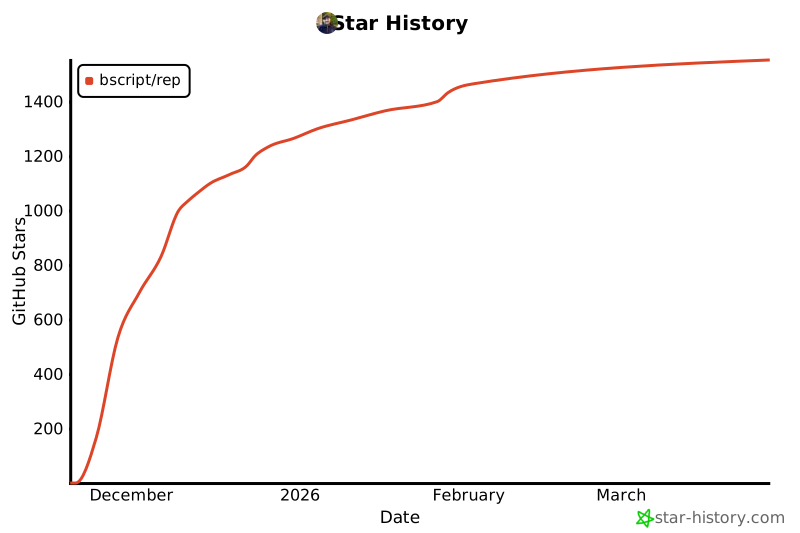](https://www.star-history.com/#bscript/rep&type=date&legend=top-left)
## Found a Bug or Issue?
If you encounter any bugs, unexpected behavior, or have feature requests, please help me improve **rep+** by [opening an issue here](https://github.com/bscript/rep/issues).
I’ll do my best to address it as quickly as possible! 🙏
## ❤️ Support the Project
I maintain **rep+** alone, in my free time.
Sponsorship helps me keep improving the extension, adding new features, and responding to issues quickly.
If **rep+ saved you time** during testing, development, or bug bounty work, please consider supporting the project.
**Every dollar helps. ❤️**
## Contributors 🤝

---
Sponsors



