https://github.com/repronim/containers
Containers "distribution" for reproducible neuroimaging
https://github.com/repronim/containers
Last synced: 7 months ago
JSON representation
Containers "distribution" for reproducible neuroimaging
- Host: GitHub
- URL: https://github.com/repronim/containers
- Owner: ReproNim
- License: apache-2.0
- Created: 2019-04-18T02:58:38.000Z (over 7 years ago)
- Default Branch: master
- Last Pushed: 2026-01-15T20:09:33.000Z (7 months ago)
- Last Synced: 2026-01-15T22:32:42.969Z (7 months ago)
- Language: Roff
- Size: 5.16 MB
- Stars: 30
- Watchers: 6
- Forks: 16
- Open Issues: 45
-
Metadata Files:
- Readme: README.md
- License: LICENSE
- Citation: CITATION.cff
Awesome Lists containing this project
README
# ReproNim/containers - containerized environments for reproducible neuroimaging
[](https://github.com/ReproNim/containers/actions/workflows/base-tests.yaml)
[](https://github.com/ReproNim/containers/actions?query=workflow%3A%22Additional+tests%22)
This repository provides a [DataLad] dataset (git/git-annex
repository) with a collection of popular computational tools provided
within ready to use containerized environments. At the moment it
provides only [Singularity] images. Versions of all images are tracked using
[git-annex] with content of the images provided from a dedicated
[Singularity Hub Collection] and http://datasets.datalad.org (AKA `///` of
DataLad) or other original collections.
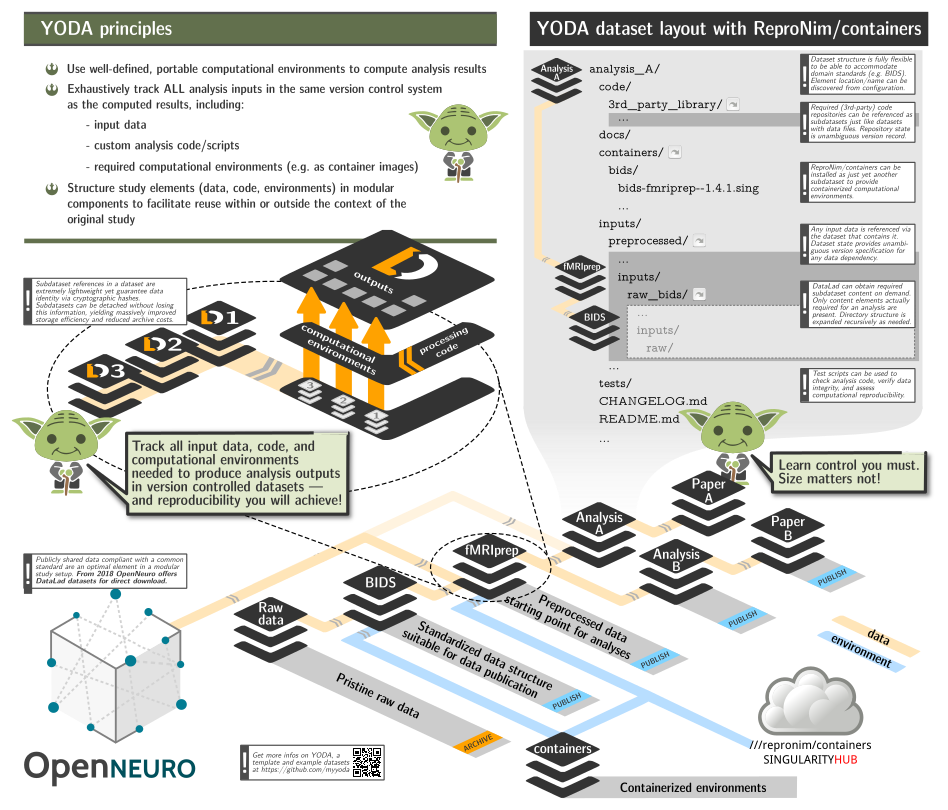
The aims for this project is
- to be able to include this repository as a
subdataset within larger study (super)datasets to facilitate rapid and
reproducible computation, while
adhering to [YODA principles] and retaining clear and unambiguous
association between data, code, and computing environments using
git/git-annex/DataLad;
- to assist with containers execution in "sanitized" environments: no `$HOME` or
system-wide `/tmp` is bind-mounted inside the containers, no
environment variables from the host system made available inside;
- make Singularity images transparently usable on non-Linux (OSX) systems via
[Docker].
All images are "registered" within the dataset for execution using
[datalad containers-run], so it is trivial to list available
containers:
```shell
$> datalad containers-list
arg-test -> scripts/tests/arg-test.simg
bids-aa -> images/bids/bids-aa--0.2.0.sing
bids-afni-proc -> images/bids/bids-afni-proc--0.0.2.sing
bids-antscorticalthickness -> images/bids/bids-antscorticalthickness--2.2.0-1.sing
bids-baracus -> images/bids/bids-baracus--1.1.2.sing
bids-brainiak-srm -> images/bids/bids-brainiak-srm--latest.sing
... many more to list them all ...
```
and execute either via `datalad containers-run` (which would also take care
about getting them first if not present):
```shell
$> datalad containers-run -n bids-validator -- --help
[INFO ] Making sure inputs are available (this may take some time)
[INFO ] == Command start (output follows) =====
Usage: bids-validator [options]
Options:
--help, -h Show help [boolean]
--version, -v Show version number [boolean]
--ignoreWarnings Disregard non-critical issues [boolean]
--ignoreNiftiHeaders Disregard NIfTI header content during validation
[boolean]
--verbose Log more extensive information about issues [boolean]
--json Output results as JSON [boolean]
--config, -c Optional configuration file. See
https://github.com/bids-standard/bids-validator for more
info
This tool checks if a dataset in a given directory is compatible with the Brain
Imaging Data Structure specification. To learn more about Brain Imaging Data
Structure visit http://bids.neuroimaging.io
[INFO ] == Command exit (modification check follows) =====
action summary:
get (notneeded: 1)
save (notneeded: 1)
```
or first getting them using [datalad get] and then either using
`singularity` `run` or `exec` directly, or (recommended) via
[scripts/singularity_cmd](). That is the helper which is used by
`containers-run` (see [.datalad/config]()).
## [scripts/singularity_cmd]()
Singularity execution by default is optimized for convenience and not for reproducibility.
This helper script assists in making singularity execution reproducible by
- disabling passing environment variables inside your containerized environment
- creating temporary `/tmp` directory for the environment, so there is no
interaction with file paths outside of the current directory (which should
ideally be a DataLad dataset)
- using custom and nearly empty [binds/HOME]() HOME directory, so there is
no possible leakage of locally user-level installed Python and other modules
to affect your computation
The [binds/HOME]() also provides a custom minimalistic [.bashrc](binds/HOME/.bashrc) file
with e.g. a customized prompt to inform you about which image you are in ATM for use
in interactive sessions:
$> scripts/singularity_cmd exec images/repronim/repronim-reproin--0.5.4.sing bash
singularity:repronim-reproin--0.5.4 > yoh@hopa:/home/yoh/proj/repronim/containers$ heudiconv --version
0.5.4
### Singularity via Docker
On non-Linux systems, or if `REPRONIM_USE_DOCKER` environment variable is set to a non-empty value,
[scripts/singularity_cmd]() will use [Docker] shim image (in privileged mode) to run
singularity within it. All necessary paths will be bind mounted as with a regular direct execution using
singularity.
### Resource Monitoring with Duct
`repronim/containers` supports optional resource monitoring using [duct](https://github.com/con/duct), a lightweight wrapper that collects execution data including CPU usage, memory consumption, and runtime statistics.
**Note:** Duct integration is currently only supported with direct Singularity execution, not with Docker mode.
Duct integration requires the `con-duct` package:
```bash
pip install con-duct
```
To enable resource monitoring, set the `REPRONIM_USE_DUCT` environment variable:
```bash
export REPRONIM_USE_DUCT=1
datalad containers-run -n bids-mriqc --input sourcedata/raw --output . \
'{inputs}' '{outputs}' participant group -w workdir
```
This will wrap your container execution with duct monitoring and automatically generate detailed resource usage logs.
See the [duct documentation](https://github.com/con/duct/blob/main/README.md) for configuration options and tools for working with duct logs.
### Interactive sessions
See [WiP PR #9](https://github.com/ReproNim/containers/pull/9) to
establish "reproducible interactive sessions" with the help of that script.
# Conventions
## Container image files
Singularity image files have [`.sif` extension](https://github.com/apptainer/sif)
(older ones created using Singularity < 3, will have `.sing`).
# A typical YODA workflow
Lets summarize YODA principles as a possible workflow:
- create a new dataset which would contain results and everything needed
to obtain them
- install/add subdatasets(code, other datasets, containers)
- perform the analysis using **only** materials available within the reach of this dataset.
Let's assume that our goal is to do Quality Control of an MRI dataset
(which is available as DataLad dataset ds000003). We will create a new
dataset with the output of the QC results (as analyzed by mriqc
BIDS-App). mriqc is provided by the ReproNim/containers dataset of
containers. Below, we execute a simple analysis workflow which
adheres to YODA principles and we **end up with a dataset that contains
all components necessary a history of how it was achieved.**
This would help to guarantee reproducibility in the future because all the
materials would be *reachable* within that dataset.
## Runnable script
For advanced users who are comfortable with DataLad, the following
script may give you everything you need.
The version of the script with all commands explained
```shell
#!/bin/sh
( # so it could be just copy pasted or used as a script
PS4='> '; set -xeu # to see what we are doing and exit upon error
# Work in some temporary directory
cd $(mktemp -d ${TMPDIR:-/tmp}/repro-XXXXXXX)
# Create a dataset to contain mriqc output
datalad create -d ds000003-qc -c text2git
cd ds000003-qc
# Install our containers collection:
datalad install -d . -s ///repronim/containers code/containers
# Optionally -- copy container of interest definition to the current (or desired)
# version # to facilitate reproducibility while still being able to upgrade containers
# subdataset if so desired to get access to newer versions.
# We will also use 0.16.0 since newer ones require more memory and
# would fail to run on CI.
datalad run -m "Downgrade/Freeze mriqc container version" \
code/containers/scripts/freeze_versions --save-dataset=. bids-mriqc=0.16.0
# That version of mriqc does not have an option --no-datalad-get we had to
# hardcode for mriqc to workaround an issue. So let's remove it
datalad run -m "Remove ad-hoc option for mriqc for older frozen version" sed -i -e 's, --no-datalad-get,,g' .datalad/config
# Install input data:
datalad install -d . -s https://github.com/ReproNim/ds000003-demo sourcedata/raw
# Setup git to ignore workdir to be used by pipelines
echo "workdir/" > .gitignore && datalad save -m "Ignore workdir" .gitignore
# Execute desired preprocessing while creating a provenance record
# in git history
datalad containers-run \
-n bids-mriqc \
--input sourcedata/raw \
--output . \
'{inputs}' '{outputs}' participant group -w workdir
)
```
## Walkthrough
For users who are new to these components, we will walk through how
these components are used together in a typical YODA workflow.
the steps
```bash
mkdir ~/my-experiments
cd ~/my-experiments
datalad create -d ds000003-qc -c text2git
cd ds000003-qc
```
DataLad has created a new directory for our results, `ds000003-qc`.
According to YODA principles, this dataset should also contain our input
data, code, and anything else we need to run the analysis.
Install the input dataset:
```bash
datalad install -d . -s https://github.com/ReproNim/ds000003-demo sourcedata/raw
```
Next we install the `ReproNim/containers` collection.
```bash
datalad install -d . -s ///repronim/containers code/containers
```
Now let's take a look at what we have.
```
ds000003-qc/ # The root dataset contains everything
|- sourcedata/
| \- raw/ # we call it source, but it is actually ds000003-demo "raw" BIDS dataset
\- code/
\- containers/ # repronim/containers, this is where our non-custom code lives
```
### Freezing Container Image Versions
`freeze_versions` is an optional step that will record and "freeze" the
version of the container used. Even if the `///repronim/containers` dataset is
upgraded with a newer version of our container, we are "pinned" to the
container we explicitly determined. Note: To switch version of the container
(e.g., to upgrade to a new one), rerun `freeze_versions` script with the version
specified.
The container version can be "frozen" into the clone of the `///repronim/containers`
dataset, **or** the top-level dataset.
**Option 1: Top level dataset (recommended)**
```bash
# Run from ~/my-experiments/ds000003-qc
datalad run -m "Downgrade/Freeze mriqc container version" \
code/containers/scripts/freeze_versions --save-dataset=. bids-mriqc=0.16.0
```
**Option 2: ///repronim/containers**
```bash
# Run from ~/my-experiments/ds000003-qc/
datalad run -m "Downgrade/Freeze mriqc container version" \
code/containers/scripts/freeze_versions bids-mriqc=0.16.0
```
Note: It is recommended to freeze a container image version into the
top-level dataset to simplify reuse. If `///repronim/containers` is
modified in any way, the author must ensure that their altered fork of
`///repronim/containers` is publicly available and that its URL
specified in the `.gitmodules`. By freezing into the top-level dataset
instead, authors do not need to host a modified version of
`///reporonim/containers`.
### Fixup datalad config
The version of mriqc we are using does not have an option `--no-datalad-get` which is hardcoded
into mriqc config, so we should remove it.
```bash
datalad run -m "Remove ad-hoc option for mriqc for older frozen version" sed -i -e 's, --no-datalad-get,,g' .datalad/config
```
### Running the Containers
When we run the bids-mriqc container, it will need a working directory
for intermediate files. These are not helpful to commit, so we will
tell `git` (and `datalad`) to ignore the whole directory.
```bash
echo "workdir/" > .gitignore && datalad save -m "Ignore workdir" .gitignore
```
Now we use `datalad containers-run` to perform the analysis.
```bash
datalad containers-run \
-n bids-mriqc \
--input sourcedata/raw \
--output . \
'{inputs}' '{outputs}' participant group -w workdir
```
If everything worked as expected, we will now see our new analysis, and
a commit message of how it was obtained! All of this is contained within
a single (nested) dataset with a complete record of how all the data was
obtained.
```shell
(git) .../ds000003-qc[master] $ git show --quiet
Author: Austin
Date: Wed Jun 5 15:41:59 2024 -0400
[DATALAD RUNCMD] ./code/containers/scripts/singularity_cm...
=== Do not change lines below ===
{
"chain": [],
"cmd": "./code/containers/scripts/singularity_cmd run code/containers/images/bids/bids-mriqc--0.16.0.sing '{inputs}' '{outputs}' participant group -w workdir",
"dsid": "c9c96ab9-f803-43ba-83e2-2eaec7ab4725",
"exit": 0,
"extra_inputs": [
"code/containers/images/bids/bids-mriqc--0.16.0.sing"
],
"inputs": [
"sourcedata/raw"
],
"outputs": [
"."
],
"pwd": "."
}
^^^ Do not change lines above ^^^
```
This record could later be reused (by anyone) using [datalad rerun] to rerun
this computation using exactly the same version(s) of input data and the
singularity container. You can even now [datalad uninstall] sourcedata/raw and even containers
sub-datasets to save space - they will be retrievable at those exact versions later
on if you need to extend or redo your analysis.
#### Notes:
- aforementioned example requires DataLad >= 0.11.5 and datalad-containers >= 0.4.0;
- for more eleborate example with use of [reproman] to parallelize execution on
remote resources, see [ReproNim/reproman PR#438](https://github.com/ReproNim/reproman/pull/438);
- a copy of the dataset is made available from [`///repronim/ds000003-qc`](http://datasets.datalad.org/?dir=/repronim/ds000003-qc)
and [https://github.com/ReproNim/ds000003-qc]().
- if you would like to create `licenses/` folder in your project datasets
to e.g. contain license for freesurfer, then you better add them to git-annex.
Following commands provide one way to do it:
```shell
mkdir licenses
# instruct git-annex to add license files to annex, but this added file with instructions to git
echo -e '* annex.largefiles=anything\n.gitattributes annex.largefiles=nothing' > licenses/.gitattributes
datalad save -m "Add licenses must go into git-annex so I could avoid sharing them" licenses/.gitattributes
cp ~/.freesurfer-license licenses/freesurfer
datalad save -m 'added freesurfer license' licenses/freesurfer
```
# Installation
It is a DataLad dataset, so you can either just [git clone] or [datalad install] it.
You will need to have [git-annex] available to retrieve any images. And you will
need DataLad and [datalad-container] extension installed for [datalad containers-run].
Since Singularity is Linux-only application, it will be "functional" only on
Linux. On OSX (and possibly Windows), if you have Docker installed, singularity
images will be executed through the provided docker shim image.
## Environment variables
A few environment variables (in addition to those consulted by datalad
and datalad-container) are considered in the scripts of this
repository:
### `SINGULARITY_CMD`
The default command (as "hardcoded" in [.datalad/config]()) is `run`
so running the container executes its default "entry point". Setting
`SINGULARITY_CMD=exec` makes it possible to run an alternative command
in them (e.g. `bash` for interactive sessions)::
SINGULARITY_CMD=exec datalad containers-run --explicit -n repronim-reproin bash
and then have `datalad` record any of the introduced changes. Such
runs will not be reproducible but at least clearly annotated in what
environment corresponding actions were taken.
# Acknowledgements
## Grants
Development of this project and [datalad-container] extension was supported by the ReproNim project
([NIH 1P41EB019936-01A1](https://projectreporter.nih.gov/project_info_description.cfm?projectnumber=1P41EB019936-01A1)).
DataLad development was supported by a US-German collaboration in computational neuroscience (CRCNS) "DataGit: converging catalogues, warehouses, and deployment logistics into a federated 'data distribution'" (Halchenko/Hanke), co-funded by the US National Science Foundation ([NSF 1429999](https://www.nsf.gov/awardsearch/showAward?AWD_ID=1429999)) and the German Federal Ministry of Education and Research (BMBF 01GQ1411). Additional support is provided by the German federal state of Saxony-Anhalt and the European Regional Development Fund, Project: Center for Behavioral Brain Sciences, Imaging Platform.
## Copyrighted works
All container images are collections of various projects governed by the
corresponding copyrights/licenses. Some are not completely FOSS and might
require additional license(s) to be obtained and provided (e.g. FreeSurfer
license for `fmriprep`).
### `artwork/repronim-containers-yoda_*`
Based on the artwork Copyright 2018-2019 Michael Hanke, from
[myyoda/poster](https://github.com/myyoda/poster), distributed under [CC BY](https://creativecommons.org/licenses/by/4.0/).
# References
## Related resources and articles
- https://www.augmentedmind.de/2025/03/30/the-9-best-docker-registry-tools/
- https://oci.dag.dev/ - explore docker registries interactively
- https://github.com/oras-project/oras-py - Python interface to interact with registries
[git-annex]: http://git-annex.branchable.com
[DataLad]: http://datalad.org
[datalad-container]: http://docs.datalad.org/projects/container
[datalad containers-run]: http://docs.datalad.org/projects/container/en/latest/generated/man/datalad-containers-run.html
[datalad get]: http://docs.datalad.org/en/stable/generated/man/datalad-get.html
[datalad run]: http://docs.datalad.org/en/stable/generated/man/datalad-run.html
[datalad rerun]: http://docs.datalad.org/en/stable/generated/man/datalad-rerun.html
[datalad install]: http://docs.datalad.org/en/stable/generated/man/datalad-install.html
[datalad uninstall]: http://docs.datalad.org/en/stable/generated/man/datalad-uninstall.html
[git clone]: https://git-scm.com/docs/git-clone
[Docker]: http://docker.com
[reproman]: http://reproman.repronim.org
[YODA principles]: https://github.com/myyoda/poster/blob/master/ohbm2018.pdf
[Singularity]: https://www.sylabs.io/singularity/
[Singularity Hub]: https://singularity-hub.org
[Singularity Hub Collection]: https://www.singularity-hub.org/collections/2761