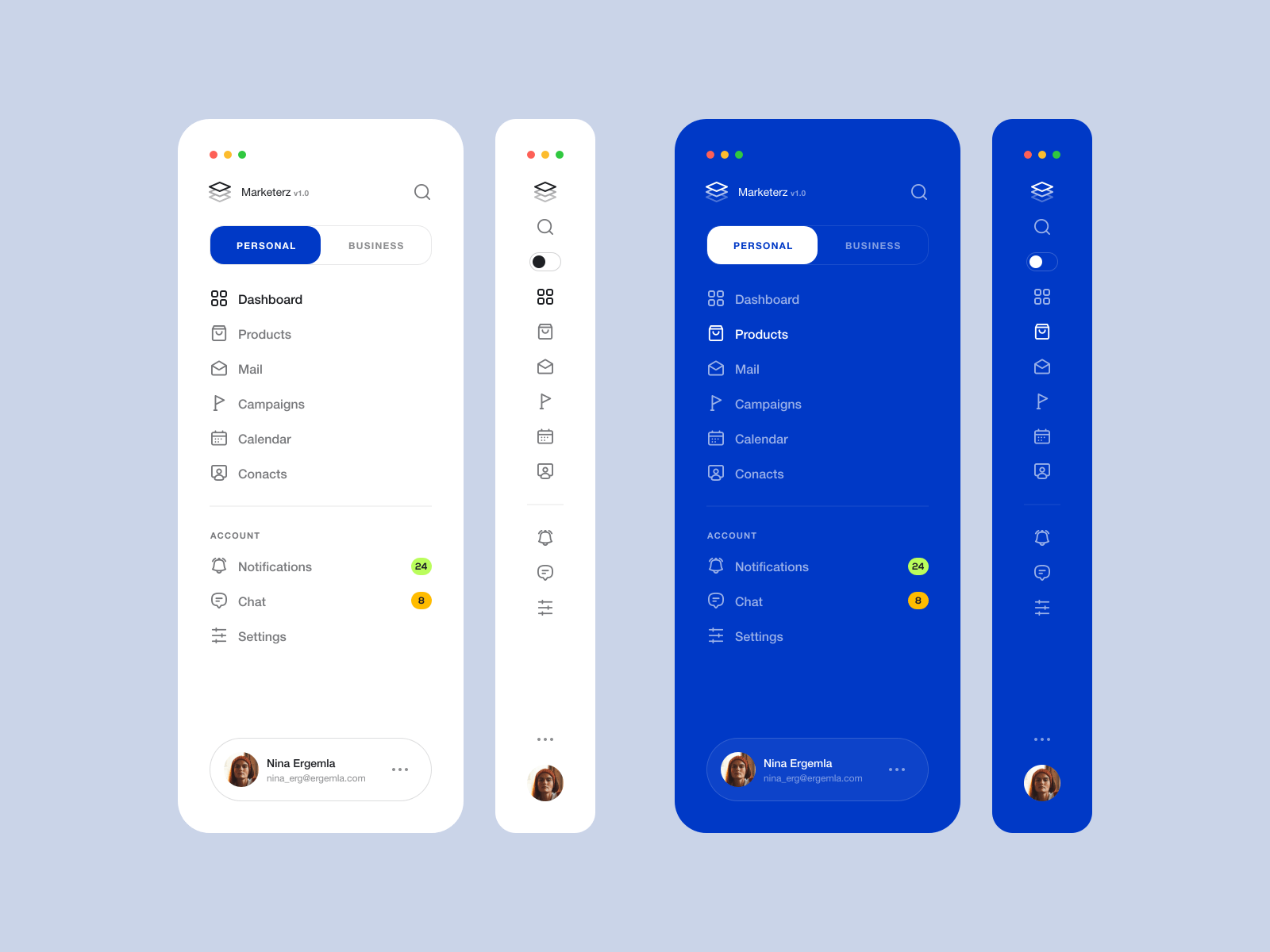
https://github.com/resfandiari/flutter_side_menu
Flutter's full customizable side menu has been used as a directory for Related Pages, Navigation Items, and more.
https://github.com/resfandiari/flutter_side_menu
flutter menu menu-navigation menubar sidemenu web
Last synced: over 1 year ago
JSON representation
Flutter's full customizable side menu has been used as a directory for Related Pages, Navigation Items, and more.
- Host: GitHub
- URL: https://github.com/resfandiari/flutter_side_menu
- Owner: resfandiari
- License: bsd-3-clause
- Created: 2022-07-28T16:37:27.000Z (almost 4 years ago)
- Default Branch: main
- Last Pushed: 2024-10-15T10:13:02.000Z (almost 2 years ago)
- Last Synced: 2025-04-02T21:11:10.889Z (over 1 year ago)
- Topics: flutter, menu, menu-navigation, menubar, sidemenu, web
- Language: Dart
- Homepage: https://pub.dev/packages/flutter_side_menu
- Size: 407 KB
- Stars: 50
- Watchers: 2
- Forks: 24
- Open Issues: 4
-
Metadata Files:
- Readme: README.md
- Changelog: CHANGELOG.md
- License: LICENSE
Awesome Lists containing this project
README
Flutter Side Menu




**Flutter's full customizable side menu has been used as a directory for Related Pages, Navigation Items, Filter side and more.**
#### Flutter Side Menu Screenshots
## Usage
### Add dependency
Please check the latest version before installation.
If there is any problem with the new version, please use the previous version
```yaml
dependencies:
flutter:
sdk: flutter
# add flutter_side_menu
flutter_side_menu: ^{latest version}
```
### Add the following imports to your Dart code
```dart
import 'package:flutter_side_menu/flutter_side_menu.dart';
```
### Property
| Property | Type | Default Value | Description |
| --------------- | ------------ | ------------- | --------------------------------------------------------------------------- |
| builder | SideMenuBuilder | null | Return 'SideMenuData' that includes headers, footers, items, or custom child |
| controller | SideMenuController | null | The 'controller' that can be used to open, close, or toggle side menu. |
| mode | SideMenuMode | SideMenuMode.auto | The 'SideMenuMode' which is auto, open or compact and can determine the menu state |
| priority | SideMenuPriority | SideMenuPriority.mode | The 'SideMenuPriority' which is mode or sizer. in sizer mode the side menu width not change if user set custom size with 'Resizer' |
| position | SideMenuPosition | SideMenuPosition.left | The 'SideMenuPosition' which is left or right. |
| minWidth | double | 50.0 | The 'minWidth' value is used to determine the side menu width in the smallest case. |
| maxWidth | double | 250.0 | The 'maxWidth' value is used to determine the side menu width in the largest case. |
| hasResizer | bool | true | The 'hasResizer' enable 'Resizer' widget for side menu. With 'Resizer' the side menu width can be customized by the user. |
| resizerData | ResizerData | ResizerData() | The 'ResizerData' that can set custom style for a 'Resizer'. |
| hasResizerToggle | bool | true | The 'hasResizerToggle' enable 'ResizerToggle' widget for side menu. With 'ResizerToggle' button you can toggle the width of the side menu between 'minWidth' or 'maxWidth'. |
| resizerToggleData | ResizerToggleData | ResizerToggleData() | The 'resizerToggleData' that can set custom style for a 'ResizerToggle'. |
| backgroundColor | Color | Color(0xffffffff) | The 'backgroundColor' it's used to determine the side menu background color |
### Example
``` dart
import 'package:flutter/material.dart';
import 'package:flutter_side_menu/flutter_side_menu.dart';
void main() => runApp(
MaterialApp(
home: Material(
child: Scaffold(
body: Row(
children: [
SideMenu(
builder: (data) => SideMenuData(
header: const Text('Header'),
items: [
SideMenuItemDataTile(
isSelected: true,
onTap: () {},
title: 'Item 1',
icon: const Icon(Icons.home),
),
],
footer: const Text('Footer'),
),
),
Expanded(
child: Container(
color: Colors.white,
child: const Center(
child: Text(
'body',
),
),
),
),
SideMenu(
position: SideMenuPosition.right,
builder: (data) => const SideMenuData(
customChild: Text('Custom view'),
),
),
],
),
),
),
),
);
```