https://github.com/restioson/meme-bot
Selfbot allowing you to upload memes to discord from your computer with a single command
https://github.com/restioson/meme-bot
bot discord discord-bot discord-py memes python python3
Last synced: about 2 months ago
JSON representation
Selfbot allowing you to upload memes to discord from your computer with a single command
- Host: GitHub
- URL: https://github.com/restioson/meme-bot
- Owner: Restioson
- Created: 2017-04-15T07:59:48.000Z (about 9 years ago)
- Default Branch: master
- Last Pushed: 2017-05-13T16:39:35.000Z (about 9 years ago)
- Last Synced: 2025-02-01T12:29:26.507Z (over 1 year ago)
- Topics: bot, discord, discord-bot, discord-py, memes, python, python3
- Language: Python
- Homepage:
- Size: 305 KB
- Stars: 0
- Watchers: 2
- Forks: 0
- Open Issues: 0
-
Metadata Files:
- Readme: README.md
Awesome Lists containing this project
README
# Meme Bot

This selfbot allows you to send memes and files from your computer via discord, with a simple command.
# Documentation
All documentation can be found [here](https://github.com/Restioson/meme-bot/wiki)
## Howto
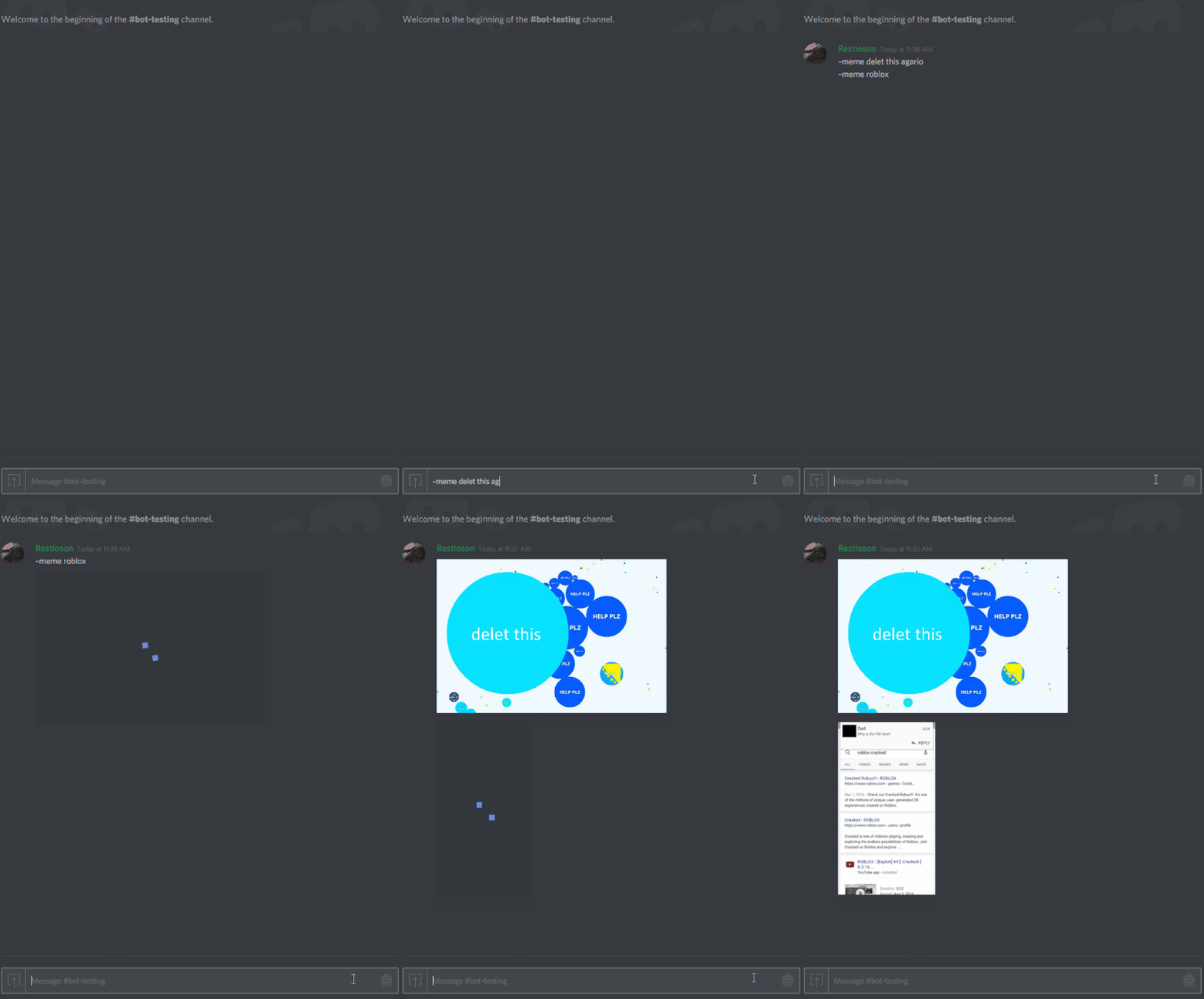
*Note: the gif is slow due to my internet speed. If your internet is faster, it will send the memes faster.*
Imgur album: http://imgur.com/gallery/B5Qfu.
# Installation
Refer to the [wiki](https://github.com/Restioson/meme-bot/wiki/Installation).
# Usage
Quick guide: http://imgur.com/gallery/B5Qfu
For a more advanced guide, refer to the [wiki](https://github.com/Restioson/meme-bot/wiki/Commands).
Note: The bot will only work if it is running. You can set it up to start on startup if you prefer, but this is outside the domain of this tutorial.
# Compatability
This selfbot *should* be compatible on all OSes supporting Python 3.5 or later.
# Reporting an issue
To report a bug/issue, please add it to the [issue tracker](https://github.com/Restioson/meme-bot/issues). Please check to see if it hasn't already been reported *before* posting.
# Contributing
If you would like to contribute to this project, fork it, commit your changes, and submit a pull request.
# FAQ
**Help! I have a problem**
Have you:
1. Read the [wiki](https://github.com/Restioson/meme-bot/wiki/Commands)
2. Read the [guide](http://imgur.com/gallery/B5Qfu)
3. Read this FAQ
If the answer is yes to all three, feel free to [create an issue](https://github.com/Restioson/meme-bot/issues/new) with the [question](https://github.com/Restioson/meme-bot/labels/question) tag, or contact me on discord: Restioson#8323.
**Help! What is a Discord user API token?**
This is your secret string that you can use to let selfbots send messages and do other things on behalf of you. You will need to give this to the bot so it can a) read messages send to you to listen for commands and b) send memes for you. I won't send this to anyone else, nor read any of your messages, but you can check it out in the [code](https://github.com/Restioson/meme-bot/blob/master/meme-bot.py#L41) if you like.
**How do I get it?**
There is a guide [here](https://www.reddit.com/r/discordapp/comments/5ncwpv/localstorage_missing/dcalpi1/). Thank you to [/u/DJScias](https://www.reddit.com/user/DJScias) for this wonderul short tutorial.
**How do I add a meme folder?**
In discord, type in `~addmemefolder C:\Path\To\Memes` under Windows, or `~addmemefolder /path/to/memes` under Mac/Linux/Other *nix.
**My meme isn't showing up or sending!**
1. Make sure that you named it something with keywords in the filename
2. Make sure that you didn't add the file extension in the `~meme` command
3. If it's a new meme, try typing `~reload` and trying again
4. Make sure that you added enough keywords to the `~meme` command.
**How do I report a bug?**
The [issue tracker](https://github.com/Restioson/meme-bot/issues).
**I have a suggestion!**
[Create an issue](https://github.com/Restioson/meme-bot/issues) with the [enhancement](https://github.com/Restioson/meme-bot/labels/enhancement) label.
# Special Thanks
Special thanks to MegaMeltdown for helping with the docs and testing the bot!
# Contact & Help
Feel free to contact me on discord: Restioson#8323