https://github.com/reynico/dreams
Sleep better
https://github.com/reynico/dreams
arduino esp32 esp8266 grafana prometheus
Last synced: 2 months ago
JSON representation
Sleep better
- Host: GitHub
- URL: https://github.com/reynico/dreams
- Owner: reynico
- License: gpl-3.0
- Created: 2019-09-17T21:18:49.000Z (almost 7 years ago)
- Default Branch: master
- Last Pushed: 2019-10-06T19:28:43.000Z (over 6 years ago)
- Last Synced: 2025-03-14T18:48:30.585Z (over 1 year ago)
- Topics: arduino, esp32, esp8266, grafana, prometheus
- Language: C++
- Size: 204 KB
- Stars: 4
- Watchers: 1
- Forks: 0
- Open Issues: 0
-
Metadata Files:
- Readme: README.md
- License: LICENSE
Awesome Lists containing this project
README
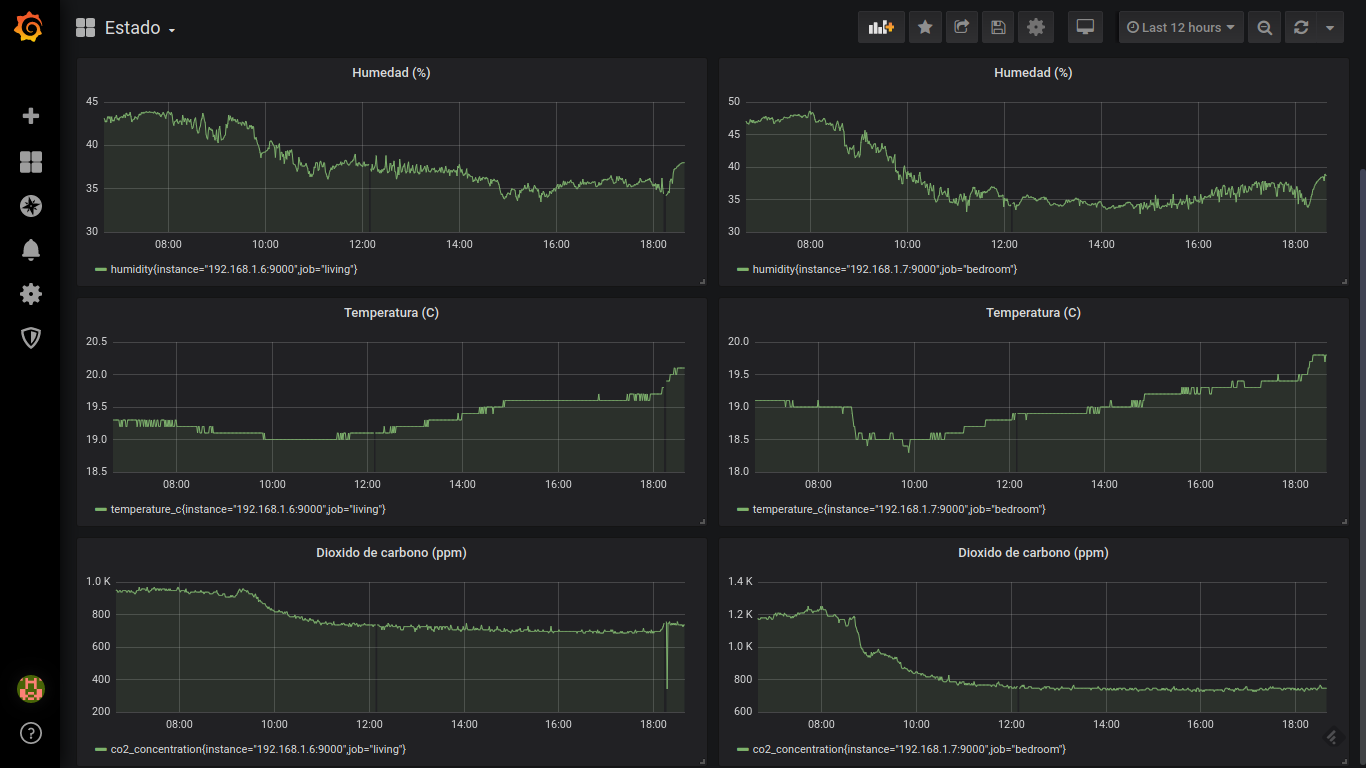
Dreams uses temperature, humidity and CO2 concentration sensors to create a Prometheus exporter with consistent data about your environment. This repository also includes the server side stuff such as [Prometheus](https://prometheus.io/) and [Grafana](https://grafana.com/). Both are [Docker](https://docs.docker.com/install/) containers running with [docker-compose](https://docs.docker.com/compose/install/). Check the [prometheus server configuration](#prometheus-server-configuration) section.
- [Shopping list](#shopping-list)
- [Diagram](#diagram)
- [Setup](#setup)
- [Setup the Arduino IDE](#setup-the-arduino-ide)
- [Setup the exporter](#setup-the-exporter)
- [Prometheus exporter](#prometheus-exporter)
- [Prometheus server configuration](#prometheus-server-configuration)
## Shopping list
* [0-5000ppm CO2 sensor](https://www.dfrobot.com/product-1549.html) ($58)
* [DHT-22 temperature and humidity sensor](https://www.dfrobot.com/product-1102.html) ($5.90)
* [FireBeetle ESP32 IoT microcontroller](https://www.dfrobot.com/product-1590.html) ($19)
## Diagram
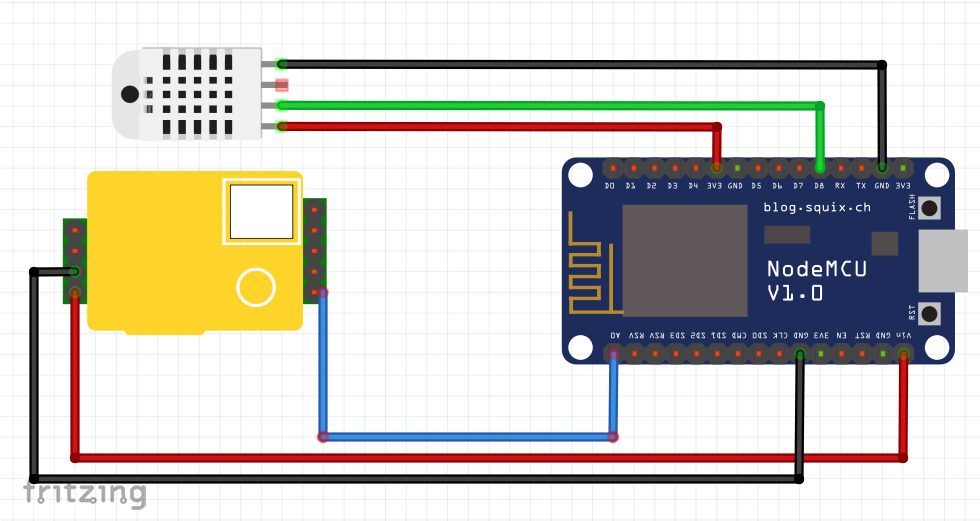
* The CO2 concentration sensor uses the internal ADC located on A0. Connect the CO2 sensor analog output to A0. 5v power supply is required.
* The DHT22 sensor uses a digital signal to send both temperature and humidity. Connect the digital output to D12. 3.3v power supply is required.
## Setup
Each [dreams.ino](dreams.ino), [dreams_bedroom.ino](dreams_bedroom.ino) and [dreams_kitchen.ino](dreams_kitchen.ino) belongs to your home exporters.
### Setup the Arduino IDE
FireBeetle is handled as an extra board for Arduino
* Go to File -> Preferences -> Additional board URL, paste https://raw.githubusercontent.com/DFRobot/FireBeetle-ESP8266/master/package_firebeetle8266_index.json
* Go to Tools -> Boards -> Boards manager. Install `FireBeetle-ESP8266`
DHT22 needs an special library as well
* Go to Sketch -> Include library -> Library manager. Search for `DHT22`, install.
### Setup the exporter
* dreams*.ino contains:
* `host`: The exporter hostname exposed in your router's ARP table
* `ip_addr`: The exporter IP address
* `gw`: The gateway
* `subnet`: The network subnet
Note: Each exporter needs to have a different IP address.
* core.ino contains:
* `ssid`: The WiFi network name to connect
* `password`: The WiFi network password to connect
## Prometheus exporter
Once powered up and connected to WiFi, each node serves a single HTML page with a Prometheus-like exporter format:
```
[nico@x220 ~]$ curl 192.168.1.6:9000/metrics
co2_concentration 735.89
temperature_c 20.10
humidity 38.00
```
## Prometheus server configuration
* Edit `server/prometheus.yml` to match your Dreams node IP addresses:
```
scrape_configs:
- job_name: 'dining'
scrape_interval: 5s
static_configs:
- targets: ['192.168.1.6:9000']
- job_name: 'bedroom'
scrape_interval: 5s
static_configs:
- targets: ['192.168.1.7:9000']
- job_name: 'kitchen'
scrape_interval: 5s
static_configs:
- targets: ['192.168.1.8:9000']
```
* `cd server/`
* `docker-compose up`
Your Prometheus + Grafana Docker server is now up and running, and accessible through [http://localhost:3000](http://localhost:3000). The datasource and dashboard is already configured, check [server/grafana/provisioning/](server/grafana/provisioning/).