https://github.com/rfresh2/zenithproxywebapi
HTTP API for ZenithProxy
https://github.com/rfresh2/zenithproxywebapi
Last synced: 3 months ago
JSON representation
HTTP API for ZenithProxy
- Host: GitHub
- URL: https://github.com/rfresh2/zenithproxywebapi
- Owner: rfresh2
- License: mit
- Created: 2025-05-02T20:25:52.000Z (about 1 year ago)
- Default Branch: mainline
- Last Pushed: 2026-01-12T18:35:28.000Z (5 months ago)
- Last Synced: 2026-01-13T00:01:02.435Z (5 months ago)
- Language: Java
- Homepage:
- Size: 116 KB
- Stars: 5
- Watchers: 1
- Forks: 1
- Open Issues: 0
-
Metadata Files:
- Readme: README.md
- License: LICENSE
Awesome Lists containing this project
README
# ZenithProxy Web API Plugin
Runs a local web server that lets you interact with the ZenithProxy instance.
# Commands
## `webApi`
* `webApi on/off` -> default: on
* `webApi port ` -> default: 8080
* `webApi auth `
* `webApi webUI on/off` -> default: on
* `webApi logRetentionEntries ` -> default: 500
* `webApi commandsAccountOwnerPerms on/off` -> default: off
* `webApi rateLimiter on/off` -> default: on
* `webApi rateLimitRequestsPerMinute ` -> default: 30
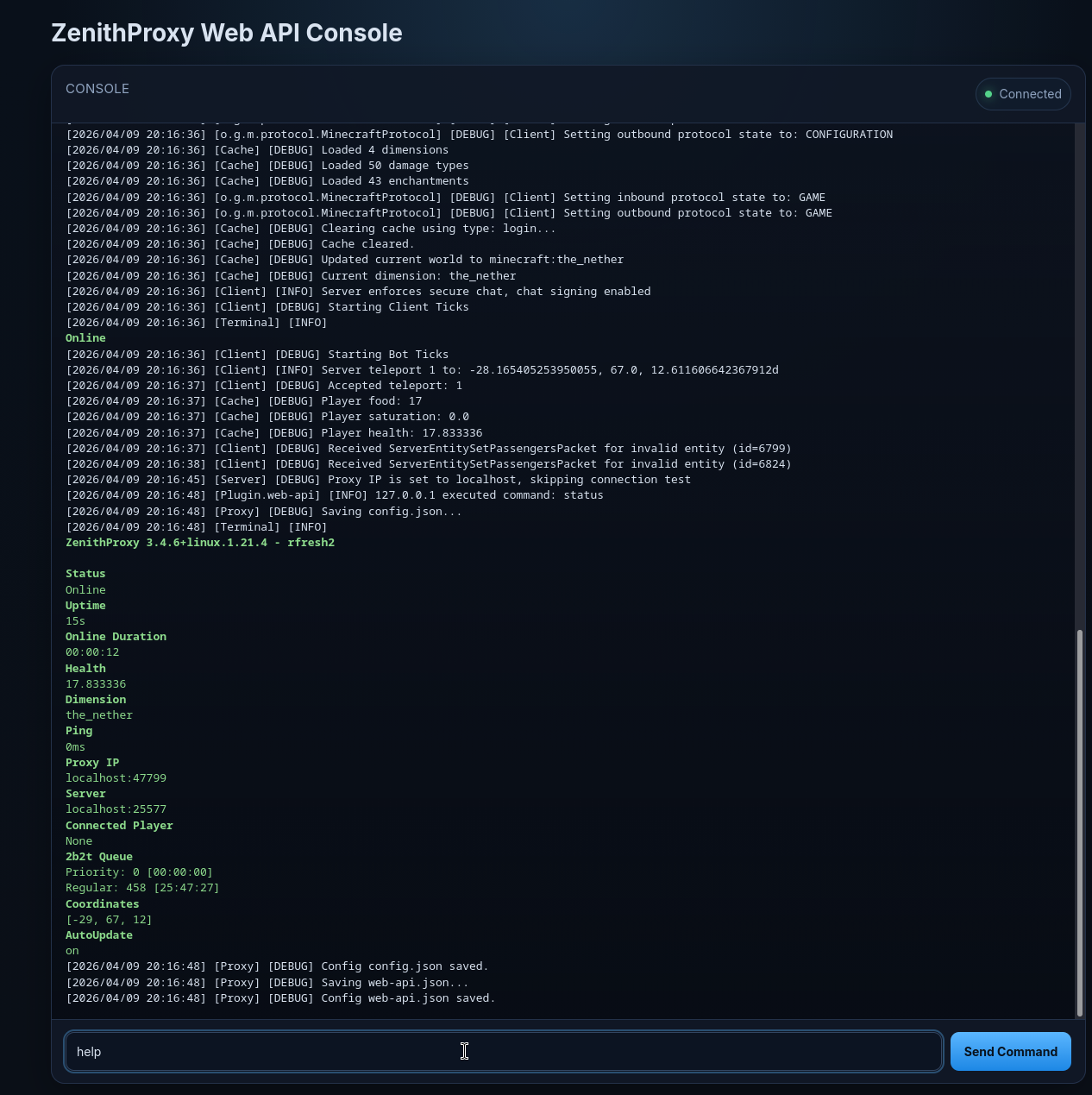
# Web UI
You can open the web UI from a browser: `http://:`
The web UI allows you to run commands and view live logs.
Access is authenticated with the same auth token.
# HTTP API
## Authorization
All HTTP requests must have an `Authorization` header.
A default auth token is generated on first launch.
Or it can be set with the `webApi auth ` command.
## POST `/api/command`
### Request Body
```json
{
"command": "status"
}
```
### Response
```json
{
"embed": "\nZenithProxy 0.0.0 - Unknown\n\nStatus\nDisconnected\nConnected Player\nNone\nOnline For\nNot Online!\nHealth\n20.0\nDimension\nNone\nPing\n0ms\nProxy IP\nlocalhost\nServer\nconnect.2b2t.org:25565\nPriority Queue\nno [unbanned]\nSpectators\non\n2b2t Queue\nPriority: 15 [00:25:49]\nRegular: 688 [07:49:27]\nCoordinates\n||[0, 0, 0]||\nAutoUpdate\non",
"embedComponent": "{\"color\":\"#E91E63\",\"extra\":[\"\\n\",{\"bold\":true,\"text\":\"ZenithProxy 0.0.0 - Unknown\"},\"\\n\",\"\\n\",{\"bold\":true,\"extra\":[\"\\n\"],\"text\":\"Status\"},{\"extra\":[\"Disconnected\"],\"text\":\"\"},\"\\n\",{\"bold\":true,\"extra\":[\"\\n\"],\"text\":\"Connected Player\"},{\"extra\":[\"None\"],\"text\":\"\"},\"\\n\",{\"bold\":true,\"extra\":[\"\\n\"],\"text\":\"Online For\"},{\"extra\":[\"Not Online!\"],\"text\":\"\"},\"\\n\",{\"bold\":true,\"extra\":[\"\\n\"],\"text\":\"Health\"},{\"extra\":[\"20.0\"],\"text\":\"\"},\"\\n\",{\"bold\":true,\"extra\":[\"\\n\"],\"text\":\"Dimension\"},{\"extra\":[\"None\"],\"text\":\"\"},\"\\n\",{\"bold\":true,\"extra\":[\"\\n\"],\"text\":\"Ping\"},{\"extra\":[\"0ms\"],\"text\":\"\"},\"\\n\",{\"bold\":true,\"extra\":[\"\\n\"],\"text\":\"Proxy IP\"},{\"extra\":[\"localhost\"],\"text\":\"\"},\"\\n\",{\"bold\":true,\"extra\":[\"\\n\"],\"text\":\"Server\"},{\"extra\":[\"connect.2b2t.org:25565\"],\"text\":\"\"},\"\\n\",{\"bold\":true,\"extra\":[\"\\n\"],\"text\":\"Priority Queue\"},{\"extra\":[\"no [unbanned]\"],\"text\":\"\"},\"\\n\",{\"bold\":true,\"extra\":[\"\\n\"],\"text\":\"Spectators\"},{\"extra\":[\"on\"],\"text\":\"\"},\"\\n\",{\"bold\":true,\"extra\":[\"\\n\"],\"text\":\"2b2t Queue\"},{\"extra\":[\"Priority: 15 [00:25:49]\\nRegular: 688 [07:49:27]\"],\"text\":\"\"},\"\\n\",{\"bold\":true,\"extra\":[\"\\n\"],\"text\":\"Coordinates\"},{\"extra\":[\"||[0, 0, 0]||\"],\"text\":\"\"},\"\\n\",{\"bold\":true,\"extra\":[\"\\n\"],\"text\":\"AutoUpdate\"},{\"extra\":[\"on\"],\"text\":\"\"}],\"text\":\"\"}",
"multiLineOutput": []
}
```
The `embedComponent` can be parsed back from json with [Kyori Adventure](https://docs.advntr.dev/getting-started.html)
```java
Component c = GsonComponentSerializer.gson().deserialize(embedComponent);
```
Or with Minecraft's text components:
```java
// MC 1.21.1 mojmap
MutableComponent component = Component.Serializer.fromJson(response.embedComponent(), Minecraft.getInstance().player.registryAccess());
```
### Example
```bash
curl --location 'http://localhost:8080/api/command' \
--header 'Authorization: c05598ed-d123-4e8f-9aa7-40c11e657f23' \
--header 'Content-Type: application/json' \
--data '{"command":"status"}'
```
## GET `/api/logs`
Returns recent log entries. Intended for use only with the web UI.
Old log entries are evicted once the configured retention limit is reached.
### Query Parameters
* `from` - optional log cursor to continue from. Default: `0`
* `limit` - optional maximum number of log entries to return. Default: `200`, max: `500`
### Response
```json
{
"baseIndex": 1250,
"fromIndex": 1300,
"nextIndex": 1350,
"retained": 500,
"lines": [
"[2026/04/09 16:25:53] [Proxy] [INFO] ZenithProxy started!\n"
]
}
```
### Response Fields
* `baseIndex` - global index of the oldest retained log entry currently available
* `fromIndex` - actual starting cursor used for this response
* `nextIndex` - cursor to pass to the next `/api/logs` request
* `retained` - number of log entries currently kept in memory
* `lines` - log entries as an array of strings
If your requested `from` value is older than `baseIndex`, older log entries have already been evicted and the response begins at `baseIndex`.
### Example
```bash
curl --location 'http://localhost:8080/api/logs?from=0&limit=100' \
--header 'Authorization: c05598ed-d123-4e8f-9aa7-40c11e657f23'
```
# FAQ
## How do I call the API from the public internet?
Depends on where and how you are hosting the ZenithProxy instance.
It's the same as accessing the ZenithProxy MC server from the public internet.
So if you had to change firewall settings, port forwarding, or set up tunneling you'd do the same for the web API's port.
## I'm running multiple ZenithProxy instance on the same server, can they all have web APIs?
Yes, but each needs to be configured to use a different port: `webApi port `