https://github.com/rhcad/vgandroid
A lightweight 2D vector drawing framework for Android.
https://github.com/rhcad/vgandroid
android touchvg
Last synced: 7 months ago
JSON representation
A lightweight 2D vector drawing framework for Android.
- Host: GitHub
- URL: https://github.com/rhcad/vgandroid
- Owner: rhcad
- License: other
- Created: 2014-06-26T06:58:55.000Z (about 12 years ago)
- Default Branch: develop
- Last Pushed: 2017-10-11T02:35:30.000Z (over 8 years ago)
- Last Synced: 2025-05-07T03:34:46.912Z (about 1 year ago)
- Topics: android, touchvg
- Language: C++
- Homepage:
- Size: 54 MB
- Stars: 40
- Watchers: 8
- Forks: 9
- Open Issues: 7
-
Metadata Files:
- Readme: README.md
- License: LICENSE
Awesome Lists containing this project
README
# TouchVG for Android
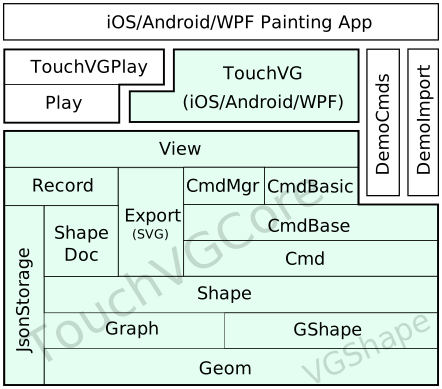
This is a lightweight 2D vector drawing framework using [vgcore](https://github.com/rhcad/vgcore) for Android.
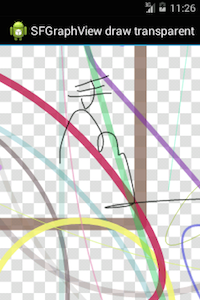
It uses `android.graphics` and `android.view` packages to render shapes and handle touches.
Features described in [Online document](http://touchvg.github.io). Please visit [vgandroid-demo](https://github.com/rhcad/vgandroid-demo) to see more examples.
## How to Compile
- Don't want to build libtouchvg.so and jar ?
- Download the [prebuilt libraries](https://github.com/rhcad/vgandroid/archive/prebuilt.zip).
- Extract `touchvg_libs` in the zip package to `vgandroid/TouchVG/libs` or `yourapp/libs`.
- Import this project in eclipse. Android SDK version in the project.properties may need to modify according to your installation.
- Enter the directory of this project, then type `./build.sh` to clone and build libraries needed.
- Need to add the [NDK](http://developer.android.com/tools/sdk/ndk/index.html) installation location to PATH.
- If the error `build/gmsl/__gmsl:512: *** non-numeric second argument to wordlist function` occurs, then open the `build/gmsl/__gmsl` file in the NDK installation directory, and change line 512 to:
`int_encode = $(__gmsl_tr1)$(wordlist 1,$(words $1),$(__gmsl_input_int))`
- [MSYS](http://www.mingw.org/wiki/msys) is recommended on Windows to run UNIX commands such as rm, sh and make. MinGW and Cygwin are not necessary for TouchVG.
- Import this project in eclipse, then build `touchvg` project.
- Android SDK version in the project.properties may need to modify according to your installation.
- Recommend using the newer [ADT Bundle](http://developer.android.com/sdk/index.html) to avoid complex configuration.
- Regenerate libtouchvg.so and JNI classes:
- Type `./build.sh -B` to rebuild the native libraries.
- Type `./build.sh APP_ABI=x86` to build for the x86 (Intel Atom) Emulator.
- Type `./build.sh -swig` to regenerate the kernel JNI classes.
- Need to install the lastest version of [SWIG](http://sourceforge.net/projects/swig/files/) 3.0, and add the location to PATH on Windows. SWIG 2.x may can't parse UTF-8 header files on Windows.
## How to Debug native code
- Add `#include "mglog.h"` and use `LOGD("your message %d", someint)` in the C++ files needed to debug.
- Set LogCat filter in Eclipse: `tag:dalvikvm|AndroidRuntime|vgjni|touchvg|vgstack|libc|DEBUG`.
- Print JNI functions to locate problems of libc crash:
1. Add `python addlog.py` in [jni/build.sh](TouchVG/jni/build.sh).
2. Type `./build.sh -swig` to add log in all JNI entry functions, or remove `touchvg_java_wrap.cpp` and type `./build.sh`.
## Add more shapes and commands
- You can use [newproj.py](https://github.com/rhcad/DemoCmds/blob/master/newproj.py) to create library project containing your own shapes and commands. So the TouchVG and TouchVGCore libraries does not require changes.
- Checkout and enter [DemoCmds](https://github.com/rhcad/DemoCmds) directory, then type `python newproj.py YourCmds`:
```shell
git clone https://github.com/rhcad/DemoCmds.git
cd DemoCmds
python newproj.py MyCmds
```
## License
This is an open source [BSD licensed](LICENSE) project. It uses the following open source projects:
- [vgcore](https://github.com/rhcad/vgcore) (BSD): Cross-platform vector drawing libraries using C++.
- [AndroidSVG](https://code.google.com/p/androidsvg) (Apache): SVG rendering library for Android.
- [x3py](https://github.com/rhcad/x3py) (Apache): Compile script files.
- [SWIG](https://github.com/swig/swig) (GPL): Use the tool to generate the glue code for Java and C#.
## How to Contribute
Contributors and sponsors are welcome. You may translate, commit issues or pull requests on this Github site.
To contribute, please follow the branching model outlined here: [A successful Git branching model](http://nvie.com/posts/a-successful-git-branching-model/).
## Contributors
- [Zhang Yungui](https://github.com/rhcad)
- [Proteas](https://github.com/proteas)