https://github.com/rhwood/jinputvalidator
Java Swing InputVerifier that adds an icon and tooltip to the component for invalid states.
https://github.com/rhwood/jinputvalidator
java swing swing-component
Last synced: 6 months ago
JSON representation
Java Swing InputVerifier that adds an icon and tooltip to the component for invalid states.
- Host: GitHub
- URL: https://github.com/rhwood/jinputvalidator
- Owner: rhwood
- License: apache-2.0
- Created: 2019-06-10T11:38:49.000Z (about 7 years ago)
- Default Branch: main
- Last Pushed: 2026-01-05T20:01:12.000Z (7 months ago)
- Last Synced: 2026-01-06T18:05:17.141Z (7 months ago)
- Topics: java, swing, swing-component
- Language: Java
- Homepage: https://rhwood.github.io/jinputvalidator/
- Size: 1.46 MB
- Stars: 29
- Watchers: 2
- Forks: 3
- Open Issues: 3
-
Metadata Files:
- Readme: README.md
- License: LICENSE.txt
- Codeowners: .github/CODEOWNERS
- Security: SECURITY.md
Awesome Lists containing this project
README
JInputValidator
===============
An [InputVerifier](https://docs.oracle.com/javase/8/docs/api/index.html?javax/swing/InputVerifier.html) for Java Swing that shows validation state to the right of the validating component.
[](https://maven-badges.herokuapp.com/maven-central/com.alexandriasoftware.swing/jinputvalidator)
[](https://www.javadoc.io/doc/com.alexandriasoftware.swing/jinputvalidator)
[](https://github.com/rhwood/jinputvalidator/actions/workflows/build.yml)
[](https://github.com/rhwood/jinputvalidator/actions/workflows/codeql-analysis.yml)
[](https://sonarcloud.io/dashboard?id=rhwood_jinputvalidator)
[](https://sonarcloud.io/dashboard?id=rhwood_jinputvalidator)
[](https://codecov.io/gh/rhwood/jinputvalidator)
[](https://securityscorecards.dev/viewer/?uri=github.com/rhwood/jinputvalidator)
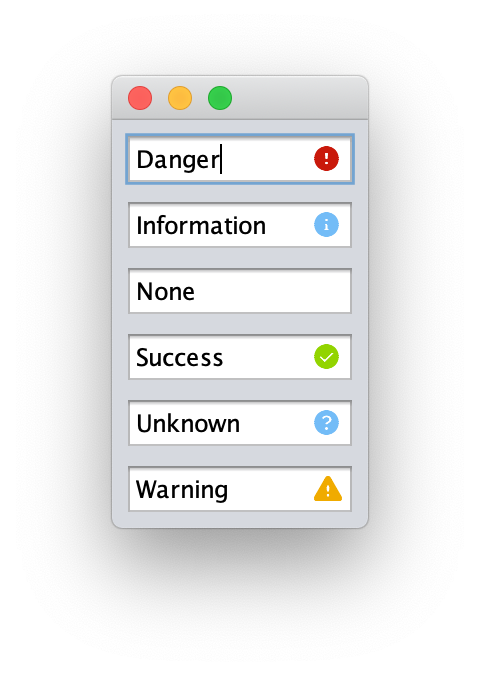
JInputValidator extends the verify idiom to use six states, each with its own graphical representation and tool tip text:
- __DANGER__, a failure state, which defaults to a red letter _X_ in a circle.
- __INFORMATION__, a non-failure state, which defaults to a light blue letter _i_ in a circle.
- __NONE__, the default state, which does not show any icon.
- __SUCCESS__, a non-failure state, which defaults to a green check mark in a circle.
- __UNKNOWN__, a non-failure state, which defaults to a light blue question mark in a circle.
- __WARNING__, a failure state, which defaults to a yellow-orange exclamtion mark in a triangle.
When a status is set to a "failure state" `InputVerifier.verify(Component c)` returns `false`, while for "non-failure states" that method returns `true`.
## Screenshots
## Using the Control
Simple example that shows a Danger indicator if an input is less than 8 characters:
```java
// create a control
JTextField myJTextField = new JTextField();
// add a new JInputValidator as the InputVerifier
myJTextField.setInputVerifier(new JInputValidator(myJTextField, true) {
@Override
protected Validation getValidation(JComponent input, JInputValidatorPreferences preferences) {
if (myJTextField.getText().length < 8) {
return new Validation(Validation.Type.DANGER, "Too short", preferences);
}
return new Validation(Validation.Type.NONE, "", preferences);
}
});
```
You can also use existing verifiers with the `JInputValidator` subclass `VerifyingValidator`:
```java
myJTextField.setInputVerifier(new InputVerifer() {
@Override
public boolean verify(JComponent input) {
return (myJTextField.getText().length >= 8);
}
})
myJTextField.setInputVerifier(new VerifyingValidator(myJTextField,
myJTextField.getInputVerifier(),
new Validation(Validation.Type.DANGER, "Too short", preferences)));
```
## Customizing
By default, `JInputValidator` uses [PatternFly 4 colors](https://www.patternfly.org/v4/design-guidelines/styles/colors) and [Font Awesome icons](https://fontawesome.com/icons?d=gallery&s=solid&m=free) for the various states.
These values can be overridden by providing a [`Preferences`](https://docs.oracle.com/javase/8/docs/api/index.html?java/util/prefs/Preferences.html) object to [`JInputValidatorPreferences.getPreferences(Preferences preferences)`](https://static.javadoc.io/com.alexandriasoftware.swing/jinputvalidator/0.1.0/com/alexandriasoftware/swing/JInputValidatorPreferences.html#getPreferences-java.util.prefs.Preferences-) containing the following keys:
- __font__ The path of the font to use for the visual verification. This must be a path that is loadable as a resource.
- __danger.color__ The color to render the danger indicator in.
- __danger.icon__ The Unicode characters for the danger indicator.
- __information.color__ The color to render the information indicator in.
- __information.icon__ The Unicode characters for the information indicator.
- __success.color__ The color to render the success indicator in.
- __sucess.icon__ The Unicode characters for the success indicator.
- __unknown.color__ The color to render the unknown indicator in.
- __unknown.icon__ The Unicode characters for the unknown indicator.
- __warning.color__ The color to render the warning indicator in.
- __warning.icon__ The Unicode characters for the warning indicator.
Once you have the `JInputValidatorPreferences` object, it can be passed to the constructor of a `JInputValidator`.
If your application already uses `Preferences` for other purposes, you can set the above keys in the package `com.github.rhwood.jinputvalidator` to override the defaults as long as your application reads its preferences before creating the first JInputValidator object.
## Supported Java versions
JSplitButton is supported on Java LTS versions 17, 21, and 25. Non-LTS versions of Java are not supported and will receive best-effort support.
Support for Java versions 8 and 11 is depricated, and CI testing will not be performed on these versions, but source code compatibility will be retained through a minimum of November 2026 for Java 8 and November 2027 for Java 11.
## License
JInputValidator is released under the [Apache 2.0 License](http://www.apache.org/licenses/LICENSE-2.0)