https://github.com/rhwood/jsplitbutton
A split button control for Java Swing.
https://github.com/rhwood/jsplitbutton
java split-button swing swing-component swing-gui
Last synced: 6 months ago
JSON representation
A split button control for Java Swing.
- Host: GitHub
- URL: https://github.com/rhwood/jsplitbutton
- Owner: rhwood
- License: apache-2.0
- Created: 2016-01-02T15:44:52.000Z (over 10 years ago)
- Default Branch: main
- Last Pushed: 2026-01-01T22:28:50.000Z (7 months ago)
- Last Synced: 2026-01-07T06:18:05.075Z (7 months ago)
- Topics: java, split-button, swing, swing-component, swing-gui
- Language: Java
- Homepage: http://rhwood.github.io/jsplitbutton/
- Size: 967 KB
- Stars: 22
- Watchers: 1
- Forks: 3
- Open Issues: 1
-
Metadata Files:
- Readme: README.md
- License: LICENSE.txt
- Codeowners: .github/CODEOWNERS
- Security: SECURITY.md
Awesome Lists containing this project
README
JSplitButton
============
A split button control for Java Swing.
[](https://jitpack.io/#rhwood/jsplitbutton)
[](https://jitpack.io/com/github/rhwood/jsplitbutton/latest/javadoc/)
[](https://github.com/rhwood/jsplitbutton/actions/workflows/build.yml)
[](https://github.com/rhwood/jsplitbutton/actions/workflows/codeql-analysis.yml)
[](https://codecov.io/gh/rhwood/jsplitbutton)
[](https://securityscorecards.dev/viewer/?uri=github.com/rhwood/jsplitbutton)
A simple implementation of the split button control for Java Swing. This control raises two events:
* ```buttonClicked(ActionEvent e)```
* ```splitButtonClicked(ActionEvent e)```
The buttonClicked event is raised when the main, or left, part of the button is clicked, which will not trigger the popup menu.
The splitButtonClicked event is raised when the split, or right, part of the button is clicked and displays a popup menu.
To handle these events you need a listener that implements:
* ```SplitButtonActionListener``` to handle both events in a single listener
* ```ButtonClickedActionListener``` to handle just buttonClicked
* ```SplitButtonClickedActionListener``` to handle just splitButtonClicked
See also http://naveedmurtuza.blogspot.ch/2010/11/jsplitbutton.html
## Screenshots
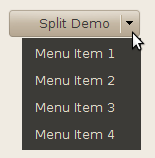
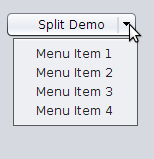
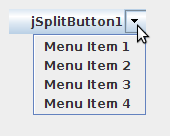
## Using the Control
```java
//first instantiate the control
JSplitButton splitButton = new JSplitButton();
//register for listener
splitButton.addSplitButtonActionListener(new SplitButtonActionListener() {
public void buttonClicked(ActionEvent e) {
System.out.println("Button Clicked");
}
public void splitButtonClicked(ActionEvent e) {
System.out.println("Split Part Clicked");
}
});
//add popup menu
splitButton.add(popupMenu);
//add this control to panel
panel.add(splitButton);
```
or (using Java 8 lambda expressions):
```java
//first instantiate the control
JSplitButton splitButton = new JSplitButton();
//register for button listener
splitButton.addButtonClickedActionListener((ActionEvent e) -> {
System.out.println("Button Clicked");
});
//register for split button listener
splitButton.addSplitButtonClickedActionListener((ActionEvent e) -> {
System.out.println("Split Part Clicked");
});
//add popup menu
splitButton.add(popupMenu);
//add this control to panel
panel.add(splitButton);
```
## Including in your project
### Gradle
1. Add the Jitpack repository to `build.gradle`
```
dependencyResolutionManagement {
repositoriesMode.set(RepositoriesMode.FAIL_ON_PROJECT_REPOS)
repositories {
mavenCentral()
maven { url 'https://jitpack.io' }
}
}
```
2. Add the dependency
```
dependencies {
implementation 'com.github.rhwood:jsplitbutton:Tag'
}
```
### Maven
1. Add the Jitpack repository to `pom.xml`
```
jitpack.io
https://jitpack.io
```
2. Add the dependency
```
com.github.rhwood
jsplitbutton
Tag
```
## Supported Java versions
JSplitButton is supported on Java LTS versions 17, 21, and 25. Non-LTS versions of Java are not supported and will receive best-effort support.
Support for Java versions 8 and 11 is depricated, and CI testing will not be performed on these versions, but source code compatibility will be retained through a minimum of November 2026 for Java 8 and November 2027 for Java 11.
## Migrating from Version 1.x to 2.0 or Newer
1. Add the Jitpack.io repositories shown above
2. Change the Group ID in `pom.xml` or `build.gradle` from `com.alexandriasoftware.swing` to `com.github.rhwood.jsplitbutton`
3. Change the package name in imports from `com.alexandriasoftware.swing` to `com.github.rhwood.jsplitbutton`
## License
- Versions 1.3.1 and newer are released under the [Apache 2.0 License](http://www.apache.org/licenses/LICENSE-2.0)
- Version 1.3.0 is released under the [GNU Public License 2.0](https://www.gnu.org/licenses/old-licenses/gpl-2.0.en.html)
## Prior History
* [Original development](http://code.google.com/p/jsplitbutton) by Naveed Quadri in 2012
* [Updated](https://github.com/akuhtz/jsplitbutton) by [Andreas Kuhtz](https://github.com/akuhtz) in 2015