https://github.com/richbl/rust-cli-sysinfo
A simple Rust-based system services status utility that runs in a Linux terminal
https://github.com/richbl/rust-cli-sysinfo
cli command-line-interface linux rust rust-lang sysinfo system-information system-information-gathering terminal utility utility-application
Last synced: 9 days ago
JSON representation
A simple Rust-based system services status utility that runs in a Linux terminal
- Host: GitHub
- URL: https://github.com/richbl/rust-cli-sysinfo
- Owner: richbl
- License: mit
- Created: 2026-06-06T21:19:03.000Z (about 1 month ago)
- Default Branch: main
- Last Pushed: 2026-07-03T04:04:32.000Z (17 days ago)
- Last Synced: 2026-07-03T06:07:25.551Z (17 days ago)
- Topics: cli, command-line-interface, linux, rust, rust-lang, sysinfo, system-information, system-information-gathering, terminal, utility, utility-application
- Language: Rust
- Homepage:
- Size: 460 KB
- Stars: 4
- Watchers: 0
- Forks: 0
- Open Issues: 0
-
Metadata Files:
- Readme: README.md
- License: LICENSE
Awesome Lists containing this project
README
# Rust CLI Sysinfo (RCS)





**Rust-CLI-Sysinfo** (RCS) is a lightweight, modular Rust utility for the Linux terminal that displays the status of customizable system services
## RCS Features
- **Comprehensive System Status**
- Displays system diagnostics right out of the box:
- CPU hardware details and real-time usage
- GPU hardware details
- Operating system
- Kernel version
- IP address
- Hostname
- Currently logged-in user(s)
- System uptime
- System load averages (over one, five, and 15 minutes)
- Memory usage
- Disk usage (defaults to `/home`, customizable via `-d`/`--disk`)
- **Customizable Services Layout**
- Select exactly which service components to display and specify their order using service tokens (see `-s`/`--services` for details)
- **Custom New Services**
- New system services can be added easily by creating a new service file, dropping it into the `src/services` folder: RCS will automatically detect and render it as an available new service
- **Visual Service Status Indicators**
- Color-coded output for CPU, memory, and disk utilization thresholds:
- **Normal:** $\color{green}{\text{Green}}$
- **Warning:** $\color{yellow}{\text{Yellow}}$
- **Critical:** $\color{red}{\text{Red}}$
- **Configuration-Free**
- No complex dotfiles or external configurations to track down
- Manage **everything** directly via command-line flags
- **Highly Efficient**
- Written in Rust for maximum performance, compiling down to a single binary with no external runtime dependencies
## RCS Screenshots
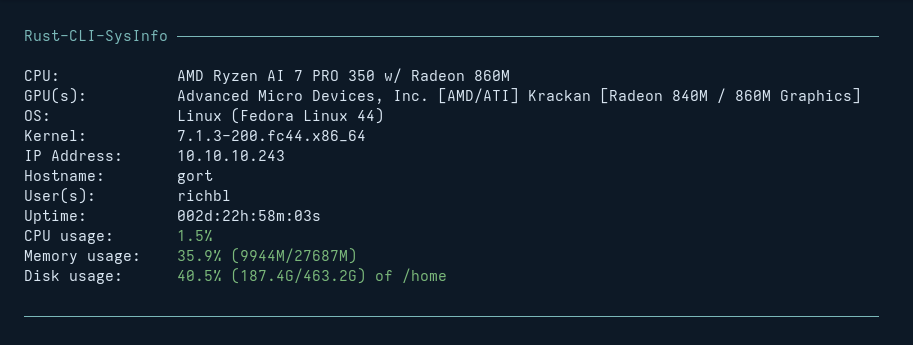
### The Default RCS Output
The standard output of the utility displays components with status-aware color coding:
### The RCS Help Output
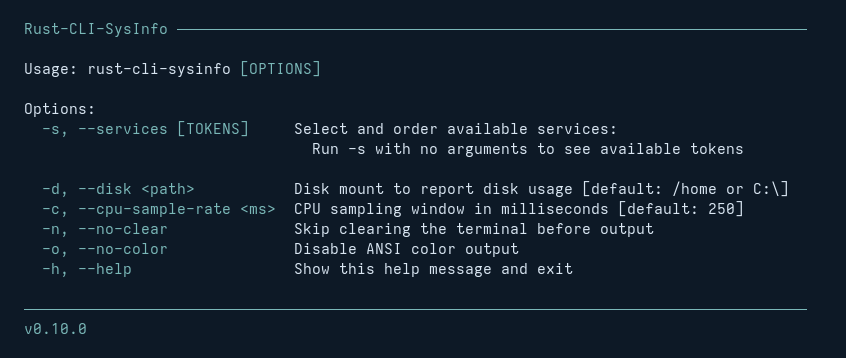
Call `rust-cli-sysinfo -h` (or `--help`) to view the complete CLI options:
### Customizing RCS with Service Tokens
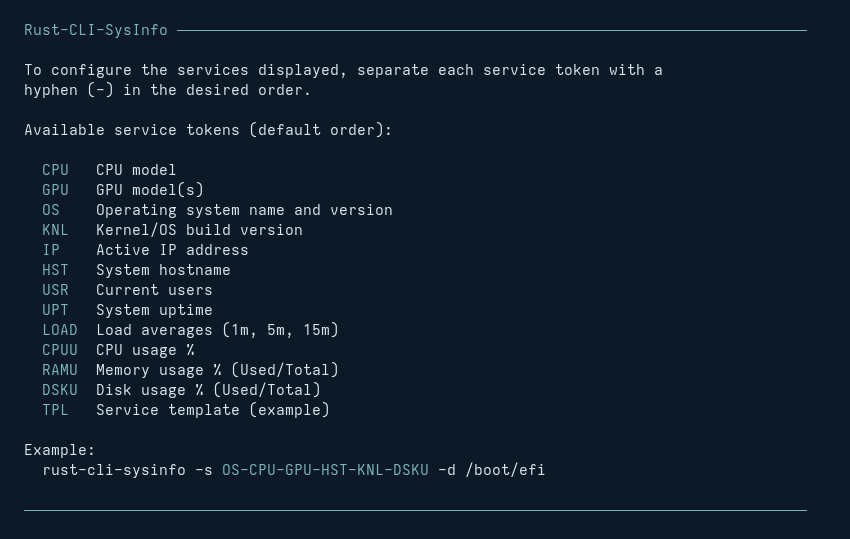
Run `rust-cli-sysinfo -s` (or `--services`) to display all available individual service tokens:
#### Customized RCS Output
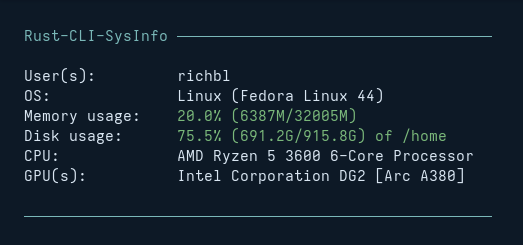
You can combine tokens to isolate and reorder specific services. For example, to focus exclusively on logged-in users (USR), OS details (OS), memory (RAMU), disk (DSKU), CPU (CPU), and GPU (GPU), use the service token layout string:
```console
rust-cli-sysinfo -s USR-OS-RAMU-DSKU-CPU-GPU
```
This will result in the following output:
## Creating New RCS Services
Want to create a new service that doesn't yet exist in RCS?
RCS leverages a **"zero-touch architecture"**, where every service is implemented within its own Rust source file and automatically registers with the utility at compile time. No need to edit or modify existing source files: just add a separate new service file and rebuild the project.
To create a new RCS service:
1. Create a new `.rs` file inside the `src/services` directory (e.g., `ip_address.rs`). Use an existing service file in `src/services` or inspect the well-documented `template.rs` file as a good starting point.
2. Build the project (`cargo build --release`). Your new module will instantly integrate into the default output stack.
**One service.**
**One file.**
**Done.**
## Requirements & Installation
### Requirements
- **Run-Time**
- Any standard modern Linux environment
- **Rust-CLI-Sysinfo** releases include a pre-compiled binary that runs natively on a Linux AMD64 architecture
- **Build-Time**
- If you're interested in compiling from source, you'll need a functioning installation of the Rust toolchain (using Cargo)
### Installation
Grab the pre-compiled binary directly from the GitHub Releases Page and place it somewhere in your local system path:
```bash
cp rust-cli-sysinfo ~/.local/bin/
```
That's it! You can now run `rust-cli-sysinfo` from within any terminal session.
### Compiling from Source
If you prefer to compile this project from sources, here are the steps:
```console
git clone https://github.com/richbl/rust-cli-sysinfo.git
cd rust-cli-sysinfo
cargo build --release --bin rust-cli-sysinfo
cp target/release/rust-cli-sysinfo ~/.local/bin/
```
Done!
## Usage
Simply invoke the tool from your terminal session:
```bash
rust-cli-sysinfo
```
To display help, use the `-h` or `--help` flag:
```bash
rust-cli-sysinfo -h
```
### Shell Integration (Recommended)
Adding the binary call to the end of your shell startup configuration script (e.g., `~/.bashrc` or `~/.zshrc`) will render **rust-cli-sysinfo** services output in your environment every time a new session starts up.
Nice!
## Roadmap
RCS is designed to remain lean and fast, but some goals for upcoming releases include:
- [x] Streamline modular service generation patterns (Zero-touch compilation)
- [ ] Additional metric services (network interfaces, thermal sensors... what else?)
- [ ] Cross-platform compatibility expansion (macOS and Windows support profiles)