https://github.com/richrd/bx
Modular Python IRC bot made from scratch.
https://github.com/richrd/bx
Last synced: 7 months ago
JSON representation
Modular Python IRC bot made from scratch.
- Host: GitHub
- URL: https://github.com/richrd/bx
- Owner: richrd
- License: apache-2.0
- Created: 2014-09-19T15:27:10.000Z (almost 12 years ago)
- Default Branch: master
- Last Pushed: 2015-08-22T21:51:51.000Z (almost 11 years ago)
- Last Synced: 2024-12-28T18:39:41.378Z (over 1 year ago)
- Language: Python
- Homepage:
- Size: 877 KB
- Stars: 4
- Watchers: 4
- Forks: 1
- Open Issues: 7
-
Metadata Files:
- Readme: README.md
- License: LICENSE
Awesome Lists containing this project
README
# bx
_______ ___ ___
| __ \ \ \ / /
| |__| | \ \/ /
| _____/ \ /
| __ \ / \
| |__| | / /\ \
|________/ /__/ \__\
Modular Python IRC bot made from scratch.
Come and talk to me at #bxbot @ QuakeNet :)
## Features
* 50+ modules with general features including:
* Authentication with different userlevels
* Auto op for trusted users
* Leave a message to an offline user
* Broadcast text or command output to channels periodicly
* Channel logs and log searching
* Highlight command to highlight everyone on a channel
* Channel mode enforcing
* Join and part commands
* Will answer simple questins
* Nick changer
* Calculator
* Link title paster
* 'wtf' for looking up acronyms
* Bot host status information
* Command line interface for managing bot
* Bitcoin and Dogecoin exchange rates
* Reittiopas.fi public transport route search
* Integrated help available
* Supports user accounts and access control
* Simple to extend if you know Python
* Aims to be compatible with Symbian S60 for hosting a bot on a phone :)
* Comming later: module for shooting and uploading pictures from a phone
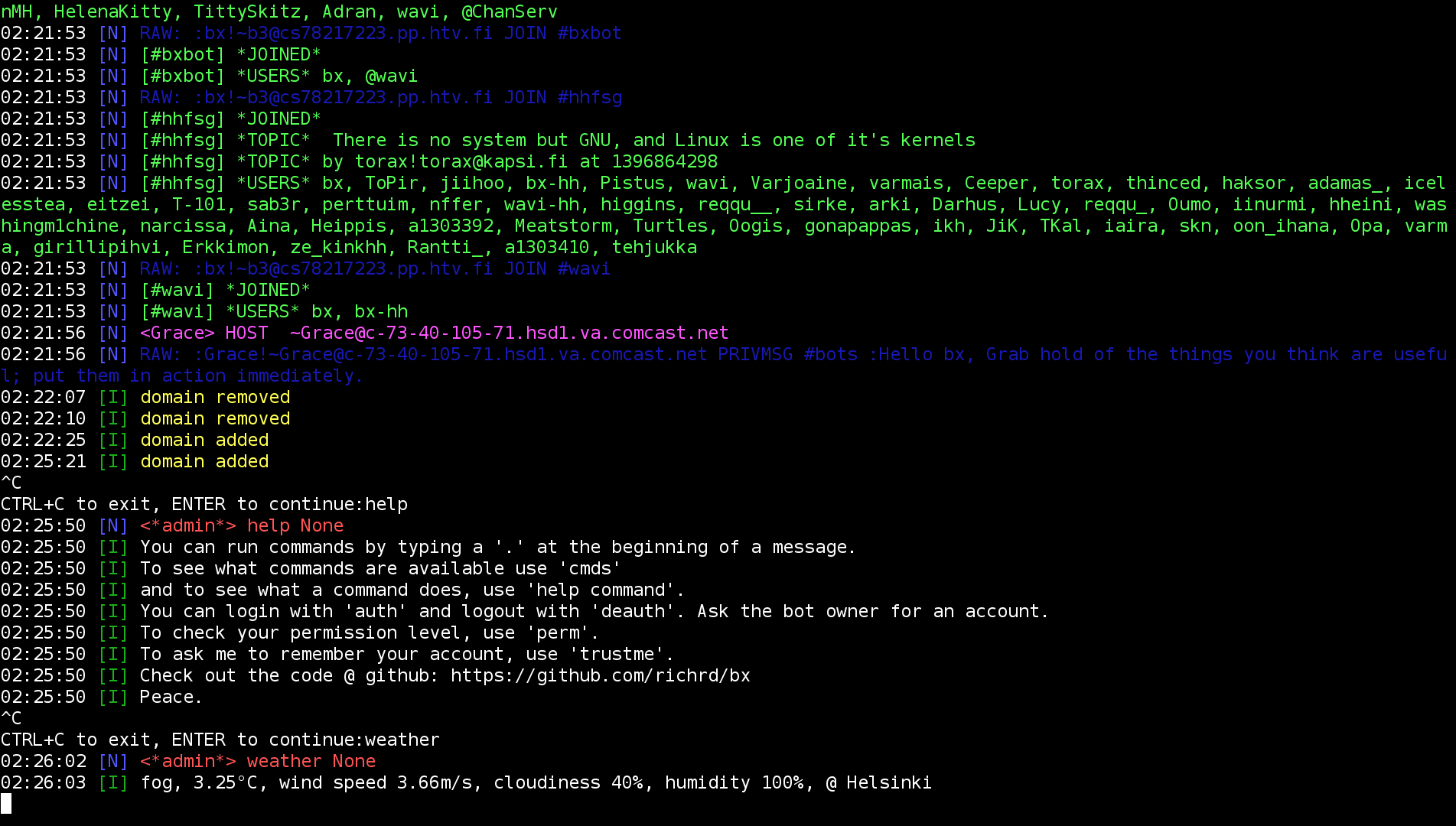
## Usage:
* To run bx:
> python bot.py
* To run with alternative config file:
> python bot.py [config_file]
To manage the bot on the command line use CTRL+C and type a command.
## To-do
* Release first majour version
### Documentation
* More comments
* General docs
* Add config description to README.md
* Or directly into config.txt
* Module developement docs and API reference
### Features
* [ ] Core
* [ ] Don't start bot if config file is broken
* [ ] Instead just print an error on the command line
* [ ] Store config data in same order as it was loaded (not alphabetically)
* [ ] Use throttle detection to delay reconnecting (if G-lined etc)
* [ ] Implement ignoring users that haven't authed
* [ ] Multi server support?
* [ ] DCC Chat?
* [ ] Config
* [ ] Rename `avoid_cmd_crash` to `cmd_crash_proof`
* [ ] Group cmd config
* [ ] Modules
* [ ] Camera module for taking photos and uploading them via ftp. Aiming to support
* [ ] Raspberry Pi
* [ ] Symbian S60
* [ ] Linux in general
* [ ] Ignore and unignore users
* [ ] Autokick unknown or untrusted users from a channel
* [ ] PyS60-specific functionality (maybe, probably not)
## Module List
* addaccount
> Create a new account.
> Usage: addaccount username password password
* addchan
> Add a channel to the autojoin list.
* alias
> Defines a new command alias.
> Usage: alias new_name command [args]
* auth
> Identify yourself with the bot (login). Only works via private messages.
> Usage: auth username password
* autochanmode
> Automatically manage channel modes according to config.
* autoop
> Automatically give OP to authed users.
* autorejoin
> Automatically rejoin a channel after kick.
* broadcast
> Broadcast messages or command output to channels and/or users (targets).
> Usage: broadcast [+-]name target[,target,...] interval command [args]
> Usage: broadcast [+-]name target[,target,...] interval :message
> Usage: broadcast +hello #chan1,#chan2 1h :hello world!
* btc
> Display the current Bitcoin exchange rate. Default exchange is bitstamp. Usage: btc [exchange]
* calc
> Calculate math expressions. e.g. calc 3+4*6
* clearlogs
> Clear n. number of messages from window logs (or all if no arguments given).
* cli
> A command line interface for the bot. Activate with CTRL+C in console.
* cmdprefix
> Check or set the command prefix that the bot will respond to.
* cmds
> Lists the commands you can use.
* deauth
> Logout of the bot.
* define
> Defines terms and words related to the bot.
* delchan
> Remove a channel from the autojoin list.
* deop
> Take OPs from a nick.
* die
> Kill the bot. Warning: I won't rise from my ashes like a fenix!
* dogecoin
> Display the current DogeCoin exchange rate, from bter. Usage: dogecoin
* dropsend
> Clear the outgoing message buffer. Warning: removes all data queued for sending to the IRC server.
* evl
> Evaluate a python expression.
* exc
> Execute python code.
* gainop
> Have the bot request OPs from QuakeNet (if channel has no OPs).
* githubnotif
> Sends notification of new github commits to all channels.
* help
> Provide basic instructions on using the bot.
> Usage: help [module]
* highlight
> Highlight everyone on the current channel.
* join
> Join list of channels, or rejoin the current channel if no channels are given.
* kick
> Kick a user off a channel.
> Usage: kick [#channel] nick
* level
> View your permission level (or someone elses).
* logs
> Print channel logs. Set time with e.g. 1h or 10m. Search logs with ?query (parameter starting with ?). Example: logs 2h ?hello
* mod
> Enable or disable modules (commands & listeners).
> Usage: mod [-/+]module_name
> e.g. prefix module name with - or + for disable or enable
* modlevel
> Change the permission level of a module.
> Usage: modlevel mod level
* msg
> Send a message as the bot to a user or channel.
* msgcount
> Show the message log size of the current window.
* newpass
> Change your password.
> Usage: newpass oldpassword newpassword newpassword
* nick
> Change the nick of the bot. If nick isn't available, the nick will be reclaimed when it becomes available.
* op
> Give OPs to yourself (default), or a list of nicks, or everyone (with '*').
* part
> Part list of channels.
* ping
> Ping the bot, to make sure it's alive and kicking.
* qauth
> Automatically auth with Q @ QuakeNet when connecting to IRC.
* raw
> Send raw data to the irc server.
* recon
> Reload bot config.
* reittiopas
> Get public transport routes via www.reittiopas.fi. Usage: reittiopas start_address - end_address
* remod
> Reload bot modules.
* run
> Run a command as another user (and/or on another channel). Usage: [channel] user command
* status
> Get status information of the host running the bot.
* storeconf
> Store configuration.
* tell
> Send a message to a user when they come online.
> Usage: tell nick message
* topic
> Change the channel topic. To add to the current topic, start your topic with a '+' symbol.
* trustme
> Remember your account. Connects your current hostname to your account so you don't have to auth every time you connect.
* unknowncmd
> Intercept unknown commands and try to respond. Experimental!
* url
> Find links in messages and post link titles when found.
* userinfo
> View info about you or another nick.
* userlevel
> Change the permission level of a user.
> Usage: userlevel user level
* view
> View various bot information.
* weather
> Display the current weather conditions. Usage: weather [location]
* wtf
> Show definitions for common acronyms or define new ones.
> Usage: wtf acronym
> Usage: wtf +acronym description