https://github.com/rimkomatic/nasalaunchsystem
https://github.com/rimkomatic/nasalaunchsystem
full-stack mern-stack mongodb mongodb-atlas nasa node-js react
Last synced: 2 months ago
JSON representation
- Host: GitHub
- URL: https://github.com/rimkomatic/nasalaunchsystem
- Owner: Rimkomatic
- Created: 2023-06-10T15:46:56.000Z (about 3 years ago)
- Default Branch: main
- Last Pushed: 2023-06-21T15:17:12.000Z (almost 3 years ago)
- Last Synced: 2023-12-26T05:35:18.156Z (over 2 years ago)
- Topics: full-stack, mern-stack, mongodb, mongodb-atlas, nasa, node-js, react
- Language: JavaScript
- Homepage: https://nasa-launch-system.vercel.app
- Size: 7.24 MB
- Stars: 1
- Watchers: 1
- Forks: 0
- Open Issues: 0
-
Metadata Files:
- Readme: ReadMe.md
Awesome Lists containing this project
README

## Nasa Space Launch Dashboard
The Full stack app is made with MERN stack , that is MongoDB,ExpressJs , React and NodeJs
#### note: The SpaceX integration is under construction
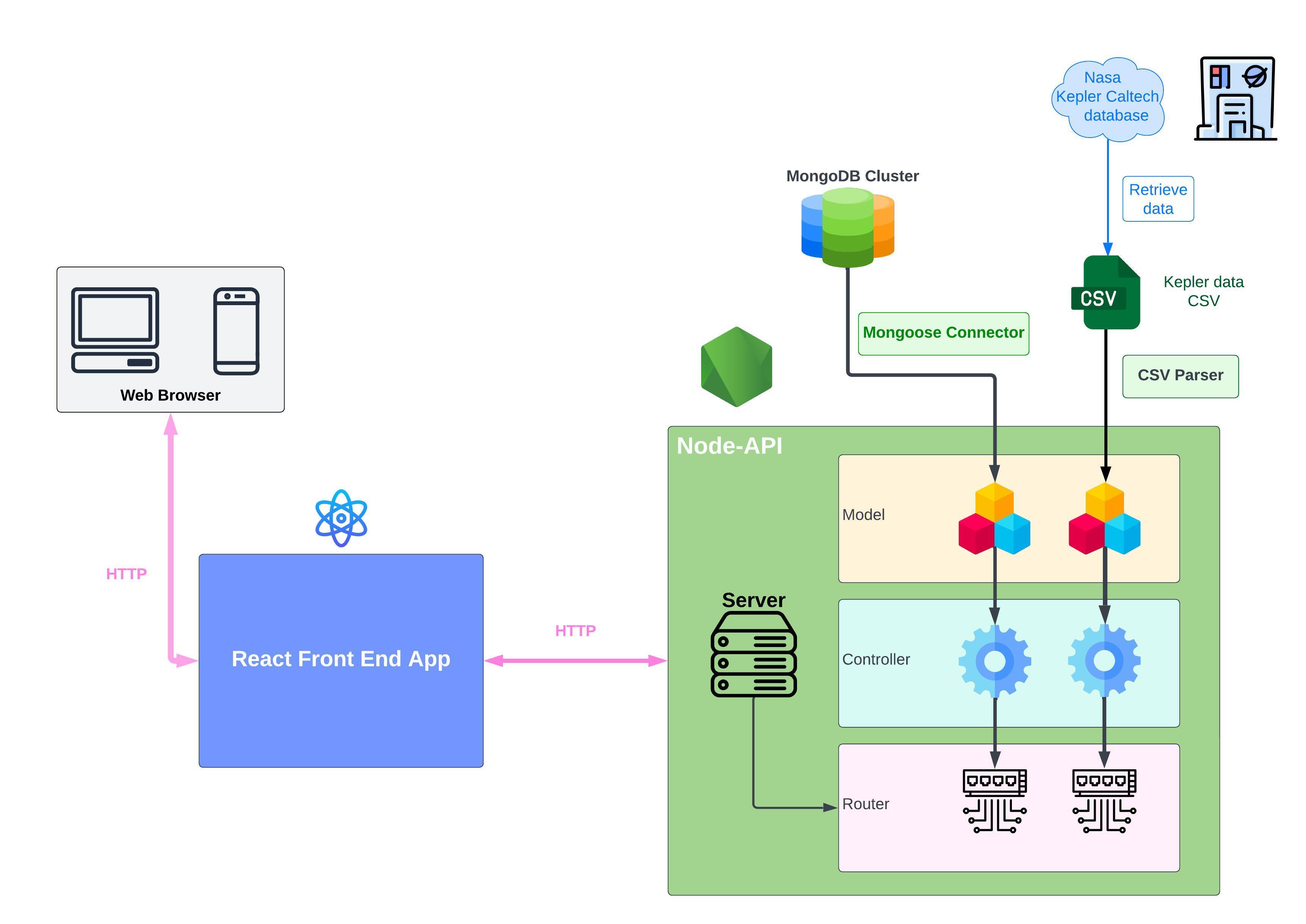
## Project Outline
The project outline is as follows
# components
All the Server components are Listed below
## Model
There are two available models
1. planets: It uses in build 'fs' and npm package CSV Parser to retrieve data as the planets.
2. Launches: It retrieves data from The NASA Cluster using Mongoose .
## Controller
controllers are the component that uses Model to serve data to the actual server. It contains functions that use the Model to export and import and in cases to delete data.
## Router
Router connects directly to the server and it access the data according to the request in the server, then it talks to the controllers of it's type and it command the controller to use the correct function to retrieve data.
# Local Installation
1. Ensure you have Node.js installed.
2. Edit the `package.json` file in the client side edit the `build` script to this:
```
cross-env BUILD_PATH=../server/public react-scripts build
```
2. Create a free [Mongo Atlas](https://www.mongodb.com/atlas/database) database online or start a local MongoDB database.
3. Create a `server/.env` file with a `MONGO_URL` property set to your MongoDB connection string.
4. In the terminal, run: `npm install`
## Running the Project
1. In the terminal, run: `npm run deploy`
2. Browse to the mission control frontend at [localhost:3011](http://localhost:8000) and schedule an interstellar launch!
## Docker
1. Ensure you have the latest version of Docker installed
2. Run
```
docker build -t nasa-project
```
3. Run
```
docker run -it -p 3011:3011 nasa-project
```
## Running the Tests
To run any automated tests, run `npm test`. This will:
* Run all the client-side tests: `npm test --prefix client`
* Run all the server-side tests: `npm test --prefix server`