https://github.com/rlaphoenix/leakysab-poc
PoC of 'LeakySAB' a vulnerability allowing extraction of usenet provider password from a SABnzbd instance
https://github.com/rlaphoenix/leakysab-poc
Last synced: 3 months ago
JSON representation
PoC of 'LeakySAB' a vulnerability allowing extraction of usenet provider password from a SABnzbd instance
- Host: GitHub
- URL: https://github.com/rlaphoenix/leakysab-poc
- Owner: rlaphoenix
- License: unlicense
- Created: 2023-02-12T18:31:39.000Z (over 3 years ago)
- Default Branch: master
- Last Pushed: 2024-04-22T00:44:17.000Z (about 2 years ago)
- Last Synced: 2025-05-06T18:51:52.438Z (about 1 year ago)
- Language: Python
- Homepage:
- Size: 47.9 KB
- Stars: 11
- Watchers: 2
- Forks: 1
- Open Issues: 0
-
Metadata Files:
- Readme: README.md
- License: LICENSE
Awesome Lists containing this project
README
# LeakySAB-PoC
This is a PoC of 'LeakySAB', a vulnerability allowing extraction of usenet provider password from a SABnzbd instance.
I'm not the first to encounter this vulnerability, but I seemed to have been the first to report it to the SABnzbd team.
It is supported and tested on all versions of `2.x` and `3.x` and has not yet been patched. It has not been tested on
version `1.x`, but likely works.
The PoC was privately sent to the SABnzbd team through email and the topic was brought up on GitHub Issues, without
sharing much details publicly. See https://github.com/sabnzbd/sabnzbd/issues/2455. The PoC was released as it looks
as if the team knew of the vulnerability at it's core, but would rather keep it unpatched than add a slight inconvenience
to the user, which is astonishingly ridiculous...
## Mitigation
There's currently no way to truly prevent this issue. As long as someone can get onto your Web UI, this
exploit will be possible. However, there are some steps you should take to protect yourself as much as possible.
Don't open your SABnzbd port (port forward) and add authentication to your SABnzbd Web UI. I recommend against
using the username 'admin' or such. I personally use a completely random string for both the username and password.
This will reduce possible attacks to only devices on your local network. However, it's still not impenetrable from
malware, threat actors getting your SABnzbd API Key, running from a public network or unsafe network, intranet access
attacks (like breaching a personal home/server VPN), or another SABnzbd exploit to bypass auth on SABnzbd Web UIs.
Of course, these listed threats are very niche and unlikely to happen, and generally out of the scope of SABnzbd.
However, I completely refute the SABnzbd teams decision to intentionally leave such a blatant exploit possible when
a simple fix could be made. E.g., prevent the host name from being altered once added, or have the user re-enter
the password if they need to change the host.
## Usage
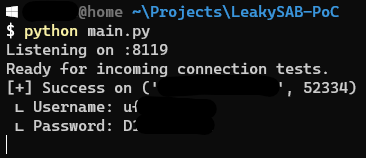
Run `$ python main.py`, this will start a TCP server binded to all available interfaces, on port 8119.
1. Go to the SABnzbd Server settings page, e.g., `http://127.0.0.1:8080/sabnzbd/config/server/`.
2. Tick the "Advanced Settings" check box on the top right of the page.
3. Click "Show Details" on the server you wish to reveal the password of.
4. Change the Host to the IP/Hostname of the Server you are running the TCP server on.
5. Change the Port to 8119 and make sure the "SSL" check box is unticked.
6. Click the Test Server button. Look at your server's terminal and you should see the Username and Password.
### API
A Web Server allowing you to run the exploit by providing the hostname and port of a SABnzbd instance is
available in [api.py](api.py).
You must create a `credentials.db` file and a `credentials` table yourself. Use this Schema:
```sql
CREATE TABLE "credentials" (
"id" INTEGER NOT NULL UNIQUE,
"host" TEXT NOT NULL COLLATE NOCASE,
"port" INTEGER NOT NULL,
"username" TEXT NOT NULL,
"password" TEXT NOT NULL,
"ssl" INTEGER NOT NULL,
PRIMARY KEY("id" AUTOINCREMENT),
UNIQUE("host","port","username","password")
);
```
### Troubleshooting
Before continuing these troubleshooting steps, make sure you have opened the port `8119` before continuing.
You can check if the port is opened by going to https://canyouseeme.org on the server to test `8119`.
### Test Server times out and no connection appears on the Server Terminal
You may not have allowed the port or Python in your Firewall. Even though I don't usually have to manually allow
something, I too had to manually allow it for it to work. This may be because Windows never gave me the Firewall
dialog on first-run for some reason. You will need to manually allow incoming traffic for the port 8119 in
Advanced Firewall Settings.
## License
© 2023 rlaphoenix — [Unlicense](LICENSE)