https://github.com/rob-white/vue-slimgrid
A Vue wrapper component for SlickGrid
https://github.com/rob-white/vue-slimgrid
component grid slickgrid slimgrid vue-slickgrid vue2 vuejs
Last synced: over 1 year ago
JSON representation
A Vue wrapper component for SlickGrid
- Host: GitHub
- URL: https://github.com/rob-white/vue-slimgrid
- Owner: rob-white
- License: mit
- Created: 2018-07-31T03:47:04.000Z (almost 8 years ago)
- Default Branch: master
- Last Pushed: 2022-12-29T19:16:08.000Z (over 3 years ago)
- Last Synced: 2025-04-04T01:30:22.539Z (over 1 year ago)
- Topics: component, grid, slickgrid, slimgrid, vue-slickgrid, vue2, vuejs
- Language: JavaScript
- Homepage:
- Size: 2.15 MB
- Stars: 53
- Watchers: 7
- Forks: 17
- Open Issues: 16
-
Metadata Files:
- Readme: README.md
- License: LICENSE
Awesome Lists containing this project
README
# Vue Slimgrid
[](https://www.npmjs.com/package/vue-slimgrid) [](https://www.npmjs.com/package/vue-slimgrid) 
> A simple Vue wrapper component for [SlickGrid](https://github.com/mleibman/SlickGrid) using [SlickGrid-ES6](https://github.com/DimitarChristoff/slickgrid-es6) as a foundation!
Includes some additional plugins/features built-in:
- [Slick Header Filter (danny-sg)](https://github.com/danny-sg/slickgrid-spreadsheet-plugins)
- [External Copy/Paste (Celebio)](https://github.com/Celebio/SlickGrid)
- [Conditional Input Filtering (ghiscoding)](https://stackoverflow.com/a/16779331)
- Pager w/ Selection Statistics (Avg, Count, Min, Max, Sum)
- Raw/Filtered Data Download to CSV
- Right-Click Context Menu
## Installation
### NPM
```sh
npm i vue-slimgrid --save
```
### Yarn
```sh
yarn add vue-slimgrid
```
## Example.vue
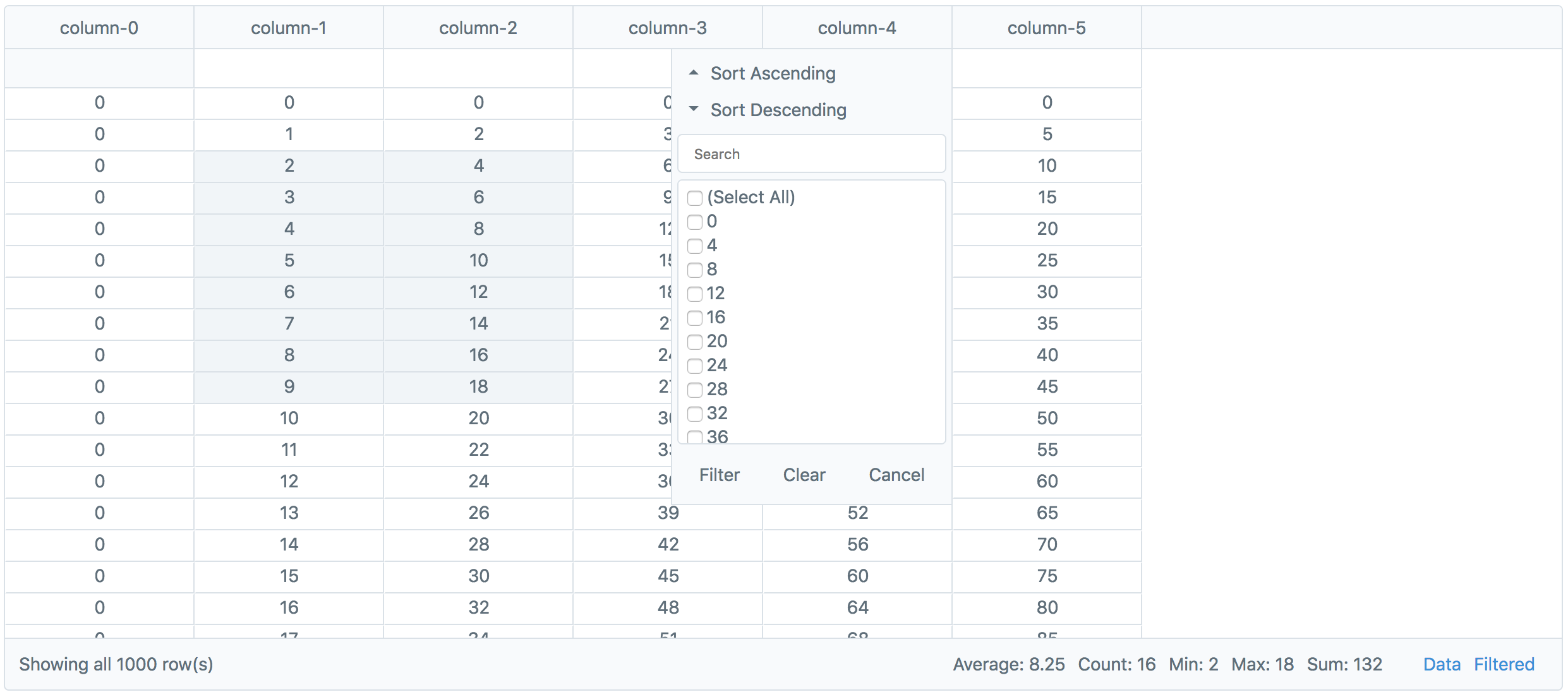
```html
import SlimGrid from 'vue-slimgrid';
export default {
components: { SlimGrid },
data() {
return {
data: this.generateDummyData()
};
},
methods: {
generateDummyData() {
let data = [];
for (let i = 0; i < 1000; i++) {
let row = { id: i };
for (let j = 0; j < 6; j++) {
row["column-" + j] = i * j;
}
data.push(row);
}
return data;
}
}
}
```
## Available Props
### pk
> The name of the column from your data to use as the primary key.
**Default:** ```id```
**Example:**
```html
```
### data
> The dataset to display in the grid.
**Default:** ```[]```
**Example:**
```html
```
### columnOptions
> Options that can be applied to each column in the grid to maniplulate how they act and display.
**Default:** (applied for each column)
```javascript
{
/**
* Along with their normal values, all options may also be used with anonymous functions:
* order(column) {
* return column.id == 'col1' ? -1 : 0;
* }
*/
/**
* The position of the column in the header relative to others.
* Lower number (more left), Higher number (more right)
*/
order: idx,
/**
* Show or hide the column.
*/
hidden: false,
/**
* Show or hide the header input field for this column.
*/
headerInput: true,
/**
* Show or hide the header filter for this column.
*/
headerFilter: true,
/**
* SlickGrid Column Option Defaults
*
* The documentation for SlickGrid specific options:
* https://github.com/mleibman/SlickGrid/wiki/Column-Options
*/
id: columnName,
name: columnName,
field: columnName,
sortable: true,
resizable: true,
focusable: true,
selectable: true,
headerCssClass: null,
minWidth: 30,
cssClass: "text-center",
defaultSortAsc: true,
groupTotalsFormatter(totals, columnDef) {
return null;
},
formatter(row, cell, value, columnDef, dataContext) {
return value;
}
}
```
> Note: The pk column is set as ```hidden: true``` and ```order: -1``` by default.
**Example:**
```html
.disabled {
height: 95%;
display: block;
padding: 0px;
white-space: nowrap;
text-align: center;
background-color: #8795A1;
color: #ffffff;
}
import SlimGrid from 'vue-slimgrid';
export default {
components: { SlimGrid },
data: () => ({
data: ['id': 1, 'col1': 'value', 'col2': 'value']
columnOptions: {
// Options applied to all columns.
'*': {
// ...
},
// Options only applied to 'col1'.
'col1': {
name: '',
hidden: false,
sortable: false,
resizable: false,
focusable: false,
selectable: false,
headerInput: false,
headerFilter: false,
formatter(row, cell, value) {
return `
<span class="disabled">
${value}
</span>
`;
}
}
}
})
}
```
### explicitColumns
> An array of column names that will be used when rendering the grid instead of auto-generating them from the provided data. *Helpful when needing to show columns if the data is empty.*
**Default:** ```[]```
**Example:**
```html
```
### height
> The height in ```px``` to display the grid.
**Default:** ```600```
**Example:**
```html
```
### selectionModel
> The SlickGrid selection model to use when rendering the grid.
**Default:** ```Plugins.CellSelectionModel()```
**Example:**
```html
import SlimGrid from 'vue-slimgrid';
import { Plugins } from 'slickgrid-es6';
export default {
components: { SlimGrid },
data: () => ({
selectionModel: new Plugins.RowSelectionModel()
})
}
```
### customPlugins
> Add, register, and enable events for custom SlickGrid plugins.
**Default:** ```{}```
**Example:**
```html
import SlimGrid from 'vue-slimgrid';
export default {
components: { SlimGrid },
data: () => ({
customPlugins: {
// Each plugin will have a key (its name) and an object of options (its value).
examplePlugin: {
// Whether or not the plugin should be "registered" with the SlickGrid instance.
register: true,
// An instantiation of the plugin that you want to add.
plugin: new ExamplePlugin({}),
// Any events you want to enable.
// Note: If you don't want to use any events or the plugin
// doesn't provide any, just exclude the "events" key.
events: {
onSomeAvailableEvent: {
// Optional
before(e, args) {
// Do something "before" the event is fired.
},
// Required
on(e, args) {
// Do something "on" this event being fired.
},
// Optional
after(e, args) {
// Do something "after" the event is fired.
}
}
}
}
}
})
}
```
### rowFormatter
> Customize the appearance/handling of particular rows. *See the [SlickGrid Item Metadata Documentation](https://github.com/mleibman/SlickGrid/wiki/Providing-data-to-the-grid#item-metadata) for more details.*
**Default:**
```javascript
function(item) {
return null;
}
```
**Example:**
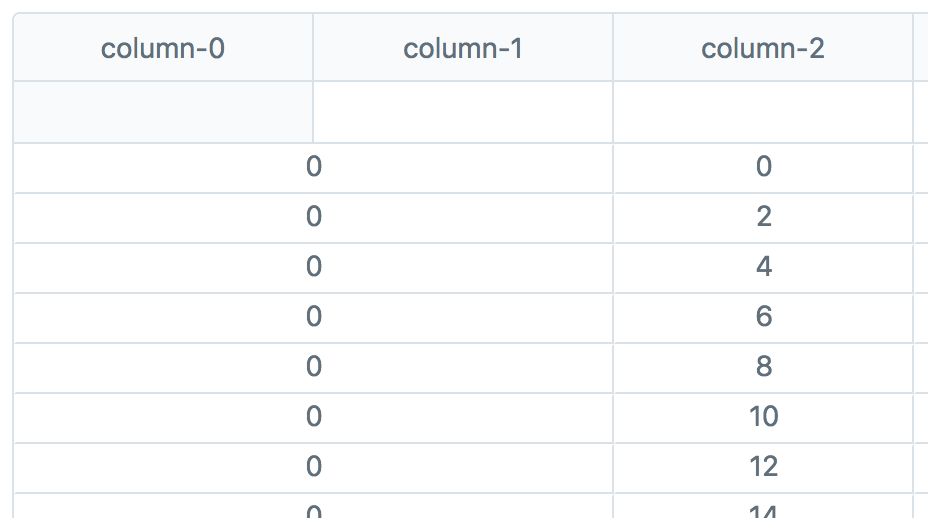
```html
import SlimGrid from 'vue-slimgrid';
export default {
components: { SlimGrid },
methods: {
rowFormatter(row) {
// Increase the colspan for the column at index 0.
// https://github.com/mleibman/SlickGrid/wiki/Providing-data-to-the-grid#item-metadata
return {
"columns": {
0: {
"colspan": "2"
}
}
};
}
}
}
```
### sort
> The function to use when a sort operation is performed on data.
**Default:**
```javascript
function(e, args) {
args.grid.getData().sort(function(row1, row2) {
for (let i = 0, l = args.sortCols.length; i < l; i++) {
const sortAsc = args.hasOwnProperty("command")
? args.command === "sort-asc"
: args.sortCols[i].sortAsc;
const field = args.sortCols[i].hasOwnProperty("field")
? args.sortCols[i].field
: args.sortCols[i].sortCol.field;
const sign = sortAsc ? 1 : -1;
const x = row1[field],
y = row2[field];
const result = (x < y ? -1 : x > y ? 1 : 0) * sign;
if (result != 0) return result;
}
return 0;
}, true);
}
```
### grouping
> Set multi-level groupings for rows. *See the [SlickGrid Grouping Example](http://mleibman.github.io/SlickGrid/examples/example-grouping) for more details.*
**Default:** ```[]```
**Example:**
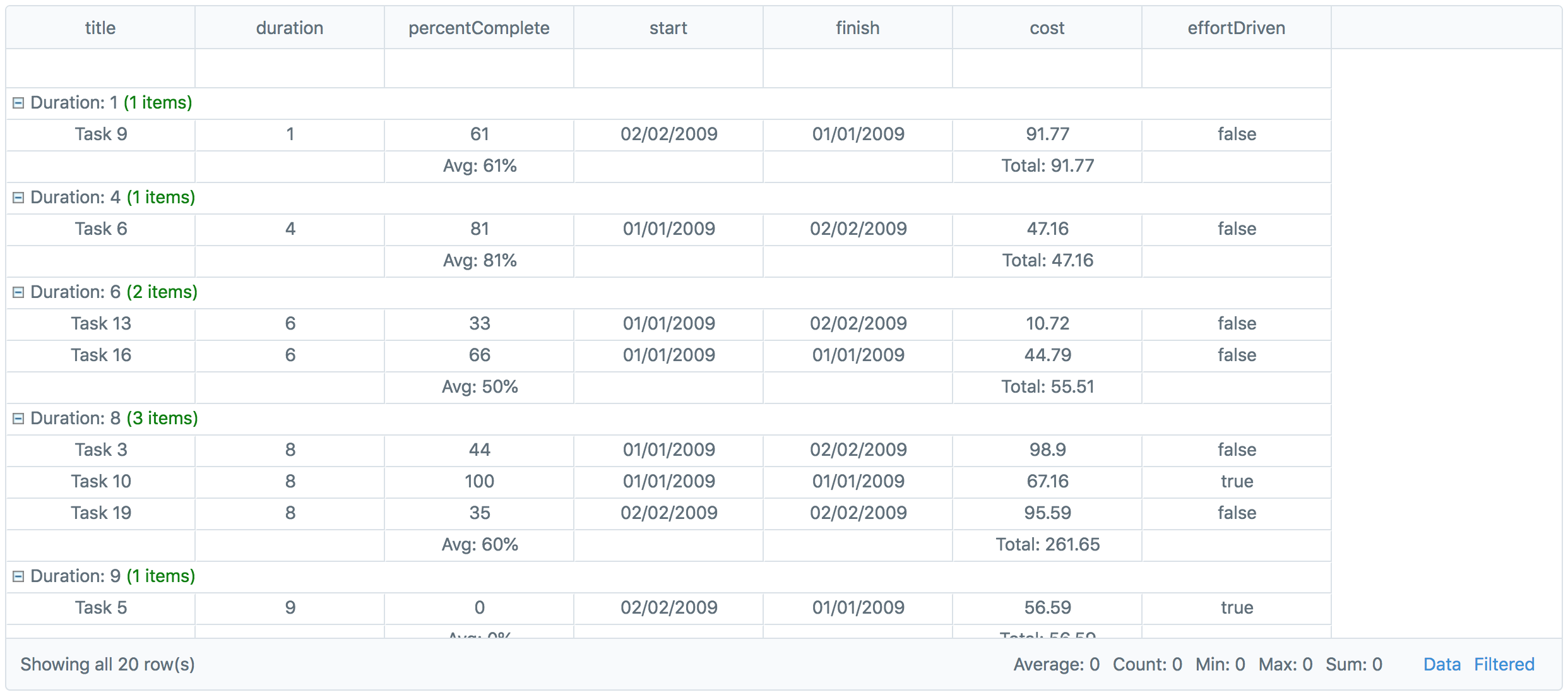
```html
import { Data } from 'slickgrid-es6';
import SlimGrid from 'vue-slimgrid';
export default {
components: { SlimGrid },
data: () => ({
byDuration: {
getter: 'duration',
formatter(g) {
return 'Duration: ' + g.value + ' <span style="color:green">(' + g.count + ' items)</span>';
},
aggregators: [
new Data.Aggregators.Avg('percentComplete'),
new Data.Aggregators.Sum('cost')
],
aggregateCollapsed: false,
lazyTotalsCalculation: true
},
columnOptions: {
// Change how the totals row is displayed by using the 'groupTotalsFormatter' option.
percentComplete: {
groupTotalsFormatter(totals, columnDef) {
let val = totals.avg && totals.avg[columnDef.field];
if (val != null) {
return 'Avg: ' + Math.round(val) + '%';
}
return '';
}
},
cost: {
groupTotalsFormatter(totals, columnDef) {
let val = totals.sum && totals.sum[columnDef.field];
if (val != null) {
return 'Total: ' + ((Math.round(parseFloat(val)*100)/100));
}
return '';
}
}
}
})
}
```
### contextMenuOptions
> Options to add to the context-menu that displays when a user right-clicks selected grid cells.
**Default:** ```[]```
**Example:**
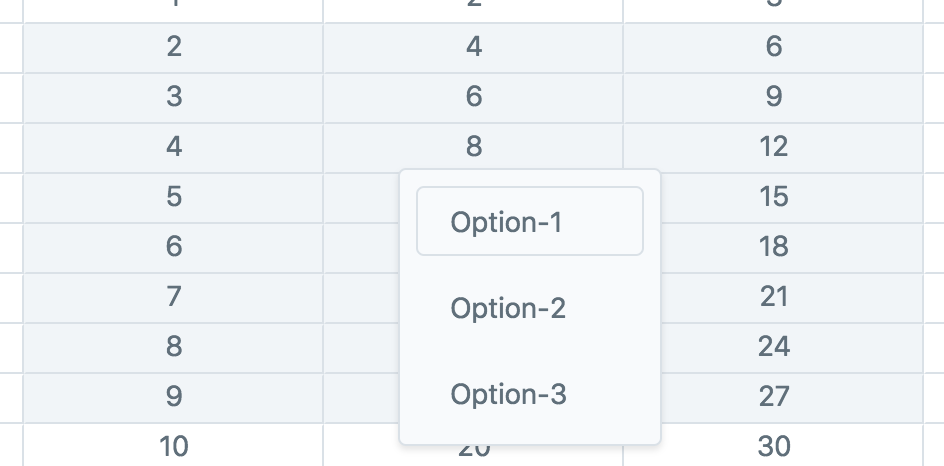
```html
import SlimGrid from 'vue-slimgrid';
export default {
components: { SlimGrid },
data: () => ({
// Each option is required to have a unique "label" key.
//
// Other custom keys may also be added that can be
// used in the event when an option is selected.
options: [
{ label: 'Option-1' },
{ label: 'Option-2' },
{ label: 'Option-3' }
]
})
}
```
### showPager
> Show or hide the pager at the bottom of the grid.
**Default:** ```true```
**Example:**

```html
```
### downloadable
> Show or hide the csv download links for raw/filtered data in the pager.
**Default:** ```true```
**Example:**
```html
```
### showPagerStats
> Show or hide the selection statistics in the pager.
**Default:** ```true```
**Example:**
```html
```
### SlickGrid Options
> Each of the base SlickGrid Grid options are also available. *See the [SlickGrid Grid Options Wiki](https://github.com/mleibman/SlickGrid/wiki/Grid-Options) for defaults and descriptions.*
## Enable Editing
> You can enable editing of cells by enabling the SlickGrid edit options and setting editors on the columns you want. *See the [SlickGrid Examples](https://github.com/mleibman/SlickGrid/wiki/Examples) for examples & cell editor info.*
```html
import { Editor } from 'slickgrid-es6';
import SlimGrid from 'vue-slimgrid';
export default {
components: { SlimGrid },
data: () => ({
columnOptions: {
// Add a text editor to all columns. If you want to write your own custom cell editor, see below:
// https://github.com/mleibman/SlickGrid/wiki/Writing-custom-cell-editors
'*': {
editor: Editor.Text
}
}
})
}
```
## Available Events
> All events you can listen for on the SlimGrid component use the kebab-case syntax:
```html
import SlimGrid from 'vue-slimgrid';
export default {
components: { SlimGrid },
methods: {
handleMethod(args) {
// Do something here...
}
}
}
```
### before-init
> Triggered right before the SlickGrid instance is created and initialized.
**Params:** ```args```
### after-init
> Triggered right after the SlickGrid instance is created and initialized.
**Params:** ```args```
### before-data-update
> Triggered right before the grid is updated with new data.
**Params:** ```args```
### after-data-update
> Triggered right after the grid is updated with new data.
**Params:** ```args```
### data-view-update
> Triggered when the underlying DataView data is updated.
**Params:** ```args```
### columns-generated
> Triggered when columns and their options are generated.
**Params:** ```args```
### filters-generated
> Triggered when filters are generated from the columns.
**Params:** ```args```
### columns-set
> Triggered when the generated columns are set on the SlickGrid instance.
**Params:** ```args```
### context-menu-option-selected
> Triggered when a context-menu option is selected.
**Params:** ```args```
### row-count-changed
> Triggered when the row count of the data changes. *See [SlickGrid DataView Wiki](https://github.com/mleibman/SlickGrid/wiki/DataView)*
**Params:** ```e, args```
### rows-changed
> Triggered when rows have been changed in the data. *See [SlickGrid DataView Wiki](https://github.com/mleibman/SlickGrid/wiki/DataView)*
**Params:** ```e, args```
### selected-ranges-changed
> Triggered when the selected cell range is changed.
**Params:** ```e, args```
### SlickGrid Events
> The following events were renamed from SlickGrid: ```grid-click```, ```grid-dbl-click```, ```grid-key-down```.
> All other events exposed by SlickGrid are also available by using kebab-case and excluding the word "on" in the event name (see example below). *See the [SlickGrid Events Wiki](https://github.com/mleibman/SlickGrid/wiki/Grid-Events) for parameters.*
**Example:**
```html
import SlimGrid from 'vue-slimgrid';
export default {
components: { SlimGrid },
methods: {
handleDblClick(e, args) {
console.log('The grid was double clicked!');
}
}
}
```
## Contribute
This package was built to simply make it easier to integrate SlickGrid into personal Vue projects. Some SlickGrid functionality may not work (I haven't tested it on everything), but any pull requests are welcome to add in features or fix bugs!
If you're looking for a fully featured, "battle-tested" grid solution, I'd check out [ag-grid](https://www.ag-grid.com).
### Install Dependencies
```
npm install
```
### Compiles and Hot-Reloads
```
cd ./examples
vue serve
```