https://github.com/robincpc/vimrc
Personal VIM settings
https://github.com/robincpc/vimrc
vim vimrc
Last synced: over 1 year ago
JSON representation
Personal VIM settings
- Host: GitHub
- URL: https://github.com/robincpc/vimrc
- Owner: RobinCPC
- Created: 2015-11-14T06:15:17.000Z (over 10 years ago)
- Default Branch: master
- Last Pushed: 2020-07-04T22:50:06.000Z (about 6 years ago)
- Last Synced: 2025-02-08T15:46:33.774Z (over 1 year ago)
- Topics: vim, vimrc
- Language: Vim script
- Size: 64.5 KB
- Stars: 3
- Watchers: 3
- Forks: 0
- Open Issues: 0
-
Metadata Files:
- Readme: README.md
Awesome Lists containing this project
README
# vimrc
Personal VIM settings
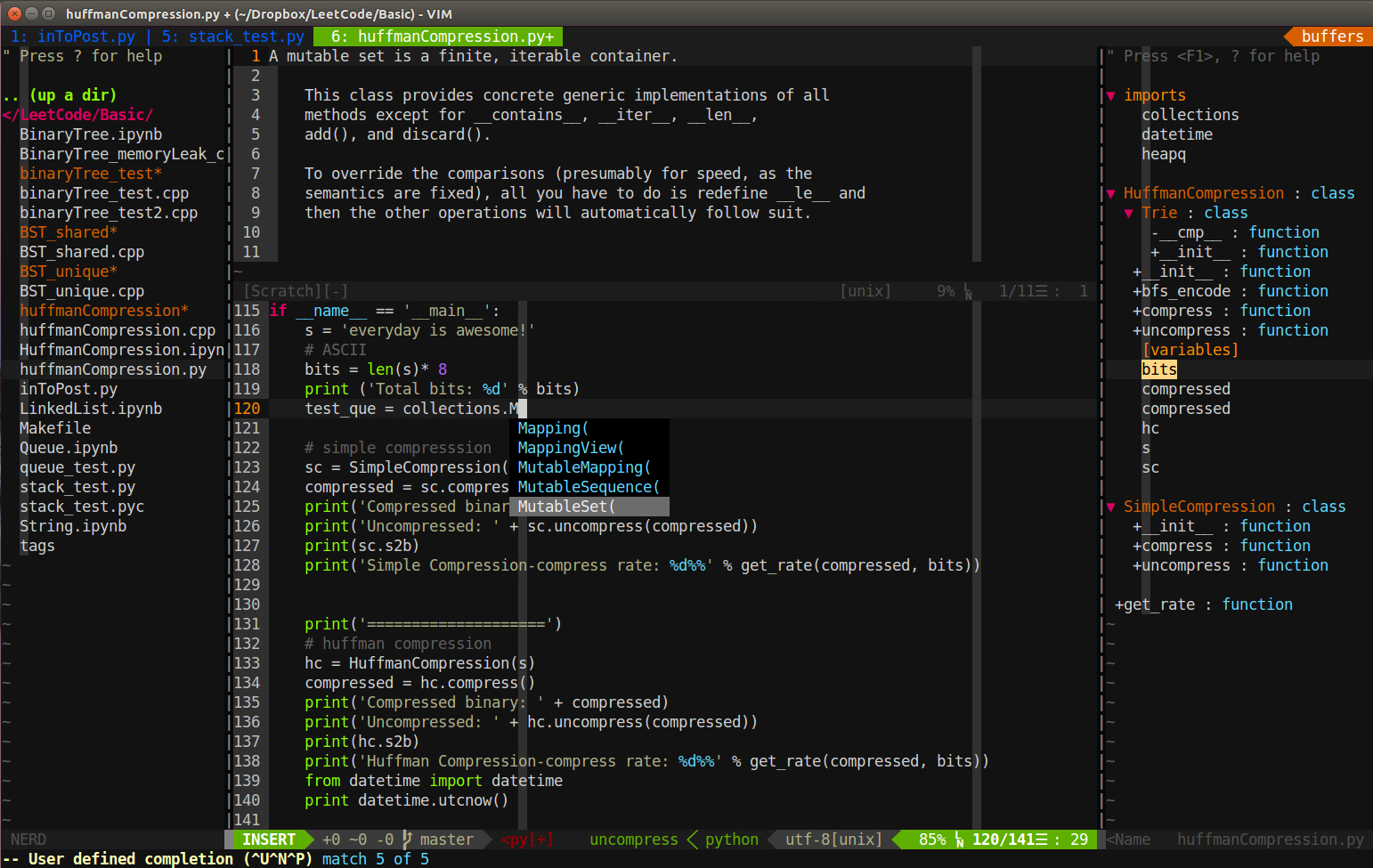
## How to Install :
### Clone necessary repository
Open terminal (in $Home directory), then type following commands:
``` bash
# move to home directory and create dotfile directory
cd $HOME
mkdir -p dotfiles && cd dotfiles
# clone vimrc
git clone https://github.com/RobinCPC/vimrc.git vim
cd vim
# create bundle directory and clone Vundle plugin
mkdir -p bundle && cd bundle
git clone https://github.com/VundleVim/Vundle.vim.git
```
### Make soft link to the relevant locations
In ~/dotfiles directory, use following commands to add softlink:
``` bash
ln -s ~/dotfiles/vim/ ~/.vim
ln -s ~/dotfiles/vim/vimrc ~/.vimrc
```
### Install Vim package by Vundle
In ~/dotfiles/vim/ directory, use following commands:
``` bash
vim vimrc
```
when in vim editor, type:
``` vim
:PluginList
:PluginInstall
```
### If tagbar not work, install ctag
In terminal:
- Ubuntu/Debian
``` bash
sudo apt-get install ctags
```
- macOS (use Homebrew)
``` bash
brew install ctags
```
Then, Homebrew will install ctags in `/usr/local/bin/`
note: macOS has another program is also named ctags (different software) in `/usr/bin/`, may need to add
`export PATH=/usr/local/bin:$PATH` to your `.bash_profile` or `,zshrc`
### Fix airline fonts
In terminal, and under $HOME directory
``` bash
cd $HOME
mkdir -p .fonts && cd .fonts/
git clone https://github.com/powerline/fonts.git
cd fonts/
./install.sh
```
Then, go to Teminal setting:
Edit->Profile Preferences
General->Font
Change default (monospace) to DejaVu Sans Mono for Powerline | 12
### If use YouCompleteMe (YCM) as completer
Need compile YCM and upgrade some python package (cryptography, pyOpenSSL)
``` bash
# Go to where YCM installed
cd ~/.vim/bundle/YouCompleteMe
# compile with C-family Languages support
./install.py --clang-completer
# may need upgrade python package if errors happenned when you open vim
sudo -H pip install --upgrade cryptography
sudo python -m easy_install --upgrade pyOpenSSL
```
#### reference:
http://mirnazim.org/writings/vim-plugins-i-use/
https://github.com/powerline/fonts
https://sheerun.net/2014/03/21/how-to-boost-your-vim-productivity/
http://www.wklken.me/category/vim.html
https://realpython.com/blog/python/vim-and-python-a-match-made-in-heaven/
http://www.cnblogs.com/renrenqq/archive/2010/09/09/1813669.html
http://scholarslab.org/research-and-development/code-spelunking-with-ctags-and-vim/
https://stackoverflow.com/questions/51283708/python-pip-package-requestsdependencywarning-when-installing-elastic-search-cura