https://github.com/robintail/merge-sx
Combines multiple SxProps for Material UI components.
https://github.com/robintail/merge-sx
combine css-in-js jss material-ui merge merging mui muiv5 react reactjs strict styled-components styling typescript
Last synced: about 1 year ago
JSON representation
Combines multiple SxProps for Material UI components.
- Host: GitHub
- URL: https://github.com/robintail/merge-sx
- Owner: RobinTail
- License: mit
- Created: 2022-11-05T22:16:08.000Z (over 3 years ago)
- Default Branch: master
- Last Pushed: 2025-03-16T12:56:31.000Z (over 1 year ago)
- Last Synced: 2025-03-25T18:46:53.693Z (over 1 year ago)
- Topics: combine, css-in-js, jss, material-ui, merge, merging, mui, muiv5, react, reactjs, strict, styled-components, styling, typescript
- Language: TypeScript
- Homepage: https://www.npmjs.com/package/merge-sx
- Size: 2.67 MB
- Stars: 11
- Watchers: 2
- Forks: 1
- Open Issues: 0
-
Metadata Files:
- Readme: README.md
- Changelog: CHANGELOG.md
- Funding: .github/FUNDING.yml
- License: LICENSE
Awesome Lists containing this project
README
# merge-sx
[](https://coveralls.io/github/RobinTail/merge-sx?branch=master)


Combines multiple [`SxProps`](https://mui.com/system/getting-started/the-sx-prop)
for [Material UI](https://mui.com/) components.
## Installation
```shell
npm install merge-sx
# or
yarn add merge-sx
```
## Usage
The utility provides a very simple and semantically clean interface, that supports conditional and optional inclusions.
```ts
import { mergeSx } from "merge-sx";
// Merge your SxProps
mergeSx(sx1, sx2 /*, ... */);
// Merge optionally
mergeSx(internalSx, props?.sx); // supports undefined
// Merge conditionally
mergeSx(commonSx, isMobile && mobileSx); // supports false
```
## Why might you need it
MUI 5 has introduced a new way of styling React components using a Theme-aware
`sx` property. It can be necessary to create your own styled components while still allowing for additional styling
by the consumer. In this case your component will have its own `sx` property, most likely optional. This makes it
necessary somehow to combine your own styles with the styles coming from the consumer of your component. One approach
might be using a styling wrapper, an alternative way to style your component with the
[`styled()` utility](https://mui.com/system/styled/). Thus, you could apply the consumer's `sx` to the pre-styled
component. However, this approach can be inconvenient for several reasons.
I came to conclusion that merging several `sx` properties is better. However, the `SxProps` has rather complex data
type. It can be an object with styling properties, can be function, can be `null`. It can be a challenge to perform
a merge under strict typing of Typescript.
## How it works
Luckily, starting version [5.1.0](https://github.com/mui/material-ui/releases/tag/v5.1.0) of MUI `SxProps`
[can](https://github.com/mui/material-ui/blob/v5.1.0/packages/mui-system/src/styleFunctionSx/styleFunctionSx.d.ts#L60)
also be `array`. However, nested arrays are not allowed, so this utility does exactly the flat merge, also bringing
support for conditional and optional inclusions, providing a very simple and semantically clean interface.
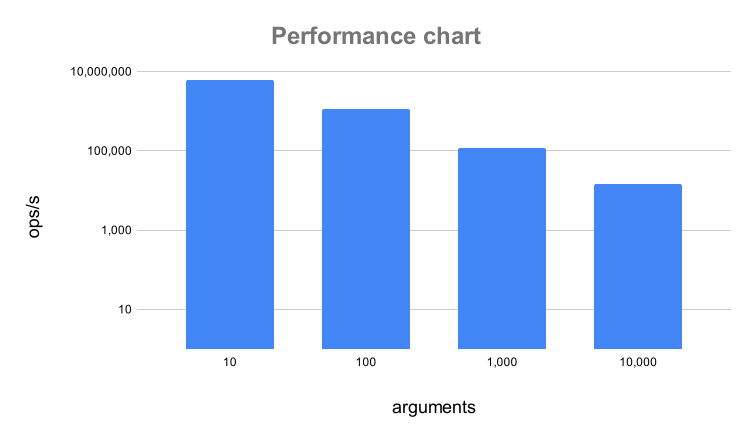
## Performance
The utility has been tested to support up to 65535 arguments.
## Examples
### Conditional merging
The utility supports `false`:
```tsx
Click me
```
### Optional merging
The utility supports `undefined`:
```tsx
interface MyButtonProps {
sx?: SxProps; // optional prop for consumer
}
const MyButton = ({ sx: consumerSx }: MyButtonProps) => (
Click me
);
```
### Inline Theme supplying
The utility is generic and accepts the type argument.
```ts
// theme is Theme
mergeSx(sx1, (theme) => ({ mb: theme.spacing(1) }));
```