https://github.com/robotcourses/robotframework-reqcov
https://github.com/robotcourses/robotframework-reqcov
Last synced: about 1 month ago
JSON representation
- Host: GitHub
- URL: https://github.com/robotcourses/robotframework-reqcov
- Owner: robotcourses
- Created: 2025-02-27T22:23:23.000Z (over 1 year ago)
- Default Branch: main
- Last Pushed: 2025-04-11T14:11:53.000Z (over 1 year ago)
- Last Synced: 2026-03-22T20:56:36.417Z (4 months ago)
- Language: Python
- Size: 57.6 KB
- Stars: 2
- Watchers: 1
- Forks: 0
- Open Issues: 0
-
Metadata Files:
- Readme: README.md
Awesome Lists containing this project
README
# 1. Robot Framework Requirement Coverage
- [1. Robot Framework Requirement Coverage](#1-robot-framework-requirement-coverage)
- [2. Video](#2-video)
- [3. English](#3-english)
- [3.1. Introduction](#31-introduction)
- [3.2. Features](#32-features)
- [3.3. Installation](#33-installation)
- [3.4. How to Use](#34-how-to-use)
- [3.5. Compatibility](#35-compatibility)
- [4. Portugês](#4-portugês)
- [4.1. Introdução](#41-introdução)
- [4.2. Recursos](#42-recursos)
- [4.3. Instalação](#43-instalação)
- [4.4. Como Usar](#44-como-usar)
- [4.5. Compatibilidade](#45-compatibilidade)
# 2. Video
Aprenda a usar a biblioteca assistindo ao nosso vídeo no YouTube: //
Learn how to use the library by watching our YouTube video:
[](https://www.youtube.com/watch?v=q9S4Y6LqZic)
🔗 **Clique na imagem para assistir ao vídeo.**
🔗 **Click on the image to watch the video.**
# 3. English
## 3.1. Introduction
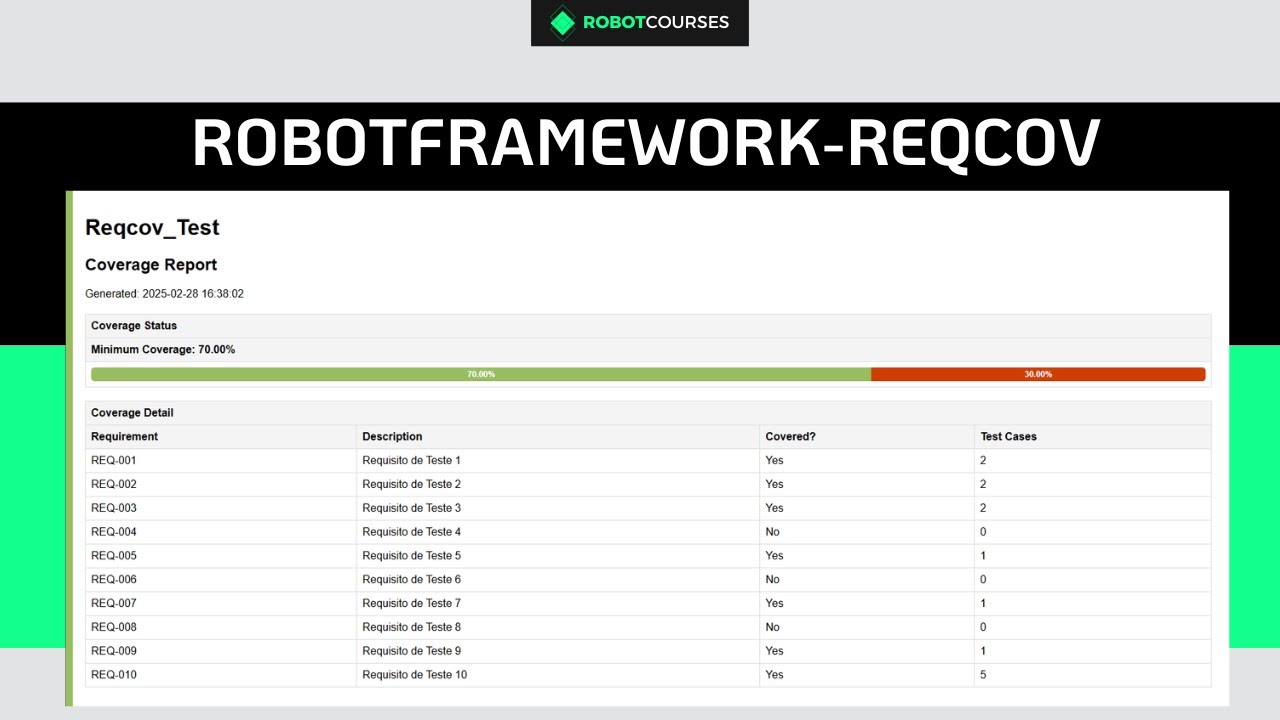
This listening library generates reports on requirements coverage for automated tests in the Robot Framework. The report includes:
## 3.2. Features
- Identification of tested requirements through Tags
- Generation of an HTML report coverage_report.html.
- Addition of a summary in the console with analysis information
- Support for light and dark mode (Dark Mode).
- Visual progress bar indicating test coverage.
- Test execution failure if the minimum coverage (if informed) is not reached. - Indication of tested and untested requirements and number of tests per requirement
## 3.3. Installation
With pip:
```bash
pip install robotframework-reqcov
```
With poetry:
```bash
poetry add robotframework-reqcov
```
## 3.4. How to Use
1 - Create a CSV file with the requirements, as shown in the example below:
``` csv
Requirement,Description
REQ-001,Requirement 1
REQ-002,Requirement 2
REQ-003,Requirement 3
REQ-004,Requirement 4
REQ-005,Requirement 5
```
2 - Add tags to the tests to track the requirements
The `id` of each requirement reported in the csv file should be used as a TAG in the related tests.
- Example 1:
``` robot
*** Settings ***
Test Tags REQ-001
*** Test Cases ***
Scenario: Test Req 1
Pass Execution Hello REQ-001
```
- Example 2:
``` robot
*** Test Cases ***
Scenario: Test Req 2
[Tags] REQ-002
Pass Execution Hello REQ-002
```
3 - Run the tests and generate the coverage report
3.1 - Without minimum coverage
``` bash
robot -d reports --listener RobotRequirementsCovarege:requirements.csv .
```
3.2 - With minimum coverage
``` bash
robot -d reports --listener RobotRequirementsCovarege:requirements.csv:60 .
```
By default, the report file `coverage_report.html` will be added in the same directory where the Robot Framework files will be added.
## 3.5. Compatibility
- [Robot Framework 7.0](https://pypi.org/project/robotframework/7.0/)
- [Python 3](https://www.python.org/)
# 4. Portugês
## 4.1. Introdução
Esta biblioteca ouvinte, gera relatórios sobre cobertura de requisitos para testes automatizados no Robot Framework. O relatório inclui:
## 4.2. Recursos
- Identificação dos requisitos testados por meio de Tags
- Geração de um report HTML coverage_report.html.
- Adição de um sumário no console com informações da análise
- Suporte a modo claro e escuro (Dark Mode).
- Barra de progresso visual indicando cobertura de testes.
- Falha na execução dos testes caso a cobertura mínima (caso informado) não seja atingida.
- Indicação dos requisitos testados, não testados e quantidade de testes por requisitos
## 4.3. Instalação
Com pip:
```bash
pip install robotframework-reqcov
```
Com poetry:
```bash
poetry add robotframework-reqcov
```
## 4.4. Como Usar
1 - Crie um arquivo CSV com os requisitos, conforme o exemplo abaixo:
``` csv
Requirement,Description
REQ-001,Requirement 1
REQ-002,Requirement 2
REQ-003,Requirement 3
REQ-004,Requirement 4
REQ-005,Requirement 5
```
2 - Adicionar tags nos testes para rastrear os requisitos
O `id` de cada requisito informado no arquivo csv, deverá ser utilizado como TAG nos testes relacionados.
- Exemplo 1:
``` robot
*** Settings ***
Test Tags REQ-001
*** Test Cases ***
Scenario: Test Req 1
Pass Execution Hello REQ-001
```
- Exemplo 2:
``` robot
*** Test Cases ***
Scenario: Test Req 2
[Tags] REQ-002
Pass Execution Hello REQ-002
```
3 - Executar os testes e gerar o relatório de cobertura
3.1 - Sem cobertura mínima
``` bash
robot -d reports --listener RobotRequirementsCovarege:requirements.csv .
```
3.2 - Com cobertura mínima
``` bash
robot -d reports --listener RobotRequirementsCovarege:requirements.csv:60 .
```
Por padrão, o arquivo de report `coverage_report.html` será adicionado no mesmo diretório onde os arquivos do Robot Framework serão adicionados.
## 4.5. Compatibilidade
- [Robot Framework 7.0](https://pypi.org/project/robotframework/7.0/)
- [Python 3](https://www.python.org/)