https://github.com/robvanderleek/mudslide
Send WhatsApp messages from the command-line 📯
https://github.com/robvanderleek/mudslide
command-line nodejs typescript whatsapp
Last synced: over 1 year ago
JSON representation
Send WhatsApp messages from the command-line 📯
- Host: GitHub
- URL: https://github.com/robvanderleek/mudslide
- Owner: robvanderleek
- License: isc
- Created: 2022-12-02T21:52:33.000Z (over 3 years ago)
- Default Branch: main
- Last Pushed: 2025-03-27T03:04:05.000Z (over 1 year ago)
- Last Synced: 2025-03-28T09:02:16.209Z (over 1 year ago)
- Topics: command-line, nodejs, typescript, whatsapp
- Language: TypeScript
- Homepage:
- Size: 1.16 MB
- Stars: 196
- Watchers: 9
- Forks: 19
- Open Issues: 9
-
Metadata Files:
- Readme: README.md
- License: LICENSE
Awesome Lists containing this project
README
# Mudslide
> [!IMPORTANT]
> The maintainers of this software cannot be held liable for misuse of this
> application, as stated in the [ISC
> license](https://github.com/robvanderleek/mudslide/blob/main/LICENSE). The
> maintainers of Mudslide do not in any way condone the use of this application
> in practices that violate the Terms of Service of WhatsApp. The maintainers
> of this application call upon the personal responsibility of its users to use
> this application in a fair way, as it is intended to be used.
> [!WARNING]
> DO NOT USE THIS TOOL FOR IMPORTANT THINGS. This tool can stop working without
> notice since it depends on libraries that could be removed any time from
> GitHub/NPM.

Send WhatsApp messages from the command-line 📯
[](https://github.com/robvanderleek/mudslide/actions/workflows/main.yml)
[](https://github.com/robvanderleek/mudslide/blob/_codelimit_reports/main/codelimit.md)
[](https://badge.fury.io/js/mudslide)
[](https://hub.docker.com/repository/docker/robvanderleek/mudslide)
[](https://dependabot.com/)
For an introduction please read this [Medium
post](https://levelup.gitconnected.com/how-to-send-whatsapp-messages-from-the-command-line-d1afd8b55de5).
This project is based on [Baileys](https://github.com/WhiskeySockets/Baileys),
a full-featured WhatsApp Web+Multi-Device API library (in case you're wondering
about the name, a Mudslide is a Baileys cocktail).
Keep in mind that the working of Mudslide depends on the Baileys library and
since that is not an official supported library by WhatsApp it could stop
working without notice.
* [Installation](#installation)
* [Usage](#usage)
* [Configuration](#configuration)
* [Troubleshooting](#troubleshooting)
* [FAQ](#faq)
* [Development](#development)
* [Feedback, suggestions and bug reports](#feedback-suggestions-and-bug-reports)
* [Contributing](#contributing)
* [License](#license)
# Installation
Using `npx`, installation is not necessary. You can run Mudslide on a system
with NodeJS 16 or higher from the command-line as follows:
```shell
npx mudslide@latest -V
```
this should display the version number of the latest release.
Using `npm` Mudslide can be installed globally as follows:
```shell
npm install -g mudslide
```
## Platform binaries
Binaries for different platforms (Linux, Windows) are available on the [latest
release page](https://github.com/robvanderleek/mudslide/releases/latest).
## Docker
Mudslide can also run inside a Docker container:
```shell
docker run robvanderleek/mudslide
```
Since Mudslide keeps authentication state on disk you need to mount a state
directory outside the container, for example:
```shell
docker run -v $HOME/.local/share/mudslide:/usr/src/app/cache -it robvanderleek/mudslide login
```
or:
```shell
docker run -v $HOME/.local/share/mudslide:/usr/src/app/cache robvanderleek/mudslide me
```
### Build image
You can build the Docker image using the supplied `Dockerfile`:
```shell
docker build -t mudslide .
```
Test if the build was successful:
```shell
docker run -it mudslide
```
## Docker Compose
If you chose to use `docker-compose` instead of `docker` you can build the
Docker image using the supplied `assets/docker-compose.yml` file (which in turn
depends on the supplied `Dockerfile`):
```shell
cd assets/
docker-compose build
```
Test if the build was successful:
```shell
docker-compose run mudslide
```
Since Mudslide keeps authentication state on disk you need to mount a state
directory outside the container, for example in `~/.local/share/mudslide`:
See respective lines in `docker-compose.yml`
```yaml
volumes:
- ~/.local/share/mudslide:/usr/src/app/cache
```
# Usage
Available commands and options can be listed with `--help` flag:
```shell
npx mudslide@latest --help
```
for most command it's necessary that you've authorized Mudslide to interact
with the WhatsApp API on your behalf. This can be done by logging in as
described below.
## Login
To login you need to authorize Mudslide from another device that has WhatsApp
installed and scan the QR code printed in the terminal:
```shell
npx mudslide@latest login
█▀▀▀▀▀█ ▀▀ ▀ █ █▀▀▀▀▀█
█ ███ █ █▄ █▀▀▀▀ █ ███ █
█ ▀▀▀ █ ▀█▀▀▄▀█▀▀ █ ▀▀▀ █
▀▀▀▀▀▀▀ ▀▄▀▄▀▄█▄▀ ▀▀▀▀▀▀▀
▀███▄ ▀▄▀▄ ▀▀ █▀ ▄▀▀▀▄▀
█▄▄▄▄ ▀ ▄ ▄▄▄█▄ ▄█▀ ▄▄
▀▄ ▄▀ ▀ ▄█▄█ ▄ ▄ ██▄█ ▀▀█
▄▀▄██▀▀██▄▀ █▄▀▄▄█▀▄█ ▀▀▄
▀▀▀ ███▀▄▄ █▀▀▀█▀█▀█
█▀▀▀▀▀█ ▀▀█ ▄█ ▀ █ ▀██
█ ███ █ ▄▄█▀██▄▄▀██▀██▄▄▄
█ ▀▀▀ █ █▀▀▀▀▀ ▀▀█▀ █ █▀
▀▀▀▀▀▀▀ ▀▀▀ ▀ ▀ ▀ ▀▀▀▀▀▀
```
In the WhatsApp mobile app go to "Settings > Connected Devices > Connect
Device" and scan the QR code. Wait until the status is "active", then you can
exit Mudslide.
## Logout
Logging out removes credentials from your local environment but will not
disconnect Mudslide from your WhatsApp account, you can disconnect Mudslide
using the WhatsApp app.
```shell
npx mudslide@latest logout
```
## Different types of recipients
Muslide supports three types of recipients for sending messages/images/files/etc.:
1. An international phone number (e.g.: `3161234567890`)
2. The authenticated user: `me`
3. A so-called WhatsApp ID, for example a group ID: `123456789-987654321@g.us`
## Sending a message to yourself or a phone number
Using the recipient `me` you can send yourself a test message:
```shell
npx mudslide@latest send me 'hello world'
```
To send a message to a phone number:
```shell
npx mudslide@latest send 3161234567890 'hello world'
```
To send a message to a group you are particpating in you need the group ID (see
the `mudslide groups` command). Send a message to a group as follows:
```shell
npx mudslide@latest send 123456789-987654321@g.us 'hello world'
```
Use `\n` to send a message with a newline, for example:
```shell
npx mudslide@latest send me 'hello\nworld'
```
## Sending an image file
Image files (PNG, JPG, GIF) can be sent to individuals or groups:
```shell
npx mudslide@latest send-image me image.png
```
```shell
npx mudslide@latest send-image 123456789-987654321@g.us image.jpg
```
> **Note**
> In case there is a space in the path or the file name, enclose the entire
> path and file name in quotes (")
### Image captions
Use the `--caption` option to add a caption to the image:
```shell
npx mudslide@latest send-image --caption 'Your text here' me image.png
```
## Sending other files
Single files can be sent to individuals or groups:
```shell
npx mudslide@latest send-file me test.json
```
```shell
npx mudslide@latest send-file 123456789-987654321@g.us document.pdf
```
> **Note**
> In case there is a space in the path or the file name, enclose the entire
> path and file name in quotes (")
### File types
By default, files will be sent as "documents" and show as a download link in the chat.
The `--type` option can be used for audio and video files that show as a playable message in the chat:
```shell
npx mudslide@latest send-file --type audio 123456789-987654321@g.us music.mp3
```
## Sending a location
Geographic locations can be sent to individuals or groups using latitude and
longitude coordinates. For example, to position yourself at the Eiffel Tower:
```shell
npx mudslide@latest send-location me 48.858222 2.2945
```
Or to send your location at the Sydney Opera House to a group:
```shell
npx mudslide@latest send-location 123456789-987654321@g.us -33.857058 151.214897
```
## Sending a poll
Polls can be sent to individuals or groups, and allow participants to select 1
or more items.
For example, to send a poll for the summer holiday destination, allowing
participants to select 2 items, use:
```shell
npx mudslide@latest send-poll 123456789-987654321@g.us 'Summer holiday destination' --item 'France' --item 'Spain' --item 'Italy' --item 'Switzerland' --selectable 2
```
Or to send a quick poll to check who's going training on Friday:
```shell
npx mudslide@latest send-poll 123456789-987654321@g.us 'Training on Friday' --item 'Yeeeess!' --item 'Nope' --item 'Maybe...'
```
## List your groups
To list all the groups you are participating in:
```shell
npx mudslide@latest groups
```
this will show a list of group IDs and subjects.
## Add/remove group participants
Participants can be added/removed from existing groups as follows:
```shell
npx mudslide@latest add-to-group 123456789-987654321@g.us 3161234567890
```
```shell
npx mudslide@latest remove-from-group 123456789-987654321@g.us 3161234567890
```
## List group participants
Group participants can be listed as follows:
```shell
npx mudslide@latest list-group 123456789-987654321@g.us
```
## Show current user details
To get the WhatsApp ID of the logged in user:
```shell
npx mudslide@latest me
```
# Configuration
By default WhatsApp credentials are cached in a folder located in the user's
home directory. This folder is `.local/share/mudslide'` on Linux & macOS and
`AppData\Local\mudslide\Data` on Windows.
A different location for the cache folder can be configured via the environment
variable `MUDSLIDE_CACHE_FOLDER` or the `-c`/`--cache` options.
## Running behind a proxy server
When the global option `--proxy` is used, Mudslide will use the environment variables `HTTP_PROXY` and `HTTPS_PROXY` to
proxy all requests. For example:
```shell
export HTTP_PROXY=http://USER:PASS@proxy.server.com:80
export HTTPS_PROXY=http://USER:PASS@proxy.server.com:80
npx mudslide@latest --proxy login
```
# Troubleshooting
In case Mudslide does not give any output or does not behave as expected, try
removing the local cache folder (see [Configuration section](#configuration)),
then disconnect the client using your mobile WhatsApp app, and login again.
To see what goes on in more detail, the verbosity of Mudslide can be incrased
with the global option `-v`. Use `-vvv` for the greatest level of detail:
```shell
npx mudslide@latest -vvv me
```
# FAQ
## How can I read messages?
Mudslide is for sending messages *only*. If you want to read messages (e.g.
when building a chat bot), have a look at the [Baileys
library](https://github.com/WhiskeySockets/Baileys).
# Development
## Setting up your environment
1. Clone the repository:
```shell
git clone git@github.com:robvanderleek/mudslide.git
```
```shell
cd mudslide
```
2. Install dependencies:
```shell
yarn install
```
3. Run Mudslide:
```shell
yarn start
```
## Running unit-tests
To run the unit-tests:
```shell
yarn test
```
# Feedback, suggestions and bug reports
Please create an issue here: https://github.com/robvanderleek/mudslide/issues
If you like this software, please star :star: it.
## Star history
[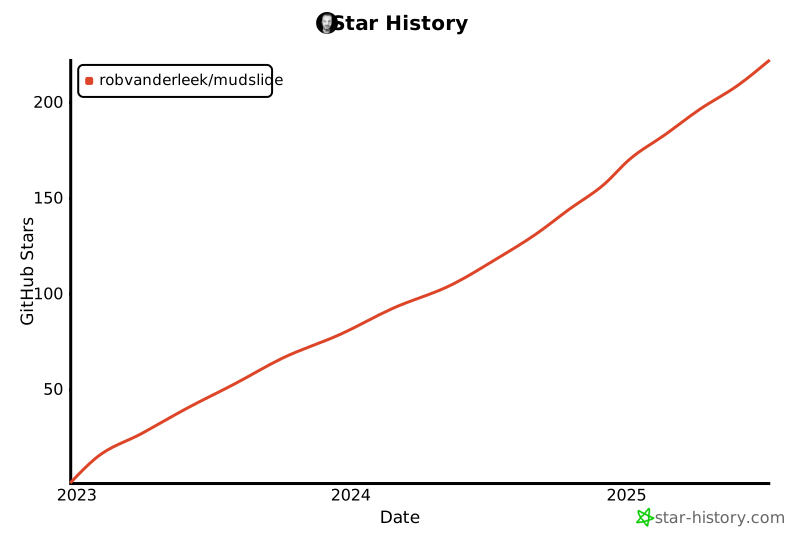](https://star-history.com/#robvanderleek/mudslide&Date)
# Contributing
If you have suggestions for how Mudslide could be improved, or want to report a
bug, [open an issue](https://github.com/robvanderleek/mudslide/issues)! All and
any contributions are appreciated.
# License
[ISC](LICENSE) © 2022 Rob van der Leek
(https://twitter.com/robvanderleek)