https://github.com/rodrigokamada/angular-pwa
Application example built with Angular 13 and adding the Progressive Web Application (PWA) using the @angular/pwa library.
https://github.com/rodrigokamada/angular-pwa
angular beginners dev-community frontend gh-actions gh-pages hacktoberfest pwa stackblitz tutorial
Last synced: 9 months ago
JSON representation
Application example built with Angular 13 and adding the Progressive Web Application (PWA) using the @angular/pwa library.
- Host: GitHub
- URL: https://github.com/rodrigokamada/angular-pwa
- Owner: rodrigokamada
- License: mit
- Created: 2021-12-22T12:17:33.000Z (over 4 years ago)
- Default Branch: main
- Last Pushed: 2024-01-27T01:27:44.000Z (over 2 years ago)
- Last Synced: 2025-09-29T12:59:54.656Z (9 months ago)
- Topics: angular, beginners, dev-community, frontend, gh-actions, gh-pages, hacktoberfest, pwa, stackblitz, tutorial
- Language: TypeScript
- Homepage: https://rodrigokamada.github.io/angular-pwa/
- Size: 2.03 MB
- Stars: 29
- Watchers: 4
- Forks: 21
- Open Issues: 2
-
Metadata Files:
- Readme: README.md
- Funding: .github/FUNDING.yml
- License: LICENSE.md
Awesome Lists containing this project
README
# Angular Progressive Web Application (PWA)
Application example built with [Angular](https://angular.io/) 14 and adding the Progressive Web Application (PWA) using the [@angular/pwa library](https://www.npmjs.com/package/@angular/pwa).
This tutorial was posted on my [blog](https://rodrigo.kamada.com.br/blog/adicionando-o-aplicativo-web-progressivo-pwa-em-uma-aplicacao-angular) in portuguese and on the [DEV Community](https://dev.to/rodrigokamada/adding-the-progressive-web-application-pwa-to-an-angular-application-4g1e) in english.
[](https://rodrigo.kamada.com.br)
[](https://www.linkedin.com/in/rodrigokamada)
[](https://twitter.com/rodrigokamada)
[](https://www.instagram.com/rodrigokamada)
## Prerequisites
Before you start, you need to install and configure the tools:
* [git](https://git-scm.com/)
* [Node.js and npm](https://nodejs.org/)
* [Angular CLI](https://angular.io/cli)
* IDE (e.g. [Visual Studio Code](https://code.visualstudio.com/))
## Getting started
### Create the Angular application
**1.** Let's create the application with the Angular base structure using the `@angular/cli` with the route file and the SCSS style format.
```powershell
ng new angular-pwa --routing true --style scss
CREATE angular-pwa/README.md (1056 bytes)
CREATE angular-pwa/.editorconfig (274 bytes)
CREATE angular-pwa/.gitignore (620 bytes)
CREATE angular-pwa/angular.json (3237 bytes)
CREATE angular-pwa/package.json (1075 bytes)
CREATE angular-pwa/tsconfig.json (863 bytes)
CREATE angular-pwa/.browserslistrc (600 bytes)
CREATE angular-pwa/karma.conf.js (1428 bytes)
CREATE angular-pwa/tsconfig.app.json (287 bytes)
CREATE angular-pwa/tsconfig.spec.json (333 bytes)
CREATE angular-pwa/.vscode/extensions.json (130 bytes)
CREATE angular-pwa/.vscode/launch.json (474 bytes)
CREATE angular-pwa/.vscode/tasks.json (938 bytes)
CREATE angular-pwa/src/favicon.ico (948 bytes)
CREATE angular-pwa/src/index.html (296 bytes)
CREATE angular-pwa/src/main.ts (372 bytes)
CREATE angular-pwa/src/polyfills.ts (2338 bytes)
CREATE angular-pwa/src/styles.scss (80 bytes)
CREATE angular-pwa/src/test.ts (745 bytes)
CREATE angular-pwa/src/assets/.gitkeep (0 bytes)
CREATE angular-pwa/src/environments/environment.prod.ts (51 bytes)
CREATE angular-pwa/src/environments/environment.ts (658 bytes)
CREATE angular-pwa/src/app/app-routing.module.ts (245 bytes)
CREATE angular-pwa/src/app/app.module.ts (393 bytes)
CREATE angular-pwa/src/app/app.component.scss (0 bytes)
CREATE angular-pwa/src/app/app.component.html (23364 bytes)
CREATE angular-pwa/src/app/app.component.spec.ts (1088 bytes)
CREATE angular-pwa/src/app/app.component.ts (216 bytes)
✔ Packages installed successfully.
Successfully initialized git.
```
**2.** Install and configure the Bootstrap CSS framework. Do steps 2 and 3 of the post *[Adding the Bootstrap CSS framework to an Angular application](https://github.com/rodrigokamada/angular-bootstrap)*.
**3.** Add the `@angular/pwd` library to set up the Angular service worker.
```powershell
ng add @angular/pwa
ℹ Using package manager: npm
✔ Found compatible package version: @angular/pwa@13.1.2.
✔ Package information loaded.
The package @angular/pwa@13.1.2 will be installed and executed.
Would you like to proceed? Yes
✔ Package successfully installed.
CREATE ngsw-config.json (631 bytes)
CREATE src/manifest.webmanifest (1346 bytes)
CREATE src/assets/icons/icon-128x128.png (1253 bytes)
CREATE src/assets/icons/icon-144x144.png (1394 bytes)
CREATE src/assets/icons/icon-152x152.png (1427 bytes)
CREATE src/assets/icons/icon-192x192.png (1790 bytes)
CREATE src/assets/icons/icon-384x384.png (3557 bytes)
CREATE src/assets/icons/icon-512x512.png (5008 bytes)
CREATE src/assets/icons/icon-72x72.png (792 bytes)
CREATE src/assets/icons/icon-96x96.png (958 bytes)
UPDATE angular.json (3621 bytes)
UPDATE package.json (1615 bytes)
UPDATE src/app/app.module.ts (804 bytes)
UPDATE src/index.html (509 bytes)
✔ Packages installed successfully.
```
**Note:**
The files `ngsw-config.json`, `src/manifest.webmanifest` and icons were added and the files `angular.json`, `package.json`, `src/app/app.module.ts` and `src/index.html` were changed to the application.
* `ngsw-config.json`: [Service worker](https://angular.io/guide/service-worker-intro) configuration file allows you to configure cache strategy and files and other configurations.
* `src/manifest.webmanifest`: Application configuration file or [WEB app manifest](https://developer.mozilla.org/en-US/docs/Web/Manifest) file allows you to configure the name, colors, icons and other configurations.
* `angular.json`: The service worker configuration was added.
* `package.json`: The `@angular/service-worker` library was added.
* `src/app/app.module.ts`: The service worker configuration was added.
* `src/index.html`: Manifest file configuration and theme color was added.
**4.** Remove the contents of the `AppComponent` class from the `src/app/app.component.ts` file. Create the `updateOnlineStatus` method to check the browser connection status as below.
```typescript
import { Component, OnInit } from '@angular/core';
@Component({
selector: 'app-root',
templateUrl: './app.component.html',
styleUrls: ['./app.component.scss'],
})
export class AppComponent implements OnInit {
isOnline: boolean;
constructor() {
this.isOnline = false;
}
public ngOnInit(): void {
this.updateOnlineStatus();
window.addEventListener('online', this.updateOnlineStatus.bind(this));
window.addEventListener('offline', this.updateOnlineStatus.bind(this));
}
private updateOnlineStatus(): void {
this.isOnline = window.navigator.onLine;
console.info(`isOnline=[${this.isOnline}]`);
}
}
```
**5.** Remove the contents of the `src/app/app.component.html` file. Add the HTML code to display the browser connection status as below.
```html
Angular Progressive Web Application (PWA)
Status:
Online
Offline
```
**6.** Run the application with the command below.
```powershell
npm start
> angular-pwa@1.0.0 start
> ng serve
✔ Browser application bundle generation complete.
Initial Chunk Files | Names | Raw Size
vendor.js | vendor | 2.05 MB |
styles.css, styles.js | styles | 486.85 kB |
polyfills.js | polyfills | 339.20 kB |
scripts.js | scripts | 76.33 kB |
main.js | main | 10.71 kB |
runtime.js | runtime | 6.86 kB |
| Initial Total | 2.95 MB
Build at: 2022-01-01T17:33:35.241Z - Hash: 1e50e703667ef1c0 - Time: 3557ms
** Angular Live Development Server is listening on localhost:4200, open your browser on http://localhost:4200/ **
✔ Compiled successfully.
```
**7.** Access the URL `http://localhost:4200/` and check if the application is working.
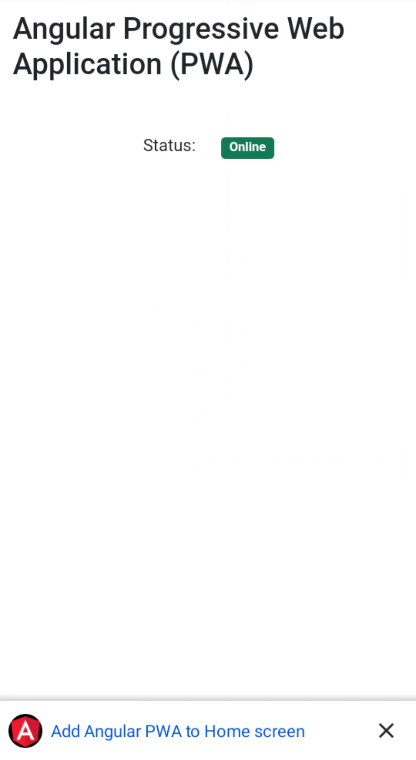
**8.** Change the contents of the `AppComponent` class from the `src/app/app.component.ts` file. Import the `SwUpdate` service and create the `updateVersion` and `closeVersion` methods to check for available updates for the application as below.
```typescript
import { Component, OnInit } from '@angular/core';
import { SwUpdate, VersionReadyEvent } from '@angular/service-worker';
import { filter, map } from 'rxjs/operators';
@Component({
selector: 'app-root',
templateUrl: './app.component.html',
styleUrls: ['./app.component.scss'],
})
export class AppComponent implements OnInit {
isOnline: boolean;
modalVersion: boolean;
constructor(private swUpdate: SwUpdate) {
this.isOnline = false;
this.modalVersion = false;
}
public ngOnInit(): void {
this.updateOnlineStatus();
window.addEventListener('online', this.updateOnlineStatus.bind(this));
window.addEventListener('offline', this.updateOnlineStatus.bind(this));
if (this.swUpdate.isEnabled) {
this.swUpdate.versionUpdates.pipe(
filter((evt: any): evt is VersionReadyEvent => evt.type === 'VERSION_READY'),
map((evt: any) => {
console.info(`currentVersion=[${evt.currentVersion} | latestVersion=[${evt.latestVersion}]`);
this.modalVersion = true;
}),
);
}
}
private updateOnlineStatus(): void {
this.isOnline = window.navigator.onLine;
console.info(`isOnline=[${this.isOnline}]`);
}
public updateVersion(): void {
this.modalVersion = false;
window.location.reload();
}
public closeVersion(): void {
this.modalVersion = false;
}
}
```
**9.** Change the contents of the `src/app/app.component.html` file. Add the HTML code to display if there are updates available for the application as below.
```html
Angular Progressive Web Application (PWA)
Status:
Online
Offline
```
**10.** Access the URL `http://localhost:4200/` and check if the application is working.
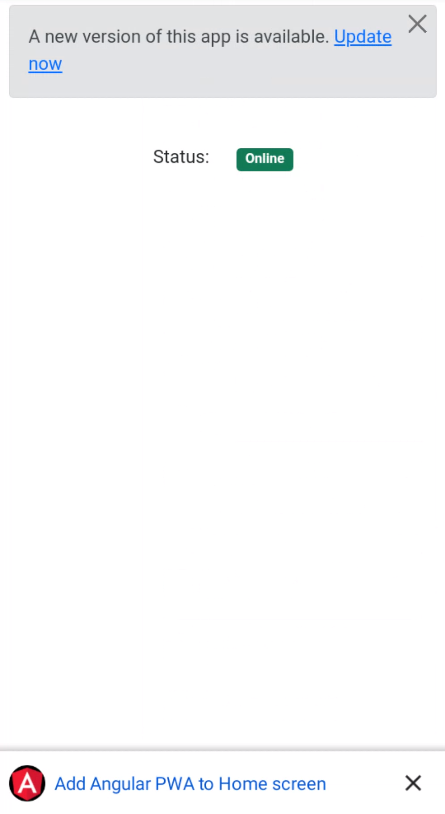
**11.** Install the `@angular/cdk` library.
```powershell
npm install @angular/cdk
```
**12.** Change the contents of the `AppComponent` class from the `src/app/app.component.ts` file. Import the `Platform` service and create the `loadModalPwa`, `addToHomeScreen` and `closePwa` methods to check the operational system and the browser and display how to add the application as below.
```typescript
import { Component, OnInit } from '@angular/core';
import { Platform } from '@angular/cdk/platform';
import { SwUpdate, VersionReadyEvent } from '@angular/service-worker';
import { filter, map } from 'rxjs/operators';
@Component({
selector: 'app-root',
templateUrl: './app.component.html',
styleUrls: ['./app.component.scss'],
})
export class AppComponent implements OnInit {
isOnline: boolean;
modalVersion: boolean;
modalPwaEvent: any;
modalPwaPlatform: string|undefined;
constructor(private platform: Platform,
private swUpdate: SwUpdate) {
this.isOnline = false;
this.modalVersion = false;
}
public ngOnInit(): void {
this.updateOnlineStatus();
window.addEventListener('online', this.updateOnlineStatus.bind(this));
window.addEventListener('offline', this.updateOnlineStatus.bind(this));
if (this.swUpdate.isEnabled) {
this.swUpdate.versionUpdates.pipe(
filter((evt: any): evt is VersionReadyEvent => evt.type === 'VERSION_READY'),
map((evt: any) => {
console.info(`currentVersion=[${evt.currentVersion} | latestVersion=[${evt.latestVersion}]`);
this.modalVersion = true;
}),
);
}
this.loadModalPwa();
}
private updateOnlineStatus(): void {
this.isOnline = window.navigator.onLine;
console.info(`isOnline=[${this.isOnline}]`);
}
public updateVersion(): void {
this.modalVersion = false;
window.location.reload();
}
public closeVersion(): void {
this.modalVersion = false;
}
private loadModalPwa(): void {
if (this.platform.ANDROID) {
window.addEventListener('beforeinstallprompt', (event: any) => {
event.preventDefault();
this.modalPwaEvent = event;
this.modalPwaPlatform = 'ANDROID';
});
}
if (this.platform.IOS && this.platform.SAFARI) {
const isInStandaloneMode = ('standalone' in window.navigator) && ((window.navigator)['standalone']);
if (!isInStandaloneMode) {
this.modalPwaPlatform = 'IOS';
}
}
}
public addToHomeScreen(): void {
this.modalPwaEvent.prompt();
this.modalPwaPlatform = undefined;
}
public closePwa(): void {
this.modalPwaPlatform = undefined;
}
}
```
**13.** Change the contents of the `src/app/app.component.html` file. Add the HTML code to display how to add the application as below.
```html
Angular Progressive Web Application (PWA)
Status:
Online
Offline
Add this WEB app to home screen
To install this WEB app on your device, tap the "Menu" button

and then "Add to home screen" button
```
**14.** Add the style in the `src/app/app.component.scss` file as below.
```css
.ios-menu {
width: 14px;
}
```
**15.** Ready! Access the URL `http://localhost:4200/` and check if the application is working. See the application working on [GitHub Pages](https://rodrigokamada.github.io/angular-pwa/) and [Stackblitz](https://stackblitz.com/edit/angular14-pwa).
**15.1.** Android version.
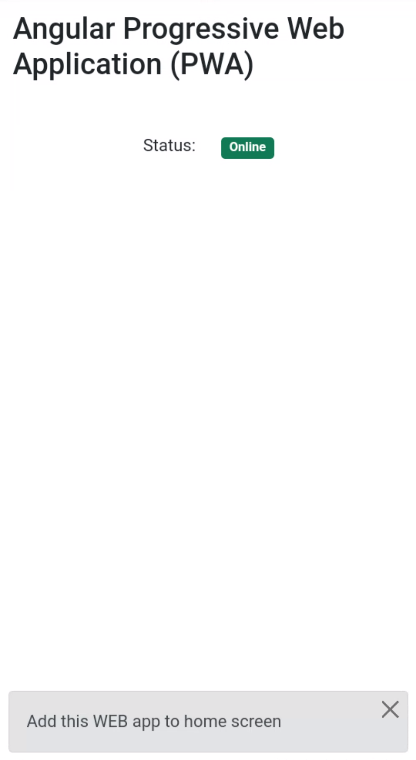
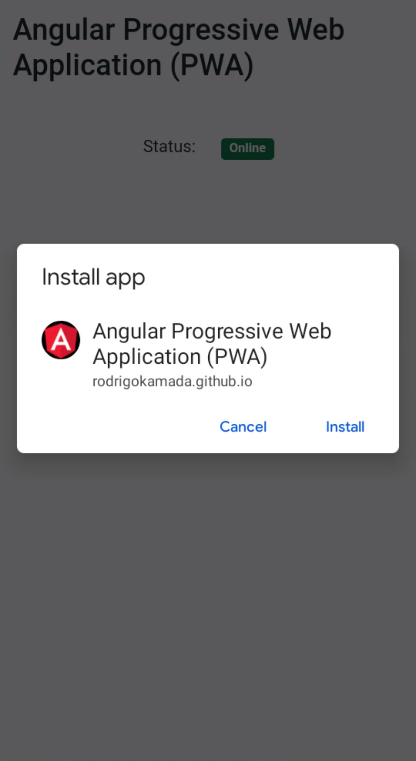
Modal to add to home screen
Confirmation to add to home screen
**15.2.** iOS version.
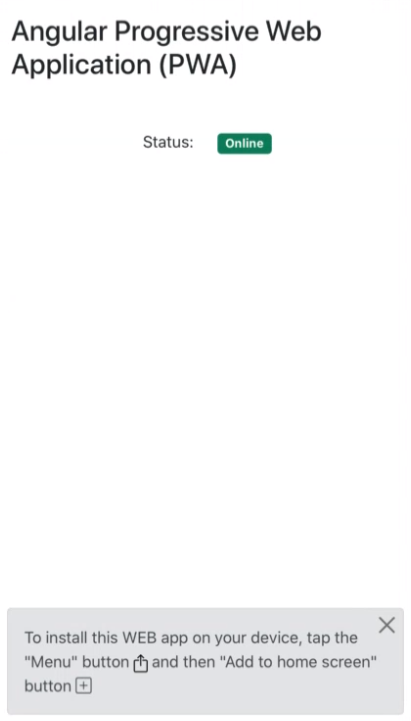
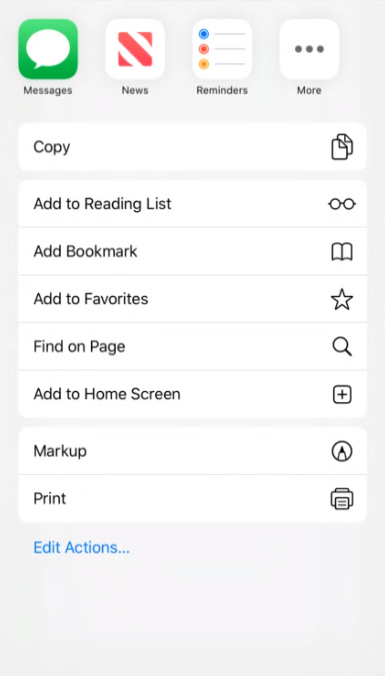
Modal to add to home screen
Menu to add to home screen
## Cloning the application
**1.** Clone the repository.
```powershell
git clone git@github.com:rodrigokamada/angular-validation.git
```
**2.** Install the dependencies.
```powershell
npm ci
```
**3.** Run the application.
```powershell
npm start
```