https://github.com/romanvm/kodi.external.library
External Kodi Videolibrary Client
https://github.com/romanvm/kodi.external.library
kodi kodi-addon kodi-plugin
Last synced: 5 months ago
JSON representation
External Kodi Videolibrary Client
- Host: GitHub
- URL: https://github.com/romanvm/kodi.external.library
- Owner: romanvm
- Created: 2016-07-21T17:30:28.000Z (almost 10 years ago)
- Default Branch: master
- Last Pushed: 2025-11-21T19:23:19.000Z (7 months ago)
- Last Synced: 2025-11-21T21:15:20.627Z (7 months ago)
- Topics: kodi, kodi-addon, kodi-plugin
- Language: Python
- Homepage:
- Size: 887 KB
- Stars: 3
- Watchers: 1
- Forks: 2
- Open Issues: 1
-
Metadata Files:
- Readme: Readme.md
Awesome Lists containing this project
README
# External Kodi Videolibrary Client
[](https://github.com/romanvm/kodi.external.library/actions/workflows/check-addon.yml)
This addon allows to browse and play videofiles from a medialibrary on a remote Kodi instance with syncing playback status.
## Motivation
Currently, Kodi supports 2 ways of accessing a common medialibrary with syncing playback status:
- Files on network shares with the common MySQL/MariaDB database.
- UPnP/DLNA access.
However, setting up a common MySQL/MariaDB database require some technical knowledge.
Also all Kodi instances that access this database must be of the same major version.
On the other hand, UPnP/DLNA access does not support full medialibrary information
and introduces unnecessary overhead of streaming if files are located on network shares.
This plugin provides an alternative way of accessing a remote Kodi medialibrary and
has the following advantages:
- It's easy to configure. Just enable Web server and Application control in the target Kodi instance
and set host, port, login and password in the plugin to access it.
- It supports all medialibrary information that can be retrieved and set via JSON-RPC and Python APIs.
- Client and "server" Kodi instances can be of different major versions (but not too different).
By default, files are streamed from the built-in HTTP server of a remote Kodi instance,
but the plugin also supports playing files directly from network shares if the remote Kodi uses
network shares as media sources.
## Known issues
- "Mark as watched/unwatched" item appears twice in the context menu but only
the colored one actually works. The other is no-op.
- The plugin also appears in "Programs" section but just displays an information pop-up
if launched from there.
- Kodi built-in web-server is not very powerful and may have troubles streaming high-bitrate videofiles,
especially if the "source" Kodi is being used for something else at the same time.
It is recommended to store your files on network shares.
Those are Kodi limitations.
## Installation
The plugin can be installed from the official Kodi addon repository -> **Video add-ons** section.
## Setup
### Remote Kodi
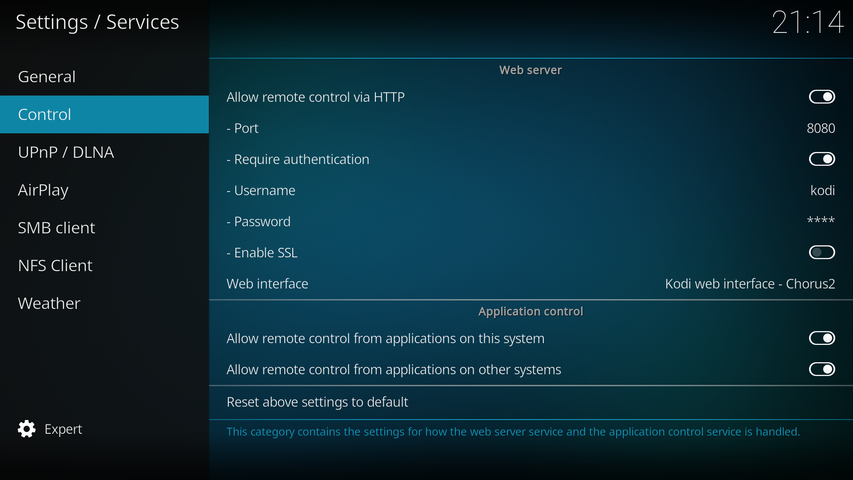
In "**Settings**" > "**Services**" > "**Control**" section enable the built-in web-server and remote control
as shown on the screenshot.
### Plugin Settings
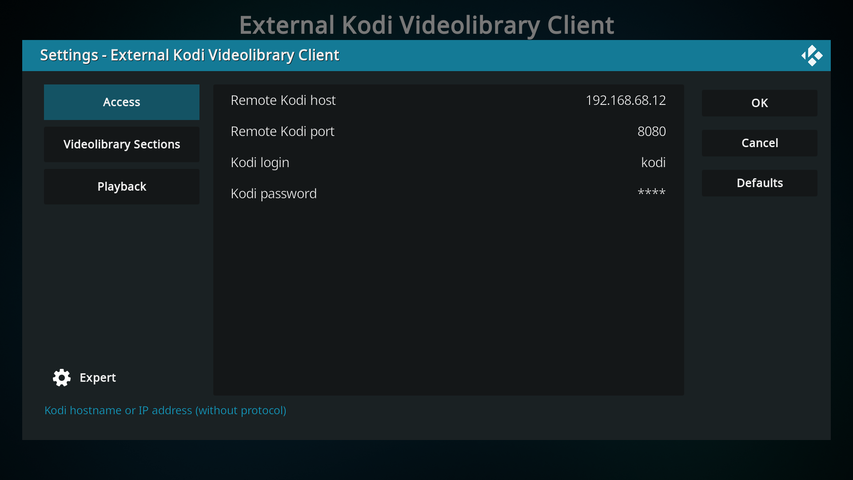
In the first section ("**Access**") enter the host address of your remote Kodi instance.
Also provide the port number, login and password configured on the previous step.
## Credits
The addon icon was borrowed from [Aeon Nox 5: SiLVO](https://github.com/MikeSiLVO/Aeon-Nox-SiLVO) skin.
## License
[GPL v.3](https://www.gnu.org/licenses/gpl-3.0.html)