https://github.com/roneoorg/hugo-artists-theme
https://github.com/roneoorg/hugo-artists-theme
Last synced: about 1 month ago
JSON representation
- Host: GitHub
- URL: https://github.com/roneoorg/hugo-artists-theme
- Owner: RoneoOrg
- License: unlicense
- Created: 2021-09-11T22:13:47.000Z (almost 5 years ago)
- Default Branch: master
- Last Pushed: 2021-09-11T22:14:01.000Z (almost 5 years ago)
- Last Synced: 2025-02-27T23:46:46.680Z (over 1 year ago)
- Language: CSS
- Size: 7.71 MB
- Stars: 0
- Watchers: 2
- Forks: 0
- Open Issues: 0
-
Metadata Files:
- Readme: README.md
- Changelog: CHANGELOG.md
- License: LICENSE
Awesome Lists containing this project
README
# Artists Theme
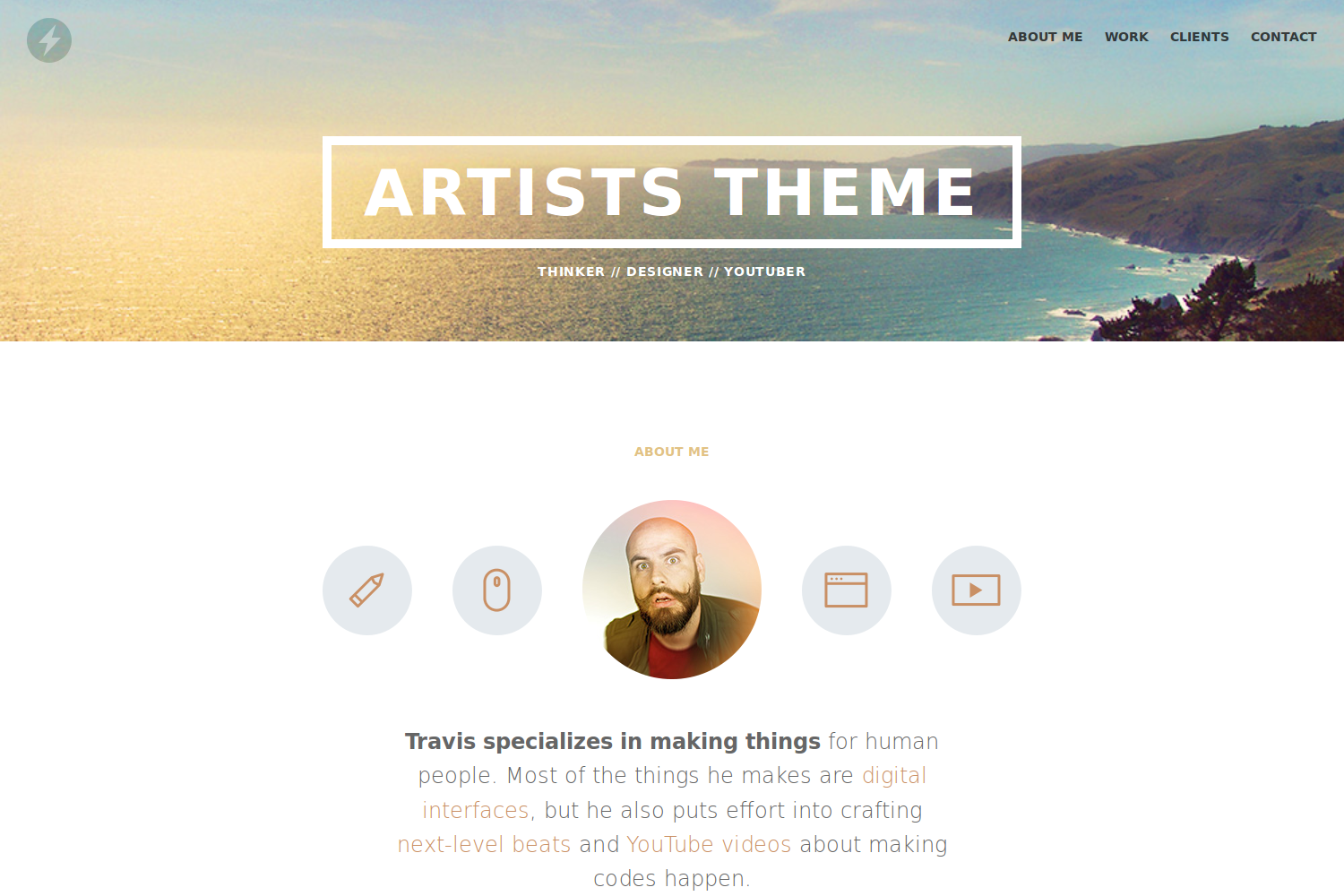
The Artists Theme is a one page portfolio for freelancers based on the original [Jekyll theme](//github.com/DevTips/Artists-Theme) by [Travis Neilson](//github.com/travisneilson) aka [DevTips](//www.youtube.com/user/DevTipsForDesigners) and his many contributors. It's the result of a longer [video series](//www.youtube.com/watch?v=T6jKLsxbFg4&list=PLqGj3iMvMa4KQZUkRjfwMmTq_f1fbxerI) made by him that is showing the whole developement process from the first designs to the final Jekyll theme. Consider to subscribe to his [YouTube channel](//www.youtube.com/user/DevTipsForDesigners).
This Hugo theme features several content sections, like an about section showing the level of your skills, a responsive portfolio with hover effects, a gallery to present your client's opinions and a contact form.
#### Please note that this theme is no longer maintained.
## Installation
Inside the folder of your Hugo site run:
$ cd themes
$ git clone https://github.com/digitalcraftsman/hugo-artists-theme
For more information read the official [setup guide](//gohugo.io/overview/installing/) of Hugo.
## Getting started
After installing the Artists Theme successfully it requires a just a few more steps to get your site finally running.
### The config file
Take a look inside the [`exampleSite`](//github.com/digitalcraftsman/hugo-artists-theme/tree/master/exampleSite) folder of this theme. You'll find a file called [`config.toml`](//github.com/digitalcraftsman/hugo-artists-theme/blob/master/exampleSite/config.toml). To use it, copy the [`config.toml`](//github.com/digitalcraftsman/hugo-artists-theme/blob/master/exampleSite/config.toml) in the root folder of your Hugo site. Feel free to customize this theme as you like.
### Change the hero background
The hero acts as an eye-catcher for your site. So consider to give him a nice background. You just need to replace the [`hero-bg.jpg`](//github.com/digitalcraftsman/hugo-artists-theme/blob/master/static/img/hero-bg.jpg) at [`static/img`](//github.com/digitalcraftsman/hugo-artists-theme/tree/master/static/img) with your own background image. But it's important that you keep the original filename.
### Add your own logo
Go to [`static/img`](//github.com/digitalcraftsman/hugo-artists-theme/tree/master/static/img) and replace the [`logo.svg`](//github.com/digitalcraftsman/hugo-artists-theme/blob/master/static/img/logo.svg) with your own file. If you don't want to use an svg you also need to change the source name inside the [`all.css`](//github.com/digitalcraftsman/hugo-artists-theme/blob/master/static/css/all.css) stylesheet [`here`](//github.com/digitalcraftsman/hugo-artists-theme/blob/master/static/css/all.css#L614) and [`here`](//github.com/digitalcraftsman/hugo-artists-theme/blob/master/static/css/all.css#L662).
### Introduce yourself
In the next step, replace the image of Travis in the about section with one of yours. Therefore search the [`avatar.jpg`](//github.com/digitalcraftsman/hugo-artists-theme/blob/master/static/img/avatar.jpg) under [`static/img`](//github.com/digitalcraftsman/hugo-artists-theme/tree/master/static/img). But keep the original filename here too.
Furthermore, you can show your visitors your skills and capabilities. Add as many skills as you like by copying the snippet below:
```toml
[[params.about.skills]]
name = "Communication"
value = 9
```
To rate your skill level, use a value between 0 and 10.
### Create your portfolio
Adding a new project is very simple. Firstly, you need to define a new project in your [`data/work.toml`](https://github.com/digitalcraftsman/hugo-artists-theme/blob/dev/exampleSite/data/work.toml) with the following code snippet:
```toml
# Section title
title = "Work"
[[projects]]
name = "TYPO International Design Talks"
folder = "proj-1"
```
The `folder` attribute defines a project-specific subfolder for your images. You will use it at the end of this section.
Beside the [`data/work.toml`](https://github.com/digitalcraftsman/hugo-artists-theme/blob/dev/exampleSite/data/work.toml), there is under `content` another subfolder called [`work`](//github.com/digitalcraftsman/hugo-artists-theme/tree/master/exampleSite/content/work) which hosts the files that will appear as your projects in the work section. Copy the whole folder into the `content` directory at the **root** of your Hugo site.
Such a project file might look like [this one](//raw.githubusercontent.com/digitalcraftsman/hugo-artists-theme/master/exampleSite/content/work/proj-1.md) written in Markdown:
```markdown

TYPO: International Design Talks is an annual event held in Berlin, London, and San Francisco. This promotional project is developed to market the event for the designindustry. The use of patterns, sophisticated color scheme and typography are applied for the print and mobile application.


```
The paths to your images are relative to the base url. Store those under [`static/img/work//`](//github.com/digitalcraftsman/hugo-artists-theme/tree/master/static/img/work). `` is a the attribute from the [`data/work.toml`](https://github.com/digitalcraftsman/hugo-artists-theme/blob/dev/exampleSite/data/work.toml) that you defined for the images above. Create at least a `thumb.jpg` for the preview in the portfolio grid.
### What your clients think
For a new quote, copy the code below into your [`data/clients.toml`](//github.com/digitalcraftsman/hugo-artists-theme/blob/dev/exampleSite/data/clients.toml):
```toml
# Section title
title = "Clients"
[[list]]
avatar = "face-aaroni.jpg"
name = "Scott Summers"
title = "Director of Design, OnToText Ind."
quote = "**While we all felt that Travis was a great** asset to our team — and really worked hard to understand our products from the point of view of the customer — we also all agree he should shower more often."
logo = "logo1.png"
```
Store both the client's avatar and logo at [`static/img/clients`](//github.com/digitalcraftsman/hugo-artists-theme/tree/master/static/img/clients)
### Add social networks
You can link some of your social networks in this theme too. Therefore copy the this snippet:
```toml
[[params.contact.social]]
icon = "twitter"
link = "//twitter.com/devtipsshow"
```
The following social network icons are available:
`twitter`, `facebook`, `github`, `pinterest` `google-plus`, `linkedin`
`youtube`, `instagram`, `dribbble`, `behance`, `soundcloud` and `vine`.
### Make the contact form working
Since this page will be static, you can use [formspree.io](//formspree.io/) as proxy to send the actual email. Each month, visitors can send you up to one thousand emails without incurring extra charges. Begin the setup by following the steps below:
1. Enter your email address under 'email' in the [`config.toml`](//github.com/digitalcraftsman/hugo-artists-theme/blob/master/exampleSite/config.toml)
2. Upload the generated site to your server
3. Send a dummy email yourself to confirm your account
4. Click the confirm link in the email from [formspree.io](//formspree.io/)
5. You're done. Happy mailing!
### Nearly finished
In order to see your site in action, run Hugo's built-in local server.
$ hugo server
Now enter [`localhost:1313`](http://localhost:1313) in the address bar of your browser.
## Contributing
Did you found a bug or got an idea for a new feature? Feel free to use the [issue tracker](//github.com/digitalcraftsman/hugo-artists-theme/issues) to let me know. Or make directly a [pull request](//github.com/digitalcraftsman/hugo-artists-theme/pulls).
## License
This theme is released under the Unlincense License. For more information read the [License](//github.com/digitalcraftsman/hugo-artists-theme/blob/master/LICENSE).
## Annotations
A big thank you to these creators for contributing sample projects for the "work" section:
- [Micael Butial](//www.behance.net/gallery/14751131/-TYPO-International-Design-Talks)
- [Petras Nargėla](//www.behance.net/gallery/16750837/Free-80-Crispy-Icons-in-PSD-AI-SVG-Webfont)
- [Sergey Valiukh](//www.behance.net/gallery/13745729/Timeline-Page)
- [Ayoub Elred](//www.behance.net/gallery/15812143/Flat-Mobile-UIUX-Concept-download)
- [Anton Skvortsov](//www.behance.net/gallery/16483395/City-IN-website-concept)
- [Nick Zoutendijk](//www.behance.net/gallery/13870569/Stripes-Co-Free-icon-Set)
- [Jonathan Quintin](//www.behance.net/gallery/12748107/Weather-Dashboard-Global-Outlook-UIUX)
- [Jieyu Xiong](//www.behance.net/gallery/15063575/Fresh-It-Up-App-Design)
Also thanks to [Steve Francia](//github.com/spf13) for creating [Hugo](//gohugo.io) and the awesome community around the project.