https://github.com/ronnakamoto/nosql-buddy
A cross-platform MongoDB management studio with visual query builder, aggregation pipelines, SQL-to-MongoDB translation, and a ZK-powered tamper-evident audit log anchored on-chain via Soroban.
https://github.com/ronnakamoto/nosql-buddy
database mongodb
Last synced: about 3 hours ago
JSON representation
A cross-platform MongoDB management studio with visual query builder, aggregation pipelines, SQL-to-MongoDB translation, and a ZK-powered tamper-evident audit log anchored on-chain via Soroban.
- Host: GitHub
- URL: https://github.com/ronnakamoto/nosql-buddy
- Owner: ronnakamoto
- Created: 2026-06-23T03:25:01.000Z (17 days ago)
- Default Branch: main
- Last Pushed: 2026-07-03T00:36:06.000Z (7 days ago)
- Last Synced: 2026-07-03T02:22:29.026Z (7 days ago)
- Topics: database, mongodb
- Language: Rust
- Homepage: https://nosqlbuddy.com
- Size: 6.07 MB
- Stars: 0
- Watchers: 0
- Forks: 0
- Open Issues: 0
-
Metadata Files:
- Readme: README.md
- Contributing: CONTRIBUTING.md
- Audit: audit-service/Cargo.toml
Awesome Lists containing this project
README
# NoSQLBuddy
A cross-platform MongoDB management studio for developers, SREs, and database engineers who work across local, staging, and production environments.
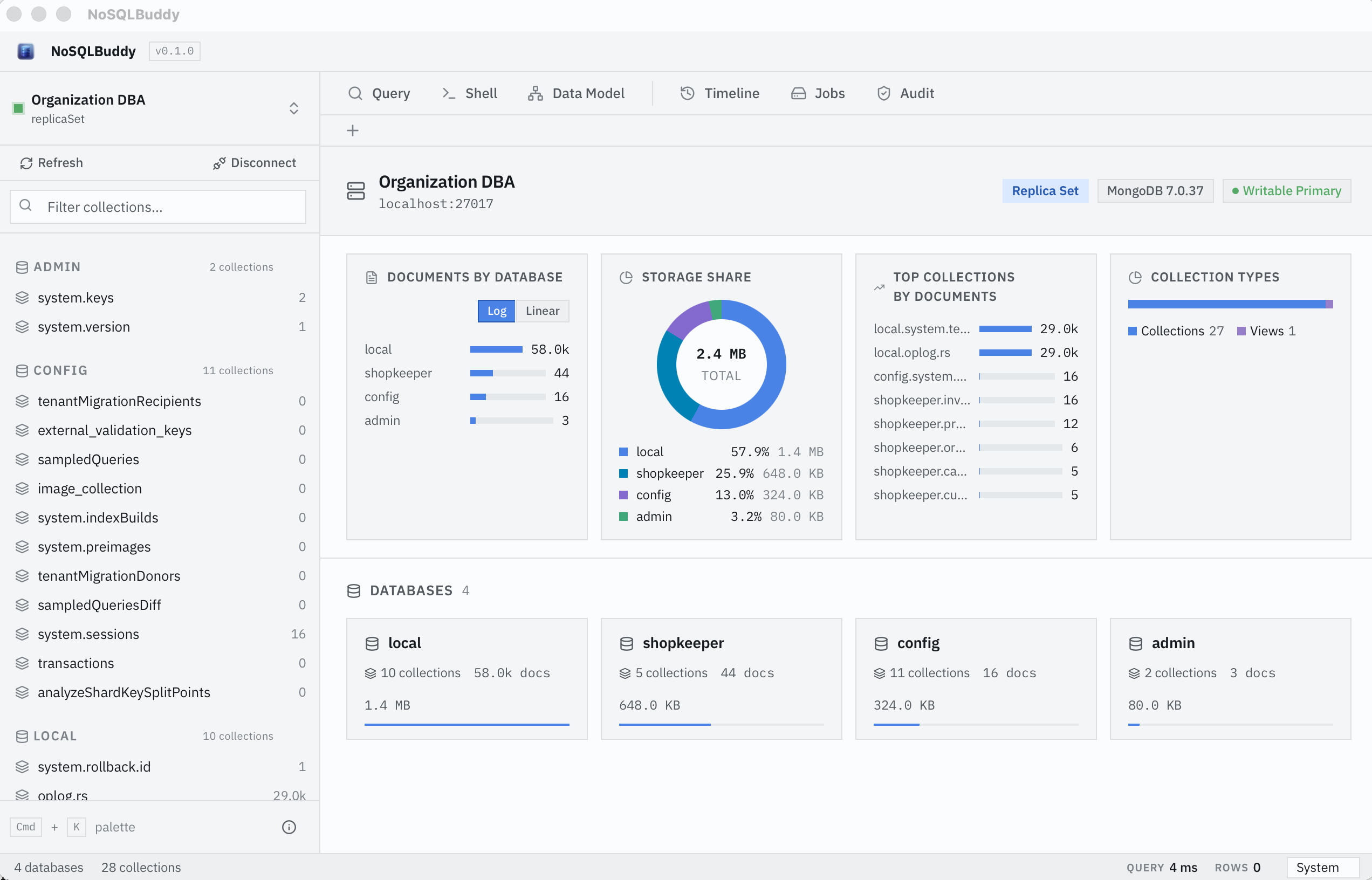
NoSQLBuddy connects to MongoDB, lets you browse data, run queries, build aggregations, translate SQL to MongoDB, inspect schema and indexes, and review performance — all from a lightweight native desktop app.
## Contents
- [Quickstart](#quickstart) — run the app and connect in minutes
- [No MongoDB yet?](#no-mongodb-yet-run-the-seeded-demo-database) — run a seeded local database
- [Features](#features)
- [Using NoSQLBuddy](#using-nosqlbuddy) — how to use the core features
- [ZK Audit Log](#zk-audit-log) — how the audit system works, roles, and modes
- [ZK implementation](#zk-implementation-circuit-prover-and-on-chain-verifier) — circuit, prover, and on-chain verifier
- [On-chain contract reference](#on-chain-contract-reference)
- [Dev Mode](#dev-mode-full-stack-locally) · [Production Mode](#production-mode-in-app-your-keys)
- [Audit domains and selective disclosure](#audit-domains-and-selective-disclosure-desktop-app)
- [Standalone audit service](#standalone-audit-service-nosqlbuddy-audit) — CLI, HTTP API, and protocol reference
- [Deploying the audit service to a server](#deploying-the-audit-service-to-a-server) — separated publisher/attester deployment
- [Security](#security) — oplog completeness protocol, threat model, and privacy tiers
- [Testing](#testing)
## Quickstart
Get the app running and connected to MongoDB in a few minutes.
1. **Install dependencies:**
```bash
git clone https://github.com/ronnakamoto/nosql-buddy.git
cd nosql-buddy
npm install
```
2. **Get a MongoDB to connect to.** Already have one (local, Atlas, remote)? Use it. Otherwise start a local single-node replica set (requires Docker):
```bash
docker compose up -d # MongoDB at localhost:27017, seeded with demo data
```
New to MongoDB or don't have one running? See [No MongoDB yet?](#no-mongodb-yet-run-the-seeded-demo-database) for what this starts and how to manage it.
3. **Launch NoSQLBuddy:**
```bash
npm run tauri dev
```
4. **Connect.** In the app, click **New Connection**, paste a connection string, and click **Connect**:
- Local dev DB: `mongodb://localhost:27017/?replicaSet=rs0`
- Atlas / remote: your own `mongodb://…` or `mongodb+srv://…` URI
5. **Explore** your data — see [Using NoSQLBuddy](#using-nosqlbuddy).
> Want the tamper-evident, on-chain audit log? See [ZK Audit Log](#zk-audit-log).
Prerequisites: [Node.js](https://nodejs.org/) 18+, [Rust](https://www.rust-lang.org/tools/install) 1.77+, and (optional) [Docker Desktop](https://www.docker.com/products/docker-desktop/) for the local database and audit stack. Full details under [Getting started](#getting-started).
## No MongoDB yet? Run the seeded demo database
NoSQLBuddy doesn't bundle a database — point it at any MongoDB you already have (local, Atlas, or remote). If you don't have one, this repo ships a one-command local database preloaded with realistic demo data, so you have something to browse right away.
Requires [Docker Desktop](https://www.docker.com/products/docker-desktop/). From the project root:
```bash
docker compose up -d
```
This starts a **single-node MongoDB replica set** at `localhost:27017` and seeds it with a sample e-commerce dataset (the `shopkeeper` database):
| Collection | Contents |
|---|---|
| `products` | 12 products with price, cost, stock, ratings, tags, and nested specs |
| `categories` | 5 product categories |
| `customers` | 5 customers with nested name and address objects |
| `orders` | 6 orders across delivered / shipped / processing / pending / cancelled states |
| `inventory_log` | Stock movements from orders and supplier restocks |
Unique, text, and compound indexes are created too, so schema/index analysis and explain plans have something to work with.
Connect the app with this URI (the **New Connection** dialog):
```
mongodb://localhost:27017/?replicaSet=rs0
```
A single-member replica set is always its own primary, so writes never fail with `NotWritablePrimary`, and it still supports change streams and transactions — everything NoSQLBuddy's live features (including the audit log) need. No `/etc/hosts` aliases or `directConnection` tricks required.
Manage it from the project root:
```bash
docker compose ps # status
docker compose logs -f # tail logs
docker compose down # stop (data is kept in a named volume)
docker compose down -v # stop and wipe all data
docker compose run --rm seeder # re-seed the demo data
```
> This single-node dev database is **separate** from the 3-node replica set used by the audit trust-anchor demo (`docker-compose.audit-db.yml`). For everyday app use, the single-node DB above is all you need.
## Features
- **Connection management** — Save connection profiles with secrets stored in the OS keychain. URIs and credentials are redacted from logs and UI responses.
- **Data browsing** — Query collections, paginate results, edit documents in place, and view JSON or table output.
- **Visual query builder** — Compose filters, projections, and sorts without writing raw JSON.
- **Aggregation editor** — Build and preview aggregation pipelines with syntax-aware JSON editing.
- **SQL to MongoDB** — Translate `SELECT`, `JOIN`, `GROUP BY`, `WHERE`, `ORDER BY`, and `LIMIT` statements into aggregation pipelines.
- **Schema and index analysis** — Infer schema shape, cardinality, and index usage from sampled documents.
- **Explain plan visualization** — Parse `explain` output into a navigable tree to diagnose slow queries.
- **Driver code generation** — Export queries and pipelines to Node.js, Python, Java, C#, Ruby, Rust, and the MongoDB shell.
- **ZK audit log** — Tamper-evident Poseidon Merkle tree, **Audited-Action Disclosure proofs** (Groth16 proofs of predicates — operation, collection, time range — over still-private events, verifiable on-chain by anyone via a free read-only Soroban simulation), epoch batching with IPFS publishing and Stellar on-chain commitments (testnet or mainnet), multi-publisher K-of-N threshold attestation, and reader-mode verification against on-chain roots. Two modes: **Dev Mode** (full stack locally via Docker, available now) and **Production Mode** (in-app pipeline with your own keys, coming soon). **Batch encryption** with age (X25519 multi-recipient) ensures only authorized auditors can read published epoch batches. **Keyed leaf derivation** (a keyed Poseidon vector commitment over structured event fields, ZK-openable in-circuit) resists offline dictionary attacks against public circuit signals.
- **Audit domains & selective disclosure** — Events are segmented per `(deployment, database)` domain, each with its own secondary Merkle root, so you can prove one tenant's record without revealing any other domain's data. An aggregation **super-root** over all domain roots (anchored in the on-chain commit metadata) lets you prove a domain is part of the committed state, and per-domain **legal hold** and **retention/pruning** manage lifecycle while keeping the anchored history intact and verifiable.
- **Oplog completeness** — Deterministic SHA-256 Merkle tree over MongoDB's oplog (`local.oplog.rs`), binding the audit log to the same ground truth that MongoDB's replication protocol uses. An independent replica member (run by the auditor/regulator) provides a trust anchor that detects any omitted writes. The on-chain commitment stores both the audit log root and the oplog root, and independent attesters submit ed25519 attestations over the oplog root for durable, post-rollover verification.
- **Standalone audit service** — `nosqlbuddy-audit` runs independently of the desktop app, capturing MongoDB change stream events, batching into epochs, publishing to IPFS, and committing Merkle roots on-chain via an HTTP API. Signs transactions natively (ed25519 + Soroban RPC) — no `stellar` CLI required. Includes an interactive `setup` wizard for one-command key generation, contract deployment, and attester authorization.
- **Native desktop experience** — Built on Tauri v2 for a small footprint, native menus, and consistent shortcuts on macOS, Windows, and Linux.
## Tech stack
- **Frontend:** React 18, TypeScript, Vite, visx
- **Backend:** Rust, Tauri v2, Tokio
- **Database:** MongoDB driver for Rust (`mongodb` + `bson`)
- **ZK proofs:** ark-circom, ark-groth16, ark-bn254, light-poseidon, circom circuits
- **On-chain:** Soroban (Stellar testnet + mainnet), native Rust RPC client, native ed25519 transaction signing
- **Decentralized storage:** IPFS (Kubo HTTP API)
- **Audit daemon:** axum HTTP server (standalone binary)
- **Testing:** Playwright (frontend), Cargo (Rust unit + integration tests)
## Getting started
### Prerequisites
- [Node.js](https://nodejs.org/) 18+
- [Rust](https://www.rust-lang.org/tools/install) 1.77+
- A MongoDB instance (local or remote) for live features. No instance handy? `docker compose up -d` starts a **single-node replica set** reachable at `mongodb://localhost:27017/?replicaSet=rs0` (always primary, no extra host configuration).
#### Audit daemon (optional)
- A MongoDB **replica set** or **sharded cluster** (change streams require oplog; standalone mongod won't work)
- A Stellar **secret key** (S... strkey) for signing on-chain transactions. Generate one with `stellar keys generate --global --network testnet` then export it with `stellar keys show --secret-key`. The daemon signs transactions natively — no `stellar` CLI needed at runtime.
- [IPFS](https://docs.ipfs.tech/install/) for batch publishing — either a local Kubo daemon (`ipfs daemon`) or a [Pinata](https://pinata.cloud) account (configured in-app during onboarding)
- Circuit artifacts for Groth16 proof generation: `merkle_inclusion.r1cs` + `merkle_inclusion.wasm` (bundled in `src-tauri/resources/circuits/`)
#### Dev Mode Docker stack (optional)
- [Docker Desktop](https://www.docker.com/products/docker-desktop/) with the Compose plugin
- The 3-node MongoDB replica set is started automatically by the in-app **Start Stack** button (which runs `docker-compose.audit-db.yml` + `docker-compose.audit.yml` together). You can also start it manually (`docker compose -f docker-compose.audit-db.yml up -d`) if you want to inspect it before launching the audit services.
### Installation
```bash
git clone https://github.com/ronnakamoto/nosql-buddy.git
cd nosql-buddy
npm install
```
### Development
Run the full Tauri dev environment (Rust backend + Vite frontend):
```bash
npm run tauri dev
```
Run the frontend alone against a mocked backend:
```bash
npm run dev
```
### Build
```bash
npm run build # Production frontend build
npm run tauri build # Native app bundle for the current platform
```
## Using NoSQLBuddy
After you connect (see [Quickstart](#quickstart)), the main workspace puts the core tools one click away:
- **Browse and edit data** — Pick a database and collection in the sidebar to page through documents. Switch between JSON and table views, and edit a document inline then save it back.
- **Run queries** — Type a MongoDB filter in the query bar, or use the **visual query builder** to compose filter, projection, and sort without writing raw JSON.
- **Build aggregations** — Open the aggregation editor to assemble a pipeline stage by stage and preview results as you go.
- **Translate SQL** — Write a `SELECT … FROM … WHERE … JOIN … GROUP BY … ORDER BY … LIMIT` statement and NoSQLBuddy converts it into an aggregation pipeline you can run or copy.
- **Inspect schema and indexes** — Sample a collection to infer its field shape, cardinality, and which indexes are used.
- **Diagnose slow queries** — Run a query with explain to get a navigable execution-plan tree.
- **Generate driver code** — Export any query or pipeline as ready-to-paste code for Node.js, Python, Java, C#, Ruby, Rust, or the mongo shell.
Connection profiles are saved with their secrets in your OS keychain; URIs and credentials are redacted from logs and responses.
## ZK Audit Log
NoSQLBuddy can produce a tamper-evident, independently verifiable audit log of every database write: every insert, update, and delete is captured into a cryptographic Merkle tree, sealed into batches, and anchored on the Stellar blockchain so no one can alter history undetected.
For a detailed explanation of the ZK Audit system, see [nosqlbuddy.com/audit](https://nosqlbuddy.com/audit).
### How it works (the short version)
1. **Capture.** Every MongoDB write (insert, update, delete) is recorded into a tamper-evident Poseidon Merkle tree. Each leaf is a **keyed Poseidon vector commitment** over the event's structured fields (operation, database, collection, timestamp, document hash) — binding, hiding, and openable inside a ZK circuit.
2. **Seal.** Writes are grouped into an "epoch" (batch). Sealing the epoch freezes its Merkle root, a single fingerprint that commits to every event in the batch.
3. **Anchor.** The Merkle root is committed on-chain (Stellar blockchain) and the full batch is stored on IPFS. This makes the fingerprint public and permanent.
4. **Disclose.** For any individual event, the operator can generate an **Audited-Action Disclosure proof**: a zero-knowledge proof that an event with a claimed operation, collection, and time range exists in the committed log — without revealing the document, the database, the exact timestamp, or any other record.
5. **Verify.** Anyone — an auditor, a regulator, a counterparty with zero data access — verifies the claim against the on-chain root via a **read-only Soroban simulation** from their own machine: no transaction, no fees, no keys, and no trust in the operator's software. Independent attesters separately guarantee that no writes were omitted.
The trust model decomposes cleanly: **on-chain root anchoring** makes history tamper-evident, **K-of-N independent attesters** guarantee completeness (no event exists that isn't in the log), and **ZK disclosure proofs** answer specific questions about private events (∃-statements) without a data dump. Each mechanism does the one job the others can't.
### ZK implementation: circuit, prover, and on-chain verifier
The zero-knowledge proof system is the core of the audit log's integrity guarantee. This section explains the three components: the Circom circuit, the off-chain prover, and the on-chain Soroban verifier.
#### 1. The circuits (Circom + Poseidon)
**Files:** [`zk-spike/circuits/audited_action.circom`](zk-spike/circuits/audited_action.circom) (disclosure — the flagship), [`zk-spike/circuits/merkle_inclusion.circom`](zk-spike/circuits/merkle_inclusion.circom) (plain inclusion)
Both circuits work over a 20-level Poseidon Merkle tree (up to 2²⁰ ≈ 1M entries per epoch) using **Poseidon(2)** — a ZK-friendly hash with `t=3` — matching `light-poseidon`'s `new_circom(2)` on the Rust side and Circom's `Poseidon(2)` on the circuit side. Poseidon is the hash function Stellar added as a **native host function in Protocol 25**, making it the natural choice for ZK proofs that verify on Stellar.
**`audited_action.circom` — Audited-Action Disclosure.** The statement a plain Merkle proof structurally cannot make: it opens the leaf's **keyed Poseidon vector commitment** in-circuit (`leaf = Poseidon(7)(key, opH, dbH, collH, ts, docH, salt)`, derived in [`zk-audit/src/commitment.rs`](zk-audit/src/commitment.rs)) and proves predicates over the still-private field values:
| Input | Visibility | Description |
|---|---|---|
| `root` | **Public** | The Merkle tree root (committed on-chain via Soroban) |
| `leaf` | **Public** | The event's commitment (binds the proof to one entry) |
| `opPred`, `collPred` | **Public** | Claimed operation / collection (field-encoded) |
| `tsMin`, `tsMax` | **Public** | Claimed time range (Unix seconds) |
| `checkOp`, `checkColl`, `checkTs` | **Public** | Which predicate checks are enabled |
| `key`, `opH`, `dbH`, `collH`, `ts`, `docH`, `salt` | Private | The commitment opening — the event's actual fields |
| `pathElements[20]`, `pathIndices[20]` | Private | Merkle authentication path |
A valid proof shows *"an event with this operation, in this collection, within this time range, exists in the anchored log"* — revealing nothing else: not the document, the database, the exact timestamp, or any sibling entry. Every predicate parameter is a public signal folded into the pairing check, so a proof cannot be replayed against a different claim.
**`merkle_inclusion.circom` — plain inclusion.** Proves a specific leaf is part of the committed tree (public signals `[root, leaf]`, private authentication path). Used for basic inclusion checks where the leaf hash itself is the claim.
#### 2. The prover (off-chain: ark-circom + ark-groth16)
**Files:** [`zk-audit/src/disclosure.rs`](zk-audit/src/disclosure.rs), [`zk-audit/src/prover.rs`](zk-audit/src/prover.rs), [`zk-audit/src/commitment.rs`](zk-audit/src/commitment.rs), [`zk-audit/src/merkle.rs`](zk-audit/src/merkle.rs), [`zk-audit/src/bin/ceremony.rs`](zk-audit/src/bin/ceremony.rs)
Proof generation runs off-chain in Rust:
1. **Witness computation** — `ark-circom` loads the compiled circuit (`.r1cs` + `.wasm`) and computes the witness via Wasmer, given the commitment opening, predicate parameters, and authentication path.
2. **Groth16 proof** — `ark-groth16` on the BN254 curve generates a zero-knowledge proof that the witness satisfies the circuit's constraints. The proof is a triple of elliptic-curve points (A ∈ G1, B ∈ G2, C ∈ G1). A false claim (wrong operation, out-of-range timestamp) fails constraint satisfaction and cannot be proven.
3. **Trusted setup** — The `zk-audit-ceremony` binary runs the Powers of Tau ceremony once per circuit to produce a stable proving key (`.pkey`) and verifying key (`.vkey`) in arkworks binary format. The proving key is reused for every proof; the verifying keys are pinned on the contract (`initialize` for inclusion, `register_disclosure_vk` for disclosure). *Honest caveat: Groth16 requires a per-circuit trusted setup; a production deployment should run a multi-party ceremony (or migrate to a universal-setup system) so no single party ever holds the toxic waste.*
```
audit event → keyed Poseidon vector commitment (leaf) → Merkle tree → auth path
+ predicate claim (op / collection / time range)
→ Circom witness → Groth16 proof (A, B, C on BN254)
```
#### 3. The on-chain verifier (Soroban + BN254 host functions)
**File:** [`zk-audit/soroban-contract/src/lib.rs`](zk-audit/soroban-contract/src/lib.rs) — functions `verify_disclosure` and `verify_inclusion`
The Soroban contract verifies Groth16 proofs **on-chain** using Stellar's native BN254 host functions, introduced in **Protocol 25 ("X-Ray")** and expanded in **Protocol 26 ("Yardstick")**. These host functions move the heavy elliptic-curve math into the protocol layer, making on-chain proof verification affordable enough to run for every batch.
The verification algorithm:
1. **Check the root was committed** — the contract looks up the root in its append-only on-chain log. You can't verify a proof against a root that was never anchored.
2. **Deserialize proof and verifying key** — points are received as raw big-endian bytes (G1: 64 bytes, G2: 128 bytes), matching the off-chain serializer in [`zk-audit/src/serialize.rs`](zk-audit/src/serialize.rs).
3. **Compute `vk_x`** — `vk_x = ic[0] + Σ pub_signals[i] · ic[i+1]` using `bn254.g1_mul` and `bn254.g1_add` (Protocol 25 host functions).
4. **Pairing check** — verifies the Groth16 pairing equation:
```
e(-A, B) · e(α, β) · e(vk_x, γ) · e(C, δ) == 1
```
via `bn254.pairing_check` (Protocol 25/26 host function). If the pairing holds, the proof is valid.
The contract uses these Soroban BN254 host functions: `g1_mul`, `g1_add`, `pairing_check`, and `Fr` field arithmetic — all from Protocol 25/26. This is what makes on-chain Groth16 verification cost-effective on Stellar.
Both verification functions are **permissionless** (no `require_auth`), and the app's Auditor role calls them via a **read-only `simulateTransaction`** — the pairing check runs inside the Soroban runtime, but the verifier needs no funded account, pays no fee, and submits nothing to the ledger. Anyone with the RPC URL and contract ID gets a cryptographic verdict without trusting the operator at all.
#### What is zero-knowledge about this
A disclosure proof reveals **only its public claim** — the predicate parameters (operation, collection, time range) and the yes/no verdict. The verifier learns:
- An event satisfying the claimed predicates exists in the committed Merkle tree
- The root matches the on-chain commitment (integrity)
They do **not** learn:
- The document content, field names, or any data from the database
- The database name or the event's exact timestamp
- The commitment key or salt (so leaves resist offline guessing attacks)
- Any sibling hashes, tree structure, or anything about any other entry
The database content never leaves the operator's infrastructure. Only a 32-byte root and a ~200-byte proof cross the trust boundary.
**Being precise about what each mechanism guarantees:** disclosure proofs are *existential* — they show a matching event exists, never that "nothing bad exists" or "this is everything." Exhaustiveness is exactly what the [oplog completeness protocol](#roles-publisher-vs-attester) provides: independent K-of-N attesters, reading their own replica, sign the oplog hash on-chain. The composition — attesters for completeness (∀), ZK for private disclosure (∃), the chain for integrity — is what makes the system trustworthy end to end; no single primitive is asked to do a job it can't.
### On-chain contract reference
The verifier contract is deployed on **Stellar testnet**:
```
Contract ID: CCUCFDRF6IMY3STBIFRBBGFFPETBSAPPTDACNOBYWKNPG5QUCAMGGUQ5
```
You can inspect committed roots and transactions on [stellar.expert](https://stellar.expert/explorer/testnet/contract/CCUCFDRF6IMY3STBIFRBBGFFPETBSAPPTDACNOBYWKNPG5QUCAMGGUQ5). The contract exposes:
| Function | What it does |
|---|---|
| `commit_root(root, metadata)` | Anchor a Merkle root on-chain (admin-gated) |
| `commit_root_with_oplog(root, oplog_root, metadata)` | Anchor root + oplog completeness hash |
| `verify_disclosure(root, leaf, op_pred, coll_pred, ts_min, ts_max, checks…, proof)` | **Verify an Audited-Action Disclosure proof on-chain** — predicates over a still-private event, against the VK pinned by `register_disclosure_vk` |
| `verify_and_record_disclosure(verifier, …same args…)` | Verify **and record**: on success, appends a verifier-attributed `DisclosureRecord` (who verified, the full claim, ledger time) to an append-only log and emits an event. Signed by the verifier's own account — the tx hash is citable evidence that *that party* checked *that claim* |
| `get_disclosure_records(limit)` | Enumerate recorded verifications (most recent first) — anyone can see what has been proven, by whom, and when |
| `verify_inclusion(root, leaf, proof)` | Verify a plain Groth16 inclusion proof, against the verifying key pinned at `initialize` |
| `register_disclosure_vk(vk)` | Pin the disclosure circuit's VK (admin, **write-once**) |
| `get_current_root()` | Read the latest committed root |
| `attest_oplog(epoch, oplog_root, signature)` | Independent attester signs the oplog hash |
**Free verification vs. recorded verification.** `verify_disclosure` is typically called via a read-only `simulateTransaction` — free, private, no account needed — and answers "is this claim true?" for *you, now*. `verify_and_record_disclosure` is a signed transaction from the **auditor's own funded account** and answers a different need: a permanent, third-party-attributable public record that the verification happened, consumable later in audit reports, disputes, or compliance filings (the Auditor role exposes both: "Verify On-Chain" and "Verify & Record"). Only successful verifications are recorded — the log is a registry of proven claims, mirroring the `attest_oplog` pattern where independent parties pay a small fee precisely because the durable record *is* the product.
Verifying keys are **never** passed by the caller — they're pinned once (`initialize` for inclusion, `register_disclosure_vk` for disclosure) and can never be changed afterwards, so a compromised admin can't retroactively swap in a VK for a weaker circuit. All predicate parameters are public signals folded into the pairing check: a valid proof is bound to its exact claim.
To independently verify a proof: obtain a proof bundle from the operator (the **Disclose** button in the Change Feed exports one, in both Dev Mode and the production surface), then paste it into the Auditor role's **Verify a proof bundle** box — the app verifies it via a read-only Soroban simulation from your own machine. Or do it yourself with any Soroban RPC client: call `verify_disclosure` with the bundle's arguments. The full contract source is in [`zk-audit/soroban-contract/`](zk-audit/soroban-contract/), with interface documentation in [`INTERFACE.md`](zk-audit/soroban-contract/INTERFACE.md).
> **Dev Mode deploys your own contract.** When you run Dev Mode setup, the wizard deploys a fresh per-user contract on testnet (your publisher key becomes admin). The contract ID above is the shared default; your Dev Mode instance will have its own. Check **Advanced → Your contract** in the Audit tab for the active ID.
### Roles: publisher vs attester
The trust model requires two independent parties. No single party should hold both roles:
| Role | Run by | What it does |
|---|---|---|
| **Publisher** (operator) | The company being audited | Captures writes, builds the Merkle tree, seals batches, anchors roots on-chain |
| **Attester** (auditor/regulator) | An independent third party | Independently verifies the oplog (MongoDB's replication log) and signs an on-chain attestation that no writes were omitted |
| **Reader** | Either party | Verifies on-chain roots against a local copy of the audit log |
> **Why separate keys?** If the publisher could also submit attestations, they could omit writes and self-attest the doctored log. Separating the keys across organizations makes this impossible. Dev Mode generates both keys on one machine for convenience; production deployments separate them across servers (see [Deploying the audit service to a server](#deploying-the-audit-service-to-a-server)).
### Two ways to run it
The Audit tab offers two modes:
| | Dev Mode | Production Mode |
|---|---|---|
| **Status** | Available | Coming soon |
| **Runs where** | Full stack in Docker on your machine | In-app pipeline — no Docker, no daemons |
| **Stellar keys** | Two testnet keys you generate (publisher + attester) | Your own keypair |
| **Contract** | Auto-deployed per-user contract on testnet (owned by your publisher key) | Auto-deployed per-user contract on testnet (owned by your key), or your own on mainnet |
| **Network** | Testnet | Testnet or mainnet |
| **MongoDB** | 3-node replica set (`docker-compose.audit-db.yml`) | Your own replica set / cluster |
| **Best for** | Learning and demoing the full system end to end | Auditing your real data with keys and a contract you control |
**New to this?** Start with **Dev Mode** to watch the whole system work end to end. (Production Mode is not yet available in the UI.)
**Roles inside Dev Mode.** The Dev tab shows one of two surfaces, picked by the **Role** switch in the header:
- **Operator** — the stack dashboard: start/stop the Docker stack, watch the change feed, seal batches, commit roots on-chain, and export proof bundles.
- **Auditor** — the independent verification surface: rebuild the log from chain + IPFS, verify proof bundles, and record verifications on-chain. No MongoDB access needed (see [In-app Auditor role](#in-app-auditor-role-no-mongodb-required)).
The default is inferred from the active connection's privileges: a write-capable credential gets the Operator surface, a read-only credential (like the dev `auditor` user) gets the Auditor surface. It's a UX default, not a permission gate — the switch overrides it either way, and MongoDB enforces the real privileges server-side.
### Dev Mode (full stack locally)
Runs the **complete audit system** on your machine via Docker — publisher, independent attester, and reader daemons — with K-of-N attestation, oplog completeness verification, and on-chain commitments to Stellar testnet.
> **Dev Mode convenience:** Both the publisher and attester keys are generated on your machine for demonstration purposes. In production, these run on separate servers controlled by separate parties (see [Deploying the audit service to a server](#deploying-the-audit-service-to-a-server)).
**Use this when:** you want to see or demo the entire audit system working end to end, without deploying anything of your own.
**Prerequisites:** Docker Desktop, and (optional) a [Pinata](https://pinata.cloud) account or local IPFS for batch publishing. **Start Stack** brings up the 3-node MongoDB replica set for you.
**Steps (no terminal needed):**
1. Open the app, go to the Audit tab, and select **Dev Mode**.
2. Click **Set up**. This runs the setup wizard for you — no terminal required. It generates the two independent Stellar keypairs (publisher + attester), funds them on testnet via Friendbot, deploys a fresh audit contract so the publisher becomes its admin, pins both verifying keys on-chain (the inclusion VK at `initialize`, the disclosure VK via `register_disclosure_vk` — so disclosure proofs verify on this contract), generates the attester's ed25519 oplog key, authorizes the attester on the contract, and writes `attester.key` + `.env.audit`. Enter your Pinata API key/secret in the form to enable IPFS publishing (optional). Your secret keys are stored locally and are never displayed.
> **No host `stellar` CLI or Rust toolchain needed for Dev Mode.** The setup runs inside the audit Docker image, which bundles the `stellar` CLI and a prebuilt contract WASM. The wizard deploys the contract and authorizes the attester from there, so deploying a per-user contract is the default — your publisher key owns it, which is required for committing roots and authorizing the attester.
>
> **Why two keys?** The trust model requires the attester to be independent from the operator. If both used the same key, the operator could submit fake attestations themselves, defeating independent verification — so the wizard generates two separate keypairs.
3. Click **Start Stack**. This brings up the 3-node MongoDB replica set and the publisher, attester, and reader containers using the `.env.audit` and `attester.key` that setup produced.
4. Write data to the audited MongoDB endpoint (`mongodb://root:nosqlbuddy-dev-root-pw@127.0.0.1:27020/?directConnection=true&authSource=admin`) to populate the audit log. The dev-mode replica set runs with auth enabled; `root`/`nosqlbuddy-dev-root-pw` are fixed, non-secret dev-only credentials (see [Security -> Auditor access model](#auditor-access-model-dev-mode) for why, and what a real auditor's credentials look like). The live view shows:
- **Event feed** — real-time stream of captured inserts, updates, and deletes. Each event has **Prove** (Groth16 inclusion proof) and **Disclose** (an Audited-Action Disclosure proof: pick which predicates — operation, collection, UTC day — become the public claim; everything else stays private). Both export a copyable bundle the auditor verifies independently.
- **Epoch progress** — how many events are in the current batch (fills up to 100 by default)
- **On-chain root** — the last Merkle root committed to Stellar
- **Multi-party sign-off** (K-of-N) — how many independent attesters have signed the batch
- **Oplog completeness** — verifies no writes were omitted by comparing against MongoDB's replication log
- **Epoch history** — list of all sealed and committed batches
5. Click **Seal Batch** to close the current epoch and freeze its Merkle root.
6. Click **Commit Batch** to pin the batch to IPFS and commit the root on-chain (Stellar testnet).
> **Installed (packaged) app:** everything above works the same in an installed build (dmg/msi/etc.). The **Set up** and **Start Stack** buttons pull the published audit image automatically — no source tree and no local `--build`.
**Manual Docker commands** (alternative to the in-app Start Stack button):
```bash
docker compose -f docker-compose.audit-db.yml up -d # start the 3-node replica set first
docker compose -f docker-compose.audit.yml up -d # then the audit stack (add --build on first run)
docker compose -f docker-compose.audit.yml ps # check status
docker compose -f docker-compose.audit.yml logs -f # tail logs
docker compose -f docker-compose.audit.yml down # stop the stack
```
#### Clean restart (reset everything and start fresh)
There are two levels of reset. Use the first if you just want to clear audit data and re-run; use the second for a completely clean slate (new keys, new contract, new database).
**Option A: Reset audit data only (keep keys and contract).** This wipes the audit log, Merkle tree, and attester state, but preserves your Stellar keypairs, contract, and on-chain history. The 3-node MongoDB replica set keeps its data too.
In the app, click **Reset Data** (next to **Stop** in the stack status bar). Or from the terminal:
```bash
docker compose -f docker-compose.audit.yml down -v # stop audit stack + wipe daemon volumes
docker compose -f docker-compose.audit.yml up -d # restart with the same .env.audit
```
**Option B: Full clean restart (new keys, new contract, new database).** This tears down everything, including the MongoDB replica set and credentials. After this, re-run setup as if starting from scratch.
```bash
# 1. Stop and remove everything (audit stack + 3-node replica set + all volumes)
docker compose -f docker-compose.audit.yml down -v
docker compose -f docker-compose.audit-db.yml down -v
# 2. Delete credentials so the setup wizard generates fresh ones
rm -f .env.audit attester.key
# 3. Start the replica set fresh
docker compose -f docker-compose.audit-db.yml up -d
# 4. Re-run setup (deploys a new contract with new keys)
docker compose -f docker-compose.audit.yml run --rm setup
# Non-interactive: docker compose -f docker-compose.audit.yml run --rm -e DEPLOY_CHOICE=deploy setup setup --non-interactive
# 5. Start the audit stack
docker compose -f docker-compose.audit.yml up -d
```
> **What survives a full reset?** On-chain Stellar history is permanent and cannot be undone. Previous testnet commits remain visible on Stellar Explorer, but the new setup creates a fresh contract so they are not referenced by the new audit log.
### Production Mode (in-app, your keys)
> **Not yet available.** Production Mode is implemented but disabled in the UI ("Coming soon"). The following documents the intended workflow for when it ships.
Runs the in-app audit pipeline with **your own Stellar keypair** and contract. Choose testnet or mainnet — this is the "double check" that an audit system you deployed elsewhere works end to end. No daemon, no Docker.
**Use this when:** you want to audit your real data with keys and a contract you control — no Docker, no background daemons.
**What you need:**
- Your Stellar secret key (`S…`). On **testnet** the key alone is enough: the first commit funds your account via Friendbot and deploys a fresh commitment contract owned by that key. On **mainnet** you also need your deployed contract ID (`C…`) and an RPC URL.
- A MongoDB **replica set** connection (change streams and oplog require it; a standalone `mongod` won't work).
**Steps:**
1. Open the app, go to the Audit tab, select **Production Mode**.
2. Choose a network: **Testnet** (auto-funded contract) or **Mainnet** (your contract ID + RPC URL).
3. Import your Stellar secret key (S... strkey). It's stored in the OS keychain and never leaves your machine.
4. If mainnet: enter your contract ID (C...) and RPC URL.
5. The live view shows: event feed, epoch progress, on-chain root, verify integrity, per-event proofs, and advanced details — committing via your keypair on your chosen network.
6. Click **Commit Batch** to commit a sealed batch. On testnet the first commit also provisions your contract (see below); pin to IPFS, commit the root on-chain via native signing, then self-attest the root. The batch shows **Verified 1/1** once attested.
**Switching modes:** Production Mode is not yet available in the UI. When it ships, you'll click **Settings** in the audit panel to toggle between Dev and Production.
#### Testnet contract provisioning, persistence, and demo attestation
Production Mode on **testnet** is self-contained: you never run the `stellar` CLI, deploy a contract by hand, or paste a contract ID. The app handles it on your first commit.
**Automatic contract deploy (first testnet commit).** `commit_root*` is admin-gated on-chain, so a commit signed by a key that isn't the contract admin passes simulation but traps on apply. To avoid that, the first testnet commit provisions a commitment contract **owned by your imported key**:
1. Funds your account via Friendbot if needed (a no-op if it's already funded).
2. Uploads the bundled `zk_audit_commitment.wasm` (shipped in `src-tauri/resources/contract/`) and creates a contract instance, signing natively (ed25519 + Soroban RPC), with no `stellar` CLI.
3. Calls `initialize`, which sets the contract **admin = your key**, so your later commits are authorized.
The same key deploys, initializes, commits, and attests, so the admin check always passes. The step is **idempotent**: subsequent commits detect that your key already owns the contract and reuse it instead of redeploying.
**Per-network contract ID persistence.** The deployed contract ID is saved to the app's global settings, keyed by network (`testnet` vs `mainnet`). It survives restarts and overrides the bundled testnet default, so every future testnet commit targets *your* contract. You can see the active contract ID under **Advanced → Your contract** in the Audit tab. Mainnet uses the contract ID you supply; nothing is auto-deployed there.
**Single-attestor demo verification (K=1).** Full K-of-N threshold attestation (the Dev Mode model) requires independent attesters. Production Mode's in-app trial registers your key as the sole attester and sets the threshold to **K=1**, so after each commit the app signs the batch root and the batch immediately shows **Verified 1/1**. This demonstrates the attestation surface end to end with one identity; a real deployment registers independent attesters and raises K (see [Dev Mode](#dev-mode-full-stack-locally) and the [oplog completeness protocol](#oplog-completeness-protocol)).
### Audit domains and selective disclosure
Beyond the single global Merkle tree, the desktop app segments the audit log into **domains** so you can disclose one tenant's history without exposing everyone else's. A domain is the pair `(deployment, database)` — for example `rs:rs0 · sales`. Events recorded before segmentation (with no deployment identity) form a backward-compatible **unattributed** domain.
These features live in the **Audit tab → Change Feed**: domain filter chips, a per-domain status panel (root, event count, legal-hold and pruned badges), and actions to prove inclusion and manage lifecycle. They apply to both Dev and Production mode.
**Per-domain roots & selective disclosure.** Each domain has its own secondary Merkle root, computed deterministically from that domain's leaves in the (tamper-verified) global log. You can generate an inclusion proof for a single record against its domain root — proving that one event is in the log without revealing any other domain's records.
**Aggregation super-root.** A second Merkle tree is built over all per-domain roots (one leaf per domain, each leaf binding `deployment | database | domainRoot`). Its **super-root** commits to the *set* of domain roots, and a short inclusion proof can show that a given domain's root is part of the committed state. The super-root is anchored on-chain by being written into the epoch's commit metadata (`domainSuperRoot=`), so no contract redeploy is needed. The "Prove in super-root" action returns a proof that is cryptographically verifiable (the leaf hashes up to the super-root through its authentication path).
**Legal hold.** A domain can be placed under legal hold, which blocks pruning/retention until the hold is lifted. Holds are persisted and survive restarts.
**Retention / pruning.** A domain can be *logically* pruned: its active event metadata is dropped from the live view, but a compact **retained Merkle commitment** (root, event count, last index, timestamp) is kept. The append-only global tree, sled state, and on-chain anchor are never modified — so the anchored history stays complete and verifiable, and the pruned domain still participates in the super-root via its retained root. Pruning is refused while a legal hold is active.
> **Guarantee layers.** Integrity (events weren't altered) and inclusion (a proof that an event is in the log) are provided per domain. Completeness (no writes were omitted) is currently a global guarantee via the oplog protocol below; per-domain completeness is not yet sliced out.
## Standalone audit service (`nosqlbuddy-audit`)
> **Advanced / reference.** Most users don't need this — [Dev Mode](#dev-mode-full-stack-locally) above covers the common workflow. This section documents running the audit daemon directly (CLI flags, HTTP API, and the end-to-end protocol).
The audit service runs as a separate process from the desktop app. It captures MongoDB writes via change streams, builds a tamper-evident Poseidon Merkle tree, batches events into epochs, publishes batches to IPFS, and commits Merkle roots to a Soroban contract on Stellar.
> **Role separation.** As described in [Roles: publisher vs attester](#roles-publisher-vs-attester) above, production deployments split the publisher and attester across separate servers. This section documents the standalone binary that each party runs independently.
### Build
```bash
cd src-tauri
cargo build --bin nosqlbuddy-audit
```
### Run via Docker Compose (single-machine demo)
> This runs the publisher, attester, and reader together on one machine. This is fine for demos and Dev Mode, but **not for production** -- see [Deploying the audit service to a server](#deploying-the-audit-service-to-a-server) for the separated deployment model.
If you don't want to install the Rust toolchain, you can run the full audit stack (publisher + attester + reader) via Docker. This uses the same binary, containerized with the Dockerfile at `audit-service/Dockerfile.audit`.
**Prerequisites:** Docker Desktop + the 3-node MongoDB replica set running.
1. Start the 3-node MongoDB replica set (from the project root):
```bash
docker compose -f docker-compose.audit-db.yml up -d
```
2. Run the setup wizard (interactive, in Docker). It generates the publisher + attester keypairs, funds them on testnet, deploys a fresh audit contract (publisher becomes admin), generates and authorizes the attester's ed25519 oplog key, and writes `./attester.key` + `.env.audit` into the project root:
```bash
docker compose -f docker-compose.audit.yml run --build --rm setup
```
Accept the defaults (choose **deploy** when asked about the contract) and enter your Pinata API key/secret when prompted. See [Dev Mode](#dev-mode-full-stack-locally) for more detail.
> **Non-interactive (CI / scripted):** Pass `DEPLOY_CHOICE=deploy` as an env var so the wizard deploys a fresh contract instead of falling back to the shared bundled one:
> ```bash
> docker compose -f docker-compose.audit.yml run --rm -e DEPLOY_CHOICE=deploy setup setup --non-interactive
> ```
3. Start the full audit stack:
```bash
docker compose -f docker-compose.audit.yml up -d --build
```
This brings up three containers:
| Service | Port | Mode | Connects to | Role |
|---|---|---|---|---|
| `publisher` | 9173 | publish | mongo1 (port 27017) | Captures change stream events, manages epochs, publishes to IPFS, commits roots on-chain |
| `attester` | 9174 | attest | mongo3 (port 27019) | Independently computes oplog hash, submits ed25519 attestations to the contract |
| `reader` | 9175 | read | mongo3 (port 27019) | Verifies on-chain roots against local audit log and oplog |
4. Manage the stack:
```bash
docker compose -f docker-compose.audit.yml ps # check status
docker compose -f docker-compose.audit.yml logs -f # tail all logs
docker compose -f docker-compose.audit.yml logs -f publisher # tail one service
docker compose -f docker-compose.audit.yml down # stop the stack (run this before restarting)
```
> **Restarting:** Always run `docker compose -f docker-compose.audit.yml down` before `up` if you made changes to `.env.audit` or the Dockerfile. Use `--build` on first run or after code changes.
>
> **Tip:** The audit stack uses a separate Compose project name (`nosqlbuddy-audit`) so it won't trigger orphan-container warnings from the MongoDB replica set. The audit containers reach the replica set over the shared `mongo-net` Docker network by container name (`mongo1`, `mongo2`, `mongo3`), so start the DB with `docker compose -f docker-compose.audit-db.yml up -d` first. The `host.docker.internal` mapping is only used to reach host services such as a local IPFS daemon.
### Setup wizard (one-time)
The `setup` subcommand is a role-aware wizard that generates Stellar keypairs, optionally deploys the contract, and writes `.env.audit`.
> **Dev Mode vs production.** For Dev Mode, run the full wizard once (`--role all`, the default) to generate both keys. For production, the **operator** runs `--role publisher` to generate their publisher key and deploy the contract, then the **auditor** runs `--role attester` independently on their own server. No single party holds both keys.
| Role | Who runs it | What it generates | On which server |
|---|---|---|---|
| `--role all` (default) | Developer | Both keys, contract deploy, attester authorization | One machine (Dev Mode) |
| `--role publisher` | Operator | Publisher key, contract deploy | Company server |
| `--role attester` | Auditor | Attester Stellar key + ed25519 oplog key | Auditor's server |
**Dev Mode (both keys, one machine):**
```bash
docker compose -f docker-compose.audit.yml run --build --rm setup
```
From source (requires the Rust toolchain)
```bash
# Run from the project root so ./attester.key and .env.audit land there.
cargo run --bin nosqlbuddy-audit -- setup
```
**Production — operator (publisher key + contract deploy):**
```bash
cargo run --bin nosqlbuddy-audit -- setup --role publisher
# Writes .env.audit with STELLAR_SECRET_KEY + CONTRACT_ID. No attester key.
# Prints the contract ID — share it with the auditor.
```
**Production — auditor (attester keys, independently):**
```bash
cargo run --bin nosqlbuddy-audit -- setup --role attester
# Prompts for the contract ID (from the operator).
# Generates the attester Stellar key + ed25519 oplog key.
# Prints the attester public address + ed25519 pubkey — send to the operator.
```
**Attester authorization (operator, after receiving auditor's public keys):**
```bash
cargo run --bin nosqlbuddy-audit -- authorize-attester \
--contract-id \
--secret-key \
--attester-address \
--attester-pubkey
```
The `--role all` wizard (Dev Mode) walks through:
1. Choosing a network (testnet or mainnet)
2. Generating (or importing) the publisher Stellar keypair
3. Generating (or importing) the attester Stellar keypair
4. Deploying a new contract or using an existing one
5. Initializing the contract (sets the admin = publisher)
6. Generating the attester's ed25519 oplog signing key
7. Authorizing the attester on the contract
8. Entering Pinata IPFS credentials (optional)
9. Writing `.env.audit` with all values
The `--role publisher` wizard does steps 1, 2, 4-5, 8-9 (skips attester key + ed25519 key + authorization).
The `--role attester` wizard does steps 1, 3, 6, 9 (skips publisher key + contract deploy + authorization). It prompts for the contract ID instead.
> **Contract deployment.** The audit Docker image bundles the `stellar` CLI and a prebuilt contract WASM, so the wizard deploys a fresh per-user contract by default (your publisher becomes its admin). Pass an existing `CONTRACT_ID` only if you want to reuse a contract you already control. Running the wizard from a full source checkout works too and additionally lets it build the WASM from source.
>
> **Setting up Dev Mode?** This is the recommended one-command path — see [Dev Mode](#dev-mode-full-stack-locally).
### Start the service
In production, each role runs on a separate server, run by a separate party. Each party only has access to their own secret key.
**Publisher mode** (run by the operator on the company server) — captures writes, manages epochs, publishes to IPFS, commits roots on-chain:
```bash
# All commands run from src-tauri/
cd src-tauri
# Basic: connect to MongoDB and listen for changes (no on-chain commits without a key)
cargo run --bin nosqlbuddy-audit -- start \
--mode publish \
--mongo-uri "mongodb://localhost:27017"
# Full: with IPFS publishing, native Stellar signing, and proof generation
cargo run --bin nosqlbuddy-audit -- start \
--mode publish \
--mongo-uri "mongodb://localhost:27017" \
--secret-key SXXXXXXXXXXXXXXXXXXXXXXXXXXXXXXXXXXXXXXXXXXXXXXXXXXXXXXX \
--network testnet \
--circuit-dir ./resources/circuits \
--ipfs-api http://127.0.0.1:5001 \
--rpc-url https://soroban-testnet.stellar.org:443
```
> **Tip:** You can also pass the secret key via the `STELLAR_SECRET_KEY` environment variable instead of `--secret-key`.
**Reader mode** — verifies local audit log against on-chain commitments (no MongoDB connection needed):
```bash
cd src-tauri
cargo run --bin nosqlbuddy-audit -- start \
--mode read \
--data-dir ~/.local/share/nosqlbuddy-audit
```
**Attester mode** (run by the auditor on the auditor's server) — independent attester that connects to the independent replica member, watches for new epoch commitments on-chain, independently computes the oplog hash, and submits attestations to the contract:
```bash
cd src-tauri
cargo run --bin nosqlbuddy-audit -- start \
--mode attest \
--mongo-uri "mongodb://localhost:27019" \
--attester-secret-key SXXXXXXXXXXXXXXXXXXXXXXXXXXXXXXXXXXXXXXXXXXXXXXXXXXXXXXX \
--network testnet \
--rpc-url https://soroban-testnet.stellar.org:443
```
> **Tip:** The attester's Stellar account key (`--attester-secret-key`) is separate from the ed25519 oplog signing key (auto-generated at `--attester-key-file`). The Stellar key signs the on-chain `attest_oplog` transaction; the ed25519 key signs the oplog hash itself. You can also pass the Stellar key via the `ATTESTER_SECRET_KEY` environment variable.
### Stop and status
```bash
# Stop a running service
cargo run --bin nosqlbuddy-audit -- stop
# Check if the service is running + health check
cargo run --bin nosqlbuddy-audit -- status
# Stop/status with a custom data dir or port
cargo run --bin nosqlbuddy-audit -- stop --data-dir /path/to/data --port 9174
```
### CLI options
| Flag | Default | Description |
|---|---|---|
| `--mode ` | `publish` | Daemon mode |
| `--mongo-uri ` | — | MongoDB connection URI (required for `publish` and `attest`) |
| `--data-dir ` | OS data dir | Data directory for audit log + sled |
| `--port ` | `9173` | HTTP API port |
| `--circuit-dir ` | — | Circuit artifacts dir (for `/proof/:index`) |
| `--proving-key ` | — | Pre-generated proving key (from trusted setup ceremony; speeds up proof generation) |
| `--ipfs-api ` | `http://127.0.0.1:5001` | IPFS Kubo HTTP API URL |
| `--rpc-url ` | Stellar testnet | Soroban RPC URL |
| `--network ` | `testnet` | Stellar network (sets passphrase + Horizon URL) |
| `--contract-id ` | Testnet contract | Soroban contract ID (required for mainnet) |
| `--horizon-url ` | Testnet Horizon | Horizon API URL for account sequence lookups |
| `--secret-key ` | — | Publisher's Stellar secret key (native signing). Also reads `STELLAR_SECRET_KEY` env var |
| `--attester-secret-key ` | — | Attester's Stellar account secret key (native signing). Also reads `ATTESTER_SECRET_KEY` env var |
| `--epoch-threshold ` | `100` | Auto-close epoch after N events (0=disabled) |
| `--epoch-time-secs ` | `0` | Auto-close epoch after S seconds (0=disabled) |
| `--oplog-hash-required` | — | Fail epoch close if oplog hash computation fails |
| `--attester-key-file ` | `/audit/attester.key` | Attester ed25519 oplog signing key (attest mode; generated if missing) |
| `--attester-identity ` | — | **Deprecated.** Stellar CLI identity for attester transactions. Use `--attester-secret-key` instead |
| `--attester-address ` | — | Stellar address of the attester (attest mode; derived from keypair if not set) |
| `--role ` | `all` | Setup wizard role (see [Setup wizard](#setup-wizard-one-time)). Also reads `SETUP_ROLE` env var |
| `--pinata-api-key ` | — | Pinata API key for cloud IPFS pinning |
| `--pinata-api-secret ` | — | Pinata API secret for cloud IPFS pinning |
| `--pinata-gateway-url ` | `https://gateway.pinata.cloud` | Pinata gateway URL |
| `--help` | — | Show help |
### HTTP API
All endpoints are on `http://localhost:9173`. Both modes share common endpoints; publisher mode adds epoch, IPFS, Stellar, and attestation endpoints.
**Common (both modes):**
| Method | Path | Description |
|---|---|---|
| `GET` | `/status` | Audit log status (root, leaf count, event count) |
| `GET` | `/events` | List all recorded audit events |
| `GET` | `/root` | Current Merkle root (hex) |
| `POST` | `/proof/:index` | Generate Groth16 inclusion proof (requires `--circuit-dir`) |
| `POST` | `/disclosure/:index` | Generate an Audited-Action Disclosure proof for a v3 event. Body: `{checkOp, checkColl, checkTs, tsMin?, tsMax?}` (time range defaults to the event's UTC day). Requires `--circuit-dir` with the `audited_action` ceremony artifacts, the leaf key, and event persistence |
**Publisher mode:**
| Method | Path | Description |
|---|---|---|
| `GET` | `/epochs` | List all epochs (open and closed, with oplog hash fields) |
| `GET` | `/epoch/current` | Get the current open epoch |
| `POST` | `/epoch/close` | Close current epoch, freeze root + compute oplog hash |
| `POST` | `/epoch/:n/commit` | Commit epoch root + oplog hash to Stellar testnet |
| `POST` | `/epoch/:n/publish-ipfs` | Publish epoch events to IPFS |
| `GET` | `/epoch/:n/ipfs-cid` | Get IPFS CID for a published epoch |
| `GET` | `/onchain-root` | Latest committed root (via native RPC) |
| `GET` | `/ipfs/check` | Check if IPFS daemon is reachable |
| `GET` | `/publishers` | List registered publishers |
| `POST` | `/publishers` | Register a publisher (`{publicKey, name}`) |
| `DELETE` | `/publishers/:key` | Remove a publisher |
| `POST` | `/attestations` | Submit an attestation |
| `GET` | `/attestations/:epoch` | List attestations for an epoch |
| `GET` | `/attestations/:epoch/status` | Attestation threshold status |
| `GET` | `/threshold` | Get K-of-N threshold |
| `POST` | `/threshold` | Set K-of-N threshold (`{threshold}`) |
**Reader mode:**
| Method | Path | Description |
|---|---|---|
| `GET` | `/reader/verify` | Verify local log against on-chain root |
| `GET` | `/reader/verify-oplog` | Verify oplog integrity (three-way compare: on-chain vs. auditor) |
| `GET` | `/reader/onchain-root` | Get on-chain root (via native RPC) |
| `POST` | `/reader/rebuild` | Rebuild/verify from chain + IPFS |
**Attester mode:**
| Method | Path | Description |
|---|---|---|
| `GET` | `/attest/status` | Attester daemon status |
| `POST` | `/attest/scan` | Scan for unattested epochs and submit attestations |
| `GET` | `/attest/attestations/:n` | List attestations for an epoch |
### Example: end-to-end flow
```bash
# 1. Start IPFS daemon
ipfs daemon &
# 2. Start the audit daemon in publisher mode (from src-tauri/)
cd src-tauri && cargo run --bin nosqlbuddy-audit -- start \
--mode publish \
--mongo-uri "mongodb://localhost:27017"
# 3. Write some data to MongoDB (triggers change stream events)
mongosh --eval 'db.test.insertOne({a: 1})'
# 4. Close the epoch to freeze the root
curl -X POST http://localhost:9173/epoch/close
# 5. Publish the epoch batch to IPFS
curl -X POST http://localhost:9173/epoch/0/publish-ipfs
# 6. Commit the root to Stellar testnet
curl -X POST http://localhost:9173/epoch/0/commit
# 7. Verify: check on-chain root matches local root
curl http://localhost:9173/onchain-root
curl http://localhost:9173/root
# 8. (Optional) Generate a Groth16 inclusion proof
curl -X POST http://localhost:9173/proof/0
# 9. (Optional) Generate an Audited-Action Disclosure proof
# (a ZK claim over the still-private event: operation + collection + UTC day)
curl -X POST http://localhost:9173/disclosure/0 \
-H 'content-type: application/json' \
-d '{"checkOp": true, "checkColl": true, "checkTs": true}'
```
## Deploying the audit service to a server
For production, the publisher and attester run on **separate servers, run by separate parties**. The operator (company being audited) runs the publisher; the auditor/regulator runs the attester. Nobody should hold both keys.
Both use the **published Docker image** (`ghcr.io/ronnakamoto/nosqlbuddy-audit`, tagged per release) with `deploy/docker-compose.audit.yml` as the release asset. The Compose file uses Docker profiles (`--profile publisher`, `--profile attester`, `--profile all`) so each party brings up only their own containers.
> **MongoDB is yours to operate.** This stack does not start a database. The publisher connects to the primary; the attester/reader connect to an independent replica member the auditor controls.
### Operator setup (publisher)
1. On the company server, create a working directory and get the deploy assets:
```bash
sudo mkdir -p /opt/nosqlbuddy-audit && cd /opt/nosqlbuddy-audit
# place docker-compose.audit.yml + audit-stack.env.publisher.example here
cp audit-stack.env.publisher.example .env.audit
```
2. Run the role-aware setup wizard to generate the publisher keypair, deploy the contract, and write `.env.audit`:
```bash
docker compose --env-file .env.audit run --rm setup -- --role publisher
```
This writes `STELLAR_SECRET_KEY` and `CONTRACT_ID` into `.env.audit`. The wizard prints the contract ID -- share it with the auditor.
3. Edit `.env.audit`: set `PUBLISHER_MONGO_URI` to your replica set and pin `AUDIT_IMAGE_TAG` to a release.
4. Start the publisher and reader:
```bash
docker compose --env-file .env.audit --profile publisher up -d
```
5. After the auditor sends their public keys (from their setup), authorize the attester on-chain:
```bash
docker compose --env-file .env.audit run --rm setup -- authorize-attester \
--contract-id \
--secret-key \
--attester-address \
--attester-pubkey \
--network testnet
```
### Auditor setup (attester)
1. On the auditor's server, create a working directory with the same deploy assets:
```bash
sudo mkdir -p /opt/nosqlbuddy-audit && cd /opt/nosqlbuddy-audit
# place docker-compose.audit.yml + audit-stack.env.attester.example here
cp audit-stack.env.attester.example .env.audit
```
2. Run the role-aware setup wizard to generate the attester keys independently:
```bash
docker compose --env-file .env.audit run --rm setup -- --role attester
```
Enter the contract ID provided by the operator. This writes `ATTESTER_SECRET_KEY` into `.env.audit` and generates `./attester.key` (ed25519 oplog key).
3. The wizard prints the attester public address and ed25519 pubkey. Send these to the operator for on-chain authorization.
4. Once authorized, edit `.env.audit`: set `ATTESTER_MONGO_URI` to the independent replica member.
5. Start the attester and reader:
```bash
docker compose --env-file .env.audit --profile attester up -d
```
### In-app Auditor role (no MongoDB required)
NoSQLBuddy includes a built-in **Auditor role** (the Role switch in the Audit tab) that lets an independent auditor verify the audit trail **without any MongoDB connection**. The auditor only needs:
- The **Soroban contract ID** (to query on-chain roots)
- The **Stellar RPC URL** (to reach the network)
- Their **age secret identity** (to decrypt IPFS batches)
- Optional **Pinata credentials** (for faster IPFS gateway access)
This is useful when:
- The auditor is on a different machine with no access to the replica set
- You want to demonstrate the audit trail to a third party who shouldn't see the database
- You need to verify historical commitments long after the oplog has rolled
**How it works:**
1. Open NoSQLBuddy, go to the **Audit Log** tab, and switch the **Role** control to **Auditor**. If the active MongoDB connection is read-only, the auditor surface is selected automatically — the role is inferred from the connection's actual privileges (`connectionStatus {showPrivileges: true}`), and the switch always lets you override it. With no connection (or when privileges can't be classified) the Operator surface is the default; auditor work itself never requires a connection.
2. Enter the contract ID, RPC URL, and age identity. When the app shares a machine with the operator's Dev Mode setup, these are pre-filled automatically from the handoff material (use **Load operator handoff** to re-fetch after a fresh setup).
3. Click **Rebuild from Chain**. The app will:
- Query the on-chain root history from Stellar
- Extract IPFS CIDs from the metadata of each committed root
- Fetch the encrypted batches from IPFS
- Decrypt them with the auditor's age identity
- Replay all events into a fresh, isolated Merkle tree
- Compare the rebuilt root with the on-chain commitment
The reconstructed tree lives in `/audit/auditor-rebuild/` — completely isolated from the operator's own audit log, so running this on the same machine never collides.
**Handoff material:** When Dev Mode setup has run on the same machine, the auditor surface auto-loads the ready-made values from `.env.audit` on open (contract ID, RPC URL, age keys, leaf key, and the auditor's MongoDB connection string); **Load operator handoff** re-fetches them on demand. In a real deployment, these are exchanged via a secure channel (Signal, 1Password, PGP) rather than copy-paste.
**Security note:** The auditor's age secret key is sensitive material. The UI shows it only behind an explicit **Reveal** button. Never share age secret keys over unencrypted channels.
### Managing the stack
Each party manages their own containers independently:
```bash
docker compose --env-file .env.audit --profile publisher ps # or --profile attester
docker compose --env-file .env.audit --profile publisher logs -f
docker compose --env-file .env.audit --profile publisher down
```
> **Run every command with `--env-file .env.audit`** and the appropriate `--profile` flag. The `publisher` profile starts publisher + reader; `attester` starts attester + reader; `all` starts everything (Dev Mode only). Daemon state persists in named volumes; secrets are injected via `environment:` and are never baked into the image.
## Testing
```bash
# Frontend type check and production build
npm run build
# Frontend smoke test (Playwright)
npx playwright test
# Rust linting
cd src-tauri
cargo clippy --all-targets --all-features -- -D warnings
# Rust tests
cargo test --all-targets
# Audit service tests only
cargo test -p nosqlbuddy-audit-service
# Full audit module tests
cargo test -p nosqlbuddy-audit-service --all-targets
```
## Security
- Connection secrets are stored in the OS keychain, not in plaintext files or settings.
- Passwords and URIs are redacted from error messages, logs, and IPC responses.
- Tauri capabilities are scoped to the minimum permissions required by the main window.
### Auditor access model (Dev Mode)
In a real audit, the auditor/regulator does not get free rein over the operator's database — they get **controlled, read-only access** scoped to what they need to independently verify completeness. The Dev Mode replica set (`docker-compose.audit-db.yml`) models this instead of hand-waving it:
- The 3-node replica set runs with `--auth` + a shared keyFile (intra-cluster auth) enabled from first boot. Unauthenticated connections are rejected outright.
- **`root`** (full admin) is the operator's credential — used by the publisher and the demo seeder.
- **`auditor`** is a dedicated, minimal-privilege credential: it can `find` on `local.oplog.rs` (enough to independently recompute the oplog Merkle hash) and run `replSetGetStatus` (replication topology) — nothing else. It cannot read `shopkeeper.orders` or any other application data, and cannot write anything.
- `mongo3` (the independent member) is configured `priority: 0, hidden: true` — it can never become primary and is invisible to normal driver topology discovery / default read preference, so it never serves app traffic. It still counts as a full voting member (`votes: 1`), which matters: the oplog-completeness trust model relies on `w:"majority"` forcing replication to this member before a write acknowledges, so it must count toward the majority.
The app's Audit tab mirrors this boundary: connect with the `auditor` credential and the Dev Mode **Role** switch auto-selects the Auditor surface (verification tools), while a write-capable credential like `root` gets the Operator surface (stack control, seal, commit).
Both users are created once, automatically, by `scripts/rs-init-audit.js` (run via a custom entrypoint, `scripts/mongo-entrypoint.sh`, against the primary's own loopback while MongoDB's "localhost exception" is open — i.e. before any user exists anywhere in the deployment). The credentials are fixed, non-secret, and documented directly in that script — appropriate for an isolated local Docker network used purely to demonstrate the concept. A real deployment must generate and rotate its own credentials out of band, exactly like the Stellar/age keys the setup wizard generates fresh per run.
Try the boundary yourself:
```bash
# Full access with the operator's credential:
docker exec nosqlbuddy-audit-db-mongo1-1 mongosh \
"mongodb://root:nosqlbuddy-dev-root-pw@127.0.0.1:27017/?authSource=admin" \
--eval "db.getSiblingDB('shopkeeper').orders.countDocuments()"
# The auditor's credential can read the oplog...
docker exec nosqlbuddy-audit-db-mongo3-1 mongosh \
"mongodb://auditor:nosqlbuddy-dev-auditor-pw@127.0.0.1:27017/?authSource=admin" \
--eval "db.getSiblingDB('local').oplog.rs.find().limit(1).count()"
# ...but is denied on application data, both for reads and writes.
docker exec nosqlbuddy-audit-db-mongo3-1 mongosh \
"mongodb://auditor:nosqlbuddy-dev-auditor-pw@127.0.0.1:27017/?authSource=admin" \
--eval "db.getSiblingDB('shopkeeper').orders.countDocuments()"
```
### Oplog completeness protocol
The ZK audit log guarantees **integrity** (no tampering with recorded events) and **inclusion** (proofs that a specific event is in the log). The **oplog completeness** protocol adds a third guarantee: **no writes were omitted from the audit log**.
#### How it works
1. **MongoDB's oplog is the source of truth.** Under `w:"majority"`, every write is replicated to all replica members' oplogs. The operator cannot prevent an oplog entry from being created without breaking replication.
2. **Canonical serialization (`oplog-hash-v1`).** Each oplog entry is serialized to deterministic bytes using a canonical projection of stable fields (`ts`, `t`, `op`, `ns`, `ui`, `o`, `o2`, `v`) with sorted keys and explicit type tags. Two independent parties hashing the same entry always produce the same bytes.
3. **SHA-256 Merkle tree.** The canonicalized entries are hashed into a binary Merkle tree. The root captures completeness, ordering, and integrity in a single 32-byte value. Inclusion proofs work for individual entries.
4. **Majority-committed point.** Only entries up to `lastCommittedOpTime` are hashed, ensuring we commit to durable entries that won't be rolled back.
5. **On-chain commitment.** The oplog Merkle root is stored alongside the audit log root in the Soroban contract (`commit_root_with_oplog`). This binds the audit log to the oplog on-chain.
6. **Independent attester.** An independent replica member (run by the auditor/regulator) independently computes the oplog hash and submits an ed25519 attestation to the contract. This provides a durable, on-chain record that survives oplog rollover.
7. **Three-way compare.** The auditor's verification tool (`/reader/verify-oplog`) compares the on-chain oplog root with the hash computed from the independent replica. If they match, the audit log is complete. If they differ, an omission is detected.
#### Information-theoretic limit
To verify that a private log contains *all* entries from a private data source, at least one independent party must have some form of access to that source. No purely cryptographic protocol between the operator and a zero-access verifier can prove completeness — the operator can always hide entries from a verifier that never sees the source.
This is the same class of limit Satoshi faced with double-spending. His solution was not to eliminate access, but to make it universal and unbypassable via the P2P broadcast protocol. Our analog: MongoDB's replication protocol forces every write to an independent replica member under `w:"majority"`, and NoSQLBuddy turns that member's verification into a one-click product.
#### Preconditions
Two preconditions (both required, both explicit):
1. **Independent member** — at least one voting replica member the operator does not control, computing the oplog hash from its own replicated copy.
2. **Fresh attestation** — the independent member signs each epoch's oplog hash while the entries are still in the oplog. The on-chain signature is the durable guarantee that survives oplog rollover.
#### Privacy model
The public sees only hashes — the oplog Merkle root, the audit log root, and ZK proofs. No database content is leaked on-chain. The auditor/regulator sees the oplog on the independent member (they are legally entitled to this access). NoSQLBuddy's reader mode shows only the hash comparison result, not the raw oplog data.
**Batch encryption (age).** Every epoch batch published to IPFS is encrypted with the age file encryption format (XChaCha20-Poly1305 + X25519 recipient envelopes) before pinning. The ciphertext is what goes on-chain as the CID — plaintext never leaves the operator's machine unencrypted. Only age recipients (the operator + each authorized auditor) can decrypt. The on-chain metadata still commits to the CID, so integrity is unchanged: anyone can verify *that* a batch was published at a given time, but only key-holders can read it.
**Keyed leaf derivation (HMAC-SHA-256).** The Merkle leaf for each event is derived from the canonical payload using a 32-byte HMAC key (`k_audit`) shared with auditors. This prevents offline dictionary attacks: an attacker who sees the `leaf` public signal in a ZK proof cannot confirm "did operation X on document Y happen?" by guessing payloads and comparing SHA-256 hashes. The key is generated at setup and written to `.env.audit` (`AUDIT_LEAF_KEY`).
**Canonical payload encoding (v2).** The payload format switched from pipe-delimited strings (`"op|db|col|data"`) to an unambiguous, length-prefixed binary encoding (`[op_len: u32 BE][op_bytes][db_len][db_bytes][col_len][col_bytes][data_len][data_bytes]`). This eliminates delimiter-injection vulnerabilities: a collection name containing `|` or JSON delimiters can no longer be confused with format boundaries.
CSFLE (Client-Side Field-Level Encryption) is an optional privacy enhancement (T2 tier) that makes the independent member see ciphertext instead of plaintext. T3 adds TEE-based observers for plaintext-capable independent compute under hardware attestation. The hackathon deliverable is T1 (base tier).
#### Secure-config tiers
| Tier | Config | What it adds |
|---|---|---|
| **T1 — Base (this project)** | Oplog binding + independent member + NoSQLBuddy reader + age-encrypted batches + HMAC leaves | Deterministic completeness; encrypted batch availability; auditor sees oplog on the independent member; public sees only hashes |
| **T2 — + CSFLE** | T1 + field-level encryption | Independent member sees ciphertext, not plaintext — full privacy-preserving verification |
| **T3 — + TEE** | T2 + TEE observers | Plaintext-capable independent compute under hardware attestation |
#### Honest residual assumption
There is **one** assumption: at least one independent replica member computes and signs the oplog hash honestly, while the entries are fresh. This is the Bitcoin 51% assumption equivalent. If the independent member colludes with the operator (or doesn't run), the operator can fake the oplog hash. But:
- The independent member is operated by the auditor/regulator (legally distinct from the operator).
- The member has its own replicated copy (the operator can't prevent replication under `w:"majority"`).
- The attester signs while fresh (the on-chain signature is durable).
- The verification is cryptographic (the hash comparison is binary).
#### Threat model
| Threat | Mitigation |
|---|---|
| Operator omits a write from the audit log | The oplog hash includes all writes; omitting even one changes the root, detected by the three-way compare |
| Operator serves a doctored oplog to the auditor | The auditor connects to their own independent replica member (Layer 0), not the operator's server |
| Oplog entries roll over (capped collection) | The independent attester signs each epoch's oplog hash while present, providing a durable on-chain record |
| Operator commits a different hash than their oplog contains | The on-chain oplog root is compared with the auditor's independent computation |
| Replication lag causes inconsistent views | Only entries up to the majority-committed point are hashed |
| IPFS batch content is public | Every batch is age-encrypted to operator + auditor recipients before pinning; only ciphertext is public |
| Offline dictionary attack against published leaf hashes | HMAC-SHA-256 leaf derivation with a shared secret key (`k_audit`) prevents guessing-and-checking against the public `leaf` circuit signal |
| Payload delimiter injection | Canonical v2 encoding uses explicit 4-byte length prefixes instead of pipe delimiters — no byte sequence can be confused with a boundary |
#### Running the demo
```bash
# Start the 3-member replica set
docker compose -f docker-compose.audit-db.yml up -d
# Run the completeness demo
./scripts/oplog-completeness-demo.sh
# Or run individual tests:
cd src-tauri
cargo test --lib audit::oplog_integration -- --ignored --nocapture # H2 determinism
cargo test --lib audit::oplog_omission -- --ignored --nocapture # Omission detection
```
#### Known limitations and production notes
- **Replica set required.** The oplog completeness protocol reads `lastCommittedOpTime` from `hello` / `lastWrite.majorityOpTime`. Standalone `mongod` does not expose this and is not supported for on-chain oplog commitments.
- **Attester key setup.** The attester daemon generates an ed25519 signing key on first run (or reads one from `--attester-key-file`). The admin must authorize the attester's Stellar address together with that public key on the contract (`authorize_attester
`). The daemon signs the `attest_oplog` transaction natively using the Stellar keypair from `--attester-secret-key` (or the `ATTESTER_SECRET_KEY` env var) — no `stellar` CLI needed.
- **Native signing.** The daemon signs Stellar transactions natively (ed25519 + Soroban RPC simulation + submission). Pass the secret key via `--secret-key` (publisher) or `--attester-secret-key` (attester), or via the `STELLAR_SECRET_KEY` / `ATTESTER_SECRET_KEY` environment variables. The legacy `stellar` CLI fallback (`--attester-identity`) still works but is deprecated.
- **Network and replication lag.** The publisher hashes only entries up to the current majority-committed point. If replication is lagging or the publisher loses its MongoDB connection, epoch close may fail to attach an oplog hash. Use `--oplog-hash-required` to make this fail-fast, or leave it as a warning if the operator wants to close epochs manually.
- **Trust anchor.** The protocol detects an operator that omits writes from the audit log. It does not protect against an attacker who controls the MongoDB primary *and* all independent replica members simultaneously. The auditor's replica must be operated independently.
- **Testnet and mainnet.** The bundled contract ID targets Stellar testnet. For mainnet, pass `--network mainnet --contract-id --rpc-url ` and ensure your account is funded. The desktop app's Production Mode supports both networks.
- **Deprecation of bare `commit_root`.** The contract still exposes `commit_root` (audit log root only) for backward compatibility. New commitments should use `commit_root_with_oplog` so every audit root is bound to an oplog completeness proof.
## Contributing
Contributions are welcome. Please open an issue or pull request with a clear description of the change, reproduction steps for bugs, and tests where possible.
## License
See the [LICENSE](./LICENSE) file for details.
## Acknowledgments
Built with [Tauri](https://tauri.app/), [React](https://react.dev/), [Vite](https://vitejs.dev/), and the MongoDB Rust driver.