https://github.com/rookiecol/vault
https://github.com/rookiecol/vault
Last synced: 11 months ago
JSON representation
- Host: GitHub
- URL: https://github.com/rookiecol/vault
- Owner: RookieCol
- Created: 2025-05-31T17:01:29.000Z (about 1 year ago)
- Default Branch: main
- Last Pushed: 2025-05-31T21:27:04.000Z (about 1 year ago)
- Last Synced: 2025-06-01T08:56:33.858Z (about 1 year ago)
- Language: Solidity
- Size: 165 KB
- Stars: 0
- Watchers: 0
- Forks: 0
- Open Issues: 0
-
Metadata Files:
- Readme: README.md
Awesome Lists containing this project
README

Homepage | Docs | Developers
Omnichain Fungible Token (OFT) Example
Quickstart | Configuration | Message Execution Options | Endpoint, MessageLib, & Executor Addresses | DVN Addresses
Template project for getting started with LayerZero's OFT contract standard.
- [So What is an Omnichain Fungible Token?](#so-what-is-an-omnichain-fungible-token)
- [Available Helpers in this Repo](#layerzero-hardhat-helper-tasks)
## So what is an Omnichain Fungible Token?
The Omnichain Fungible Token (OFT) Standard is an ERC20 token that can be transferred across multiple blockchains without asset wrapping or middlechains.
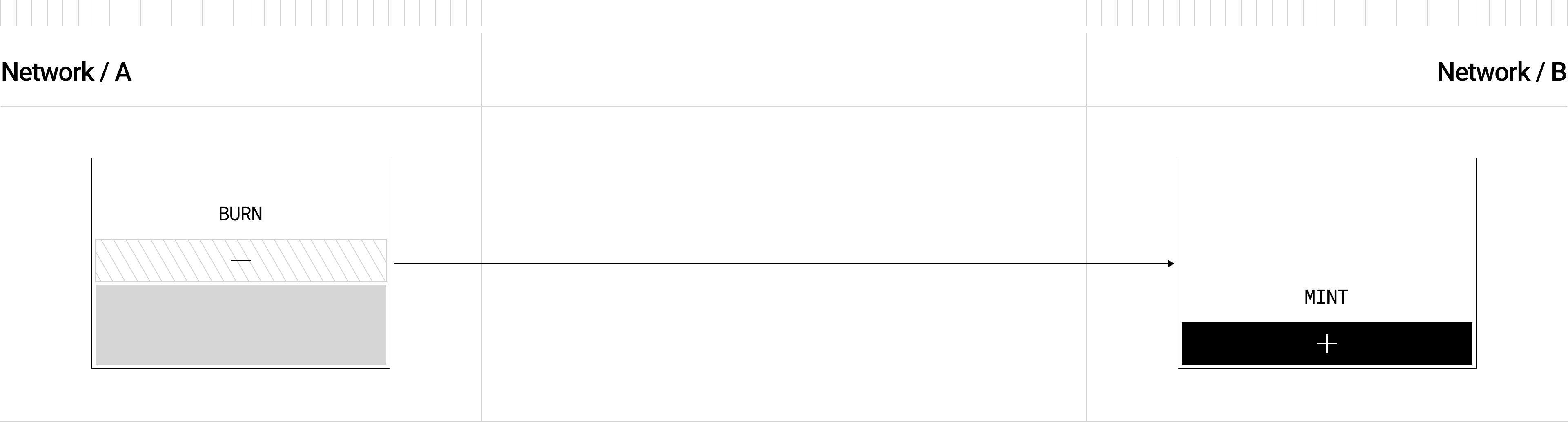
This standard works by combining the LayerZero OApp Contract Standard with the ERC20 [`_burn`](https://github.com/LayerZero-Labs/LayerZero-v2/blob/main/packages/layerzero-v2/evm/oapp/contracts/oft/OFT.sol#L80) method, to initiate omnichain send transfers on the source chain, sending a message via the LayerZero protocol, and delivering a function call to the destination contract to [`_mint`](https://github.com/LayerZero-Labs/LayerZero-v2/blob/main/packages/layerzero-v2/evm/oapp/contracts/oft/OFT.sol#L96) the same number of tokens burned, creating a unified supply across all networks connected.
Read more about what you can do with OFTs by reading the [OFT Quickstart](https://docs.layerzero.network/v2/developers/evm/oft/quickstart) in the LayerZero Documentation.
## LayerZero Hardhat Helper Tasks
LayerZero Devtools provides several helper hardhat tasks to easily deploy, verify, configure, connect, and send OFTs cross-chain.
Deploys your contract to any of the available networks in your [`hardhat.config.ts`](./hardhat.config.ts) when given a deploy tag (by default contract name) and returns a list of available networks to select for the deployment. For specifics around all deployment options, please refer to the [Deploying Contracts](https://docs.layerzero.network/v2/developers/evm/create-lz-oapp/deploying) section of the documentation. LayerZero's `lz:deploy` utilizes `hardhat-deploy`.
```yml
'arbitrum-sepolia': {
eid: EndpointId.ARBSEP_V2_TESTNET,
url: process.env.RPC_URL_ARBSEP_TESTNET,
accounts,
},
'base-sepolia': {
eid: EndpointId.BASESEP_V2_TESTNET,
url: process.env.RPC_URL_BASE_TESTNET,
accounts,
},
```
npx hardhat lz:oapp:config:init --oapp-config YOUR_OAPP_CONFIG --contract-name CONTRACT_NAME
Initializes a `layerzero.config.ts` file for all available pathways between your hardhat networks with the current LayerZero default placeholder settings. This task can be incredibly useful for correctly formatting your config file.
You can run this task by providing the `contract-name` you want to set for the config and `file-name` you want to generate:
```bash
npx hardhat lz:oapp:config:init --contract-name CONTRACT_NAME --oapp-config FILE_NAME
```
This will create a `layerzero.config.ts` in your working directory populated with your contract name and connections for every pathway possible between your hardhat networks:
```yml
import { EndpointId } from '@layerzerolabs/lz-definitions'
const arbsepContract = {
eid: EndpointId.ARBSEP_V2_TESTNET,
contractName: 'MyOFT',
}
const sepoliaContract = {
eid: EndpointId.SEPOLIA_V2_TESTNET,
contractName: 'MyOFT',
}
export default {
contracts: [{ contract: arbsepContract }, { contract: sepoliaContract }],
connections: [
{
from: arbsepContract,
to: sepoliaContract,
config: {
sendLibrary: '0x4f7cd4DA19ABB31b0eC98b9066B9e857B1bf9C0E',
receiveLibraryConfig: { receiveLibrary: '0x75Db67CDab2824970131D5aa9CECfC9F69c69636', gracePeriod: 0 },
sendConfig: {
executorConfig: { maxMessageSize: 10000, executor: '0x5Df3a1cEbBD9c8BA7F8dF51Fd632A9aef8308897' },
ulnConfig: {
confirmations: 1,
requiredDVNs: ['0x53f488E93b4f1b60E8E83aa374dBe1780A1EE8a8'],
optionalDVNs: [],
optionalDVNThreshold: 0,
},
},
// receiveConfig: {
// ulnConfig: {
// confirmations: 2,
// requiredDVNs: ['0x53f488E93b4f1b60E8E83aa374dBe1780A1EE8a8'],
// optionalDVNs: [],
// optionalDVNThreshold: 0,
// },
// },
},
},
{
from: sepoliaContract,
to: arbsepContract,
config: {
sendLibrary: '0xcc1ae8Cf5D3904Cef3360A9532B477529b177cCE',
receiveLibraryConfig: { receiveLibrary: '0xdAf00F5eE2158dD58E0d3857851c432E34A3A851', gracePeriod: 0 },
// sendConfig: {
// executorConfig: { maxMessageSize: 10000, executor: '0x718B92b5CB0a5552039B593faF724D182A881eDA' },
// ulnConfig: {
// confirmations: 2,
// requiredDVNs: ['0x8eebf8b423B73bFCa51a1Db4B7354AA0bFCA9193'],
// optionalDVNs: [],
// optionalDVNThreshold: 0,
// },
// },
receiveConfig: {
ulnConfig: {
confirmations: 1,
requiredDVNs: ['0x8eebf8b423B73bFCa51a1Db4B7354AA0bFCA9193'],
optionalDVNs: [],
optionalDVNThreshold: 0,
},
},
},
},
],
}
```
npx hardhat lz:oapp:config:wire --oapp-config YOUR_OAPP_CONFIG
Calls the configuration functions between your deployed OApp contracts on every chain based on the provided `layerzero.config.ts`.
Running `lz:oapp:wire` will make the following function calls per pathway connection for a fully defined config file using your specified settings and your environment variables (Private Keys and RPCs):
- function setPeer(uint32 \_eid, bytes32 \_peer) public virtual onlyOwner {}
To use this task, run:
```bash
npx hardhat lz:oapp:wire --oapp-config YOUR_LAYERZERO_CONFIG_FILE
```
Whenever you make changes to the configuration, run `lz:oapp:wire` again. The task will check your current configuration, and only apply NEW changes.
To use a Gnosis Safe multisig as the signer for these transactions, add the following to each network in your `hardhat.config.ts` and add the `--safe` flag to `lz:oapp:wire --safe`:
```yml
// hardhat.config.ts
networks: {
// Include configurations for other networks as needed
fuji: {
/* ... */
// Network-specific settings
safeConfig: {
safeUrl: 'http://something', // URL of the Safe API, not the Safe itself
safeAddress: 'address'
}
}
}
```
npx hardhat lz:oapp:config:get --oapp-config YOUR_OAPP_CONFIG
Returns your current OApp's configuration for each chain and pathway in 3 columns:
- **Custom Configuration**: the changes that your `layerzero.config.ts` currently has set
- **Default Configuration**: the default placeholder configuration that LayerZero provides
- **Active Configuration**: the active configuration that applies to the message pathway (Defaults + Custom Values)
If you do NOT explicitly set each configuration parameter, your OApp will fallback to the placeholder parameters in the default config.
```bash
┌────────────────────┬───────────────────────────────────────────────────────────────────────────────┬───────────────────────────────────────────────────────────────────────────────┬───────────────────────────────────────────────────────────────────────────────┐
│ │ Custom OApp Config │ Default OApp Config │ Active OApp Config │
├────────────────────┼───────────────────────────────────────────────────────────────────────────────┼───────────────────────────────────────────────────────────────────────────────┼───────────────────────────────────────────────────────────────────────────────┤
│ localNetworkName │ arbsep │ arbsep │ arbsep │
├────────────────────┼───────────────────────────────────────────────────────────────────────────────┼───────────────────────────────────────────────────────────────────────────────┼───────────────────────────────────────────────────────────────────────────────┤
│ remoteNetworkName │ sepolia │ sepolia │ sepolia │
├────────────────────┼───────────────────────────────────────────────────────────────────────────────┼───────────────────────────────────────────────────────────────────────────────┼───────────────────────────────────────────────────────────────────────────────┤
│ sendLibrary │ 0x4f7cd4DA19ABB31b0eC98b9066B9e857B1bf9C0E │ 0x4f7cd4DA19ABB31b0eC98b9066B9e857B1bf9C0E │ 0x4f7cd4DA19ABB31b0eC98b9066B9e857B1bf9C0E │
├────────────────────┼───────────────────────────────────────────────────────────────────────────────┼───────────────────────────────────────────────────────────────────────────────┼───────────────────────────────────────────────────────────────────────────────┤
│ receiveLibrary │ 0x75Db67CDab2824970131D5aa9CECfC9F69c69636 │ 0x75Db67CDab2824970131D5aa9CECfC9F69c69636 │ 0x75Db67CDab2824970131D5aa9CECfC9F69c69636 │
├────────────────────┼───────────────────────────────────────────────────────────────────────────────┼───────────────────────────────────────────────────────────────────────────────┼───────────────────────────────────────────────────────────────────────────────┤
│ sendUlnConfig │ ┌──────────────────────┬────────────────────────────────────────────────────┐ │ ┌──────────────────────┬────────────────────────────────────────────────────┐ │ ┌──────────────────────┬────────────────────────────────────────────────────┐ │
│ │ │ confirmations │ 1 │ │ │ confirmations │ 1 │ │ │ confirmations │ 1 │ │
│ │ ├──────────────────────┼────────────────────────────────────────────────────┤ │ ├──────────────────────┼────────────────────────────────────────────────────┤ │ ├──────────────────────┼────────────────────────────────────────────────────┤ │
│ │ │ requiredDVNs │ ┌───┬────────────────────────────────────────────┐ │ │ │ requiredDVNs │ ┌───┬────────────────────────────────────────────┐ │ │ │ requiredDVNs │ ┌───┬────────────────────────────────────────────┐ │ │
│ │ │ │ │ 0 │ 0x53f488E93b4f1b60E8E83aa374dBe1780A1EE8a8 │ │ │ │ │ │ 0 │ 0x53f488E93b4f1b60E8E83aa374dBe1780A1EE8a8 │ │ │ │ │ │ 0 │ 0x53f488E93b4f1b60E8E83aa374dBe1780A1EE8a8 │ │ │
│ │ │ │ └───┴────────────────────────────────────────────┘ │ │ │ │ └───┴────────────────────────────────────────────┘ │ │ │ │ └───┴────────────────────────────────────────────┘ │ │
│ │ │ │ │ │ │ │ │ │ │ │ │ │
│ │ ├──────────────────────┼────────────────────────────────────────────────────┤ │ ├──────────────────────┼────────────────────────────────────────────────────┤ │ ├──────────────────────┼────────────────────────────────────────────────────┤ │
│ │ │ optionalDVNs │ │ │ │ optionalDVNs │ │ │ │ optionalDVNs │ │ │
│ │ ├──────────────────────┼────────────────────────────────────────────────────┤ │ ├──────────────────────┼────────────────────────────────────────────────────┤ │ ├──────────────────────┼────────────────────────────────────────────────────┤ │
│ │ │ optionalDVNThreshold │ 0 │ │ │ optionalDVNThreshold │ 0 │ │ │ optionalDVNThreshold │ 0 │ │
│ │ └──────────────────────┴────────────────────────────────────────────────────┘ │ └──────────────────────┴────────────────────────────────────────────────────┘ │ └──────────────────────┴────────────────────────────────────────────────────┘ │
│ │ │ │ │
├────────────────────┼───────────────────────────────────────────────────────────────────────────────┼───────────────────────────────────────────────────────────────────────────────┼───────────────────────────────────────────────────────────────────────────────┤
│ sendExecutorConfig │ ┌────────────────┬────────────────────────────────────────────┐ │ ┌────────────────┬────────────────────────────────────────────┐ │ ┌────────────────┬────────────────────────────────────────────┐ │
│ │ │ executor │ 0x5Df3a1cEbBD9c8BA7F8dF51Fd632A9aef8308897 │ │ │ executor │ 0x5Df3a1cEbBD9c8BA7F8dF51Fd632A9aef8308897 │ │ │ executor │ 0x5Df3a1cEbBD9c8BA7F8dF51Fd632A9aef8308897 │ │
│ │ ├────────────────┼────────────────────────────────────────────┤ │ ├────────────────┼────────────────────────────────────────────┤ │ ├────────────────┼────────────────────────────────────────────┤ │
│ │ │ maxMessageSize │ 10000 │ │ │ maxMessageSize │ 10000 │ │ │ maxMessageSize │ 10000 │ │
│ │ └────────────────┴────────────────────────────────────────────┘ │ └────────────────┴────────────────────────────────────────────┘ │ └────────────────┴────────────────────────────────────────────┘ │
│ │ │ │ │
├────────────────────┼───────────────────────────────────────────────────────────────────────────────┼───────────────────────────────────────────────────────────────────────────────┼───────────────────────────────────────────────────────────────────────────────┤
│ receiveUlnConfig │ ┌──────────────────────┬────────────────────────────────────────────────────┐ │ ┌──────────────────────┬────────────────────────────────────────────────────┐ │ ┌──────────────────────┬────────────────────────────────────────────────────┐ │
│ │ │ confirmations │ 2 │ │ │ confirmations │ 2 │ │ │ confirmations │ 2 │ │
│ │ ├──────────────────────┼────────────────────────────────────────────────────┤ │ ├──────────────────────┼────────────────────────────────────────────────────┤ │ ├──────────────────────┼────────────────────────────────────────────────────┤ │
│ │ │ requiredDVNs │ ┌───┬────────────────────────────────────────────┐ │ │ │ requiredDVNs │ ┌───┬────────────────────────────────────────────┐ │ │ │ requiredDVNs │ ┌───┬────────────────────────────────────────────┐ │ │
│ │ │ │ │ 0 │ 0x53f488E93b4f1b60E8E83aa374dBe1780A1EE8a8 │ │ │ │ │ │ 0 │ 0x53f488E93b4f1b60E8E83aa374dBe1780A1EE8a8 │ │ │ │ │ │ 0 │ 0x53f488E93b4f1b60E8E83aa374dBe1780A1EE8a8 │ │ │
│ │ │ │ └───┴────────────────────────────────────────────┘ │ │ │ │ └───┴────────────────────────────────────────────┘ │ │ │ │ └───┴────────────────────────────────────────────┘ │ │
│ │ │ │ │ │ │ │ │ │ │ │ │ │
│ │ ├──────────────────────┼────────────────────────────────────────────────────┤ │ ├──────────────────────┼────────────────────────────────────────────────────┤ │ ├──────────────────────┼────────────────────────────────────────────────────┤ │
│ │ │ optionalDVNs │ │ │ │ optionalDVNs │ │ │ │ optionalDVNs │ │ │
│ │ ├──────────────────────┼────────────────────────────────────────────────────┤ │ ├──────────────────────┼────────────────────────────────────────────────────┤ │ ├──────────────────────┼────────────────────────────────────────────────────┤ │
│ │ │ optionalDVNThreshold │ 0 │ │ │ optionalDVNThreshold │ 0 │ │ │ optionalDVNThreshold │ 0 │ │
│ │ └──────────────────────┴────────────────────────────────────────────────────┘ │ └──────────────────────┴────────────────────────────────────────────────────┘ │ └──────────────────────┴────────────────────────────────────────────────────┘ │
│ │ │ │ │
└────────────────────┴───────────────────────────────────────────────────────────────────────────────┴───────────────────────────────────────────────────────────────────────────────┴───────────────────────────────────────────────────────────────────────────────┘
```
npx hardhat lz:oapp:config:get:executor --oapp-config YOUR_OAPP_CONFIG
Returns the LayerZero Executor config for each network in your `hardhat.config.ts`. You can use this method to see the max destination gas in wei (`nativeCap`) you can request in your [`execution options`](https://docs.layerzero.network/v2/developers/evm/gas-settings/options).
```bash
┌───────────────────┬────────────────────────────────────────────┐
│ localNetworkName │ mantle │
├───────────────────┼────────────────────────────────────────────┤
│ remoteNetworkName │ polygon │
├───────────────────┼────────────────────────────────────────────┤
│ executorDstConfig │ ┌────────────────┬───────────────────────┐ │
│ │ │ baseGas │ 85000 │ │
│ │ ├────────────────┼───────────────────────┤ │
│ │ │ multiplierBps │ 12000 │ │
│ │ ├────────────────┼───────────────────────┤ │
│ │ │ floorMarginUSD │ 5000000000000000000 │ │
│ │ ├────────────────┼───────────────────────┤ │
│ │ │ nativeCap │ 681000000000000000000 │ │
│ │ └────────────────┴───────────────────────┘ │
│ │ │
└───────────────────┴────────────────────────────────────────────┘
```
## Developing Contracts
#### Installing dependencies
We recommend using `pnpm` as a package manager (but you can of course use a package manager of your choice):
```bash
pnpm install
```
#### Compiling your contracts
This project supports both `hardhat` and `forge` compilation. By default, the `compile` command will execute both:
```bash
pnpm compile
```
If you prefer one over the other, you can use the tooling-specific commands:
```bash
pnpm compile:forge
pnpm compile:hardhat
```
Or adjust the `package.json` to for example remove `forge` build:
```diff
- "compile": "$npm_execpath run compile:forge && $npm_execpath run compile:hardhat",
- "compile:forge": "forge build",
- "compile:hardhat": "hardhat compile",
+ "compile": "hardhat compile"
```
#### Running tests
Similarly to the contract compilation, we support both `hardhat` and `forge` tests. By default, the `test` command will execute both:
```bash
pnpm test
```
If you prefer one over the other, you can use the tooling-specific commands:
```bash
pnpm test:forge
pnpm test:hardhat
```
Or adjust the `package.json` to for example remove `hardhat` tests:
```diff
- "test": "$npm_execpath test:forge && $npm_execpath test:hardhat",
- "test:forge": "forge test",
- "test:hardhat": "$npm_execpath hardhat test"
+ "test": "forge test"
```
## Deploying Contracts
Set up deployer wallet/account:
- Rename `.env.example` -> `.env`
- Choose your preferred means of setting up your deployer wallet/account:
```
MNEMONIC="test test test test test test test test test test test junk"
or...
PRIVATE_KEY="0xabc...def"
```
- Fund this address with the corresponding chain's native tokens you want to deploy to.
To deploy your contracts to your desired blockchains, run the following command in your project's folder:
```bash
npx hardhat lz:deploy
```
More information about available CLI arguments can be found using the `--help` flag:
```bash
npx hardhat lz:deploy --help
```
By following these steps, you can focus more on creating innovative omnichain solutions and less on the complexities of cross-chain communication.
## Estimating `lzReceive` and `lzCompose` Gas Usage
This guide explains how to use the `pnpm` commands to estimate gas usage for LayerZero's `lzReceive` and `lzCompose` functions. These commands wrap Foundry scripts for easier invocation and allow you to pass the required arguments dynamically.
### Available Commands
1. **`gas:lzReceive`**
This command profiles the `lzReceive` function for estimating gas usage across multiple runs.
```json
"gas:lzReceive": "forge script scripts/GasProfiler.s.sol:GasProfilerScript --via-ir --sig 'run_lzReceive(string,address,uint32,address,uint32,address,bytes,uint256,uint256)'"
```
2. **`gas:lzCompose`**
This command profiles the `lzCompose` function for estimating gas usage across multiple runs.
```json
"gas:lzCompose": "forge script scripts/GasProfiler.s.sol:GasProfilerScript --via-ir --sig 'run_lzCompose(string,address,uint32,address,uint32,address,address,bytes,uint256,uint256)'"
```
### Usage Examples
#### `lzReceive`
To estimate the gas for the `lzReceive` function:
```bash
pnpm gas:lzReceive
\
\
\
\
\
\
\
\
pnpm gas:lzCompose
```
Where:
- `rpcUrl`: The RPC URL for the target blockchain (e.g., Optimism, Arbitrum, etc.).
- `endpointAddress`: The deployed LayerZero EndpointV2 contract address.
- `srcEid`: The source endpoint ID (uint32).
- `sender`: The sender's address (OApp).
- `dstEid`: The destination endpoint ID (uint32).
- `receiver`: The address intended to receive the message (OApp).
- `message`: The message payload as a `bytes` array.
- `msg.value`: The amount of Ether sent with the message (in wei).
- `numOfRuns`: The number of test runs to execute.
#### `lzCompose`
To estimate the gas for the `lzCompose` function:
```bash
pnpm gas:lzCompose
\
\
\
\
\
\
\
\
\
```
Where:
- `rpcUrl`: The RPC URL for the target blockchain (e.g., Optimism, Arbitrum, etc.).
- `endpointAddress`: The deployed LayerZero EndpointV2 contract address.
- `srcEid`: The source endpoint ID (uint32).
- `sender`: The originating OApp address.
- `dstEid`: The destination endpoint ID (uint32).
- `receiver`: The address intended to receive the message (OApp).
- `composer`: The LayerZero Composer contract address.
- `composeMsg`: The compose message payload as a `bytes` array.
- `msgValue`: The amount of Ether sent with the message (in wei).
- `numOfRuns`: The number of test runs to execute.
### Notes
- Modify `numOfRuns` based on the level of accuracy or performance you require for gas profiling.
- Log outputs will provide metrics such as the **average**, **median**, **minimum**, and **maximum** gas usage across all successful runs.
This approach simplifies repetitive tasks and ensures consistent testing across various configurations.
## Connecting Contracts
This example uses the [Simple Config Generator](https://docs.layerzero.network/v2/developers/evm/technical-reference/simple-config), which is recommended over manual configuration.
### Generate [LZ Config](https://docs.layerzero.network/v2/concepts/glossary#lz-config) file based on hardhat.config.ts
Fill out your `layerzero.config.ts` with the contracts you want to connect. You can generate the default [LZ Config](https://docs.layerzero.network/v2/concepts/glossary#lz-config) file for your declared hardhat networks (in `hardhat.config.ts`) by running:
```bash
npx hardhat lz:oapp:config:init --contract-name [YOUR_CONTRACT_NAME] --oapp-config [CONFIG_NAME]
```
### Customize values in the LZ Config
> [!NOTE]
> You may need to change the contract name if you're deploying multiple OApp contracts on different chains (e.g., OFT and OFT Adapter).
```typescript
const optimismContract: OmniPointHardhat = {
eid: EndpointId.OPTSEP_V2_TESTNET,
contractName: "MyOFTAdapter",
};
const avalancheContract: OmniPointHardhat = {
eid: EndpointId.AVALANCHE_V2_TESTNET,
contractName: "MyOFT",
};
```
### Apply configurations
After applying the desired settings, run:
```bash
npx hardhat lz:oapp:wire --oapp-config layerzero.config.ts
```
Congratulations! Your contracts are now wired and can begin sending messages to each other.
### Manual Configuration
This section only applies if you would like to configure manually instead of using the Simple Config Generator.
Define the pathway you want to create from and to each contract:
```typescript
connections: [
// ETH <--> ARB PATHWAY: START
{
from: ethereumContract,
to: arbitrumContract,
},
{
from: arbitrumContract,
to: ethereumContract,
},
// ETH <--> ARB PATHWAY: END
];
```
Finally, define the config settings for each direction of the pathway:
```typescript
connections: [
// ETH <--> ARB PATHWAY: START
{
from: ethereumContract,
to: arbitrumContract,
config: {
sendLibrary: contractsConfig.ethereum.sendLib302,
receiveLibraryConfig: {
receiveLibrary: contractsConfig.ethereum.receiveLib302,
gracePeriod: BigInt(0),
},
// Optional Receive Library Timeout for when the Old Receive Library Address will no longer be valid
receiveLibraryTimeoutConfig: {
lib: "0x0000000000000000000000000000000000000000",
expiry: BigInt(0),
},
// Optional Send Configuration
// @dev Controls how the `from` chain sends messages to the `to` chain.
sendConfig: {
executorConfig: {
maxMessageSize: 10000,
// The configured Executor address
executor: contractsConfig.ethereum.executor,
},
ulnConfig: {
// The number of block confirmations to wait on BSC before emitting the message from the source chain.
confirmations: BigInt(15),
// The address of the DVNs you will pay to verify a sent message on the source chain ).
// The destination tx will wait until ALL `requiredDVNs` verify the message.
requiredDVNs: [
contractsConfig.ethereum.horizenDVN, // Horizen
contractsConfig.ethereum.polyhedraDVN, // Polyhedra
contractsConfig.ethereum.animocaBlockdaemonDVN, // Animoca-Blockdaemon (only available on ETH <-> Arbitrum One)
contractsConfig.ethereum.lzDVN, // LayerZero Labs
],
// The address of the DVNs you will pay to verify a sent message on the source chain ).
// The destination tx will wait until the configured threshold of `optionalDVNs` verify a message.
optionalDVNs: [],
// The number of `optionalDVNs` that need to successfully verify the message for it to be considered Verified.
optionalDVNThreshold: 0,
},
},
// Optional Receive Configuration
// @dev Controls how the `from` chain receives messages from the `to` chain.
receiveConfig: {
ulnConfig: {
// The number of block confirmations to expect from the `to` chain.
confirmations: BigInt(20),
// The address of the DVNs your `receiveConfig` expects to receive verifications from on the `from` chain ).
// The `from` chain's OApp will wait until the configured threshold of `requiredDVNs` verify the message.
requiredDVNs: [
contractsConfig.ethereum.lzDVN, // LayerZero Labs DVN
contractsConfig.ethereum.animocaBlockdaemonDVN, // Blockdaemon-Animoca
contractsConfig.ethereum.horizenDVN, // Horizen Labs
contractsConfig.ethereum.polyhedraDVN, // Polyhedra
],
// The address of the `optionalDVNs` you expect to receive verifications from on the `from` chain ).
// The destination tx will wait until the configured threshold of `optionalDVNs` verify the message.
optionalDVNs: [],
// The number of `optionalDVNs` that need to successfully verify the message for it to be considered Verified.
optionalDVNThreshold: 0,
},
},
// Optional Enforced Options Configuration
// @dev Controls how much gas to use on the `to` chain, which the user pays for on the source `from` chain.
enforcedOptions: [
{
msgType: 1,
optionType: ExecutorOptionType.LZ_RECEIVE,
gas: 65000,
value: 0,
},
{
msgType: 2,
optionType: ExecutorOptionType.LZ_RECEIVE,
gas: 65000,
value: 0,
},
{
msgType: 2,
optionType: ExecutorOptionType.COMPOSE,
index: 0,
gas: 50000,
value: 0,
},
],
},
},
{
from: arbitrumContract,
to: ethereumContract,
},
// ETH <--> ARB PATHWAY: END
];
```
Join our community! | Follow us on X (formerly Twitter)