https://github.com/roots/post-content-to-markdown
A WordPress plugin that converts post content to Markdown when requested with an `text/markdown` Accept header.
https://github.com/roots/post-content-to-markdown
Last synced: 3 months ago
JSON representation
A WordPress plugin that converts post content to Markdown when requested with an `text/markdown` Accept header.
- Host: GitHub
- URL: https://github.com/roots/post-content-to-markdown
- Owner: roots
- Created: 2025-10-03T03:51:25.000Z (9 months ago)
- Default Branch: main
- Last Pushed: 2025-10-03T04:19:25.000Z (9 months ago)
- Last Synced: 2025-10-03T05:43:46.571Z (9 months ago)
- Language: PHP
- Homepage:
- Size: 4.88 KB
- Stars: 1
- Watchers: 1
- Forks: 0
- Open Issues: 0
-
Metadata Files:
- Readme: README.md
Awesome Lists containing this project
README
# Post Content to Markdown
[](https://packagist.org/packages/roots/post-content-to-markdown)
[](https://twitter.com/rootswp)
[](https://github.com/sponsors/roots)
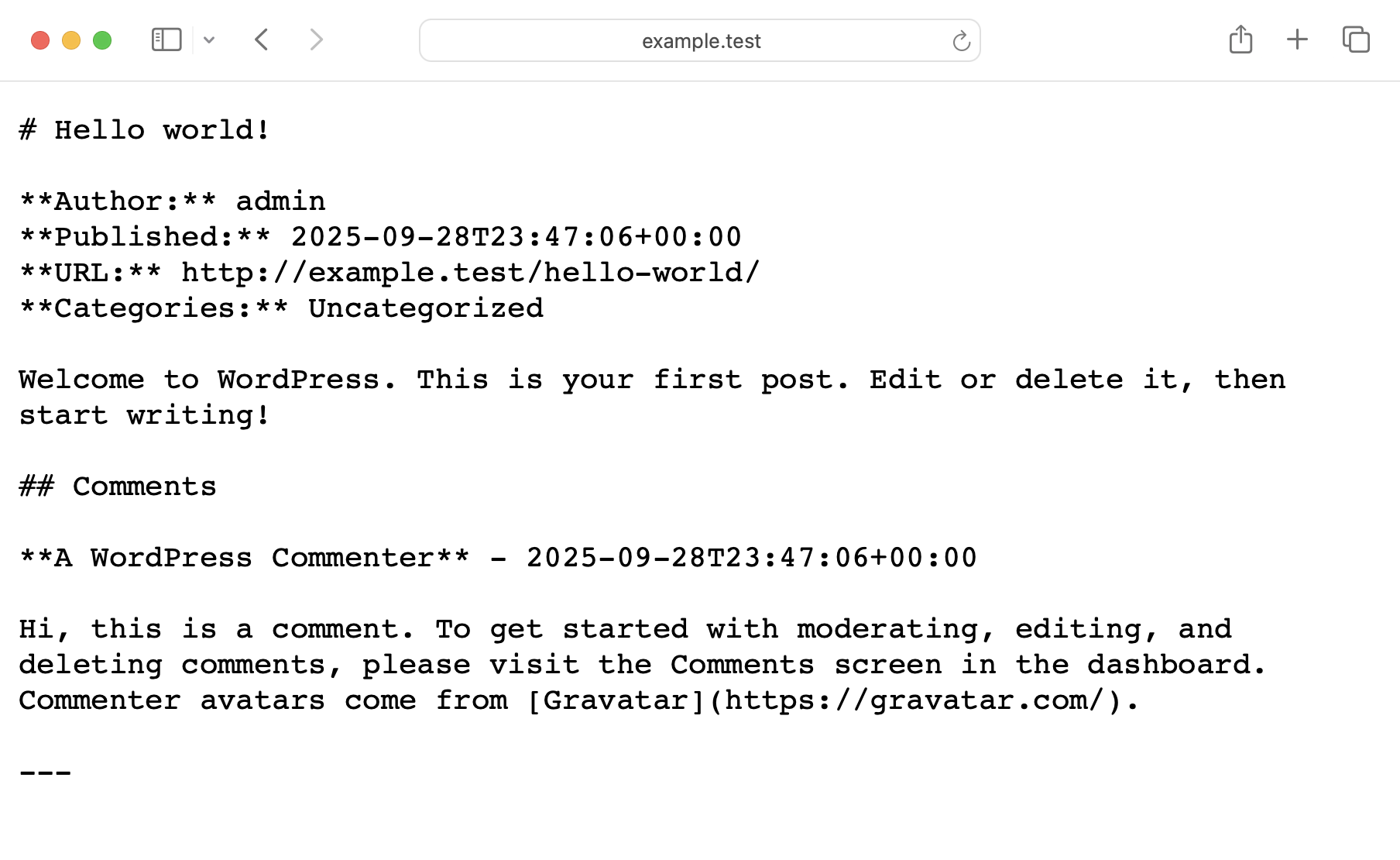
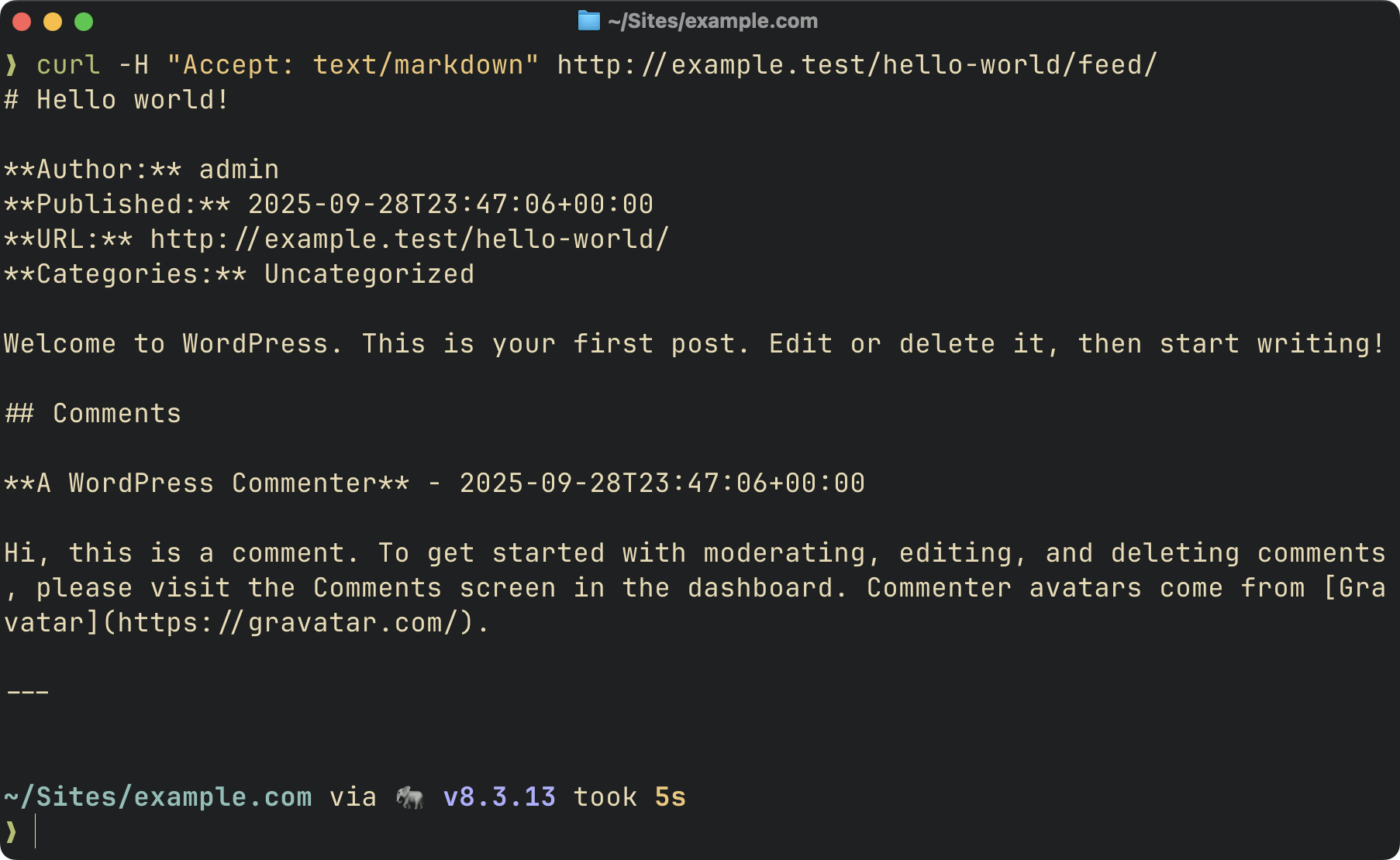
A WordPress plugin that returns post content in Markdown format when requested with an `Accept` header set to `text/markdown`, a `.md` URL suffix (e.g. `/hello-world.md`), or a `?format=markdown` query parameter.
| Query parameter / `.md` URL | Accept header |
|-------------|---------------|
|  |  |
## Support us
Roots is an independent open source org, supported only by developers like you. Your sponsorship funds [WP Packages](https://wp-packages.org/) and the entire Roots ecosystem, and keeps them independent. Support us by purchasing [Radicle](https://roots.io/radicle/) or [sponsoring us on GitHub](https://github.com/sponsors/roots) — sponsors get access to our private Discord.
## Requirements
PHP 8.1+
## Installation
### via Composer
```bash
composer require roots/post-content-to-markdown
```
### Manual
1. Download the [latest release](https://github.com/roots/post-content-to-markdown/releases)
2. Place in `wp-content/plugins/post-content-to-markdown/`
3. Activate via wp-admin or WP-CLI
## Usage
### Accept headers (ideal for LLMs)
Send an `Accept: text/markdown` header to any of these URLs:
- **Single post:** `https://example.com/post-slug/` → Returns post content as Markdown
- **Single post with comments:** `https://example.com/post-slug/feed/` → Returns post + all comments
- **Main feed:** `https://example.com/feed/` → Returns latest posts as Markdown
**Examples:**
```bash
# Single post
curl -H "Accept: text/markdown" https://example.com/my-awesome-post/
# Single post with comments
curl -H "Accept: text/markdown" https://example.com/my-awesome-post/feed/
# Main feed
curl -H "Accept: text/markdown" https://example.com/feed/
```
### Query parameters (accessible/shareable)
For browsers and sharing, use the `?format=markdown` query parameter:
- **Single post:** `https://example.com/post-slug/?format=markdown`
- **Single post with comments:** `https://example.com/post-slug/feed/?format=markdown`
- **Main feed:** `https://example.com/feed/?format=markdown`
**Examples:**
```bash
# View in browser
https://example.com/my-awesome-post/?format=markdown
# Get post with comments
https://example.com/my-awesome-post/feed/?format=markdown
# Get main feed
https://example.com/feed/?format=markdown
```
### `.md` URL suffix
Appending `.md` to any permalink returns the same Markdown representation and is a first-class, shareable URL.
```bash
# Equivalent to Accept: text/markdown
curl https://example.com/my-awesome-post.md
```
`.md` URL responses include `X-Robots-Tag: noindex, nofollow` so search engines don't index the Markdown alias alongside the canonical HTML page. Disable this feature with the `post_content_to_markdown/md_url_enabled` filter.
HTML responses advertise the Markdown representation two ways so both RFC 8288-aware crawlers and HTML-parsing clients can discover it without sending `Accept: text/markdown`:
```
Link: ; rel="alternate"; type="text/markdown"
```
```html
```
### Response headers
Markdown responses carry:
- `Content-Type: text/markdown; charset=utf-8`
- `Vary: Accept` — tells caches to key by `Accept` so the HTML and Markdown representations don't cross-serve.
- `X-Markdown-Source: accept | md-url | query` — identifies how the client asked for Markdown. Useful for inspecting agent traffic in access logs.
### Dedicated Markdown feed
A dedicated Markdown feed is also available at `/feed/markdown/`:
```bash
curl https://example.com/feed/markdown/
```
The feed includes:
- Feed metadata (site name, description, last updated, feed URL)
- Post title, author, publication date (ISO 8601), and permalink
- Post categories and tags
- Post content converted to Markdown
- Optional excerpt support
- Optional comment support
**Example Output:**
```markdown
# My WordPress Site - Markdown Feed
**Description:** Just another WordPress site
**Last Updated:** 2025-10-03T19:45:00+00:00
**Feed URL:** https://example.com/feed/markdown/
---
# Hello World!
**Author:** John Doe
**Published:** 2025-10-03T12:00:00+00:00
**URL:** https://example.com/hello-world/
**Categories:** News, Updates
**Tags:** announcement, wordpress
Welcome to WordPress. This is your first post. Edit or delete it, then start writing!
---
```
**Feed URL structure:**
Markdown feeds are accessible via:
- `/feed/markdown/` - Dedicated Markdown feed
- `/feed/?format=markdown` or `/feed/` with `Accept: text/markdown` - Main feed as Markdown
- `/post-slug/feed/?format=markdown` or `/post-slug/feed/` with `Accept: text/markdown` - Single post with comments
Note that WordPress requires pretty permalinks to be enabled (Settings → Permalinks must be set to anything other than "Plain").
**Autodiscovery:**
The plugin automatically adds a `` element to your site's RSS feed, allowing feed readers and LLMs to discover the Markdown version:
```xml
```
## Filters
The plugin provides several filters for customization:
### Single post filters
#### `post_content_to_markdown/post_types`
Filter the post types that can be served as Markdown for single posts.
```php
add_filter('post_content_to_markdown/post_types', function ($post_types) {
// Add support for pages and custom post types
return ['post', 'page', 'product'];
});
```
**Default:** `['post']`
#### `post_content_to_markdown/post_allowed`
Filter whether a specific post is allowed to be served as Markdown. Runs after the post type check, so it only receives posts whose type is already allowed. Returning `false` short-circuits the Markdown response and falls through to the normal HTML render.
```php
add_filter('post_content_to_markdown/post_allowed', function ($allowed, $post) {
// Only serve Markdown for specific page slugs
if ($post->post_type === 'page') {
return in_array($post->post_name, ['example', 'example-2'], true);
}
return $allowed;
}, 10, 2);
```
Or restrict by post ID:
```php
add_filter('post_content_to_markdown/post_allowed', function ($allowed, $post) {
if ($post->post_type === 'page') {
return in_array($post->ID, [1, 2, 3], true);
}
return $allowed;
}, 10, 2);
```
**Default:** `true`
#### `post_content_to_markdown/md_url_enabled`
Controls whether `.md` URL suffixes (e.g. `/about.md`) are treated as a Markdown request. Enabled by default so consumers get shareable Markdown URLs automatically. Disable if you'd rather only accept Markdown requests via the `Accept` header or `?format=markdown` query parameter.
```php
add_filter('post_content_to_markdown/md_url_enabled', '__return_false');
```
**Default:** `true`
#### `post_content_to_markdown/strict_accept`
Controls whether the plugin returns `406 Not Acceptable` when the client's `Accept` header rules out every representation the site can serve (i.e. neither `text/html` nor `text/markdown` is acceptable). Enabled by default for spec-correct content negotiation. Disable if you'd rather always fall back to HTML for any `Accept` value.
```php
add_filter('post_content_to_markdown/strict_accept', '__return_false');
```
**Default:** `true`
#### `post_content_to_markdown/emit_vary`
Controls whether the plugin appends `Vary: Accept` to every front-end response. Enabled by default so that downstream caches (browsers, proxies, CDNs) key on the Accept header and don't cross-serve an HTML response to a Markdown request (or vice versa). Disable if you don't want the plugin touching HTML response headers — Markdown responses will still include `Vary: Accept` regardless, so content negotiation stays correct for direct Markdown hits.
```php
add_filter('post_content_to_markdown/emit_vary', '__return_false');
```
**Default:** `true`
#### `post_content_to_markdown/cache_md_urls`
By default the plugin sets `DONOTCACHEPAGE` for every Markdown request so WordPress page caches (WP Super Cache, Batcache, etc.) don't cross-serve a Markdown body to an HTML client. `.md` URLs are a distinct URL key and safe to cache in principle, but WP page caches can transform response bodies assuming HTML (gzip, footer injection, cache-comment insertion), so caching them is opt-in. Enable if your page cache passes non-HTML bodies through untouched.
```php
add_filter('post_content_to_markdown/cache_md_urls', '__return_true');
```
**Default:** `false`
### Feed filters
#### `post_content_to_markdown/feed_post_types`
Filter the post types included in the Markdown feed.
```php
add_filter('post_content_to_markdown/feed_post_types', function ($post_types) {
return ['post', 'page'];
});
```
**Default:** `['post']`
#### `post_content_to_markdown/feed_posts_per_page`
Filter the number of posts included in the Markdown feed.
```php
add_filter('post_content_to_markdown/feed_posts_per_page', function ($count) {
return 20;
});
```
**Default:** `10`
#### `post_content_to_markdown/feed_include_comments`
Enable or disable comments in the Markdown feed.
```php
add_filter('post_content_to_markdown/feed_include_comments', function () {
return true;
});
```
**Default:** `false`
#### `post_content_to_markdown/feed_include_excerpt`
Enable or disable post excerpts in the Markdown feed.
```php
add_filter('post_content_to_markdown/feed_include_excerpt', function () {
return true;
});
```
**Default:** `false`
#### `post_content_to_markdown/feed_cache_duration`
Filter the cache duration for the Markdown feed in seconds.
```php
add_filter('post_content_to_markdown/feed_cache_duration', function ($duration) {
return 2 * HOUR_IN_SECONDS; // Cache for 2 hours
});
```
**Default:** `HOUR_IN_SECONDS` (1 hour)
### Conversion filters
#### `post_content_to_markdown/conversion_cache_duration`
Filter the cache duration for the HTML → Markdown conversion result in seconds. The conversion is memoized per content hash in the object cache; shorten this TTL if your content renders dynamically (e.g. dynamic blocks, request-aware shortcodes) and you want fresher output.
```php
add_filter('post_content_to_markdown/conversion_cache_duration', function ($duration) {
return 5 * MINUTE_IN_SECONDS;
});
```
**Default:** `HOUR_IN_SECONDS` (1 hour)
#### `post_content_to_markdown/converter_options`
Filter the HTML to Markdown converter options.
```php
add_filter('post_content_to_markdown/converter_options', function ($options) {
return [
'header_style' => 'setext', // Use underline style for H1/H2
'strip_tags' => false, // Keep HTML tags without markdown equivalents
'remove_nodes' => 'script style img', // Remove script, style, and img elements
'hard_break' => false, // Convert
to two spaces + newline
];
});
```
**Available options:**
- `header_style`: `'atx'` (default) or `'setext'`
- `strip_tags`: Remove HTML tags without Markdown equivalents (default: `true`)
- `remove_nodes`: Space-separated list of DOM nodes to remove (default: `'script style'`)
- `hard_break`: Convert `
` to newlines (default: `true`)
#### `post_content_to_markdown/markdown_output`
Filter the final Markdown output after conversion.
```php
add_filter('post_content_to_markdown/markdown_output', function ($markdown, $original_html) {
// Add a footer to all Markdown output
return $markdown . "\n\n---\nConverted from HTML to Markdown";
}, 10, 2);
```
**Parameters:**
- `$markdown`: The converted Markdown text
- `$original_html`: The original HTML content
## Performance
The HTML → Markdown conversion is cached at the object-cache layer (`wp_cache_get` / `wp_cache_set`) keyed on a content hash. Sites with a persistent object cache like Redis or Memcached avoid re-running block rendering, shortcode expansion, and the `league/html-to-markdown` conversion on repeat hits. Cache entries expire after an hour (filterable via `post_content_to_markdown/conversion_cache_duration`); content changes produce a new hash and a fresh entry, so no explicit invalidation is needed.
The cache assumes that rendering the same post content produces the same output. If you use dynamic blocks or shortcodes whose output varies by request context (e.g. current user, current time, site option that changes mid-TTL), the first render is frozen for the TTL window. Shorten the TTL via the filter above for content where that matters. The `post_content_to_markdown/markdown_output` filter runs on every request (after the cache lookup), so per-request customization there works without fighting the cache.
The Markdown feed is cached for 1 hour by default via a transient. The cache is automatically cleared when:
- A post is published or updated
- A post is deleted
- Comments are added, edited, or deleted (when comments are included in feed)
You can customize the cache duration using the `post_content_to_markdown/feed_cache_duration` filter.
## CDN configuration
Most WordPress sites don't cache HTML at the CDN (WordPress is dynamic by default), in which case `Vary: Accept` has no practical cost. If you do cache HTML at the edge, `Vary: Accept` will fragment cache entries per user-agent `Accept` string (Chrome, Safari, agent UAs all send different values). Normalize `Accept` at the edge to two buckets — "wants Markdown" and "anything else" — before it reaches origin, then cache each bucket separately. On Cloudflare, a Cache Rule with a custom cache key that includes a normalized `Accept` header handles this; Cloudflare's [Markdown for Agents](https://blog.cloudflare.com/markdown-for-agents/) feature automates the normalization on supported zones.
## Resources
* [Serving Markdown to AI Agents via Accept Headers](https://benword.com/serving-markdown-to-ai-agents-via-accept-headers)
* [The `text/markdown` Media Type](https://www.rfc-editor.org/rfc/rfc7763.html)
## Community
Keep track of development and community news.
- Join us on Discord by [sponsoring us on GitHub](https://github.com/sponsors/roots)
- Join us on [Roots Discourse](https://discourse.roots.io/)
- Follow [@rootswp on Twitter](https://twitter.com/rootswp)
- Follow the [Roots Blog](https://roots.io/blog/)
- Subscribe to the [Roots Newsletter](https://roots.io/subscribe/)