https://github.com/rootshelll/simple-php-shell-a-powerful-yet-lightweight-php-shell-script
Discover Simple PHP Shell, a lightweight yet powerful PHP shell script for executing commands, managing files, viewing system info, and more. A detailed guide on installation, usage, and security.
https://github.com/rootshelll/simple-php-shell-a-powerful-yet-lightweight-php-shell-script
directory-listing execute-commands file-upload mysql-query open-source php-file-manager php-script php-shell phpinfo shell-command simple-php-shell
Last synced: 24 days ago
JSON representation
Discover Simple PHP Shell, a lightweight yet powerful PHP shell script for executing commands, managing files, viewing system info, and more. A detailed guide on installation, usage, and security.
- Host: GitHub
- URL: https://github.com/rootshelll/simple-php-shell-a-powerful-yet-lightweight-php-shell-script
- Owner: RootShelll
- Created: 2025-02-18T13:58:21.000Z (over 1 year ago)
- Default Branch: main
- Last Pushed: 2025-02-18T15:07:27.000Z (over 1 year ago)
- Last Synced: 2025-10-30T15:40:34.748Z (9 months ago)
- Topics: directory-listing, execute-commands, file-upload, mysql-query, open-source, php-file-manager, php-script, php-shell, phpinfo, shell-command, simple-php-shell
- Language: PHP
- Homepage: https://r00t-shell.com/
- Size: 127 KB
- Stars: 2
- Watchers: 1
- Forks: 0
- Open Issues: 0
-
Metadata Files:
- Readme: README.md
Awesome Lists containing this project
README
# Simple PHP Shell: A Comprehensive Guide
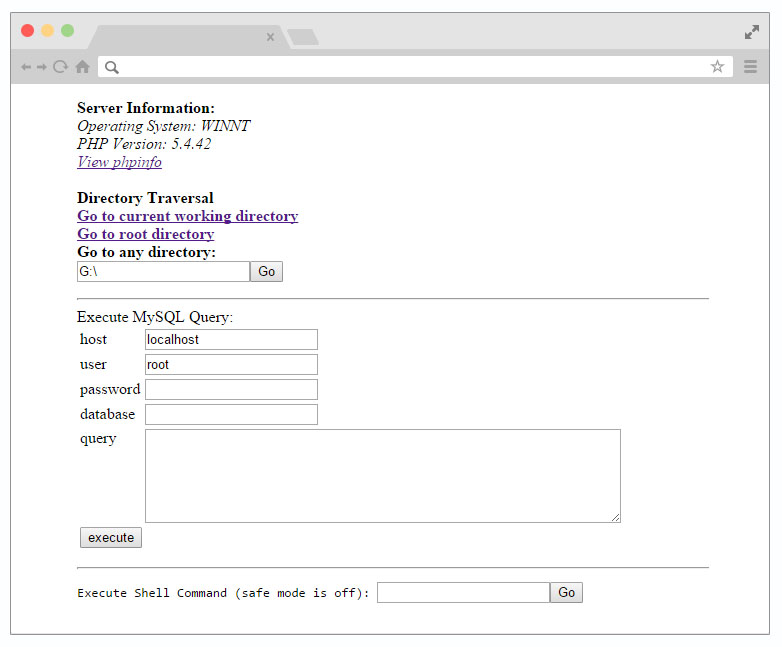
Simple PHP Shell is a lightweight yet powerful PHP script that provides essential shell functionalities directly from a web interface. Whether you need to view system information, manage files, or execute commands, this tool is designed for both beginners and advanced users.
---
## Table of Contents
- [Overview](#overview)
- [Key Features](#key-features)
- [Installation Guide](#installation-guide)
- [Detailed Usage Instructions](#detailed-usage-instructions)
- [1. Viewing System Information](#1-viewing-system-information)
- [2. Directory Navigation & File Management](#2-directory-navigation--file-management)
- [3. Executing Commands and Queries](#3-executing-commands-and-queries)
- [4. Advanced Features](#4-advanced-features)
- [Security Considerations](#security-considerations)
- [License Information](#license-information)
- [Conclusion](#conclusion)
---
## Overview
Simple PHP Shell is a versatile PHP script that allows you to:
- Display the operating system type and PHP version.
- View full PHP configuration using `phpinfo()`.
- Navigate directories and manage files.
- Upload, download, edit, or delete files.
- Execute shell commands and run MySQL queries.
This guide covers everything from installation to secure usage, ensuring even first-time users can operate the tool confidently.
---
## Key Features
- **System Information**: Quickly see your OS type and PHP version.
- **PHP Info Display**: Access a full overview of your PHP configuration.
- **File & Directory Management**: Navigate directories, upload files, and more.
- **Compression & Download**: Compress folders using GZIP and download them.
- **Permission Management**: Easily change folder permissions (e.g., chmod to 777).
- **Database File Highlighting**: Files interacting with databases are highlighted for quick identification.
- **Command Execution**: Run shell commands and execute MySQL queries directly.
---
## Installation Guide
1. **Download the Script**
Visit the [GitHub repository]([[https://github.com/RootShelll/Simple-PHP-Shell-A-Powerful-Yet-Lightweight-PHP-Shell-Script](https://github.com/RootShelll/Simple-PHP-Shell-A-Powerful-Yet-Lightweight-PHP-Shell-Script)](https://github.com/RootShelll/Simple-PHP-Shell-A-Powerful-Yet-Lightweight-PHP-Shell-Script)) and download the latest version.
2. **Upload to Your Server**
Use FTP or your hosting control panel to upload the script files to a secure directory on your web server.
3. **Set Proper Permissions**
Ensure the directories you wish to manage have the necessary write permissions. Although the script can set folder permissions to 777, use this feature with caution in trusted environments.
4. **Access via Browser**
Open your browser and navigate to the script’s URL (e.g., `http://yourdomain.com/simple-php-shell.php`).
---
## Detailed Usage Instructions
### 1. Viewing System Information
- **Dashboard**: On launch, the interface displays the OS type and PHP version.
- **PHP Info**: Click on the `phpinfo()` button to view detailed PHP configuration.
### 2. Directory Navigation & File Management
- **Directory Listing**: Easily navigate through folders on your server.
- **File Operations**:
- **Upload Files**: Add files to any directory.
- **Download/Compress**: Download individual files or compress entire folders with GZIP.
- **Edit/Delete**: Open files for editing or delete them directly from the interface.
### 3. Executing Commands and Queries
- **Shell Command Execution**: Run system commands directly from your web browser.
- **MySQL Query Execution**: Input and run MySQL queries for database management.
### 4. Advanced Features
- **Database File Highlighting**: Files involved in database interactions are marked (typically in red) to facilitate quick identification.
- **Permission Adjustments**: Use the built-in feature to change directory permissions when troubleshooting.
> **Note:** Always ensure you understand the commands and queries you execute. Improper use can lead to security vulnerabilities or server misconfigurations.
---
## Security Considerations
> **Warning:**
> This script grants significant control over your server. To maintain security, consider the following:
> - Deploy the script in a controlled, secure environment.
> - Change default access credentials, if applicable.
> - Restrict access using server-level protections like `.htaccess`.
> - Disable or remove the script when not in active use.
---
## License Information
Simple PHP Shell is released into the public domain under the [Unlicense](http://unlicense.org). This means you are free to use, modify, and distribute the software for any purpose.
---
## Conclusion
Simple PHP Shell offers a powerful yet straightforward solution for remote server management. Whether you're a developer or system administrator, this tool simplifies file management, command execution, and system diagnostics—all from a user-friendly web interface.
For more details, updates, or to report issues, please visit the [GitHub repository]([[https://github.com/RootShelll/Simple-PHP-Shell-A-Powerful-Yet-Lightweight-PHP-Shell-Script](https://github.com/RootShelll/Simple-PHP-Shell-A-Powerful-Yet-Lightweight-PHP-Shell-Script)](https://github.com/RootShelll/Simple-PHP-Shell-A-Powerful-Yet-Lightweight-PHP-Shell-Script)).
---
Simple PHP Shell is an open-source PHP script for remote server management, file handling, and command execution. Perfect for developers and system administrators seeking lightweight yet powerful tools.
```