https://github.com/rose-stl-lab/spherical-dyffusion
[NeurIPS 24] Probablistic Emulation of a Global Climate Model with Spherical DYffusion
https://github.com/rose-stl-lab/spherical-dyffusion
ai-for-science climate-modeling diffusion dyffusion large-ensembles neurips neurips-2024 pytorch pytorch-lightning
Last synced: 11 months ago
JSON representation
[NeurIPS 24] Probablistic Emulation of a Global Climate Model with Spherical DYffusion
- Host: GitHub
- URL: https://github.com/rose-stl-lab/spherical-dyffusion
- Owner: Rose-STL-Lab
- License: apache-2.0
- Created: 2024-10-31T06:03:43.000Z (over 1 year ago)
- Default Branch: main
- Last Pushed: 2025-03-07T21:31:57.000Z (over 1 year ago)
- Last Synced: 2025-04-10T11:38:41.759Z (over 1 year ago)
- Topics: ai-for-science, climate-modeling, diffusion, dyffusion, large-ensembles, neurips, neurips-2024, pytorch, pytorch-lightning
- Language: Python
- Homepage: https://arxiv.org/abs/2406.14798
- Size: 337 KB
- Stars: 26
- Watchers: 2
- Forks: 0
- Open Issues: 0
-
Metadata Files:
- Readme: README.md
- Contributing: CONTRIBUTING.md
- License: LICENSE
Awesome Lists containing this project
README
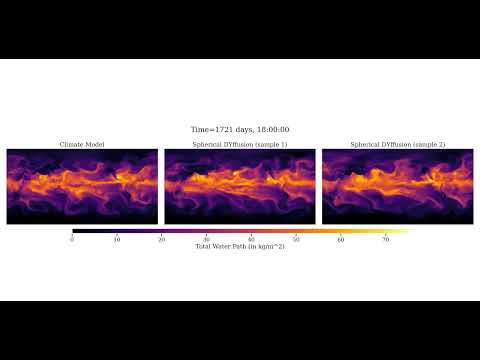
# Probabilistic Emulation of a Global Climate Model with Spherical DYffusion (NeurIPS 2024, Spotlight)





✨Official implementation of our Spherical DYffusion paper✨
[//]: # ([](https://youtu.be/Hac_xGsJ1qY))
## | Environment Setup
We recommend installing in a virtual environment from PyPi or Conda. Then, run:
python3 -m pip install .[dev]
python3 -m pip install --no-deps nvidia-modulus@git+https://github.com/ai2cm/modulus.git@94f62e1ce2083640829ec12d80b00619c40a47f8
Alternatively, use the provided [environment/install_dependencies.sh](environment/install_dependencies.sh) script.
Note that for some compute setups you may want to install pytorch first for proper GPU support.
For more details about installing [PyTorch](https://pytorch.org/get-started/locally/), please refer to their official documentation.
## | Dataset
The final
training and validation data can be downloaded from Google Cloud Storage following the instructions
of the ACE paper at https://zenodo.org/records/10791087. The data are licensed under Creative
Commons Attribution 4.0 International.
The dataset statistics that you'll need to run the experiments are saved in the [data_statistics](data_statistics) directory.
## | Checkpoints
Model weights are available at [https://huggingface.co/salv47/spherical-dyffusion](https://huggingface.co/salv47/spherical-dyffusion/tree/main).
## | Running experiments
### Inference
Firstly, download the validation data as instructed in the [Dataset](#dataset) section.
Secondly, use the `run_inference.py` script with a corresponding configuration file.
The configurations files used for our paper can be found in the [src/configs/inference](src/configs/inference) directory.
That is, you can run inference with the following command:
python run_inference.py .yaml
The available inference configurations are:
- [ckpts_from_huggingface_debug.yaml](src/configs/inference/ckpts_from_huggingface_debug.yaml): Short inference meant for debugging with checkpoints downloaded from Hugging Face.
- [ckpts_from_huggingface_10years.yaml](src/configs/inference/ckpts_from_huggingface_10years.yaml): 10-year-long inference with checkpoints downloaded from Hugging Face.
To use these configs, **you need to correctly specify the `dataset.data_path` parameter in the configuration file to point to the downloaded validation data.**
You may also need to specify the `overrides.datamodule_config.data_dir_stats` to point to the [data statistics](data_statistics) directory.
### Training
We use [Hydra](https://hydra.cc/) for configuration management and [PyTorch Lightning](https://www.pytorchlightning.ai/) for training.
We recommend familiarizing yourself with these tools before running training experiments.
The basic configuration files used for our paper can be found in the [src/configs](src/configs) directory.
To use them, please first specify the correct data path's in the [src/configs/datamodule/fv3gfs_prescriptive_only.yaml](src/configs/datamodule/fv3gfs_prescriptive_only.yaml) config file.
Specifically, set ``datamodule.data_dir=`` and ``datamodule.data_dir_stats=`` appropriately.
To run training, you can use the `run.py` script with a corresponding experiment configuration file.
For example, to train Spherical DYffusion with the default configuration, first train the interpolator with:
python run.py experiment=fv3gfs_interpolation
After that, train the forecaster with:
python run.py experiment=fv3gfs_dyffusion diffusion.interpolator_run_id=
where `` is the Weights & Biases run ID of the interpolator experiment.
To train the basic UNet-based DYffusion, you would additionally append `model=unet` to both commands.
### Tips & Tricks
Memory Considerations and OOM Errors
To control memory usage and avoid OOM errors, you can adjust the training batch size and evaluation batch size:
**For training**, you can adjust the `datamodule.batch_size_per_gpu` parameter.
Note that this will automatically adjust `trainer.accumulate_grad_batches` to keep the effective batch size (set by `datamodule.batch_size`) constant (so it need to be divisible by `datamodule.batch_size_per_gpu`).
**For evaluation** or OOMs during validation, you can adjust the `datamodule.eval_batch_size` parameter.
Note that the effective validation-time batch size is `datamodule.eval_batch_size * module.num_predictions`. Be mindful of that when choosing `eval_batch_size`. You can control how many ensemble members to run in memory
at once with `module.num_predictions_in_memory`.
Besides those main knobs, you may turn on mixed precision training with `trainer.precision=16` to reduce memory usage and
may also adjust the `datamodule.num_workers` parameter to control the number of data loading processes.
Wandb Integration
We use [Weights & Biases](https://wandb.ai/) for logging and checkpointing.
Please set your wandb username/entity with one of the following options:
- Edit the [src/configs/local/default.yaml](src/configs/local/default.yaml) file (recommended, local for you only).
- Edit the [src/configs/logger/wandb.yaml](src/configs/logger/wandb.yaml) file.
- as a command line argument (e.g. `python run.py logger.wandb.entity=my_username`).
Checkpointing
By default, checkpoints are saved locally in the `/checkpoints` directory in the root of the repository,
which you can control with the `work_dir=` argument.
When using the wandb logger (default), checkpoints may be saved to wandb (`logger.wandb.save_to_wandb`) or S3 storage (`logger.wandb.save_to_s3_bucket`).
Set these to `False` to disable saving them to wandb or S3.
If disabling both (only save checkpoints locally), make sure to set `logger.wandb.save_best_ckpt=False logger.wandb.save_last_ckpt=False`.
You can set these preferences in your [local config](src/configs/local/default.yaml) file
(see [src/configs/local/example_local_config.yaml](src/configs/local/example_local_config.yaml) for an example).
Debugging
For minimal data and model size, you can use the following:
python run.py ++model.debug_mode=True ++datamodule.debug_mode=True
Note that the model and datamodule need to support to appropriately handle the debug mode.
Code Quality
Code quality is automatically checked when pushing to the repository.
However, it is recommended that you also run the checks locally with `make quality`.
To automatically fix some issues (as much as possible), run:
make style
hydra.errors.InstantiationException
The ``hydra.errors.InstantiationException`` itself is not very informative,
so you need to look at the preceding exception(s) (i.e. scroll up) to see what went wrong.
Local Configurations
You can use a local config file that, defines the local data dir, working dir etc., by putting a ``default.yaml`` config
in the [src/configs/local/](src/configs/local) subdirectory. Hydra searches for & uses by default the file configs/local/default.yaml, if it exists.
You may take inspiration from the [example_local_config.yaml](src/configs/local/example_local_config.yaml) file.
## | Citation
@inproceedings{cachay2024spherical,
title={Probablistic Emulation of a Global Climate Model with Spherical {DY}ffusion},
author={Salva R{\"u}hling Cachay and Brian Henn and Oliver Watt-Meyer and Christopher S. Bretherton and Rose Yu},
booktitle={The Thirty-eighth Annual Conference on Neural Information Processing Systems},
year={2024},
url={https://openreview.net/forum?id=Ib2iHIJRTh}
}