https://github.com/roseswe/conky-osl
Conky Configfile for openSUSE, Debian, ZorinOS/Ubuntu and other distros
https://github.com/roseswe/conky-osl
conky conkyrc debian opensuse
Last synced: about 1 month ago
JSON representation
Conky Configfile for openSUSE, Debian, ZorinOS/Ubuntu and other distros
- Host: GitHub
- URL: https://github.com/roseswe/conky-osl
- Owner: roseswe
- Created: 2022-02-21T06:25:41.000Z (over 4 years ago)
- Default Branch: master
- Last Pushed: 2025-09-27T18:18:29.000Z (9 months ago)
- Last Synced: 2025-11-29T17:26:40.362Z (7 months ago)
- Topics: conky, conkyrc, debian, opensuse
- Language: Shell
- Homepage:
- Size: 414 KB
- Stars: 0
- Watchers: 1
- Forks: 0
- Open Issues: 2
-
Metadata Files:
- Readme: README.md
- Changelog: ChangeLog
Awesome Lists containing this project
README
vim:set fileencoding=utf8 fileformat=unix filetype=gfm tabstop=2 expandtab: ==>>
# Conky: A versatile system monitor for your Desktop
## Introduction
Conky is a system monitor for X, originally based on torsmo. Since its inception, Conky has evolved significantly while maintaining its simplicity and configurability. Conky can display almost anything, either on your main desktop or in its own window. Not only does it have many built-in objects, but it can also display almost any information using scripts and other external programs.
This gives you a pre-configured setup for Conky to monitor and display various system information on your desktop.
Requires (g)awk and lsof installed, which is installed by default on all tested systems.
## A versatile Conky configuration file for openSUSE, SLES and Debian
The Conky configuration file ´conky-osl.conf´ was developed and adapted specifically for running Conky on openSUSE Leap 15.x, openSUSE Tumbleweed and SLES under the GNOME and KDE desktop managers. However, it has not yet been tested under other Linux distributions or desktop environments other than those mentioned below. The configuration file was written by Ralph Roth, ROSE SWE, http://rose.rult.at/ and is subject to his copyright.
## Optimized for dark background images
This configuration file is designed for use with one or two monitors and various GNOME extensions. It is specifically designed for use with dark background images or backgrounds.
## Requirements
You need `lsof` and `gawk` (version 4.x or 5.x, not mawk!) installed. lm-sensors is a plus
## Setup/Installation
cp conky-osl.conf ~/.conkyrc ## old style
mkdir -p ~/.config/conky
cp conky-osl.conf ~/.config/conky/conky.conf ## new style, works with openSUSE Leap 15.5 conky version
./chg_lan.sh ## automatic setup with version 1.2++
Example chg_lan.sh run:
$ ./chg_lan.sh
Found interface enxd09466f5977f
## Network Monitoring
The network statistics are currently hard coded (eth0). So if you have an other interface you must adapt (e.g sed) this to your environment! For a quick fix we provide the shell script `chg_lan.sh` that changes eth0 to your first available interface. The script creates a new file `conky-osl-fixedlan.conf` that can be used. The created script will be automatically be copied to the conky config file folder.
## Running Conky
Make sure you have the correct font installed. See `font = 'DejaVu Sans Mono:size=8',`
nohup conky -c ~/.conkyrc & ## old style
GNOME Desktop: Start Application "Tweaks" - select "Startup Applications" - click "+" sign and select conky from the list (must be running)
### GNOME Autostart Example File
```
ralph@slowroll ~/.config/autostart $ cat conky.desktop
[Desktop Entry]
Type=Application
Name=conky
# Wayland fix?
Exec=sh -c 'sleep 15 && conky --daemonize --pause=1'
StartupNotify=false
Terminal=false
Icon=conky-logomark-violet
Categories=System;Monitor;
```
## Example Screenshots
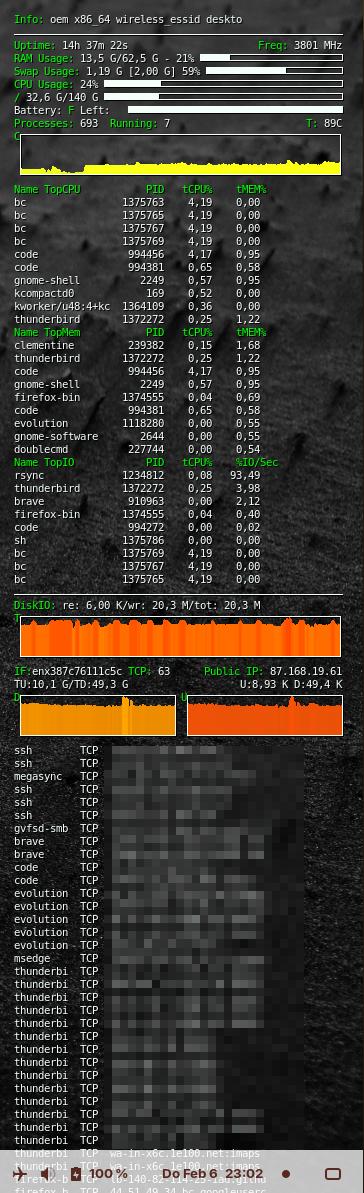
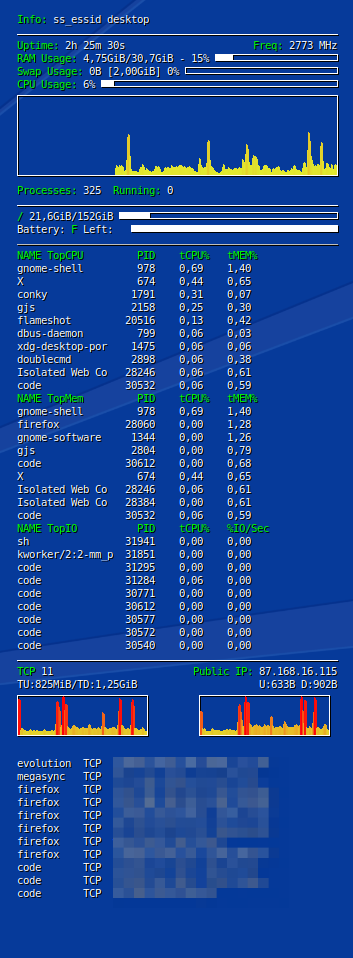
## Reference/Variables
See
Tricks and Tips
## Tested Conky Versions
All tested conky versions so far tested on the following platforms
$ rpm -q conky
# ✅openSUSE Leap 15.1
conky-1.11.6-pm151.8.17.x86_64, conky-1.11.6-pm151.8.22.x86_64,
conky-1.11.6-pm151.8.27.x86_64, conky-1.11.6-pm151.8.37.x86_64
# ✅openSUSE Leap 15.2
conky-1.11.5-1.20.x86_64
# ✅openSUSE Leap 15.3, 15.4 and SLES 15.3/SLES-for-SAP Application 15.3
conky-1.11.5-1.20.x86_64
conky-1.13.1-150400.10.pm.22.x86_64 (Pakman), conky-1.13.1-150400.10.pm.28.x86_64, conky-1.13.1-150400.10.pm.31.x86_64, conky-1.13.1-150400.10.pm.32.x86_64 (Pakman)
conky-1.13.1-150400.11.pm.1.x86_64
# openSUSE Leap 15.5/15.6
✅/❌ conky-1.11.5-1.20.x86_64 (openSUSE 15.6)
❌ conky-1.21.7-150600.9.pm.1 (packman), conky-1.22.2-150600.8.pm.2.x86_64 (slow startup)
# openSUSE Tumbleweed/Leap/Slowroll
TW: ✅conky-1.13.1-3.2.x86_64 (06/2023) ✅conky-1.21.7-1.2.x86_64 (02/25), ✅conky-1.22.2-1.1.x86_64 (08/25)
SR: ✅conky-1.21.7-1.2.x86_64 (02/25), ✅conky-1.22.2-1.1 (09/25)
✅Leap 15.6: 1.13.1-150600.11.pm.8
✅Leap 16.0: conky-1.13.1-bp160.1.3.x86_64
$ dpkg -l conky|grep conky
$ dpkg -l conky-std|grep conky # ZorinOS 18
# Debian 12.0-12.5/12.9/12.11, LXDE Desktop
✅conky-1.18.3 (i686)
# ZorinOS 17.1/ZorinOS 17.2/17.3
✅conky-1.12.2-1
# ZorinOS 18.0/18.1
✅conky/now 1.12.2-1
✅conky-all/noble 1.19.6-1build3
# Pop!OS 24.04 LTS
✅/❌ conky-1.19.6 ## works, but conky window is visible and can/must be moved each time...
## Todo/Open/Fixme/Issues
- warning: `conky' uses wireless extensions which will stop working for Wi-Fi 7 hardware; use nl80211
- VMs may not display the CPU core temperature at all
- lsof does not show open TCP/UDP ports at all with a network bridge (see issue #3)
- Pop-OS 24.04 - shows conky output in a dedicated window
## Fonts
Not used yet: https://github.com/googlefonts/noto-emoji/releases
## Color Gradients
Here's a list of color gradients suitable for dark backgrounds, with hex codes:
${cpugraph 40,320 2F4F4F 98FB98 s -t -l} ==> Dark Slate Gray to Pale Green
${cpugraph 40,320 2F4F4F 4682B4 s -t -l} ==> Dark Slate Gray to Steel Blue
${cpugraph 40,320 FFD700 FFA07A s -t -l} ==> Gold to Light Salmon
${cpugraph 40,320 FF8C00 FFA500 s -t -l} ==> Dark Orange to Orange
${cpugraph 40,320 FFD700 FF4500 s -t -l} ==> Gold to Orange Red
${cpugraph 40,320 4B0082 DA70D6 s -t -l} ==> Indigo to Orchid
${cpugraph 40,320 008080 00FFFF s -t -l} ==> Teal to Cyan
${cpugraph 40,320 8B4513 DEB887 s -t -l} ==> Saddle Brown to Burlywood
${cpugraph 40,320 483D8B B0E0E6 s -t -l} ==> Dark Slate Blue to Powder Blue
${cpugraph 40,320 800080 FF00FF s -t -l} ==> Purple to Magenta
${cpugraph 40,320 FFFFFF FFD700 s -t -l} ==> White to Gold
${cpugraph 40,320 FFFACD FFD700 s -t -l} ==> Lemon Chiffon to Gold
${cpugraph 40,320 FFFFFF FFE4C4 s -t -l} ==> White to Bisque
${cpugraph 40,320 FFFACD FFFFFF s -t -l} ==> Lemon Chiffon to White
${cpugraph 40,320 FFF8DC FFD700 s -t -l} ==> Cornsilk to Gold
${cpugraph 40,320 FFFFF0 FFDAB9 s -t -l} ==> Ivory to Peach Puff
${cpugraph 40,320 FFFFFF FFEBCD s -t -l} ==> White to Blanched Almond
${cpugraph 40,320 F0FFF0 FFD700 s -t -l} ==> Honeydew to Gold
${cpugraph 40,320 FFFFFF FFF0F5 s -t -l} ==> White to Lavender Blush
${cpugraph 40,320 FFFACD FFE4E1 s -t -l} ==> Lemon Chiffon to Misty Rose
Here's a list of cpugraph settings with higher contrast, suitable for dark backgrounds:
${cpugraph 40,320 000000 FFFFFF s -t -l} ==> Black to White
${cpugraph 40,320 000000 FFD700 s -t -l} ==> Black to Gold
${cpugraph 40,320 000080 00FFFF s -t -l} ==> Navy to Cyan
${cpugraph 40,320 8B0000 FF69B4 s -t -l} ==> Dark Red to Hot Pink
${cpugraph 40,320 006400 7FFF00 s -t -l} ==> Dark Green to Chartreuse
${cpugraph 40,320 4B0082 FF00FF s -t -l} ==> Indigo to Magenta
${cpugraph 40,320 191970 87CEFA s -t -l} ==> Midnight Blue to Light Sky Blue
${cpugraph 40,320 8B4513 FFA500 s -t -l} ==> Saddle Brown to Orange
${cpugraph 40,320 2F4F4F 00FF7F s -t -l} ==> Dark Slate Gray to Spring Green
${cpugraph 40,320 800080 FFFF00 s -t -l} ==> Purple to Yellow
These combinations provide strong contrast and should be highly visible on dark backgrounds.
Here are 10 fitting default_colors for Conky on dark backgrounds:
Light Blue: #ADD8E6
Sky Blue: #87CEEB
Pale Cyan: #AFEEEE
Powder Blue: #B0E0E6
Steel Blue: #4682B4
Slate Gray: #708090
Cornflower Blue: #6495ED
Cadet Blue: #5F9EA0
Light Steel Blue: #B0C4DE
Medium Turquoise: #48D1CC
These colors provide good readability and visual appeal on dark backgrounds, offering a range of blue and gray tones that contrast nicely with dark themes.
Here's a list of 10 default colors for Conky that lean more towards white, while still providing good contrast on dark backgrounds:
White Smoke: #F5F5F5
Ghost White: #F8F8FF
Snow: #FFFAFA
Ivory: #FFFFF0
Floral White: #FFFAF0
Alice Blue: #F0F8FF
Lavender: #E6E6FA
Azure: #F0FFFF
Mint Cream: #F5FFFA
Honeydew: #F0FFF0
These colors are closer to white but still have slight tints that can add a subtle, pleasing effect to your Conky display. They should provide excellent readability on dark backgrounds.
$Id: README.md,v 1.42 2026/02/26 16:21:56 ralph Exp $ ==>>