https://github.com/rosettea/bunnyfetch
🐰 Tiny system info fetch utility.
https://github.com/rosettea/bunnyfetch
command-line command-line-tool golang pfetch screenfetch system-information
Last synced: 11 months ago
JSON representation
🐰 Tiny system info fetch utility.
- Host: GitHub
- URL: https://github.com/rosettea/bunnyfetch
- Owner: Rosettea
- License: mit
- Created: 2020-09-25T19:12:48.000Z (almost 6 years ago)
- Default Branch: master
- Last Pushed: 2025-01-14T02:15:38.000Z (over 1 year ago)
- Last Synced: 2025-06-26T06:38:16.463Z (about 1 year ago)
- Topics: command-line, command-line-tool, golang, pfetch, screenfetch, system-information
- Language: Go
- Homepage:
- Size: 1.3 MB
- Stars: 184
- Watchers: 2
- Forks: 9
- Open Issues: 1
-
Metadata Files:
- Readme: README.md
- License: LICENSE
Awesome Lists containing this project
README
Bunnyfetch
🐰 Tiny system info fetch utility.


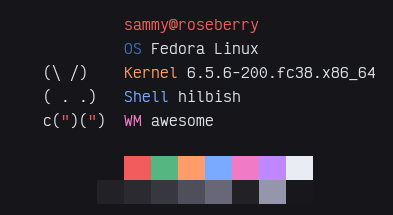
Bunnyfetch is a small and fast tool for getting info about your system.
The idea is from this here and I decided to make it crossplatform in Go.
# Install
Binaries are provided at the releases page [here](https://github.com/Rosettea/Bunnyfetch/releases).
Or, you can just run `go install github.com/Rosettea/bunnyfetch@latest`
## Manual Compile
```sh
git clone https://github.com/Rosettea/Bunnyfetch
cd Bunnyfetch
go get -d ./...
go build -ldflags "-w -s" # ldflags make the binary smaller
```
# Usage
Run `bunnyfetch`!
Some people may notice that the color of "OS" will not match their colorscheme.
That is because it is taken from the /etc/os-release file. If you wish to disable
the feature, the `--no-distro-color` or `-d` flag can be used.
# License
Bunnyfetch is licensed under the MIT license.
[Read here](LICENSE) for more info.